n8n self-hosting with Docker: install, back up and update it safely
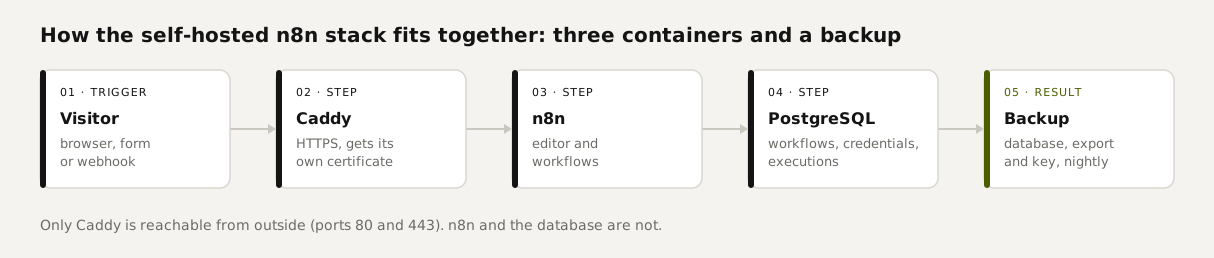
Self-hosting n8n is free: you run the Community Edition and pay only for a server, from about €10 a month. The Docker Compose file below runs n8n with a PostgreSQL database and a web server that gets its own HTTPS certificate. On our test machine the whole stack was up after 100 seconds, image downloads included. The backup script saves the database, your workflows and the encryption key every night, and we restored one of those backups to prove it works.
Tested by us on 11 November 2026.
What you need
- A server with at least 2 GB of RAM. After an hour of testing we measured 724 MB for n8n, PostgreSQL and Caddy combined. At Hetzner that server (CPX12) costs €9.99 a month in Finland or €11.99 in Germany, before VAT.
- Docker Engine with Docker Compose v2. Check with
docker compose version. - A domain name with an A record pointing at your server's IP, for example
n8n.yourcompany.com. - Ports 80 and 443 open in your firewall. Nothing else: n8n itself and the database stay closed.
Install n8n with Docker Compose
Create a folder and add the files
On your server, create a folder such as
/opt/n8nand put compose.yaml, env.example and backup.sh in it. Copyenv.exampleto.env.bashsudo mkdir -p /opt/n8n && cd /opt/n8n cp env.example .env chmod 600 .env && chmod +x backup.shFill in .env
Set your domain in
N8N_DOMAINand pick a long database password. Generate the encryption key once and also store it in your password manager. Without that key, the credentials you saved can't be decrypted after a restore.bashopenssl rand -hex 32Start the containers
Docker pulls the images and starts PostgreSQL, n8n and Caddy. n8n waits until the database reports healthy. On the first request, Caddy requests a certificate for your domain.
bashdocker compose up -d docker compose psCreate the owner account
Open
https://n8n.yourcompany.com. n8n asks for the first account, which becomes the owner. Do it right away: until that account exists, anyone who finds the URL can claim it.Schedule the nightly backup
Add this line with
crontab -e. The script creates one folder per night and deletes folders older than 14 days.bash15 3 * * * cd /opt/n8n && ./backup.sh >> backups/backup.log 2>&1
# n8n self-hosted: n8n + PostgreSQL + Caddy (automatic HTTPS)
# Tested 2026-11-11 with n8n 2.47.3, postgres:18, caddy:2 (Docker 28.4, Docker Desktop on Windows 10).
# Guide: mia-automation.com/en/guides/n8n-self-hosting-docker. Fill in .env first (see env.example).
services:
  postgres:
    image: postgres:18
    restart: unless-stopped
    environment:
      POSTGRES_USER: ${POSTGRES_USER}
      POSTGRES_PASSWORD: ${POSTGRES_PASSWORD}
      POSTGRES_DB: ${POSTGRES_DB}
      PGDATA: /var/lib/postgresql/data   # keep: postgres 18 otherwise writes outside the volume
    volumes:
      - db-data:/var/lib/postgresql/data
    healthcheck:
      test: ["CMD-SHELL", "pg_isready -U ${POSTGRES_USER} -d ${POSTGRES_DB}"]
      interval: 5s
      timeout: 5s
      retries: 10

  n8n:
    image: docker.n8n.io/n8nio/n8n:${N8N_VERSION}   # pin a version; update on purpose, never "latest"
    restart: unless-stopped
    depends_on:
      postgres:
        condition: service_healthy
    environment:
      DB_TYPE: postgresdb
      DB_POSTGRESDB_HOST: postgres
      DB_POSTGRESDB_PORT: "5432"
      DB_POSTGRESDB_DATABASE: ${POSTGRES_DB}
      DB_POSTGRESDB_USER: ${POSTGRES_USER}
      DB_POSTGRESDB_PASSWORD: ${POSTGRES_PASSWORD}
      N8N_ENCRYPTION_KEY: ${N8N_ENCRYPTION_KEY}   # without this key your saved credentials are lost
      N8N_HOST: ${N8N_DOMAIN}
      N8N_PROTOCOL: https
      N8N_PORT: "5678"
      N8N_WEBHOOK_URL: https://${N8N_DOMAIN}/
      N8N_PROXY_HOPS: "1"
      GENERIC_TIMEZONE: ${TIMEZONE}
      TZ: ${TIMEZONE}
      N8N_DIAGNOSTICS_ENABLED: "false"
      EXECUTIONS_DATA_PRUNE: "true"
      EXECUTIONS_DATA_MAX_AGE: "336"   # keep execution history for 14 days
    volumes:
      - n8n-data:/home/node/.n8n
    # no "ports": n8n is only reachable through Caddy

  caddy:
    image: caddy:2
    restart: unless-stopped
    depends_on:
      - n8n
    command: caddy reverse-proxy --from ${N8N_DOMAIN} --to n8n:5678
    ports:
      - "80:80"
      - "443:443"
    volumes:
      - caddy-data:/data
      - caddy-config:/config

volumes:
  db-data:
  n8n-data:
  caddy-data:
  caddy-config:
compose.yaml, tested November 11, 2026, with n8n 2.47.3, PostgreSQL 18 and Caddy 2.
# Copy to .env and fill in. Never commit .env.
N8N_VERSION=2.47.3
N8N_DOMAIN=n8n.example.com
TIMEZONE=Europe/Amsterdam
POSTGRES_USER=n8n
POSTGRES_PASSWORD=change-me-long-random
POSTGRES_DB=n8n
# Generate once with: openssl rand -hex 32   and store it in your password manager
N8N_ENCRYPTION_KEY=change-me-64-hex-characters
env.example: copy it to .env and fill it in. Never commit .env.
Keep the PGDATA line in the PostgreSQL service. Version 18 stores its data in a different default location than earlier versions. Drop that line and the database writes outside the volume, then comes back empty after a restart. n8n's docs flag the same trap.
What happened in our test
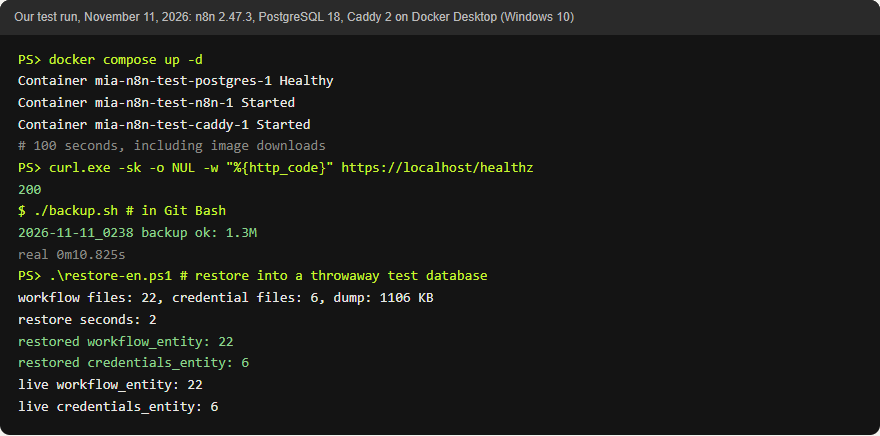
We ran this exact file on Docker Desktop on a Windows 10 PC with localhost as the domain. Docker Desktop runs the containers in a Linux environment (WSL 2), so they're the same images you'd run on a Linux server. All three containers were up after 100 seconds, downloads included. For localhost, Caddy issued its own local certificate. For a real domain, Caddy's docs say it requests a publicly trusted certificate as long as DNS points at your machine and ports 80 and 443 are open. We haven't tested that last part on a public server.
 (opens at full size)
 (opens at full size)
Backups that restore cleanly
#!/usr/bin/env bash
# Nightly backup for the n8n compose stack: database dump + workflow/credential export + encryption key.
# Tested 2026-11-11 with n8n 2.47.3 and postgres:18. Run from the folder that holds compose.yaml.
# Cron example (03:15 every night):  15 3 * * * cd /opt/n8n && ./backup.sh >> backups/backup.log 2>&1
set -euo pipefail
cd "$(dirname "$0")"
set -a; . ./.env; set +a
STAMP=$(date +%Y-%m-%d_%H%M)
DEST="backups/$STAMP"
KEEP_DAYS=${KEEP_DAYS:-14}
mkdir -p "$DEST"

# 1. Full database (users, settings, executions, encrypted credentials)
docker compose exec -T postgres pg_dump -U "$POSTGRES_USER" -d "$POSTGRES_DB" --format=custom > "$DEST/n8n-db.dump"

# 2. Workflows and credentials as separate JSON files (still encrypted)
docker compose exec -T n8n sh -c 'rm -rf /tmp/export && n8n export:workflow --backup --output=/tmp/export/workflows/ && n8n export:credentials --backup --output=/tmp/export/credentials/' >/dev/null
docker compose cp n8n:/tmp/export/. "$DEST/"
docker compose exec -T n8n rm -rf /tmp/export

# 3. The key that decrypts the credentials
printf 'N8N_ENCRYPTION_KEY=%s\n' "$N8N_ENCRYPTION_KEY" > "$DEST/encryption-key.txt"
chmod 600 "$DEST/encryption-key.txt"

# 4. Check: the dump must not be empty, and at least the folders exist
test -s "$DEST/n8n-db.dump" || { echo "$STAMP backup FAILED: empty database dump"; exit 1; }

# 5. Remove backups older than KEEP_DAYS
find backups -mindepth 1 -maxdepth 1 -type d -mtime +"$KEEP_DAYS" -exec rm -rf {} +

echo "$STAMP backup ok: $(du -sh "$DEST" | cut -f1)"
# Copy the backups folder off this server (another machine, object storage). A backup on the same disk is not a backup.
backup.sh, tested November 11, 2026. It reads .env for the database user and the encryption key.
Backing up only your workflows isn't enough. According to n8n's docs, a command-line export leaves out your users, the execution history and the encryption key. So the script saves three things: a full database dump, workflows and credentials as separate files, and the key.
We checked that the backup is usable. The script produced a 1.3 MB backup in 11 seconds. We restored the dump into a fresh, empty PostgreSQL container in 2 seconds and counted 22 workflows and 6 credentials, matching the running install. Our test instance was small. In production, the dump grows mainly with execution history, which is why the compose file keeps 14 days of it and lets n8n prune the rest.
docker compose stop n8n
docker compose exec -T postgres dropdb -U n8n n8n
docker compose exec -T postgres createdb -U n8n n8n
docker compose exec -T postgres pg_restore -U n8n -d n8n --no-owner < backups/2026-11-11_0315/n8n-db.dump
docker compose start n8n
Full restore on the same server, with the same N8N_ENCRYPTION_KEY in .env. Adjust the user name and folder. Tested on our stack: after the restart n8n was healthy and all 22 workflows were back.
Updating n8n safely
The compose file pins a version instead of using latest, so you decide when to update. n8n recommends a full backup and a look at the release notes before every update. Switching back to an older image doesn't undo the database migrations an update ran; that's what the backup is for.
./backup.sh
# set the new version number for N8N_VERSION in .env
docker compose pull n8n
docker compose up -d n8n
docker compose logs -f n8n
The update routine. Watch the logs until n8n reports the editor is reachable.
Securing a self-hosted n8n
n8n ships with a built-in check: docker compose exec n8n n8n audit. On our test instance it reported 6 webhooks without authentication (our test hooks), 18 nodes that can run arbitrary code (our Code nodes) and 3 credentials no active workflow used. Test hooks can stay open while you test; close them or add a secret afterwards. Our own Code nodes stay. Unused credentials should go. Run the audit after every big change.
- Keep only ports 80 and 443 open. In the compose file, n8n has no port of its own exposed.
- Require authentication on every webhook that accepts outside traffic. In the Webhook node, set Authentication to *Header Auth* with a long secret; our payment workflow rejected a wrong secret with a 403.
- Delete credentials you no longer use; the audit lists them by name. Be careful with nodes that run code or shell commands, such as Code and Execute Command, and disable node types you don't use with
NODES_EXCLUDE. - Read the release notes monthly and update with the routine above. If a release includes a security fix, update that week.
- Telemetry is off via
N8N_DIAGNOSTICS_ENABLED=false.
Can you use self-hosted n8n for clients?
Yes, within limits. Per n8n's license FAQ, the free version lets you run your own business, build workflows for clients on your own instance and charge for building and maintaining them. You can't offer n8n as a service where clients build or change their own workflows, including through your own interface or an AI agent acting for them. If you're unsure, the FAQ points to a dedicated address for license questions.
Self-hosted vs. n8n Cloud
| Self-hosted | n8n Cloud Starter | |
|---|---|---|
| Price per month | About €10 to €12 for a server, before VAT | €20 on annual billing |
| Executions | Unlimited | 2,500 a month |
| Updates and backups | You handle them | n8n handles them |
| Where your data lives | On your own server | With n8n |
Production checklist
- Owner account created with a strong password.
N8N_ENCRYPTION_KEYstored in .env and in your password manager.- n8n version pinned in .env, not
latest. - Nightly backup running and copied off the server.
- A restore rehearsed once on a separate database.
- Only ports 80 and 443 open.
n8n auditrun and every finding handled on purpose.- An error-alert workflow that emails you when a workflow fails (template 08 in our ten tested n8n workflows).
Questions
Is self-hosted n8n free?
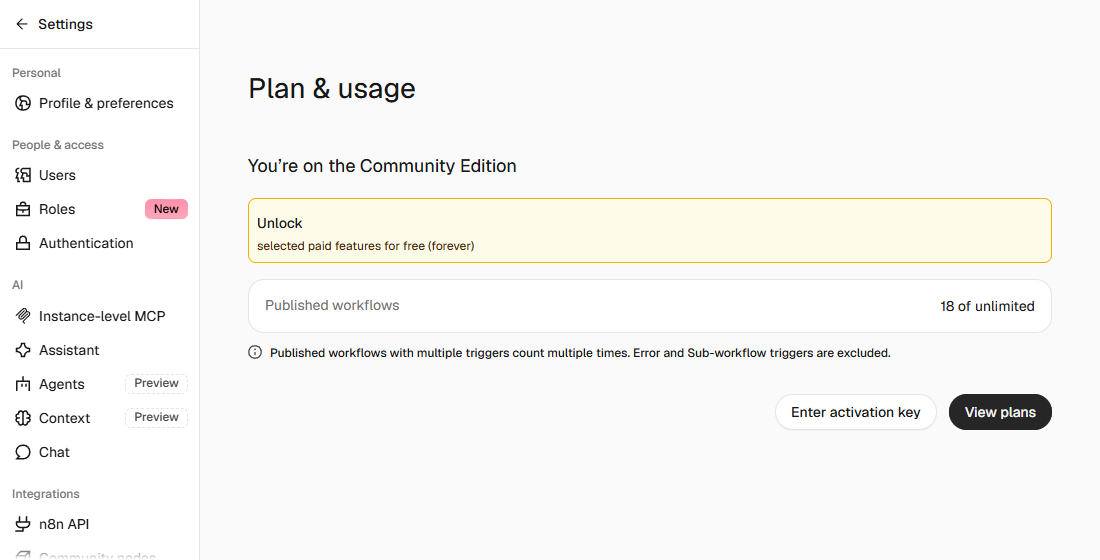
Yes. Without a license key, n8n runs as the Community Edition with no limit on workflows or executions. You only pay for the server.
How do I install n8n with Docker Compose on my own server?
Put compose.yaml and a filled-in .env in a folder, point your domain at the server and run docker compose up -d. Then create the owner account in your browser.
How do I back up and update self-hosted n8n?
Each night, dump the database, export workflows and credentials, and keep the encryption key. To update, take a backup first, then raise the version number in .env and pull the new image.
How do I secure a self-hosted n8n?
Allow only HTTPS through the web server, require authentication on webhooks, delete unused credentials and run n8n audit regularly.
What does self-hosting cost compared to n8n Cloud?
A 2 GB server runs about €10 to €12 a month before VAT. n8n Cloud Starter is €20 a month on annual billing, with 2,500 executions.
Can I use self-hosted n8n commercially or for clients?
You can build workflows for clients and get paid for it. You can't offer n8n as a service where clients build their own workflows.
Sources
- n8n Docs: Install using Docker Compose checked on
- n8n Docs: Back up and restore checked on
- n8n Docs: Update n8n checked on
- n8n Docs: Run security audits checked on
- n8n Docs: License FAQ checked on
- Caddy: Reverse proxy quick-start checked on
- Hetzner Cloud: server prices checked on
- n8n pricing checked on
More in automation recipes
- What is n8n? A plain-English guide with real costs and three tested workflowsWhat n8n is, what it costs in the cloud or on your own server, and three workflows we built and tested that you can import today.
- n8n workflows for small businesses: ten tested templates you can importTen n8n workflows we built and ran with test data: quote follow-up, late payment reminders, inquiry forms, email sorting and more. Free to download.
- AI automation: when a rule is enough and when you need a modelWhen a fixed rule is enough and when you need AI, based on our test with 50 emails, plus what it costs per 1,000 messages.
- Building n8n workflows with Claude Code: what works and what you still checkClaude Code built, validated and tested three n8n workflows through n8n's MCP server. What worked, what you still check yourself, and the prompt to copy.
Also useful
- n8n AI tutorial: build AI steps and agents in n8n, with three tested examplesHow AI works in n8n, with three workflows we built and tested: summarizing email, sorting email and an agent with tools. Results and cost per run included.
- n8n MCP: expose your workflows to AI apps, and use MCP servers from n8nTurn n8n into an MCP server for Claude, ChatGPT or your own agent, and let n8n use other MCP servers. Tested with MCP Inspector, templates included.
- Claude Code Templates: Seven Files, Tested One by One and Then TogetherSeven Claude Code template files we use: CLAUDE.md, settings, a blocking hook, two subagents, a status line and a loop. Each tested, then all together.