n8n workflows for small businesses: ten tested templates you can import
These are ten n8n workflows a small business can put to work right away, from quote follow-ups to an error alert. We built them on November 11, 2026, in n8n 2.47.3 and ran each one with test data. For every workflow you'll find what it does, which accounts it needs, what you fill in yourself and what happened when we ran it. The files are free and contain no credentials.
Tested by us on 11 November 2026.
What an n8n workflow is
A workflow is a series of steps n8n runs on its own when something happens: a form is submitted, an email arrives, or it's Monday at 9:00. Each step is a node. A template is a workflow someone else already built and shared as a JSON file. You import it, connect your own accounts and switch it on. For what n8n is and what it costs, see what is n8n.
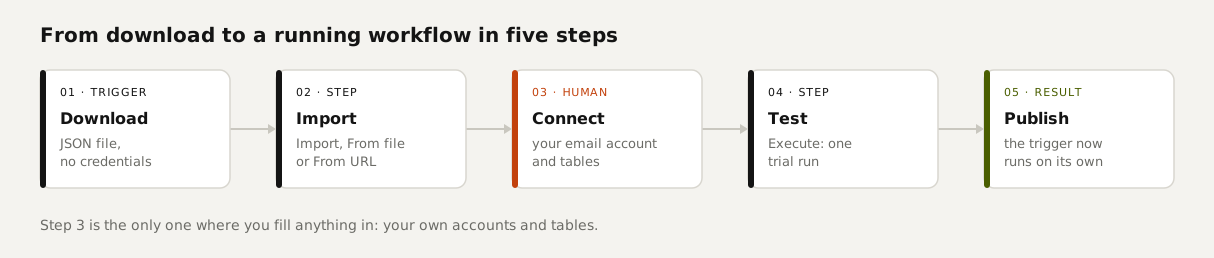
The ten workflows
| Workflow | What it does | You need | Download |
|---|---|---|---|
| 01 Quote follow-up with approval | Finds quotes that have been open for 7 days and emails you a draft reminder with a button. The client only gets it after you click. | Email account (SMTP), quotes table | 01-quote-follow-up-with-approval.json |
| 02 Late payment reminder | First reminder one day after the due date, second after 14 days. Then it stops and you pick up the phone. | Email account, invoices table, workflow 10 | 02-late-payment-reminder.json |
| 03 Inquiry form | A form on its own link. The inquiry goes into your lead list, the sender gets a confirmation and you get an alert. | Email account, leads table | 03-inquiry-form-to-lead-list.json |
| 04 Summarize email | Every new email in two lines: what the sender wants and what you need to do. | Email account (IMAP and SMTP), an AI model | 04-summarize-incoming-email.json |
| 05 Sort email | Fixed sender rules first, an AI model for the rest, unknown answers to a person. | Email account (IMAP), an AI model, inbox_log table | 05-sort-email-rules-first.json |
| 06 Morning digest | Every weekday at 7:30, open quotes and overdue invoices in one email. Quiet morning, no email. | Email account, quotes and invoices tables | 06-morning-digest.json |
| 07 Payment received | A payment notification hits a webhook, the invoice is marked paid and a thank-you goes out. Without the secret header, n8n refuses. | Email account, invoices table, a secret | 07-payment-received-webhook.json |
| 08 Error alert | When another workflow fails, you get an email with the step, the error and a link. | Email account | 08-error-alert.json |
| 09 Website monitor | Checks every 5 minutes whether your site responds and emails only when the status changes. | Email account, site_status table | 09-website-monitor.json |
| 10 Kill switch and daily cap | A helper workflow other workflows ask before they run: is it on, and how many runs are left today? | switches table | 10-kill-switch-and-daily-cap.json |
The templates use n8n's built-in Data Tables instead of Google Sheets or a CRM. That way each one works without an extra account, and you can see in n8n itself what happened. If you'd rather use Sheets, swap the table node for the Sheets node and keep the same column names; they're listed in each file's note.
What happened when we ran them
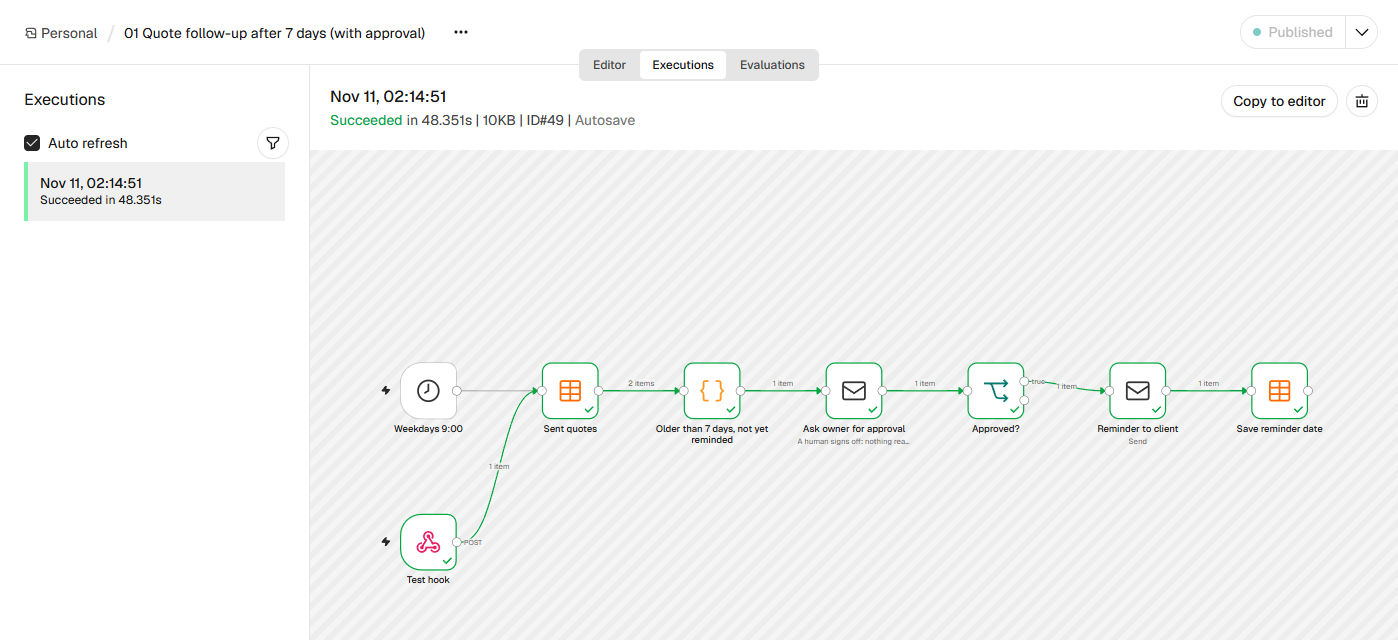
- 01 Quote follow-up: of two open quotes, one was older than 7 days and triggered an approval email. After we clicked Send, the reminder went to the client and the date was saved. The run took 1 minute 40 seconds, mostly waiting for our click.
- 02 Late payment reminder: of three open invoices, two were overdue. One got its first reminder, the other its second. A second run a minute later sent nothing, as intended. With the switch turned off, the flow stopped and logged why.
- 03 Inquiry form: succeeded in 777 milliseconds, with a new row in the lead list and two emails sent.
- 04 Summarize email: five client emails in one 11-second run. The gist was right for all five. But the small local model we used (qwen2.5:7b) answered *Action: None* for three of them, even though the client was asking for something. Use a stronger model for this step.
- 05 Sort email: 46 of 50 test emails sorted correctly. The background and the variants we compared are in our piece on AI automation.
- 07 Payment received: with the wrong secret, n8n answered *403 Authorization data is wrong*. With the right one, the invoice was marked paid and the thank-you email went out.
- 09 Website monitor: when the site stopped responding, we got one alert. On the next check it stayed quiet, because the status hadn't changed.
 (opens at full size)
How to import an n8n workflow
Download the file
Click the link in the table and save the JSON file.
Open the import menu
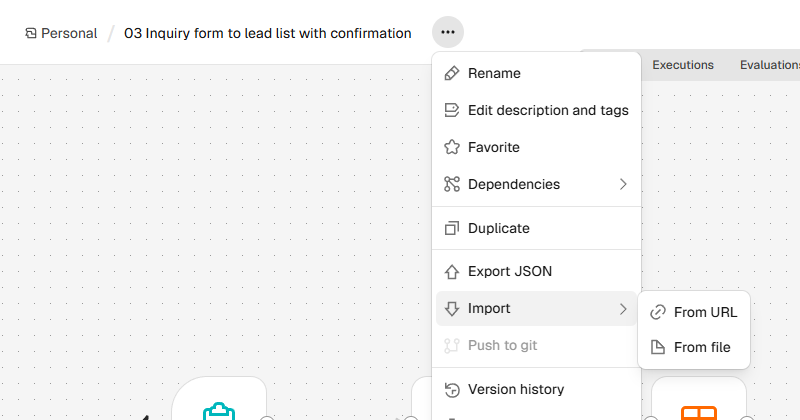
Create a new workflow in n8n, click the three dots next to its name, then Import and From file. With From URL you paste the download link and skip saving the file.
Connect accounts and tables
Nodes with a red triangle are missing an account or table. Create the tables with the columns from the note and pick them in each table node. Pick your own account in the email nodes.
Test with one run
Click Execute at the bottom. Add a few test rows first so you can see what happens.
Switch it on
When it works, click Publish at the top right. Only then does the trigger fire on its own.
 (opens at full size)
Which accounts and API keys you need
Eight of the ten need nothing more than an email account that can send over SMTP: your own business mailbox or a sending service. Workflows 04 and 05 also need IMAP to read mail, plus an AI model. We tested with a small model running on the PC itself through Ollama, so no API key was involved. To use a hosted model, replace the *Chat model* node with your provider's chat model node and add your key there. Workflow 07 needs a secret you make up yourself.
Connecting tools n8n has no node for
We searched all 924 node types in n8n 2.47.3. HubSpot, Pipedrive, Gmail, Outlook, Stripe, Shopify and WooCommerce have built-in nodes. Plenty of smaller accounting and payment tools don't. If your tool has an API, connect it with the HTTP Request node: in workflows 02 and 06 you'd replace the table node with an HTTP call to the invoices in your accounting system.
Where to find more n8n templates
n8n's official library at n8n.io/workflows listed 14,208 templates on November 11, 2026, organized by category. Most are contributed by users. Before you switch one on, check its date, the n8n version and which accounts it touches. Nodes change between versions, and a year-old template may use a node that now behaves differently. That's why every file on this page lists the version and test date.
Questions
Where can I find good n8n templates?
In the official library at n8n.io/workflows and on this page. For any template, check the test date, the n8n version and which accounts it needs.
How do I import an n8n workflow?
In a new workflow, click the three dots next to the name, choose Import, then From file or From URL. Then connect your own accounts.
Are n8n templates free?
The files on this page are free. You only pay for n8n itself if you use the cloud version, and for any services you connect, such as an AI model.
Which accounts and API keys do I need?
For most workflows here, only an email account. The AI workflows also need a model, either local or from a provider with an API key.
Which workflows are most useful for a small business?
Start with the error alert, the late payment reminder and the morning digest. They need no AI and pay off every week.
Do these templates work on self-hosted n8n?
Yes. We tested them on self-hosted n8n 2.47.3, the free Community Edition. They also work on n8n Cloud, as long as your version includes Data Tables.
Sources
- n8n: Workflow templates checked on
- n8n Docs: Export and import checked on
- n8n Docs: AI components checked on
- Mollie Docs: Webhooks checked on
More in automation recipes
- What is n8n? A plain-English guide with real costs and three tested workflowsWhat n8n is, what it costs in the cloud or on your own server, and three workflows we built and tested that you can import today.
- AI automation: when a rule is enough and when you need a modelWhen a fixed rule is enough and when you need AI, based on our test with 50 emails, plus what it costs per 1,000 messages.
- n8n self-hosting with Docker: install, back up and update it safelySelf-host n8n with Docker Compose, PostgreSQL and automatic HTTPS. Includes a tested backup script, a verified restore, the update routine and monthly costs.
- Building n8n workflows with Claude Code: what works and what you still checkClaude Code built, validated and tested three n8n workflows through n8n's MCP server. What worked, what you still check yourself, and the prompt to copy.
Also useful
- n8n AI tutorial: build AI steps and agents in n8n, with three tested examplesHow AI works in n8n, with three workflows we built and tested: summarizing email, sorting email and an agent with tools. Results and cost per run included.
- n8n MCP: expose your workflows to AI apps, and use MCP servers from n8nTurn n8n into an MCP server for Claude, ChatGPT or your own agent, and let n8n use other MCP servers. Tested with MCP Inspector, templates included.
- AI for small business: Claude for Small Business, ChatGPT, and ten tasks worth handing overWhat Claude for Small Business and ChatGPT cost, ten owner tasks AI handles well, and the one forecast mistake our test caught before it reached the bank.