n8n MCP: expose your workflows to AI apps, and use MCP servers from n8n
MCP (Model Context Protocol) is the standard that lets an AI app use tools from another program, and n8n speaks it in both directions. As an MCP server, n8n makes your workflows available to Claude, ChatGPT or a coding agent, either per workflow with the MCP Server Trigger or for your whole instance with the built-in MCP server. As an MCP client, an n8n agent uses the tools of another MCP server. We built and tested both directions on n8n 2.47.3.
Tested by us on 11 November 2026.
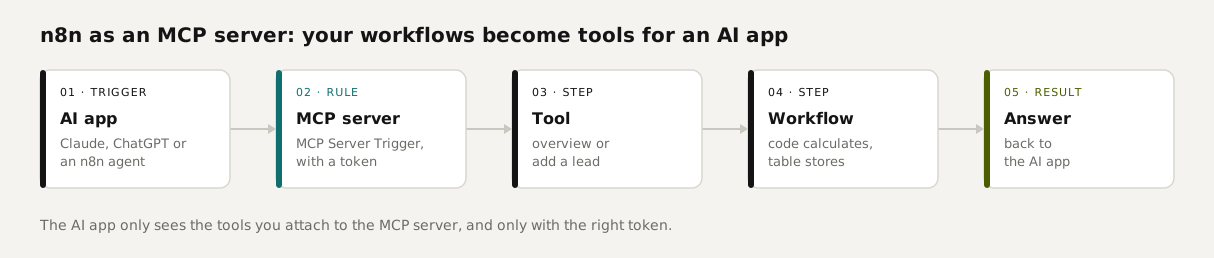
Three ways to combine n8n and MCP
| Approach | What the AI app can do | When to use it |
|---|---|---|
| MCP Server Trigger in one workflow | Only the tools you attach to that workflow | You want tight control over what an AI app may do, such as read-only access |
| n8n's built-in MCP server | Search, build, validate, test and run workflows; 57 tools on our instance | You want an AI app or coding agent to build workflows for you |
| MCP Client Tool in an agent | An n8n agent uses the tools of another MCP server | Your agent needs a service that offers an MCP server |
Recipe 1: a workflow as an MCP server
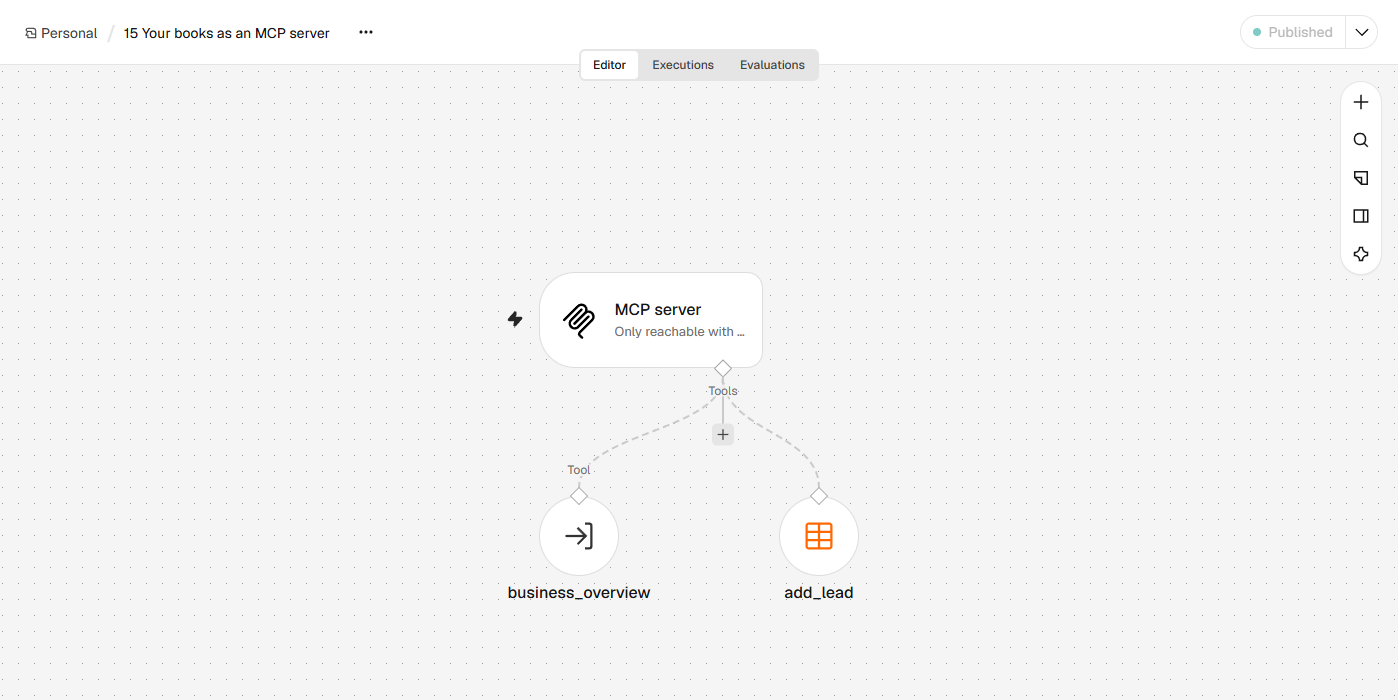
We built an MCP server with two tools: *business_overview* (open invoices and quotes, all totals precalculated) and *add_lead* (a new row in the lead list). An AI app that connects sees those two and nothing else.
MCP Server Trigger
Drop the trigger on a new canvas. Set Authentication to *Bearer Auth* and create a credential with a long random token. Give it a fixed path; ours is *books*. Under *Instructions*, describe when each tool may be used.
Attach the tools
A *Call n8n Workflow Tool* for the overview and a Data Table tool for the lead. Give each tool a short, accurate description, because that's what the AI app reads to choose. With
$fromAI()the AI app fills in fields such as name and email.Publish
After Publish, the server lives at
https://<your-n8n>/mcp/books. The test URL only works while the editor is listening for a test event.Test with MCP Inspector
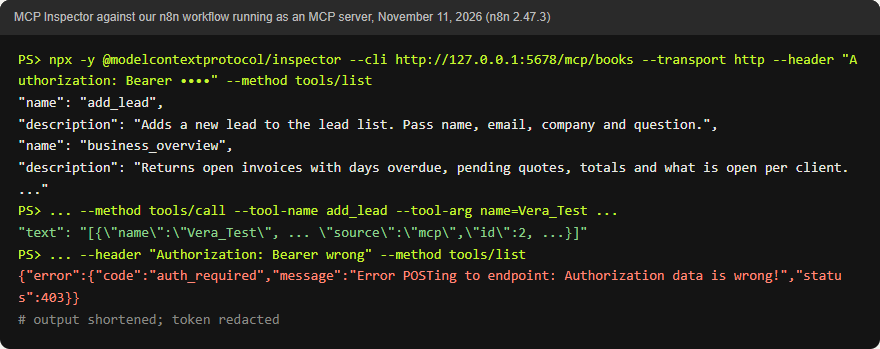
The official MCP Inspector has a command-line mode, so you can check your tools without an AI app.
bashnpx -y @modelcontextprotocol/inspector --cli https://<your-n8n>/mcp/books --transport http --header "Authorization: Bearer <token>" --method tools/list
 (opens at full size)
 (opens at full size)
In our test, the Inspector listed both tools with the descriptions and fields we set. The overview came back with the totals already calculated, and *add_lead* inserted a test lead with *mcp* as its source. With a wrong token, n8n refused with *Authorization data is wrong* and status 403, and it did the same with no token at all. Template: 15-your-books-as-mcp-server.json, plus the helper workflow 12-business-overview-helper.json.
Connect it to Claude Code or Claude Desktop
In Claude Code you add the server with one command; --header carries the token, and --scope user makes the server available in all your projects. For Claude Desktop, n8n's docs describe a route through the mcp-remote package. To be clear, we didn't run these two commands ourselves. In our test setup, n8n ran on a different machine than Claude Code, so we connected Claude Code to n8n's built-in MCP server through a small relay of our own. That worked; the command below is the one Claude Code's docs give.
claude mcp add --transport http n8n-books https://<your-n8n>/mcp/books --header "Authorization: Bearer <token>"
claude mcp list
Command as documented by Claude Code, checked November 11, 2026.
Recipe 2: n8n's built-in MCP server
n8n also has an MCP server for the whole instance. Turn it on under Settings, Instance-level MCP, or on a self-hosted instance with the environment variables N8N_MCP_MANAGED_BY_ENV=true and N8N_MCP_ACCESS_ENABLED=true. The URL ends in /mcp-server/http, and clients authenticate with OAuth or a personal access token. We enabled it with the variables and listed the tools: 57 of them, from *search_workflows* and *execute_workflow* to *create_workflow_from_code*, *validate_workflow* and *test_workflow*.
Think about what that means. An AI app holding that token can build, change and run workflows. According to n8n's docs, it can find every workflow you have access to, but it can only run or edit the ones you enable one by one. We saw that in practice: when Claude Code tried to open one of our existing workflows through this server, n8n replied that the workflow wasn't enabled for MCP. Building, validating and testing three new workflows worked fine. We describe how that went in building n8n workflows with Claude Code.
Recipe 3: n8n as an MCP client
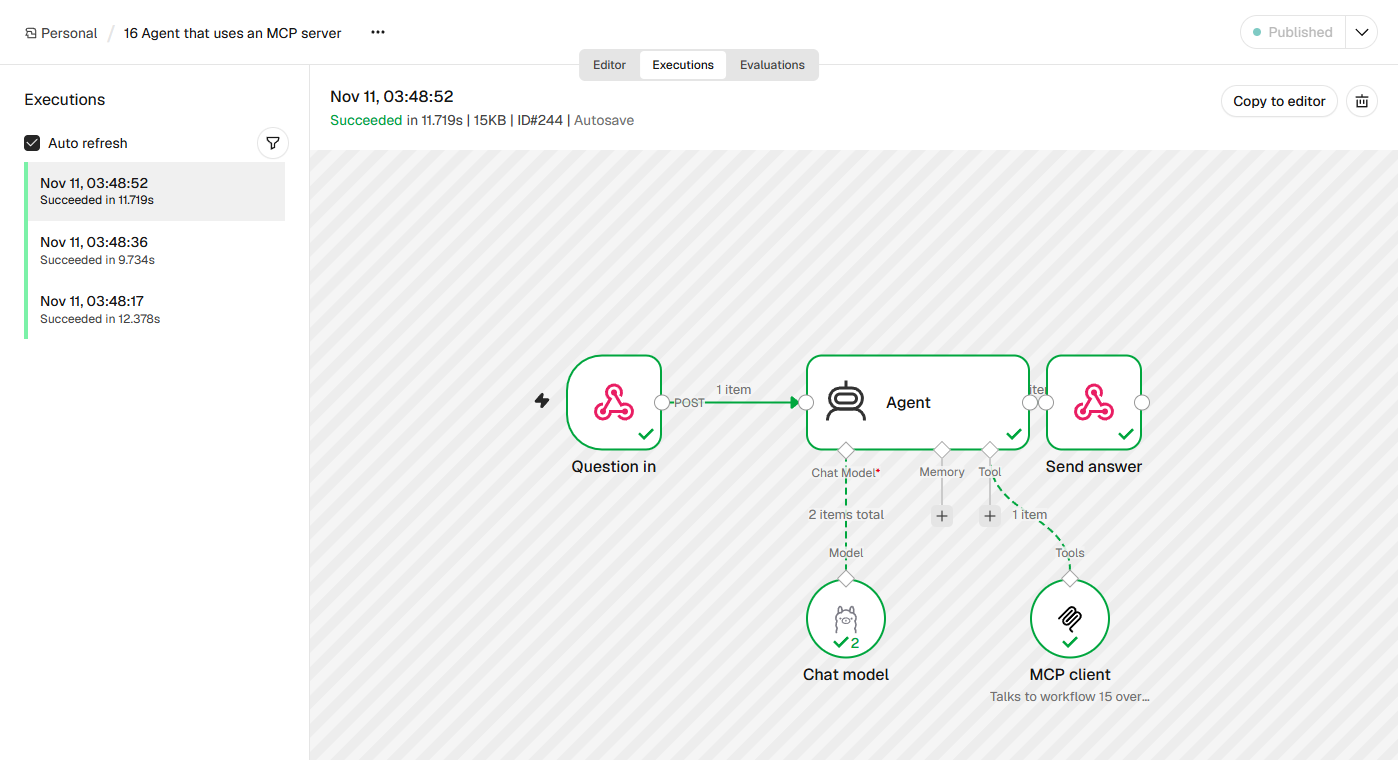
It works the other way too. Attach an *MCP Client Tool* to an n8n agent, with the MCP server's URL and token, and the agent gets all of that server's tools. We had an agent running a small local model (qwen2.5:7b) use our own MCP server from recipe 1 and asked it three questions.
 (opens at full size)
Two of the three answers were fully right: the most overdue invoice with the correct number of days, and the total value of pending quotes. The third question was *Does Eastend Bikes have anything outstanding?* The tool returned one open invoice of $605, not yet due, and a pending quote of $1,850. The agent named the invoice and left out the quote. The MCP connection did its job; the gap was in the model's reading. In our Dutch run, the same agent made a different slip on that question. Template: 16-agent-with-mcp-client.json.
What to watch out for
- Always turn on authentication. Without a token, anyone who guesses the URL can use your tools. In our test, n8n rejected a wrong token with a 403.
- Only expose write tools when you need them. A tool that adds a row or sends an email can be called at the wrong moment. Spell out in the server instructions when it's allowed, and route anything that leaves the building through a human.
- Keep the math in the workflow. Our overview returns totals and days already calculated. In earlier tests, a small model doing its own arithmetic got it wrong.
- Running n8n in queue mode with several webhook processes? Per n8n's docs, route all
/mcptraffic to a single process, because an MCP connection stays open.
Questions
What is the n8n MCP server?
It's n8n's support for the Model Context Protocol. With it, an AI app can use n8n workflows as tools, either per workflow through the MCP Server Trigger or for the whole instance through the built-in MCP server.
How do I turn n8n into an MCP server?
Per workflow with the MCP Server Trigger and the tools you attach to it, or instance-wide by enabling the built-in MCP server under Settings, Instance-level MCP.
Can Claude Code talk to n8n over MCP?
Yes. Add the MCP server's URL with claude mcp add and a Bearer token in the header, and Claude Code can use its tools.
Is n8n's MCP server secure?
As secure as you set it up: require authentication, expose only the tools you need, and route actions that leave your business through a human.
Sources
- n8n Docs: MCP Server Trigger checked on
- n8n Docs: Connect to n8n MCP server checked on
- n8n Docs: Manage settings using environment variables (MCP) checked on
- n8n Docs: MCP Client checked on
- n8n Docs: Integrate AI checked on
- Claude Code Docs: MCP checked on
More in automation recipes
- n8n AI tutorial: build AI steps and agents in n8n, with three tested examplesHow AI works in n8n, with three workflows we built and tested: summarizing email, sorting email and an agent with tools. Results and cost per run included.
- An n8n AI agent that sorts email and drafts replies, with approval before sendingAn n8n AI agent that sorts your inbox and drafts replies, with your approval before anything is sent. Tested on 50 emails, with a review of every draft.
- n8n workflows for small businesses: ten tested templates you can importTen n8n workflows we built and ran with test data: quote follow-up, late payment reminders, inquiry forms, email sorting and more. Free to download.
- Building n8n workflows with Claude Code: what works and what you still checkClaude Code built, validated and tested three n8n workflows through n8n's MCP server. What worked, what you still check yourself, and the prompt to copy.
Also useful
- What is n8n? A plain-English guide with real costs and three tested workflowsWhat n8n is, what it costs in the cloud or on your own server, and three workflows we built and tested that you can import today.
- n8n self-hosting with Docker: install, back up and update it safelySelf-host n8n with Docker Compose, PostgreSQL and automatic HTTPS. Includes a tested backup script, a verified restore, the update routine and monthly costs.
- Agentic AI vs. AI Agents: What Differs When You Run ThemAn AI agent does one job; agentic AI is the setup that lets agents act on their own, often several at once. Shown with 1,379 jobs from our own work.