Building n8n workflows with Claude Code: what works and what you still check
Claude Code can build n8n workflows for you through n8n's built-in MCP server. In our test it built three from a single plain-English prompt in seven and a half minutes. All three passed validation on the first try, and when we ran them ourselves afterwards, they did what we asked. What you still check: how often a workflow runs, whether an alert keeps repeating, and which test data gets left behind. Below is the setup, the prompt you can copy and what we saw.
Tested by us on 11 November 2026.
What you need
- Claude Code on a paid plan or with an API key.
- n8n with the built-in MCP server turned on, under Settings, Instance-level MCP, or on self-hosted n8n with
N8N_MCP_MANAGED_BY_ENV=trueandN8N_MCP_ACCESS_ENABLED=true. We used n8n 2.47.3. - A personal MCP token from the same settings page, API key tab. Or sign in with OAuth.
- The credentials your workflows need, already set up in n8n. The agent uses them but doesn't create them.
Connect Claude Code to n8n
claude mcp add --transport http n8n-mcp https://<your-n8n>/mcp-server/http \
  --header "Authorization: Bearer <your-n8n-mcp-token>"
claude mcp list
The command from n8n's docs, checked November 11, 2026.
In our test setup, n8n ran on a different computer than Claude Code, so we connected the two through a small relay of our own instead of this command. Claude Code saw the same 57 tools, but each call took 10 to 30 seconds instead of a fraction of that. That changes the run time, not how the agent works.
The prompt we used
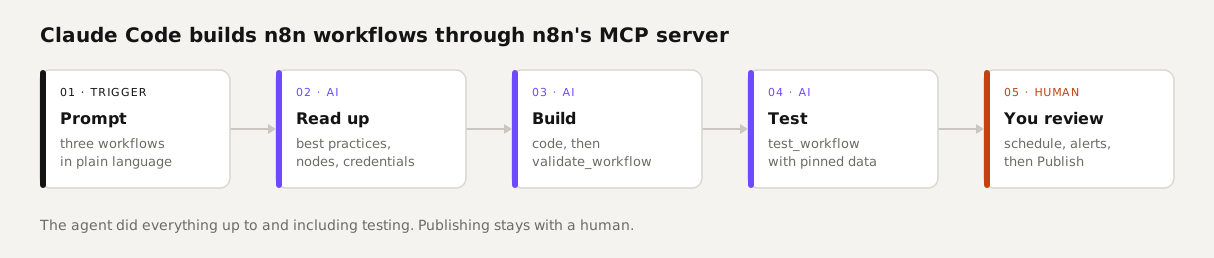
A good prompt tells the agent how to work, not only what to build. Ours makes it read n8n's guidance and node definitions first, forbids creating credentials, requires a passing validation and a test run, and forbids publishing. Download: prompt.md.
You are building n8n workflows through the MCP server "n8n". Work like this:
1. First read get_workflow_best_practices and get_workflow_sdk_reference. Look nodes up with search_nodes and get_node_types; don't guess parameters.
2. Use existing credentials: find them with list_credentials. Don't create credentials and never put passwords or keys anywhere.
3. Build each workflow with create_workflow_from_code and check it with validate_workflow. Fix errors until validation passes.
4. Test each workflow with test_workflow (use prepare_workflow_pin_data for test data where needed) and read the result.
5. Don't publish anything. Leave every workflow unpublished; a human switches it on.
6. Finish with a short report per workflow: name, id, whether validation and testing passed, and what you couldn't test.
The working rules from our prompt. The three workflows we wanted followed underneath.
| Workflow | What we asked for |
|---|---|
| Website monitor | Request example.com every 10 minutes; email an alert on any status other than 200, or no response. |
| Callback request | A form with name and phone number; each submission becomes a row in a new table. |
| Weekly lead count | Every Monday at 8:00, count the leads from the past 7 days and email the number. |
What Claude Code did
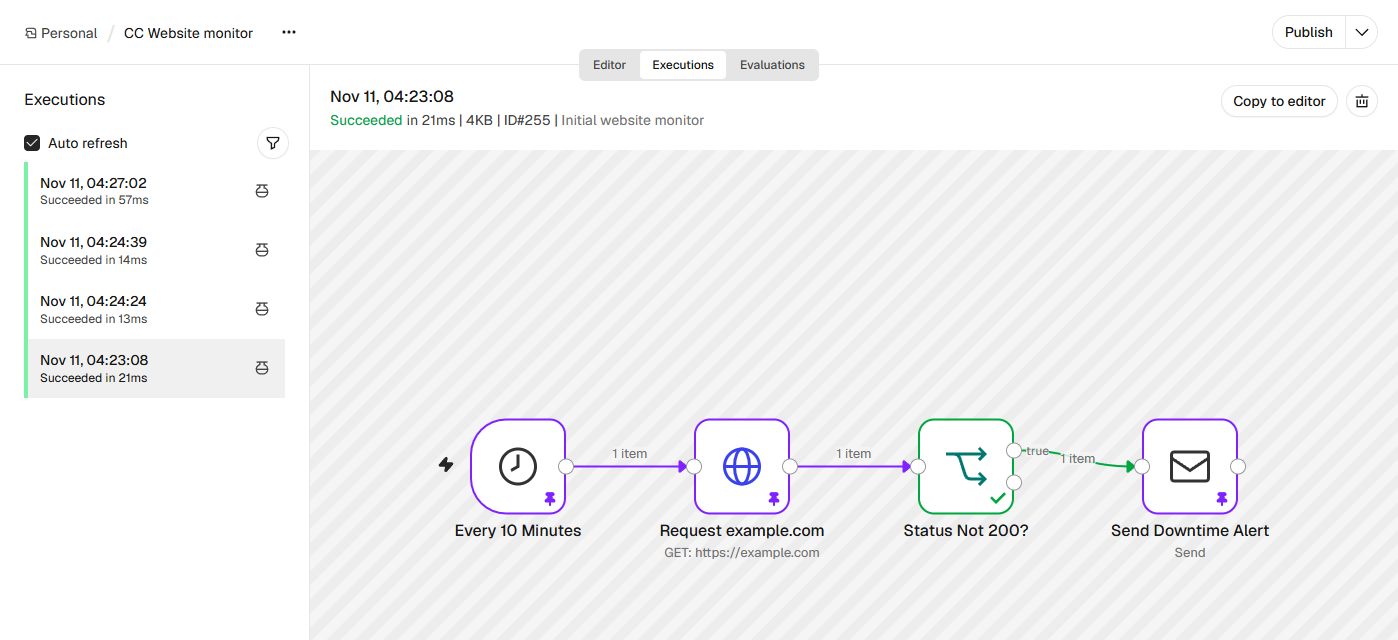
The run took seven and a half minutes and 36 tool calls. Claude Code read the SDK reference, asked for n8n's best practices four times, looked up nodes, credentials and existing tables, and created the missing table. All three workflows passed validation on the first attempt. It saved them and ran five tests: one per workflow, plus two extra scenarios for the monitor (status 200 and no response). All five passed.
 (opens at full size)
- It stayed inside the lines. Four times it reached for tools outside n8n, to write and run a small script that would parse a large tool output, and all four attempts were refused because we only allowed the n8n tools.
- Its report was accurate. It said no real email was sent and no real request reached example.com, because the test tool simulated those steps. It also flagged that the monitor emails every 10 minutes while a site stays down, and that a test row was left in the new table.
- It built sensibly. The table step looks the table up by name rather than by an internal ID, and the count is computed once, so the lead count sends one email however many leads there are.
Our own check
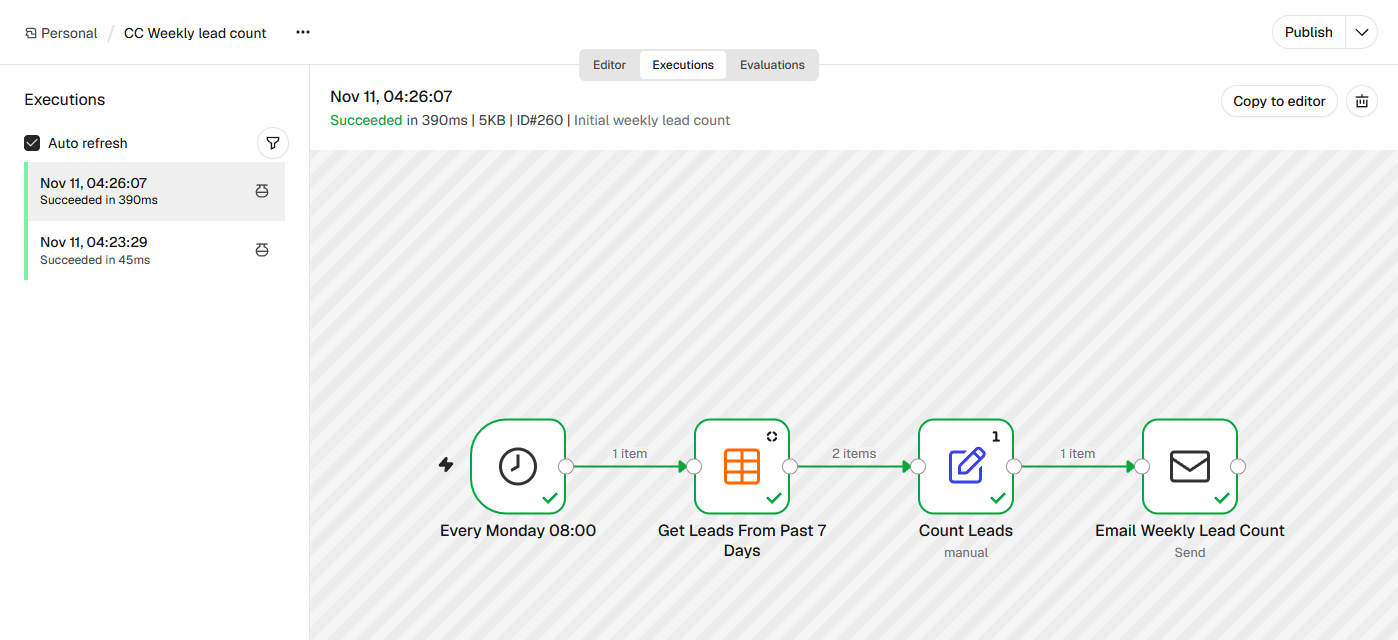
We then ran all three ourselves with only the trigger pinned, so every other step ran for real. The weekly count read the lead table, counted 2 new leads (correct) and sent exactly one email, subject *Weekly lead count: 2*. The monitor got a 200 from example.com and stayed quiet. The callback form stored our test submission; our first try left the phone number empty, because we had sent the field under the wrong name.
 (opens at full size)
What you still check yourself
- How often it runs. Every 10 minutes is 4,320 executions a month. That doesn't fit n8n Cloud Starter's 2,500, and the agent didn't mention it.
- Alerts that keep firing. The monitor sends an email on every check while the site is down: six an hour. Our own website monitor template remembers the previous status and only alerts on a change. Ask for that in your prompt.
- Leftover test data. Claude Code left a test row in the new table and said so. It had no tool to delete rows, so cleanup is yours.
- Sender and credentials. It used the recipient address as the sender, because our prompt didn't name one. Check every email step for the account and the from address.
- Publishing stays with you. Never let the agent publish. Review the workflow in the editor, attach an error alert, then click Publish yourself.
MCP or the REST API?
A coding agent can also drive n8n through its regular REST API with an API key and curl. That's how we built our own ten templates earlier the same day. It works, but the agent has to know each node's JSON format and can't validate or test without running something first. The MCP server hands it exactly those steps: guidance, node definitions, validation and test runs with pinned data. That's why all three workflows here passed validation on the first try, in both of our runs.
Questions
Can Claude Code build n8n workflows?
Yes. Through n8n's built-in MCP server, Claude Code can create, validate and test workflows. In our test it built three that worked when we ran them ourselves.
How do I connect Claude Code to n8n?
Turn on instance-level MCP in n8n, create a token, and add the server in Claude Code with claude mcp add, using the URL that ends in /mcp-server/http and a Bearer header.
Do I need to review workflows that Claude Code builds?
Yes. Check how often they run, whether alerts repeat, which credentials and sender they use, and what test data is left behind. Publish them yourself.
Is n8n's MCP server better than the REST API for a coding agent?
For building, yes: the MCP server offers guidance, validation and test runs. For simple admin tasks, like switching a workflow on or off, the REST API is enough.
Sources
- n8n Docs: Connect to n8n MCP server checked on
- n8n Docs: MCP client examples (Claude Code) checked on
- n8n Docs: MCP server tools reference checked on
- Claude Code Docs: MCP checked on
- Claude Code Docs: Setup (plans) checked on
- n8n pricing checked on
More in automation recipes
- n8n MCP: expose your workflows to AI apps, and use MCP servers from n8nTurn n8n into an MCP server for Claude, ChatGPT or your own agent, and let n8n use other MCP servers. Tested with MCP Inspector, templates included.
- n8n workflows for small businesses: ten tested templates you can importTen n8n workflows we built and ran with test data: quote follow-up, late payment reminders, inquiry forms, email sorting and more. Free to download.
- What is n8n? A plain-English guide with real costs and three tested workflowsWhat n8n is, what it costs in the cloud or on your own server, and three workflows we built and tested that you can import today.
- An n8n AI agent that sorts email and drafts replies, with approval before sendingAn n8n AI agent that sorts your inbox and drafts replies, with your approval before anything is sent. Tested on 50 emails, with a review of every draft.
Also useful
- n8n AI tutorial: build AI steps and agents in n8n, with three tested examplesHow AI works in n8n, with three workflows we built and tested: summarizing email, sorting email and an agent with tools. Results and cost per run included.
- n8n self-hosting with Docker: install, back up and update it safelySelf-host n8n with Docker Compose, PostgreSQL and automatic HTTPS. Includes a tested backup script, a verified restore, the update routine and monthly costs.
- How to Build an MCP Server: A Tested Python and Node ExampleBuild a working MCP server in Python or Node, test it without a model, inspect it, then connect it to an AI app. Full code and the errors we hit.