AI automation: when a rule is enough and when you need a model
AI automation is work that runs on its own, with an AI model handling the steps that need judgment: reading an email, picking a category, drafting a reply. Traditional automation only follows fixed rules. So start with whatever happens the same way every time, and bring in AI only where a rule falls short. In our test with 50 emails, the AI step cost a few cents per 1,000 messages on a small model. The real gain was fewer mistakes, not lower cost.
Tested by us on 11 November 2026.
How AI automation differs from traditional automation
A fixed rule does the same thing every time. When an email comes from your accounting software, the rule files it under invoices. That's fast, free and predictable, but the rule doesn't understand anything. An AI model reads the text and decides. It copes with an email that's worded a little differently, but it can get things wrong, and every message costs a small amount.
| Fixed rule | AI step | |
|---|---|---|
| Does | Exactly what you defined | Reads the text and decides |
| Mistakes | The same ones every time, so they're easy to find | They vary, so you need a safety net |
| Cost per run | Nothing | A fraction of a cent to a few dollars, depending on model and text length |
| Example | Sender is your supplier: file under supplier | Client asks whether the color can still change: client question |
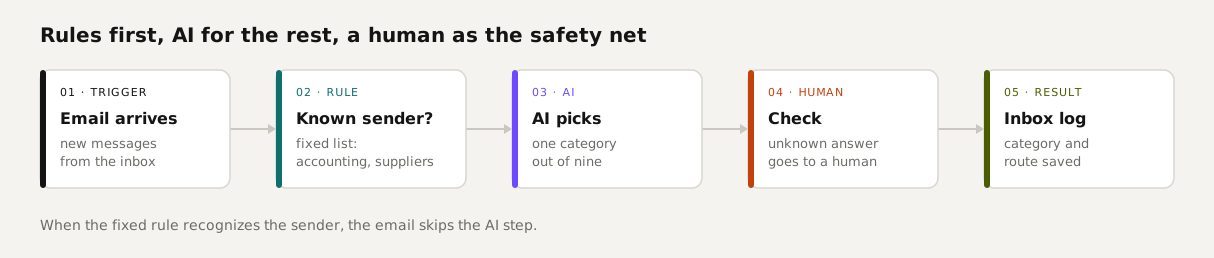
Decide step by step: rule, template or AI?
We ask one question for every step: does this happen the same way every time? If yes, it becomes plain code, a rule or a template. If no, AI can do it, and we write down right away when that step could turn into a rule. The table applies that question to everyday office work.
| Task | Use | Why |
|---|---|---|
| Copying form fields into your lead list | Rule | The fields are the same every time. |
| Confirmation email after an inquiry | Template | Fixed text with the name and question filled in. |
| Reminder after an invoice is overdue | Rule + template | Comparing dates is arithmetic; the wording doesn't change. |
| Sorting email from a known sender | Rule | Your suppliers and accounting tool rarely change. |
| Sorting email from an unknown sender | AI | You have to read the content to know what the person wants. |
| Summarizing a long client email | AI | Free text, different every time. |
| Drafting a reply to a client | AI, with a human signing off | The model drafts; a person decides whether it goes out. |
What we tested: 50 emails, three setups
We wrote 50 emails for a made-up custom carpentry shop: quote requests, client questions, appointments, suppliers, invoices and noise. We recorded the right category for each one. Then an n8n workflow sorted them, using a small language model running on an ordinary PC (qwen2.5:7b). We tried three setups.
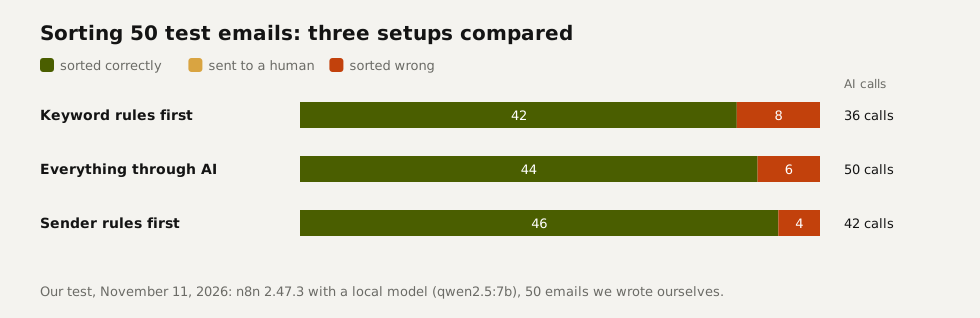
- Keyword rules first (does the email mention *invoice*, *application* or *newsletter*?) let 14 emails skip the AI step, but two of those were wrong. A complaint that an invoice listed too many hours became an invoice, and a supplier's product newsletter became a newsletter.
- Everything through AI made no rule mistakes, because there were no rules. It also made 50 model calls, and the model got six emails wrong.
- Sender rules first (known suppliers, plus addresses like *accounting@*) caught 8 emails without AI, all correct. The model handled the other 42 and got four wrong: two client questions and two pieces of noise.
The takeaway: a fixed rule only beats a model when the rule is solid. Loose keywords in free text aren't. A sender address, a form field or a date is. We ran the same test in Dutch and the ranking was identical.
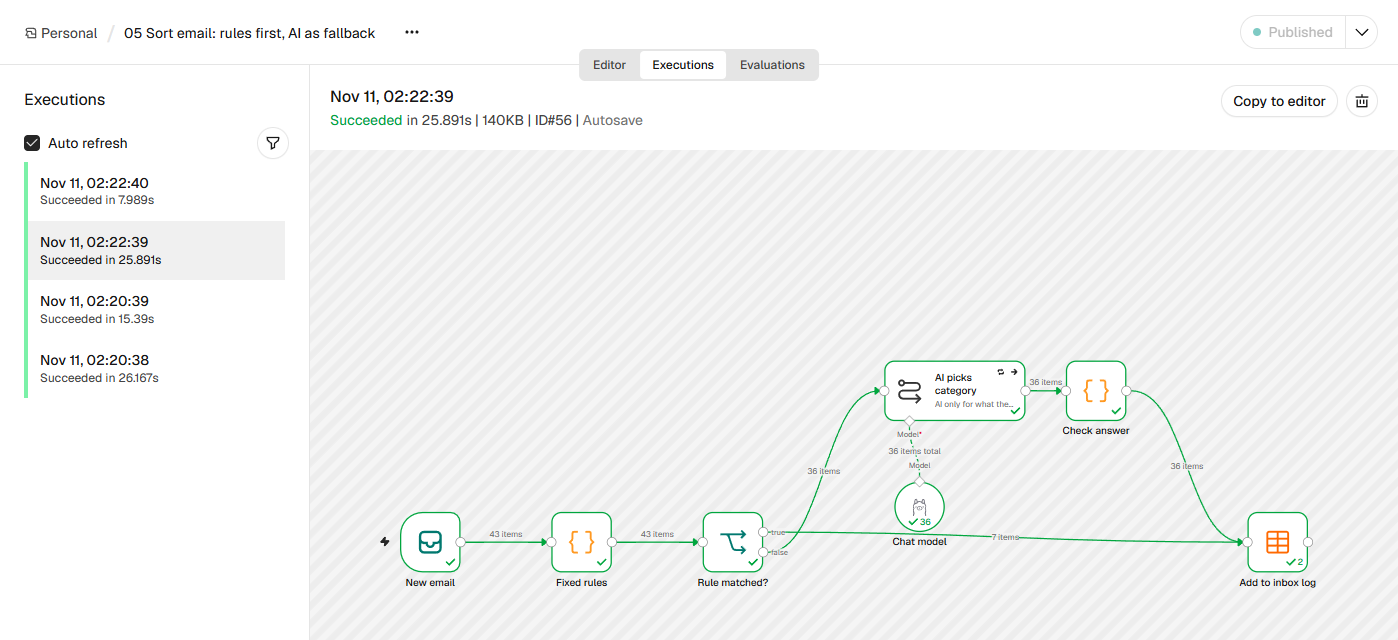 (opens at full size)
The safety net you can't skip
Our first version used n8n's built-in text classifier node. In the first batch of 38 emails, the model returned one answer the node couldn't parse, and the entire batch failed. In the next run, one email disappeared without an error. So now the model returns a single word, and a plain code step checks that word. If it isn't on the list, the email gets the label *review* and a person looks at it. Since that change, every run has accounted for all 50 emails.
That check also caught a bug of our own. Our first English run sent 22 emails to review, because the check stripped the underscore out of *quote_request* and then didn't recognize it. Those emails weren't misfiled; they waited for a person, and the jump in review cases told us something was off.
What AI automation costs per month
Sorting is cheap. In our English run, the model read about 210 tokens per email and wrote back one or two (a token is roughly three quarters of a word). Each model counts tokens a little differently, so treat these figures as an order of magnitude.
| Model (example) | Price per million tokens in / out | Cost to sort 1,000 emails |
|---|---|---|
| Local model on your own PC | None | Electricity only |
| Claude Haiku 5.5 | $0.10 / $0.50 | About $0.02 |
| Gemini 3.1 Flash-Lite | $0.25 / $1.50 | About $0.06 |
| Claude Sonnet 5.5 | $2 / $10 | About $0.44 |
Costs climb with long documents and with agents that take many steps on their own. We track what each of our routines would cost at standard API prices. One that writes short reports runs about 4 euro cents per run. One that plans the day's work runs about €2.47. A single long build job by an agent reached €77 in one run (our own measurement, seven days to November 10, 2026). That's where the bill is, not in sorting email.
Add the automation tool on top. n8n is free to self-host or starts at €20 a month in the cloud on annual billing; see what n8n is and what it costs.
What to automate first
Start with three routines that need no AI
An alert when something breaks, a reminder when an invoice is overdue, and a morning digest of what's open. They're boring, they work on day one, and they cost nothing per run.
Find the step where you read and decide yourself
Usually that's the inbox: what is this, and who needs to answer it? That's where AI helps first.
Put a rule in front of it
Filter out whatever you can recognize by sender or a fixed field. Send the rest to the model.
Build the safety net
Any answer that isn't on your list goes to a person. Anything that leaves the building, like an email to a client, waits for approval.
Write down when an AI step becomes a rule
If the model keeps making the same call for the same kind of email, turn that into a fixed rule. We note this on every AI step, as a note on the node.
Questions
What is AI automation, and how is it different from regular automation?
Regular automation runs fixed rules. AI automation adds a model for steps that need judgment, like reading an email and choosing a category. The best setups combine the two.
What should you automate first?
Tasks that happen the same way every time and need no judgment: alerts, reminders and digests. Then the step where you currently read and decide yourself, which is usually the inbox.
When do you need AI, and when is a fixed rule enough?
A rule is enough when you can tell the outcome from something solid, like the sender, a form field or a date. You need AI when you have to understand free text. Keywords aren't solid: in our test they misfiled two emails.
How much does AI automation cost a small business per month?
For sorting and summarizing email, model costs are often well under a dollar a month, plus the tool itself (n8n from €20 a month, or self-hosted). Agents doing long jobs can cost dollars per run.
What is the 30% rule in AI?
There's no official 30% rule. People use the term in different ways, usually to mean AI handles the repetitive work and humans keep the judgment calls. We prefer asking, step by step: does this happen the same way every time?
Sources
- Anthropic: Building effective agents checked on
- n8n Docs: Integrate AI checked on
- Anthropic: Pricing checked on
- Google Gemini API: Pricing checked on
- n8n pricing checked on
More in automation recipes
- What is n8n? A plain-English guide with real costs and three tested workflowsWhat n8n is, what it costs in the cloud or on your own server, and three workflows we built and tested that you can import today.
- n8n workflows for small businesses: ten tested templates you can importTen n8n workflows we built and ran with test data: quote follow-up, late payment reminders, inquiry forms, email sorting and more. Free to download.
- n8n AI tutorial: build AI steps and agents in n8n, with three tested examplesHow AI works in n8n, with three workflows we built and tested: summarizing email, sorting email and an agent with tools. Results and cost per run included.
- Building n8n workflows with Claude Code: what works and what you still checkClaude Code built, validated and tested three n8n workflows through n8n's MCP server. What worked, what you still check yourself, and the prompt to copy.
Also useful
- An n8n AI agent that sorts email and drafts replies, with approval before sendingAn n8n AI agent that sorts your inbox and drafts replies, with your approval before anything is sent. Tested on 50 emails, with a review of every draft.
- n8n pricing: what 10, 100 or 1,000 runs a day costn8n Cloud costs €20 to €144 a month; self-hosting costs a server of about €11. What 10, 100 and 1,000 runs a day cost, with our own test.
- What Are Claude Skills? How They Work, a Tested Example, and When to Use OneClaude Skills explained with a working editing skill we tested 11 times in Claude Code: how often it loaded on its own and how to force it.