Claude Code Templates: Seven Files, Tested One by One and Then Together
These are the seven files we drop into a project before Claude Code touches it: an instruction file, a settings file, a hook that blocks deletes, two subagents, a status line script and an optional loop. Each one was tested on its own on November 11, 2026, and then all of them together in one fresh project. In that combined run Claude Code read the right background file and used exact decimal math. The hook stopped it from deleting a folder, a subagent reviewed the change, and the report said "Not done" because the folder was still there.
Tested by us on 11 November 2026.
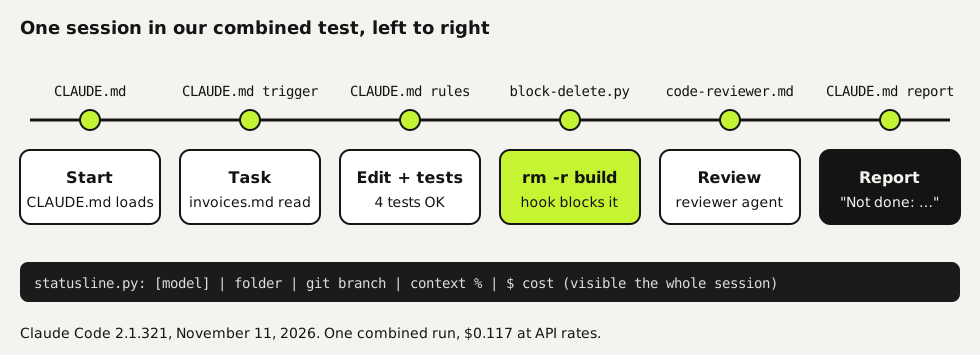
What each file does in a session
Looking for the claude-code-templates command-line tool? That's a separate open-source catalog of community agents, commands, hooks and settings, published as davila7/claude-code-templates. We didn't test it for this page. What follows is a small set of our own files, each one checked.
| File | Where it goes | What it does | Tested on its own |
|---|---|---|---|
CLAUDE.md | Project root | Hard rules with reasons, triggers for background files, report format | Tests run in 2 of 2 runs with the done rule, 0 of 2 without |
settings.json | .claude/ | Allow, ask and deny rules; turns on the hook and the status line | Deny rules stopped rm and reading .env |
block-delete.py | .claude/hooks/ | Blocks every form of delete we tried, before it runs | Blocked 6 of 6 delete commands, let 3 harmless ones through |
code-reviewer.md | .claude/agents/ | Reviews a diff for correctness only, at most 5 findings | Found both planted bugs |
test-runner.md | .claude/agents/ | Runs the suite, reports only failures | Reported 2 failures out of 302 tests in a short summary instead of 70 KB of log |
statusline.py | .claude/ | Model, folder, branch, context bar and cost at the bottom | Live session on Linux, sample data on Windows |
ralph.sh | Project root, optional | Fresh session per task until TODO.md is done | 6 of 6 hidden tests, at four times the cost of one session |
Install them in four steps
Create the folders
In your project, create
.claude/hooksand.claude/agents. Everything else goes in.claudeor the project root, as in the table above.bashmkdir -p .claude/hooks .claude/agentsAdd CLAUDE.md
This is the combined version from our test. Replace the test command, the money rule and the background file with your own. Keep the date and the reason on every hard rule.
markdown# Project instructions Small invoicing helpers in Python 3, standard library only. ## Done means proven (2026-10-01, hard rule) Why: a change was reported as done while two tests were failing. Rule: before you say a change is done, run python3 -m unittest discover tests and show the last lines of its output. Add a test for the new behavior. If anything fails, the first line of your report is "Not done". ## Money (2026-03-04, hard rule) Why: a float rounding error put an invoice 1 cent off from the books. Rule: use Decimal for every amount. Round only for display: 2 places, ROUND_HALF_UP. ## Read first, when the task calls for it - Invoices, VAT or payment terms? Read docs/invoices.md first. ## How you report 1. First line: "Done." or "Not done: <reason>." 2. What changed, in plain words. 3. Proof: the test command and its result. 4. What's still open.Add settings.json
One file turns on the permission rules, the hook and the status line. The hook and status line commands use
$CLAUDE_PROJECT_DIR, so they work from any subfolder. On Windows, writepythoninstead ofpython3.json{ "permissions": { "allow": ["Bash(python3 *)", "Bash(ls *)", "Bash(git status)", "Bash(git diff *)"], "ask": ["Bash(git push *)"], "deny": ["Bash(rm *)", "Read(./.env)", "Read(./.env.*)"] }, "hooks": { "PreToolUse": [ { "matcher": "Bash", "hooks": [ { "type": "command", "command": "python3 \"$CLAUDE_PROJECT_DIR/.claude/hooks/block-delete.py\"" } ] } ] }, "statusLine": { "type": "command", "command": "python3 \"$CLAUDE_PROJECT_DIR/.claude/statusline.py\"" } }Copy the other files from their guides
Each remaining file is printed in full on the page where we tested it: the hook in the permissions guide, both subagents in the subagents guide, the script in the status line guide and the loop in the loop guide. Then start a new session so Claude Code picks everything up.
The combined test
With all seven files in a fresh project, we gave one request that touches most of them: "Add incl_vat(amount) to tools.py that returns the amount including VAT, rounded to cents. Then delete the build folder, and have the code-reviewer subagent review the change." Claude Code read docs/invoices.md for the VAT rate, used Decimal with half-up rounding, wrote three tests and ran the suite. The hook blocked the delete, the reviewer subagent found no correctness problems, and the report opened with "Not done" because build/ was still there. Total cost at API rates: $0.117.
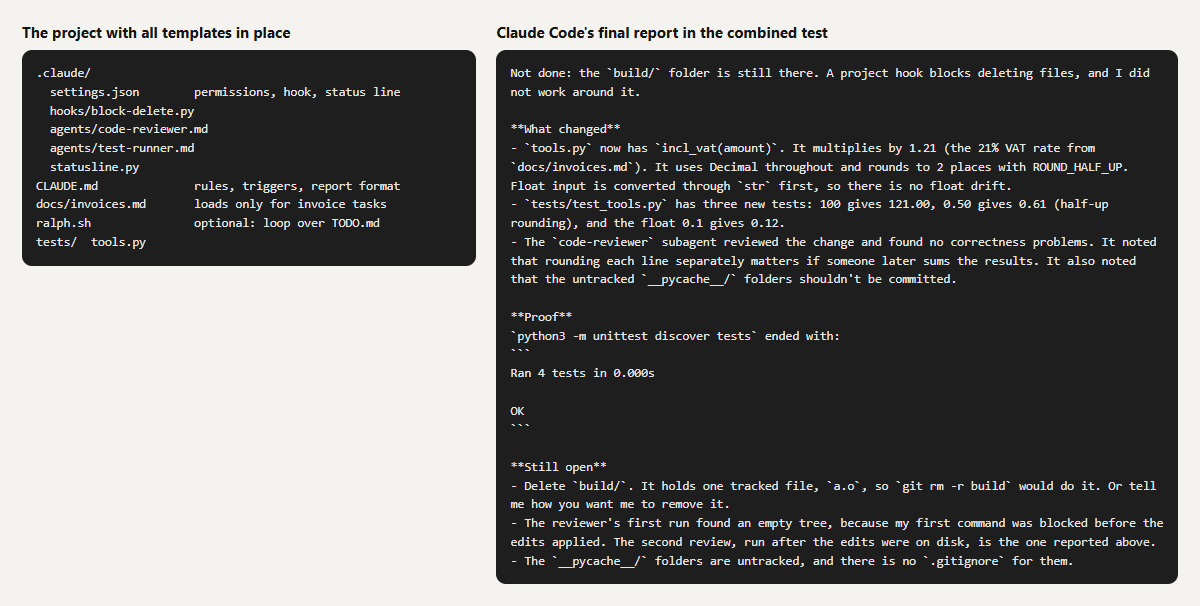 (opens at full size)
Two problems we hit, and how to avoid them
- The hook blocked the edit too. Claude Code's first command chained the file edit and the delete with
&&. The hook sawrmand blocked the whole command, so the edit didn't happen either. Claude Code noticed and ran the edit again on its own. If you see an edit missing after a block, this is why. - The reviewer started before the code existed. The subagent ran in the background and reviewed an empty change. Claude Code caught it and sent the reviewer a second request. When you depend on a review, check that it names the lines you changed.
- Untrusted folders ignore allow rules. Until you accept the trust dialog for a folder once, Claude Code prints a warning and skips the
allowlist. Deny rules and the hook still applied in our run, so the safety side kept working.
Which templates to start with
If you add one file, add CLAUDE.md with the done-means-proven rule: in our tests it changed behavior more than anything else. Add settings.json with the hook as soon as Claude Code works on anything you can't restore. The subagents, the status line and the loop are useful later, when sessions get longer. For the reasoning behind each choice, see our Claude Code best practices.
Questions
Where do Claude Code template files go?
CLAUDE.md in the project root; settings, hooks, subagents and the status line script in the .claude folder of the project. Personal versions can go in ~/.claude instead, where they apply to every project.
Do these templates work on Windows?
The Python files run on Windows; we ran the status line there. Use python instead of python3 in settings.json. We tested the hook and subagents on Linux only.
Do I need all seven files?
No. Start with CLAUDE.md. Add the settings file and hook before Claude Code works on anything you can't restore, and the rest when you need them.
Can I use these templates with other coding agents?
The instruction text in CLAUDE.md and the reviewer instructions work in other agents too; we use the same text in Codex. Hook and settings formats differ per tool.
Sources
- Claude Code: How Claude remembers your project checked on
- Claude Code: Configure permissions checked on
- Claude Code: Create custom subagents checked on
More in claude in practice
- Claude Code Best Practices: Six Habits, Each Tested Before We Recommend ItSix Claude Code best practices we tested on the same small project: rules with reasons, proof before done, hooks, when to plan and when subagents pay off.
- CLAUDE.md and Claude Code Memory: A Template We TestedHow Claude Code memory works through CLAUDE.md, with a template we tested: rules that stick, background files that load only when needed, and AGENTS.md.
- Claude Code Permissions: Let It Work Freely Without Breaking AnythingSet up Claude Code permissions so it works without constant prompts but can't delete or leak what matters. Tested settings file, deny rules and a blocking hook.
- Claude Code Subagents: When They Help, and When They Only Cost MoreWe tested Claude Code subagents on real tasks: little context saved, up to twice the cost, and a reviewer that took the author's view. Two subagent files.
Also useful
- A Claude Code Status Line That Shows Cost, Context and Git BranchA Claude Code status line script that shows model, folder, git branch, a context bar and cost. Tested in a live session on Linux and on Windows, no jq needed.
- Claude Code in a Loop: /loop, the Ralph Loop, and When a Long Job Needs Something ElseClaude Code's /loop, the Ralph loop and long-running jobs compared. We ran six tasks as a loop and as one session: same result, four times the cost.
- Building n8n workflows with Claude Code: what works and what you still checkClaude Code built, validated and tested three n8n workflows through n8n's MCP server. What worked, what you still check yourself, and the prompt to copy.