n8n AI tutorial: build AI steps and agents in n8n, with three tested examples
AI in n8n comes down to nodes that call a language model: either one prompt and one answer (an LLM chain), or an agent that picks its own tools. You plug in the model yourself, from a provider or running on your own machine. We built three AI workflows, from simple to agent, and tested them with a small local model. The biggest lesson: let the model read and write, and leave the math to plain code. That change took our agent from 4 correct answers out of 6 (and 2 in a middle version with more tools) to 6 out of 6.
Tested by us on 11 November 2026.
The AI nodes in n8n
An AI step in n8n is a root node with a chat model attached underneath. In n8n 2.47.3 we counted 20 chat model nodes, including OpenAI, Anthropic, Google Gemini, Mistral, DeepSeek, Groq, OpenRouter and Ollama for models on your own hardware.
| Node | What it does | When to use it |
|---|---|---|
| Basic LLM Chain | Sends one prompt to the model and returns one answer | Summarizing, rewriting, picking a single word |
| Text Classifier | Picks a category from your list | Sorting, with a safety net behind it (see example 2) |
| Information Extractor | Pulls fields out of free text | Getting a name, date or amount from an email |
| AI Agent | A model that calls tools until it has an answer | Questions where the model has to look something up first |
| Tools | What the agent can use: a table, another workflow, an MCP server | Anything the agent needs to read or do |
| Memory | Keeps the conversation history | Chatbots with several turns |
What you need
- n8n, self-hosted or in the cloud. We tested on n8n 2.47.3, self-hosted with Docker.
- A chat model. With a hosted provider you create an API key and paste it into the chat model node. We used qwen2.5:7b through Ollama on an ordinary PC with a GTX 1660 Ti, so no key was needed.
- For examples 1 and 2, an email account with IMAP. For example 3, two tables with quotes and invoices.
- If Ollama runs as its own container next to n8n, set the Ollama credential's base URL to the service name, ours was
http://ollama:11434. From a Docker container,localhostpoints at the container itself.
Example 1: summarize incoming email
Trigger: Email Trigger (IMAP)
Reads new mail from your inbox and marks it as read. Messages that arrive together come through as several items in one execution.
Basic LLM Chain with a fixed prompt
Give the model a strict two-line format and forbid it to make things up. Attach the chat model node underneath. Our prompt is below.
textYou summarize business emails for a busy business owner. Write in English, exactly two lines: Gist: <what the sender wants, in one sentence> Action: <what the owner needs to do, or 'none'> Do not make up anything that is not in the email.Send Email to yourself
Sends the two lines with the original subject. If your team works in Slack or Teams, use that node instead.
In our test, five client emails arrived in one 11-second execution. The gist was right for all five. The action line wasn't: for three of the five the small model wrote *Action: None* even though the client was asking for something, like having someone look at a sticking cabinet door. Use a stronger model for this step, or leave the action line out. Template: 04-summarize-incoming-email.json.
Example 2: sort email with a safety net
Here the model picks one category out of nine. A plain rule handles mail from known senders, such as your suppliers, and only the rest goes to the model. A code step checks the answer, and anything that isn't on the list goes to a person. On 50 English test emails, the sender rule handled 8 (all correct) and the model the other 42. It got four wrong: two client questions it filed as an appointment and a quote request, and two pieces of noise (a sales pitch and a parcel notice). Nothing went to review in that run. We started with n8n's built-in Text Classifier node and dropped it. In our first run, with a custom system prompt that left out the list of categories (our mistake), one answer the node couldn't parse failed the whole batch of 38 emails with *Model output doesn't fit required format*. With the default prompt, one email out of 28 went in and never came out of the node, without an error. A Basic LLM Chain plus a code check gives one answer per email, every time. More variants are compared in AI automation. Template: 05-sort-email-rules-first.json.
Example 3: an agent that answers questions about your books
The agent gets a question like *Which invoice is the most overdue?* and looks up the answer itself. We asked six questions with known answers, including one it couldn't answer: a client's phone number, which isn't stored anywhere. We built three versions.
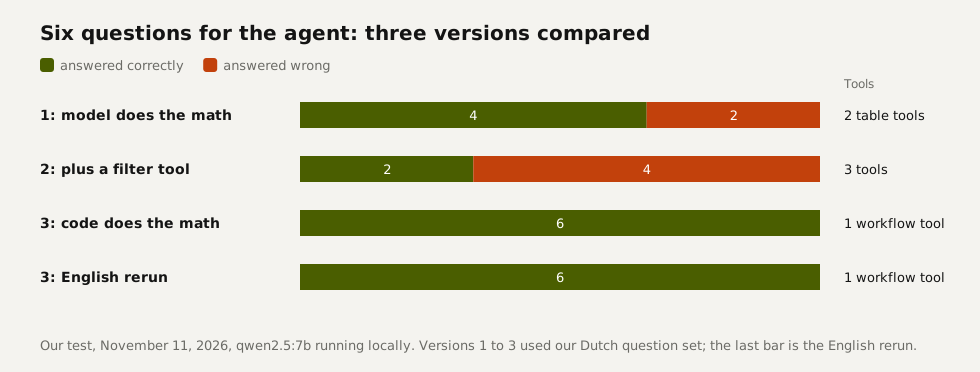
- Version 1: two tools that return the invoice and quote tables; the model does its own math. Asked whether a client had anything outstanding, it only checked invoices and missed an open quote. Asked for the most overdue invoice, it picked one that wasn't even due yet.
- Version 2: an extra tool that returns only overdue invoices. That question now worked, but the model added 363 and 605 to get 1,068, and offered a made-up email address when asked for a phone number.
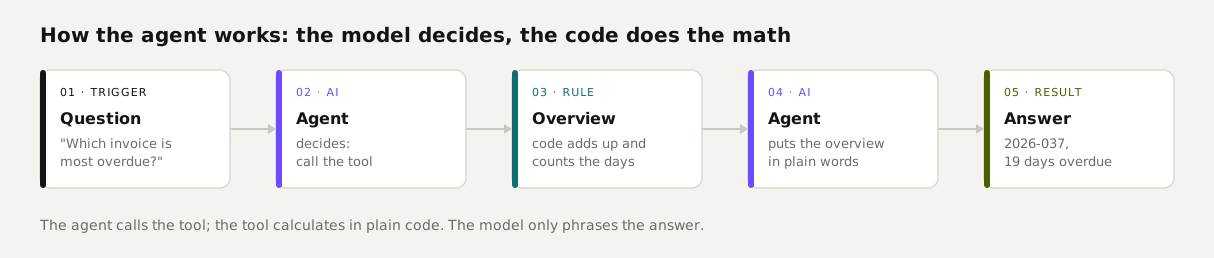
- Version 3 uses a single tool: a sub-workflow that reads both tables and computes totals, days overdue and what's open per client in a Code node. The model only turns that overview into plain language. Six out of six, on a repeat run too. The English rerun got all six right as well; in one earlier English run, it described an invoice due in a week as due today.
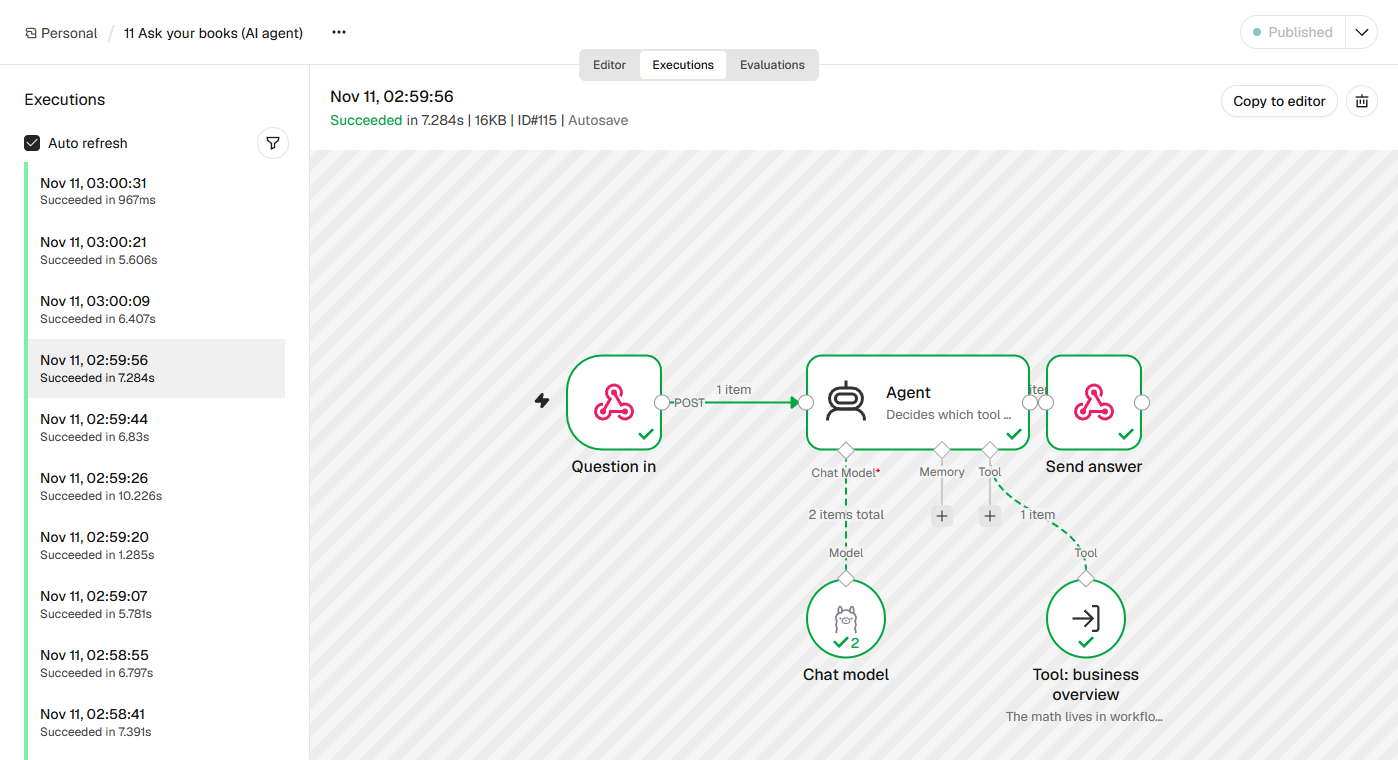 (opens at full size)
One thing to watch: for the phone-number question, the model didn't call the tool at all. The answer happened to be right, but it never looked at the data. The agent node in n8n 2.47.3 has an option that forces a tool call on the first step (forceToolCallOnFirstIteration); we haven't tested it yet. Templates: 11-ask-your-books-agent.json plus the helper workflow 12-business-overview-helper.json.
What an AI run in n8n costs
n8n shows how many tokens the model read and wrote in each execution (a token is roughly three quarters of a word). These are our averages from the English runs, priced with three models' official rates. Each model counts tokens a little differently, so treat them as an order of magnitude.
| Workflow | Tokens in / out per run | Claude Haiku 5.5 | Gemini 3.1 Flash-Lite | Claude Sonnet 5.5 |
|---|---|---|---|---|
| Summarize email | 100 / 28 | $0.02 per 1,000 runs | $0.07 per 1,000 runs | $0.48 per 1,000 runs |
| Sort email | 210 / 2 | $0.02 per 1,000 runs | $0.06 per 1,000 runs | $0.44 per 1,000 runs |
| Agent, per question | 750 / 40, two model calls | $0.10 per 1,000 runs | $0.25 per 1,000 runs | $1.90 per 1,000 runs |
An agent question uses about seven times the tokens of a summary, because the model works twice and reads the whole overview. A local model costs nothing per run, but you wait longer: our agent took 6 to 10 seconds per question (curl round trip included).
AI agents in n8n or in Python?
Build in n8n when your agent mostly calls existing apps, when someone who doesn't code needs to adjust it, or when there's an approval step. Every step is visible and every execution is saved. Write it in code when the logic itself is complex, when you want tests and line-by-line version control, or when the agent works on its own for a long time. We use both: n8n for the integrations and code for the math, as example 3 shows.
Import a ready-made workflow
In a new workflow, click the three dots next to the name, choose Import, then From file. Then connect your email account and your own chat model. All templates, including the ones without AI, are in our ten tested n8n workflows.
Questions
What is n8n, and what are its main features?
n8n is a platform for building workflows that do work across your apps on their own. For AI, it has nodes for a single model prompt, for sorting and extracting text, and for agents that use tools.
How do I build my first n8n workflow with an AI step?
Start with a trigger, such as new email, and add a Basic LLM Chain with a strict prompt. Attach a chat model and send the result to yourself. Or import our email summary template.
Should I build AI agents in n8n or in Python?
n8n suits agents that call apps and need to be visible to coworkers. Python suits complex logic and long autonomous jobs. You can combine the two.
Which AI models can I use in n8n, and what does a run cost?
n8n 2.47.3 has 20 chat model nodes, including OpenAI, Anthropic, Gemini, Mistral and Ollama for local models. In our measurements, a summary on a small hosted model came to about $0.02 per 1,000 runs, and an agent question to about $0.10 per 1,000 runs.
How do I import a ready-made workflow?
In a new workflow, click the three dots next to the name, then Import and From file or From URL. Then connect your own accounts.
Sources
- n8n Docs: Integrate AI checked on
- n8n Docs: What agents do checked on
- n8n Docs: Ollama Chat Model checked on
- Anthropic: Pricing checked on
- Google Gemini API: Pricing checked on
- n8n Docs checked on
More in automation recipes
- What is n8n? A plain-English guide with real costs and three tested workflowsWhat n8n is, what it costs in the cloud or on your own server, and three workflows we built and tested that you can import today.
- AI automation: when a rule is enough and when you need a modelWhen a fixed rule is enough and when you need AI, based on our test with 50 emails, plus what it costs per 1,000 messages.
- n8n workflows for small businesses: ten tested templates you can importTen n8n workflows we built and ran with test data: quote follow-up, late payment reminders, inquiry forms, email sorting and more. Free to download.
- An n8n AI agent that sorts email and drafts replies, with approval before sendingAn n8n AI agent that sorts your inbox and drafts replies, with your approval before anything is sent. Tested on 50 emails, with a review of every draft.
Also useful
- n8n self-hosting with Docker: install, back up and update it safelySelf-host n8n with Docker Compose, PostgreSQL and automatic HTTPS. Includes a tested backup script, a verified restore, the update routine and monthly costs.
- n8n MCP: expose your workflows to AI apps, and use MCP servers from n8nTurn n8n into an MCP server for Claude, ChatGPT or your own agent, and let n8n use other MCP servers. Tested with MCP Inspector, templates included.
- Agentic AI vs. AI Agents: What Differs When You Run ThemAn AI agent does one job; agentic AI is the setup that lets agents act on their own, often several at once. Shown with 1,379 jobs from our own work.