What is n8n? A plain-English guide with real costs and three tested workflows
n8n is a workflow automation tool: when something happens in one app, it runs a chain of steps across your other apps, like adding a new inquiry to your lead list, emailing a confirmation and pinging you. You build those chains on a visual canvas, without code. Self-hosting is free; n8n Cloud starts at €20 a month on annual billing. Below we walk through how it works using three workflows we built and tested on November 11, 2026, and you can download all three.
Tested by us on 11 November 2026.
n8n in one sentence
n8n (pronounced "n-eight-n", short for *nodemation*) is a platform for building workflows: sequences of steps that start on an event and then do work in your email, spreadsheets, CRM or accounting tool. The makers count more than 1,500 integrations. When an app isn't on the list, the HTTP Request node talks to its API directly.
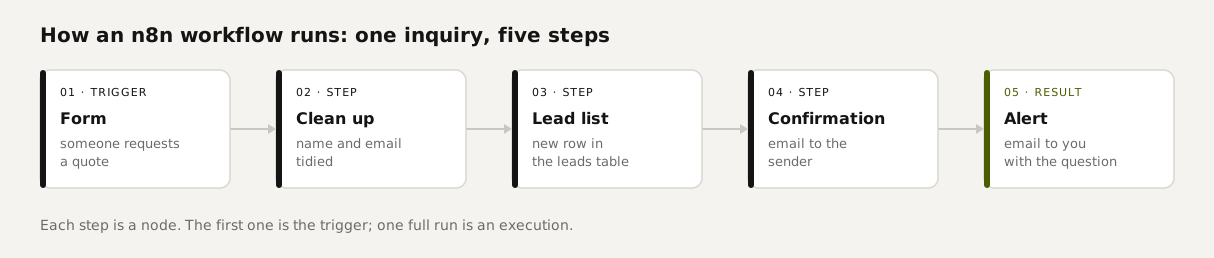
- Trigger: what starts a workflow. A form submission, a new email, a schedule, or a message from another app (a webhook).
- Node: a single step. Add a row, send an email, calculate something in a Code node, or have an AI model read a message.
- Execution: one complete run of a workflow. n8n Cloud bills per execution, no matter how many steps it has.
What it looks like when it runs
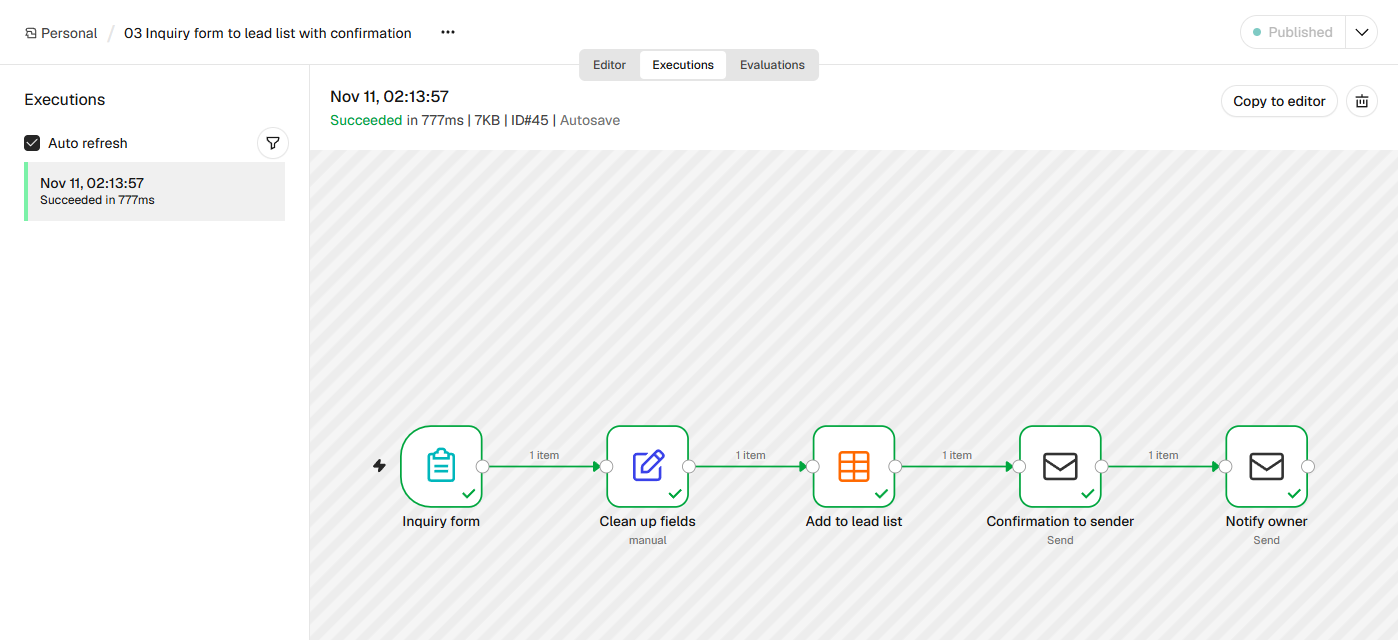
Here's an execution of our inquiry workflow. We submitted the form with a test request. In 777 milliseconds the request was in the lead list, the sender had a confirmation email and the owner had an alert. Each green check is a step that succeeded, and the *1 item* label shows one request passing through.
 (opens at full size)
What n8n is used for: three workflows you can import today
None of these need AI, and the only account you have to connect is an email (SMTP) account. They store data in n8n's built-in Data Tables, so there's no spreadsheet to set up. If your team lives in Google Sheets, swap the table node for the Sheets node and keep the same columns.
| Workflow | What you get | Where it stops | Download |
|---|---|---|---|
| Inquiry form to lead list | A hosted form with its own link. Every request lands in your lead list. The sender gets a confirmation within a second, and you get an alert. | The form uses n8n's styling. To use a form on your own site, point it at a webhook instead. | 03-inquiry-form-to-lead-list.json |
| Morning digest, no AI | Every weekday at 7:30, an email listing open quotes and overdue invoices with amounts and days outstanding. On a quiet morning it sends nothing. | It only knows what's in the tables. It can't see your accounting system until you connect it. | 06-morning-digest.json |
| Error alert | When any other workflow fails, you get an email with its name, the failing step, the error message and a link to the execution. | You switch it on per workflow under Settings, Error workflow. | 08-error-alert.json |
Download the file
Save the JSON file. It contains no passwords or keys.
Import it
Open a new workflow in n8n, click the three dots next to the workflow name, then Import and From file. From URL also works: paste the download link and skip saving the file.
Connect your accounts
Nodes with a red warning triangle are missing an account. Open each one and pick or create your SMTP account. In the table nodes, pick your own table.
Test, then publish
Click Execute at the bottom to run it once. When it works, click Publish at the top right. Only then does the trigger fire on its own.
Is n8n free?
Yes, if you host it yourself. The Community Edition costs nothing and, according to n8n's docs, includes almost the full feature set. What it leaves out is mostly team features: projects, single sign-on and sharing workflows between users. A free registration adds folders and a couple of debugging features. You still pay for the server it runs on.
Is n8n open source? Not in the strict sense. n8n calls itself *fair-code*: the code is public, but the Sustainable Use License limits how you use it. Per the license FAQ, you can run your own business on it, build workflows for clients on your own instance and charge for building and maintaining them. You can't offer n8n as a service where customers build their own workflows, and you can't white-label it.
What n8n costs: cloud vs. self-hosted
| Version | Price | Executions per month | Good fit for |
|---|---|---|---|
| Community Edition (self-hosted) | €0 plus your server | Unlimited | Anyone who can run a server, or has someone who can |
| Cloud Starter | €20/month, billed annually | 2,500 | A solo founder who wants to start without a server |
| Cloud Pro | €50/month, billed annually | 10,000 | Small teams with more workflows |
| Business (self-hosted) | €667/month, billed annually | 40,000 | Companies that need SSO and separate environments |
Watch how executions add up. One execution is one full run, however many steps it has. In our email-sorting test, 50 messages arrived as only two executions, because the email trigger picks up new messages in a batch. A workflow that checks your website every five minutes is the opposite: 288 executions a day even when nothing is wrong, or about 8,640 a month. That's more than Starter includes.
A worked example: three workflows for a month
Take the three workflows above. The morning digest runs on weekdays, so about 22 executions a month. The inquiry form runs once per request: 40 inquiries means 40 runs. The error alert runs only when something breaks. Together that's under 100 executions a month, which fits comfortably inside Cloud Starter's 2,500.
Self-hosting means paying for a server instead. We measured memory after an hour of testing: n8n, PostgreSQL and a web server used 724 MB together, so a 2 GB server is enough to start. At Hetzner, that server (CPX12) is €9.99 a month in Finland or €11.99 in Germany, before VAT. Add your own time for updates and backups.
| Your situation | Cheapest option | Why |
|---|---|---|
| Under 2,500 executions a month and no server experience | Cloud Starter, €20/month | A server is slightly cheaper, but the upkeep costs more time than the difference is worth. |
| More than 2,500 executions a month | Self-host, around €12/month | Starter is too small and Pro costs €50; a server doesn't charge per execution. |
| Client data can't sit with a third party | Self-host | Everything stays on your server, including execution history. |
Can n8n run locally?
Yes. With Docker Desktop or npm, n8n runs on a Windows PC or a Mac. Every workflow on this page was tested that way, on an ordinary Windows 10 machine, where n8n with a database and HTTPS was up in 100 seconds including downloads. That's fine for trying things out. For workflows that need to run around the clock, use a server: your laptop sleeps, and forms and webhooks need to be reachable from outside.
n8n vs. Zapier
Pick Zapier if you want to connect two apps quickly and never think about a server; its free plan gives you 100 tasks a month for two-step Zaps. Pick n8n if your workflows have many steps or run often. Zapier counts every successful action as a task, while n8n Cloud counts the whole run once. n8n also wins when your data has to stay in-house, because you can run it on your own server.
| n8n | Zapier | |
|---|---|---|
| Bills per | Execution (whole workflow) | Task (each successful action) |
| Free option | Self-hosted, unlimited | 100 tasks, two-step Zaps only |
| First paid plan | €20/month, 2,500 executions | $19.99/month, 750 tasks |
| Self-hosting | Yes | No |
What n8n isn't
n8n isn't an AI model. It has AI nodes, but the model comes from a provider you connect or from one running on your own machine. In our tests a small model ran locally, so each message cost nothing but electricity. n8n also isn't a ready-made assistant. It does exactly what you build, and nothing you didn't.
What tripped us up in testing
- A click that did nothing. In a workflow with an approval button in the email, our first click didn't resume anything. n8n ignores requests that look like bots, and our test command looked like one. That's deliberate: it stops your email provider's link scanner from approving things. Click those buttons yourself, in a browser.
- Running from the command line.
n8n executerefused workflows that use a table node, saying the module was disabled. The same workflow ran fine from the Execute button in the editor or through a test webhook. - Red triangles after import. Every email node shows a warning until you pick your own SMTP account. That's expected: our files contain no credentials.
Questions
What is n8n?
A workflow automation platform. You build chains of steps on a visual canvas that run on their own when something happens, like adding a new inquiry to a list and sending a confirmation.
What is n8n used for?
Handling inquiries, chasing late payments, sending a daily digest, sorting email with an AI model, or alerting you when another workflow fails. The three workflows on this page are ready to import.
Is n8n free?
The self-hosted Community Edition is free; you only pay for the server. n8n Cloud starts at €20 a month on annual billing.
Is n8n open source?
Not strictly. The code is public under the Sustainable Use License, which n8n calls fair-code. You can use it for your own business and build workflows for clients, but you can't resell it as a hosted automation service.
Is n8n better than Zapier?
For multi-step workflows or high volumes, n8n is usually cheaper, and you can self-host it. For a quick link between two apps with no server to maintain, Zapier is simpler.
Sources
- n8n Docs: Choose how to use n8n checked on
- n8n Docs: Compare editions checked on
- n8n Docs: License FAQ (Sustainable Use License) checked on
- n8n pricing checked on
- n8n on GitHub (README: name, license, integrations) checked on
- n8n Docs: Export and import workflows checked on
- Zapier pricing checked on
- Hetzner Cloud: Regular Performance plans checked on
More in automation recipes
- n8n self-hosting with Docker: install, back up and update it safelySelf-host n8n with Docker Compose, PostgreSQL and automatic HTTPS. Includes a tested backup script, a verified restore, the update routine and monthly costs.
- n8n workflows for small businesses: ten tested templates you can importTen n8n workflows we built and ran with test data: quote follow-up, late payment reminders, inquiry forms, email sorting and more. Free to download.
- n8n AI tutorial: build AI steps and agents in n8n, with three tested examplesHow AI works in n8n, with three workflows we built and tested: summarizing email, sorting email and an agent with tools. Results and cost per run included.
- AI automation: when a rule is enough and when you need a modelWhen a fixed rule is enough and when you need AI, based on our test with 50 emails, plus what it costs per 1,000 messages.
Also useful
- An n8n AI agent that sorts email and drafts replies, with approval before sendingAn n8n AI agent that sorts your inbox and drafts replies, with your approval before anything is sent. Tested on 50 emails, with a review of every draft.
- n8n MCP: expose your workflows to AI apps, and use MCP servers from n8nTurn n8n into an MCP server for Claude, ChatGPT or your own agent, and let n8n use other MCP servers. Tested with MCP Inspector, templates included.
- Building n8n workflows with Claude Code: what works and what you still checkClaude Code built, validated and tested three n8n workflows through n8n's MCP server. What worked, what you still check yourself, and the prompt to copy.