An n8n AI agent that sorts email and drafts replies, with approval before sending
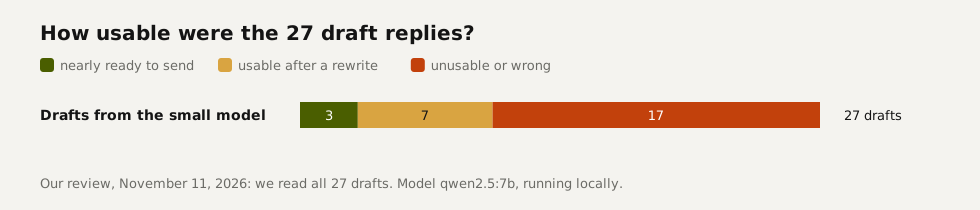
This n8n workflow reads your inbox, categorizes every email and drafts a reply to quote requests, client questions and appointment requests. Each draft lands in your inbox with two buttons, Send and Don't send, and nothing reaches the client until you click. We tested it on 50 emails. Sorting held up: 46 of 50 right, and every email that needed a reply got a draft. Drafting didn't: 17 of the 27 drafts were unusable, and five of them mentioned another client's unpaid invoice. That's why the approval step is there.
Tested by us on 11 November 2026.
What you need
- n8n 2.x, self-hosted or cloud. We tested on n8n 2.47.3.
- An email account with IMAP for reading and SMTP for sending.
- A chat model. We tested with qwen2.5:7b, a small model running locally through Ollama. It was good enough for sorting and not good enough for writing (see the test).
- An n8n Data Table called *inbox_log* with the columns sender, subject, category and route.
- Monthly cost: n8n itself (free self-hosted, or from €20 in the cloud) plus the model. A draft used about 610 tokens in and 76 out in our English run, roughly $0.10 per 1,000 emails on a small hosted model.
How it's built
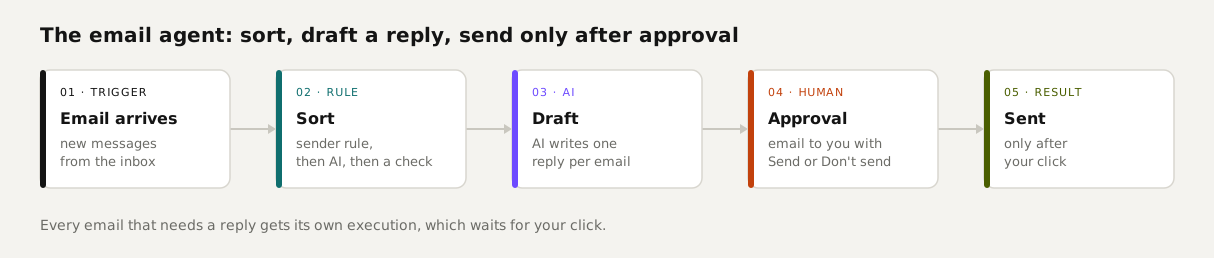
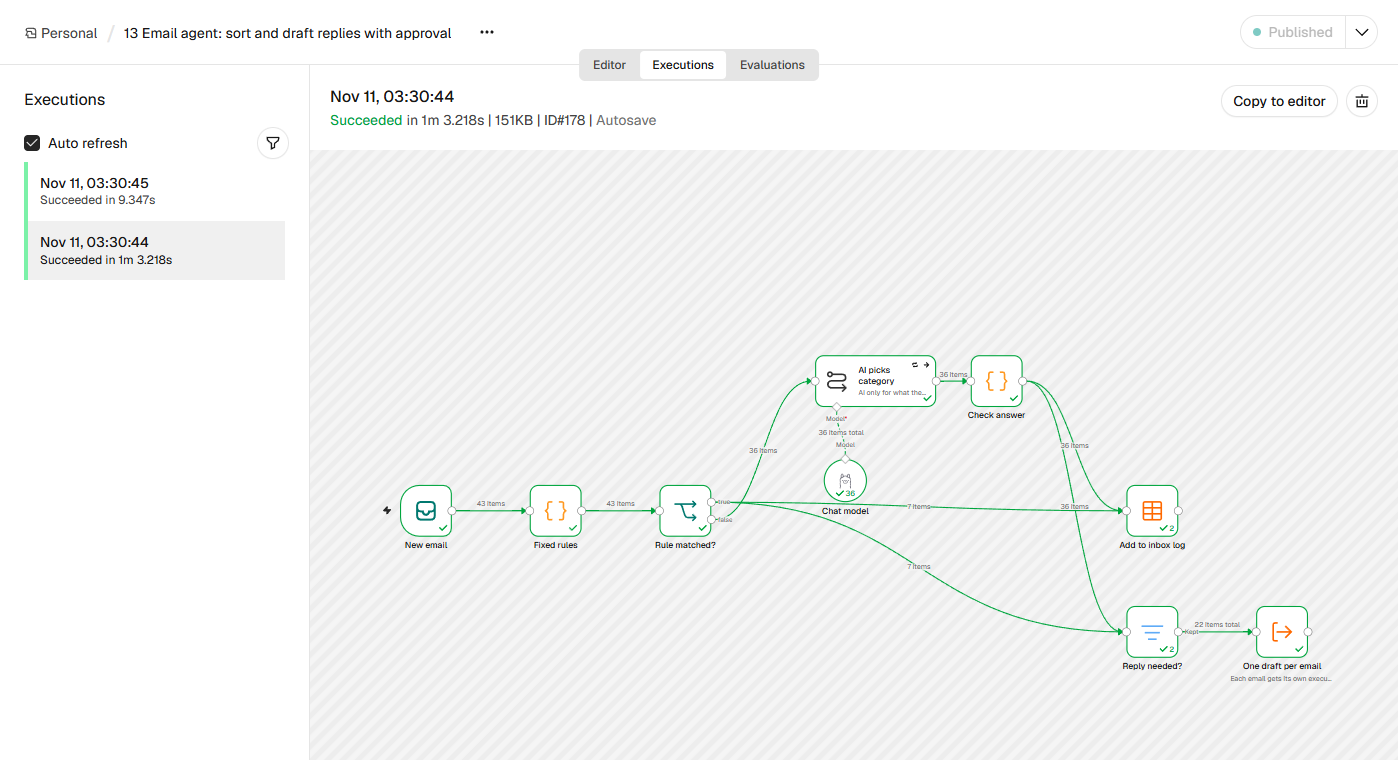
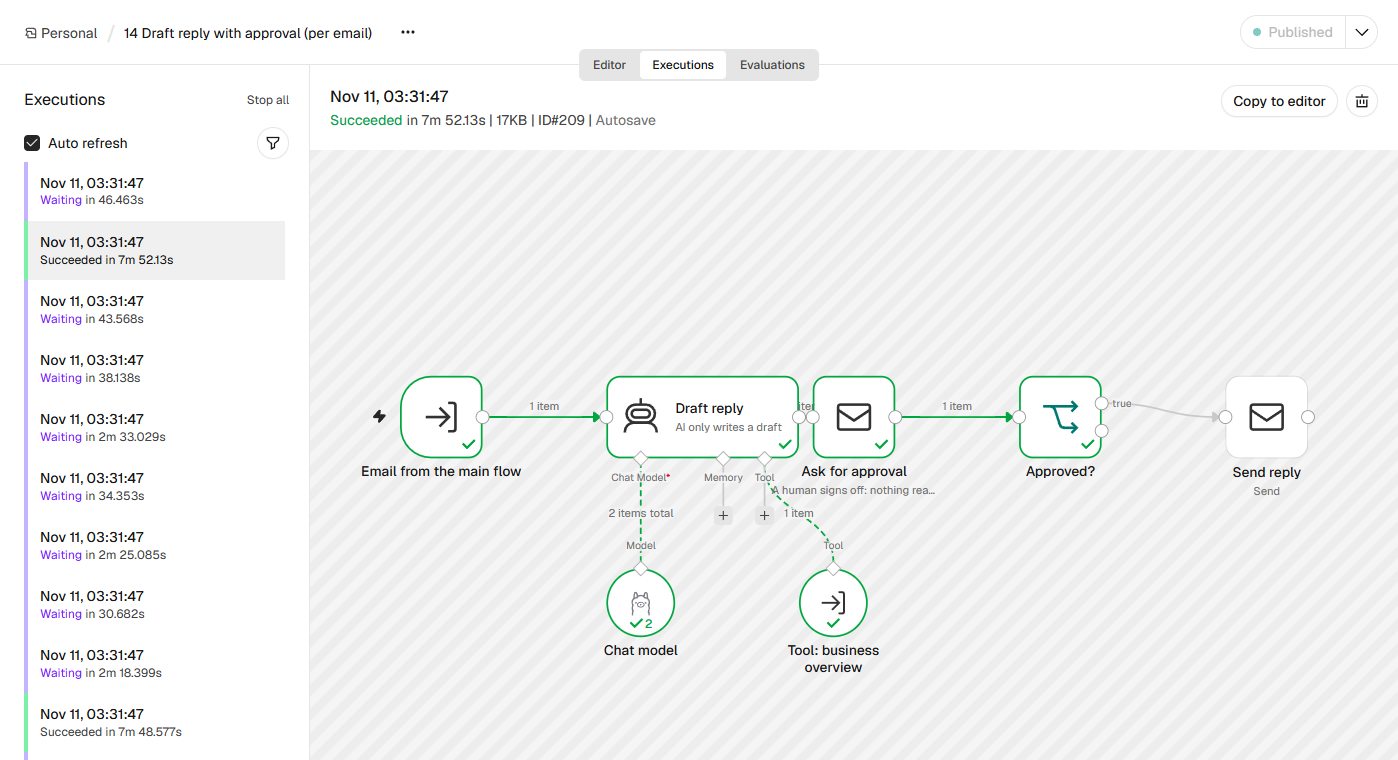
The agent is two workflows. The main flow reads and sorts. For each email that needs a reply, it starts a second workflow, which drafts the reply and waits for your approval. Every email gets its own execution, so you approve or reject each one separately.
Email Trigger (IMAP)
Reads new mail. When many messages arrive together, n8n handles them as one execution with several items.
Fixed rules on the sender
A Code node recognizes your suppliers and addresses like accounting@. Those emails skip the AI step. In our tests, rules based on keywords caused errors; rules based on the sender didn't.
AI picks a category, code checks it
A Basic LLM Chain picks one of nine categories. A Code node after it marks any answer that isn't on the list as *review*. Everything then goes to the inbox log.
Reply needed?
A Filter node only lets quote requests, client questions and appointments through.
One draft per email
An Execute Workflow node in *each* mode, with *wait for sub-workflow* turned off. Each email starts its own execution of the second workflow, so one pending approval doesn't block the rest.
Draft reply
In the second workflow, an AI Agent writes the draft. The prompt forbids promising prices, dates or discounts that aren't in the email.
Ask for approval
The Send Email node with the *Send and Wait for Response* operation emails you the original message and the draft, with Send and Don't send buttons. Set a time limit; we use 3 days. No click means nothing goes out.
Send
Only after Send does a regular email node send the draft to the original sender, with *Re:* in front of the subject.
 (opens at full size)
The template
Download 13-email-agent-sort-and-draft.json and 14-draft-reply-with-approval.json. Import 14 first, then 13, and pick workflow 14 in the *One draft per email* node. The template deliberately leaves out the lookup tool we tested with (see the warning below); otherwise it matches what we ran. The files contain no keys and no addresses, only example values to replace.
The test: 50 emails, 27 drafts, every draft read
We sent 50 emails we wrote for a made-up carpentry shop to a test inbox, each with its correct category recorded in advance. The main flow sorted 46 correctly. All 26 emails that needed a reply got a draft. One piece of spam, a pitch to improve our website, was misfiled as an appointment and got a draft too. Then we read all 27 drafts.
- Made-up prices. Asked about a bathroom vanity, the model wrote that vanities *start around $800*; asked about a built-in closet, it estimated *$2,500*. Neither number came from anywhere.
- Concessions nobody approved. Asked whether an invoice for 6 hours was right when the crew was there for 4, the draft promised to correct the invoice.
- Spam answered. The website pitch got a polite reply instead of being ignored.
- Placeholders left in. Many drafts ended with *[Your Company Name]* or guessed a first name from the email address.
What worked: the tone was friendly, most drafts were short, and the reply to a complaint about a scratched desk asked for the order number and offered a repair visit. We approved that one. For writing, use a stronger model than the small local one we tested. Keep the small model for sorting, where it got 46 of 50 right. We ran the same test in Dutch; there the agent never called the lookup tool, and 10 of 26 drafts were unusable.
Where a human signs off
Every reply goes through you. We tested both buttons. After Send on the scratched-desk reply, the client had it within seconds. After Don't send on a draft that mentioned another client's invoice, nothing went out; in the execution, the send step stayed grey.
 (opens at full size)
Cost per run, and when things fail
| Step | Tokens in / out | Claude Haiku 5.5 | Claude Sonnet 5.5 |
|---|---|---|---|
| Sorting, per email | 210 / 2 | $0.02 per 1,000 | $0.44 per 1,000 |
| Drafting with the lookup tool, per email | 610 / 76 | $0.10 per 1,000 | $1.99 per 1,000 |
Running locally cost nothing per email but took time: with 27 drafts in parallel, the model averaged about a minute per draft. Hook the error alert from our ten tested n8n workflows up to both workflows so you hear about it when the model or mail server stops responding. An email marked *review* stays in the inbox log until someone looks at it.
Variations
To sort without drafting, use template 05; our comparison of three sorting setups is in AI automation. An agent that answers questions about your open invoices, with the math done in code, is in our n8n AI tutorial.
Questions
Can an n8n AI agent answer email on its own?
Technically yes, but we advise against it. In our English test, 17 of 27 drafts were unusable, including made-up prices and another client's invoice details. Let the agent draft and approve every reply yourself.
How do I add an approval step in n8n?
Use the Send Email node with the Send and Wait for Response operation and the Approval response type. n8n pauses until you click a button in the email, with a time limit you choose.
Which model should I use for an n8n email agent?
A small model was enough for sorting in our test. It wasn't enough for writing replies: use a stronger model there and keep the approval step.
What does an n8n email agent cost per month?
On a small hosted model, around ten cents per 1,000 emails for sorting and drafting, plus n8n itself. On a large model, around $2.40 per 1,000 emails.
Sources
- n8n Docs: Integrate AI checked on
- n8n Docs: Human-in-the-loop for tools checked on
- n8n Docs: What agents do checked on
- Anthropic: Pricing checked on
More in automation recipes
- n8n AI tutorial: build AI steps and agents in n8n, with three tested examplesHow AI works in n8n, with three workflows we built and tested: summarizing email, sorting email and an agent with tools. Results and cost per run included.
- AI automation: when a rule is enough and when you need a modelWhen a fixed rule is enough and when you need AI, based on our test with 50 emails, plus what it costs per 1,000 messages.
- n8n workflows for small businesses: ten tested templates you can importTen n8n workflows we built and ran with test data: quote follow-up, late payment reminders, inquiry forms, email sorting and more. Free to download.
- n8n MCP: expose your workflows to AI apps, and use MCP servers from n8nTurn n8n into an MCP server for Claude, ChatGPT or your own agent, and let n8n use other MCP servers. Tested with MCP Inspector, templates included.
Also useful
- What is n8n? A plain-English guide with real costs and three tested workflowsWhat n8n is, what it costs in the cloud or on your own server, and three workflows we built and tested that you can import today.
- n8n self-hosting with Docker: install, back up and update it safelySelf-host n8n with Docker Compose, PostgreSQL and automatic HTTPS. Includes a tested backup script, a verified restore, the update routine and monthly costs.
- Agentic AI vs. AI Agents: What Differs When You Run ThemAn AI agent does one job; agentic AI is the setup that lets agents act on their own, often several at once. Shown with 1,379 jobs from our own work.