Claude Desktop App: Download, Install and the Settings Worth Changing
Download the Claude desktop app from claude.com/download. It's free for macOS, Windows and, in beta, Ubuntu and Debian. A free account gets you chat; Claude Code and Cowork need a paid plan. We downloaded the Windows installer and checked its signature, then looked up where the app keeps its config on a Windows PC and a Mac. On Windows, the Microsoft Store version doesn't use the folder the docs point to.
Tested by us on 11 November 2026.
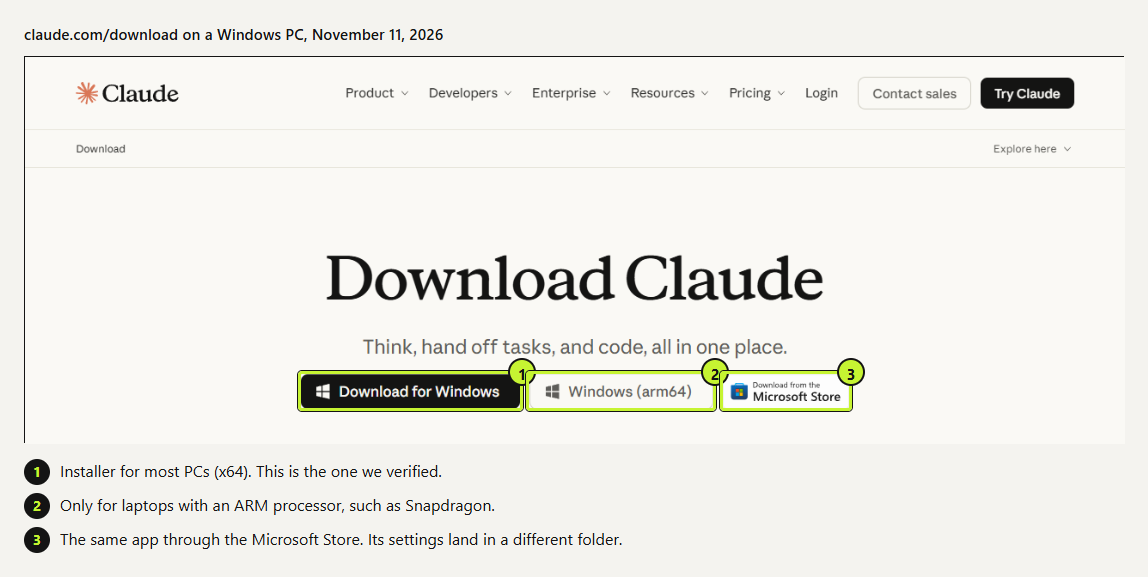
Which download you need
 (opens at full size)
| Platform | What you get | Minimum |
|---|---|---|
| Windows | Installer for x64 or ARM64, or the Microsoft Store listing | Windows 10 |
| macOS | One universal DMG for Apple silicon and Intel Macs | macOS 13 Ventura |
| Linux (beta) | Anthropic's apt repository, or a standalone .deb file | Ubuntu 22.04 or Debian 12, x64 or arm64 |
| iPhone and Android | The regular Claude mobile app; there's no desktop build | n/a |
Not sure whether your Windows laptop is ARM? Open Settings > System > About and look at “System type”. Most Snapdragon laptops are ARM64; nearly everything else is x64.
Install Claude Desktop
Download the build for your system
On claude.com/download, pick macOS, Windows x64, Windows ARM64 or the Store. Anthropic offers the direct installer and the Store listing as two routes to the same app. We checked the Store install on our PC; the config folder for the direct installer below comes from the docs.
Run the installer
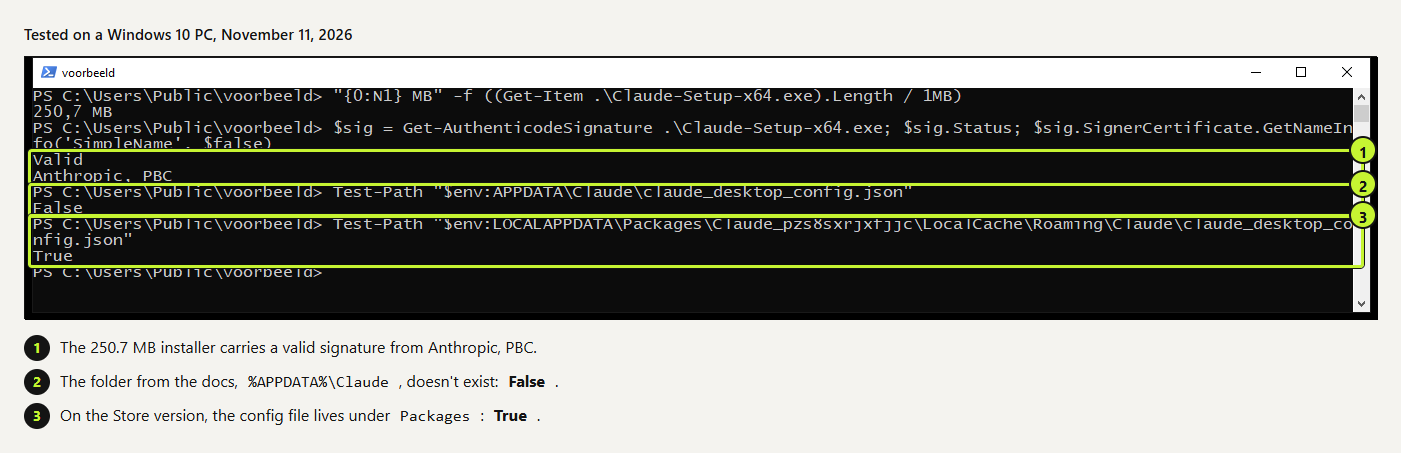
On Windows, double-click the downloaded file. The x64 installer we pulled was 250.7 MB. On a Mac, open the DMG and drag Claude into Applications.
Check the signature (optional)
To confirm the file came from Anthropic before you run it, check its signature in PowerShell, using the file name in your Downloads folder. Ours returned
Valid, signed byCN="Anthropic, PBC". On a Mac,spctl -a -vv /Applications/Claude.appdoes the same job; ours saidacceptedandNotarized Developer IDfor Anthropic PBC.powershellGet-AuthenticodeSignature "$env:USERPROFILE\Downloads\Claude-Setup-x64.exe" | Format-List Status, SignerCertificateSign in
Open Claude from the Start menu or Applications and sign in with your claude.ai account. Conversations, projects, memory and preferences sync across devices, so your chat history is there on first launch.
On Linux, add Anthropic's signed apt repository (the help article has the exact commands), then run sudo apt install claude-desktop. The Linux app doesn't update itself; updates come through sudo apt update && sudo apt upgrade. Dictation and computer use aren't available on Linux yet. We haven't installed the Linux beta ourselves.
Desktop app vs. the browser
| Desktop app | Browser (claude.ai) | |
|---|---|---|
| Chat, projects, memory | Yes, synced | Yes, synced |
| Web connectors (Google Drive, Slack) | Yes | Yes |
| Local files and apps on your computer | Yes, through extensions and local MCP servers | No |
| Global hotkey from any app | Yes, Quick Entry (Mac only) | No |
| Claude Code and Cowork | Both, on a paid plan | Claude Code on the web (claude.ai/code); no Cowork |
| Works on a borrowed computer with nothing installed | No | Yes |
If you only chat and use web connectors, the browser is enough. Install the app when you want Claude to work with files and programs on your own machine.
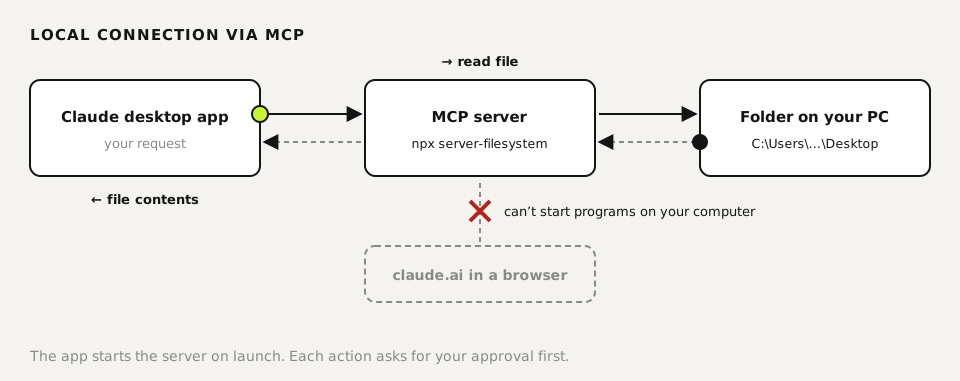
An MCP server is a small program the app starts on your computer, and it gives Claude access to one specific thing there, such as a folder. MCP (Model Context Protocol) is the open standard for these connections. A website can't start programs on your computer, which is why this only works in the app.
Settings to change after you install
Menu names below follow Anthropic's help articles; we checked the files and folders behind them ourselves.
- Quick Entry (Mac only). Per Anthropic's help article, go to Settings > Desktop app and turn on the shortcut. By default, a double-tap of Option opens a prompt box over whatever app you're in. macOS asks for Accessibility permission, plus Screen Recording if you want to attach screenshots or windows. Caps Lock dictation is off by default because it takes over that key.
- Extensions. Under Settings > Extensions, click Browse extensions for connections Anthropic has reviewed, such as file access or your calendar. Each one installs with a single button, and extensions from that directory update themselves.
- Web connectors. Turn on the services you already use, such as Google Drive. They also work on claude.ai and on your phone, so you set them up once.
- Your own local MCP server. If the connection you need isn't in the extension directory, add it under Settings > Developer > Edit Config. That opens
claude_desktop_config.json. There's an example below, plus the folder where a Store install keeps that file. - On Windows there's no Quick Entry. The useful first change is the same as on a Mac: add the extensions or MCP servers you need, starting with one project folder.
{
  "mcpServers": {
    "filesystem": {
      "command": "npx",
      "args": [
        "-y",
        "@modelcontextprotocol/server-filesystem",
        "C:\\Users\\yourname\\Desktop",
        "C:\\Users\\yourname\\Downloads"
      ]
    }
  }
}
Example from the official MCP docs: Claude can read and change files in Desktop and Downloads. Replace yourname with your Windows user name. This server needs Node.js installed.
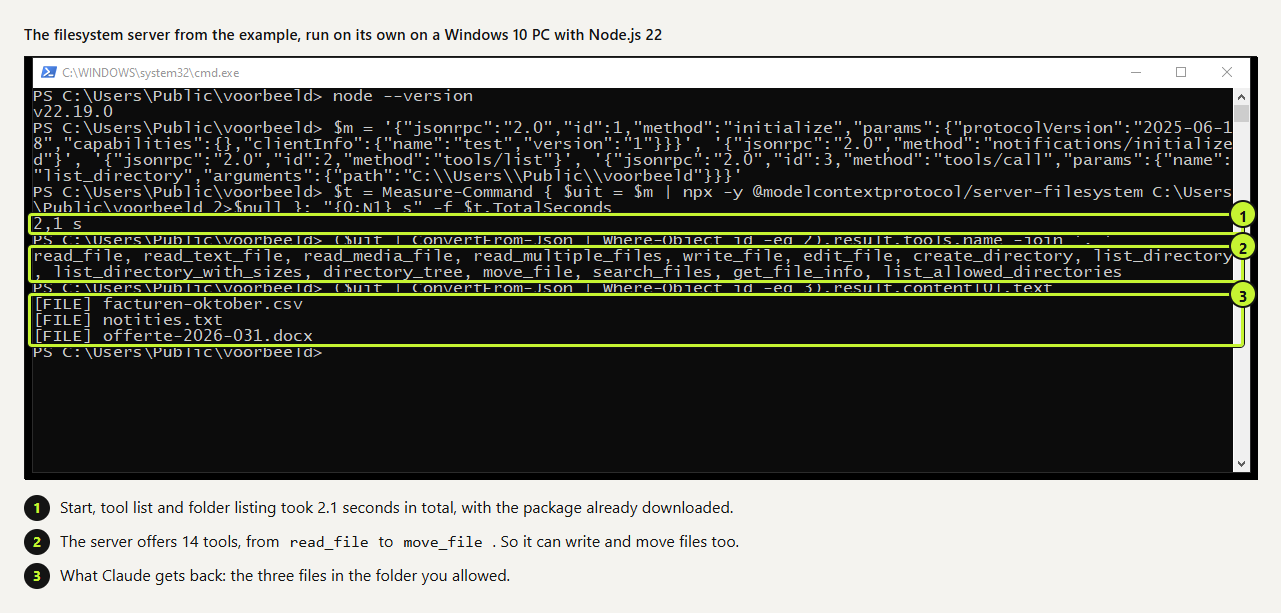
To see what Claude gets back from this server, we started it on its own on a Windows 10 PC with Node.js 22 and sent it the same three requests the app sends: start, list tools, list a folder. It answered in 2.1 seconds with 14 tools and the three test files we'd put in the folder.
 (opens at full size)
Where the config file is (Windows Store installs differ)
 (opens at full size)
The MCP docs list %APPDATA%\Claude for Windows. On our Windows 10 PC, where Claude came from the Microsoft Store, that folder didn't exist. Store apps get a sandboxed copy of AppData, and the config file was inside it:
explorer "$env:LOCALAPPDATA\Packages\Claude_pzs8sxrjxfjjc\LocalCache\Roaming\Claude"Opens the folder with the config file and logs for the Store version.
| Install | Config file | Logs |
|---|---|---|
| macOS | ~/Library/Application Support/Claude/claude_desktop_config.json | ~/Library/Logs/Claude |
| Windows, direct installer | %APPDATA%\Claude\claude_desktop_config.json (per the docs) | %APPDATA%\Claude\logs |
| Windows, Microsoft Store | %LOCALAPPDATA%\Packages\Claude_pzs8sxrjxfjjc\LocalCache\Roaming\Claude\claude_desktop_config.json | The logs folder next to it |
| Linux | ~/.config/Claude/claude_desktop_config.json | ~/.config/Claude/logs |
The safe route is Edit Config inside the app, because it always opens the file the app reads. If you edit by hand and nothing changes after a restart, open mcp.log in the logs folder; it records why a server failed to start. Also check that the file is valid JSON. One stray or missing comma and the app ignores the whole file.
Claude Code inside the desktop app
Yes, Claude Code runs in the desktop app on paid plans, with windows and buttons instead of a terminal. According to the download page, you can preview a running server, review local changes and track pull request status from the app. Already working in a terminal? Type /desktop to move that session into the app. Prefer the terminal on Windows? Our Windows install guide covers it, including the PATH step the installer skips.
What it costs
The app is free and works on every plan, including Free. On Free you can chat; Claude Code needs Pro or higher. On November 11, 2026, Anthropic's pricing page listed Pro at $20 a month, or $17 a month billed annually. Max was $100 and Ultra $200 a month. Team started at $25 per seat per month. Prices exclude sales tax.
Questions
Is there a Claude desktop app for Mac and Windows?
Yes: Windows 10 or later (x64 and ARM64), macOS 13 or later, and a Linux beta for Ubuntu 22.04+ and Debian 12+.
Is the Claude desktop app free?
The app itself is free and works with a free account. Claude Code and Cowork need a paid plan; Pro was $20 a month on November 11, 2026.
Can I use Claude Code in the desktop app?
Yes, on Pro or higher. It's a graphical version of Claude Code, and /desktop moves a terminal session into the app.
Why doesn't my MCP server show up in Claude Desktop?
Quit the app fully and restart it, then read mcp.log in the logs folder. On a Microsoft Store install, make sure you edited the config inside the Packages folder, not %APPDATA%\Claude. Using Edit Config in the app avoids that mix-up.
Which settings should I change right after installing?
On a Mac, turn on Quick Entry under Settings > Desktop app. Then add the extensions you need under Settings > Extensions and connect your web services. Custom MCP servers go in through Settings > Developer > Edit Config.
Sources
- Claude: download page and FAQ checked on
- Claude Help Center: Install Claude Desktop checked on
- Claude Help Center: Use quick entry with Claude Desktop on Mac checked on
- Claude Help Center: Getting started with local MCP servers on Claude Desktop checked on
- Model Context Protocol: Connect to local MCP servers checked on
- Claude Code docs: Use Claude Code in the cloud checked on
- Claude: plans and pricing checked on
More in claude in practice
- Claude Code MCP Servers: Add Them, Test Them, Remove ThemHow to add an MCP server to Claude Code with claude mcp add, pick the right scope, test it in a real session and remove it. Tested on Windows and Linux.
- Installing Claude Code: Pick the Right Version, Install It, Run a First TaskInstall Claude Code with one command, tested on a fresh Mac, Ubuntu and Windows 10: which version to pick, the PATH fix, real errors and a first task.
- What Are Claude Skills? How They Work, a Tested Example, and When to Use OneClaude Skills explained with a working editing skill we tested 11 times in Claude Code: how often it loaded on its own and how to force it.
- Claude Skills vs. MCP vs. Plugins vs. Subagents: Which One for Which JobWhen to use a Claude Code skill, CLAUDE.md, an MCP server, a subagent or a plugin. We measured a 4,500-word guide as a skill: 60 tokens until needed.
Also useful
- AI for accountants: receipts, ledger review and client questions, tested five timesWe ran receipt extraction, a month-end ledger review and the totals five times each. Which steps AI handled, which belong in a formula, and what to check.
- AI for customer service: five support tasks we tested, and how to stop the message pile-upFive support tasks tested, plus ten runs that show when AI invents refund rules and the one prompt line that stopped it. And how to send one message, not five.
- AI for ecommerce: product copy, supplier data, customer questions and stock, each tested three timesWe ran product descriptions, a messy supplier export, customer questions and a reorder check three times each. What AI got right, and what belongs in a formula.