What Are Claude Skills? How They Work, a Tested Example, and When to Use One
A Claude Skill is a folder with a SKILL.md file of instructions that Claude reads only when your request matches it. You write a procedure once, and Claude applies it whenever it fits. Below is an editing skill we tested 11 times in Claude Code. Claude loaded it on its own in 10 runs and skipped it once, which is why we also show how to force it.
Tested by us on 11 November 2026.
How a skill works
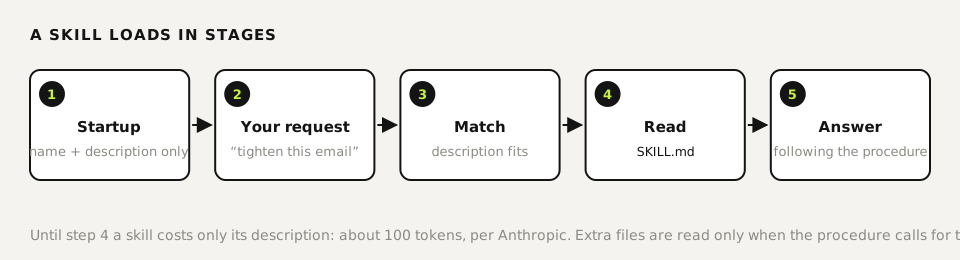
Each skill is a folder. Inside is SKILL.md: a short header with a name and a description, then the instructions, plus any scripts or reference files you want alongside. Claude keeps only the name and description in view, roughly 100 tokens per skill according to Anthropic's docs. When a request matches a description, Claude reads the rest of that file. Anthropic calls this progressive disclosure, and it's why you can install dozens of skills without crowding the conversation.
A real example: plain-english-pass
We wrote this skill for client-facing text. Save it as SKILL.md inside a folder named plain-english-pass.
---
name: plain-english-pass
description: Use for any request to proofread, tighten, edit or rewrite English text (emails, proposals, web copy). Removes filler, AI clichés, passive voice and em dashes and returns a change table plus the fixed text.
---

# Plain English pass

Read the text the way a sharp editor would read it aloud. Change the wording, never the facts or the offer.

## Check for

1. **Throat-clearing.** "Here's the thing", "It's worth noting". Cut it and start with the point.
2. **Filler adverbs.** really, just, simply, actually, truly, literally. Delete unless the sentence breaks.
3. **Cliché verbs and adjectives.** leverage, unlock, streamline, seamless, robust. Replace with what happens.
4. **Passive voice without a reason.** "The report was sent" becomes "Dana sent the report".
5. **Em dashes.** Replace with a period, comma or colon.
6. **"Not X, it's Y" contrasts.** State Y directly.

## Report

Start with one line: "Ready to send" or "N changes, M that matter".
Then a three-column table: Original, Issue (number from the list), Fixed.
End with the full revised text.

## Don't

- Don't add claims, numbers or promises.
- Don't change product names, prices or dates.
Tested November 11, 2026, with Claude Code 2.1.321. Names may use lowercase letters, numbers and hyphens only, and can't contain “claude” or “anthropic”.
What happened when we tested it
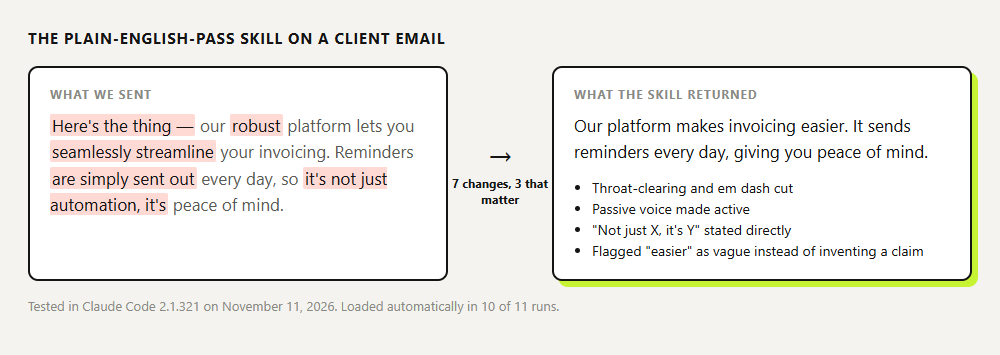
We put the folder in .claude/skills/ of a test project and asked Claude Code to tighten a three-sentence client email full of filler, an em dash and a "not X, it's Y" contrast. We never named the skill. To see whether the wording of the description matters, we ran two versions:
| Description starts with | Runs | Skill loaded |
|---|---|---|
| "Edits English business text for filler…" (triggers at the end) | 6 | 5 of 6 |
| "Use for any request to proofread, tighten, edit…" (triggers first) | 5 | 5 of 5 |
The one miss was the very first run: Claude answered directly, without the change table, so our rules didn't apply. Eleven runs can't show that one wording beats the other. What they do show is that automatic loading is likely, not certain. When the format matters, start the message with /plain-english-pass and Claude Code always runs the skill.
 (opens at full size)
It also flagged "makes invoicing easier" as still vague and refused to fill in specifics, because the skill forbids adding claims. A rule like that is easy to forget when you type a prompt from memory, and a skill applies it every time.
Skill vs. prompt vs. CLAUDE.md vs. MCP
| Thing | When it loads | Use it for |
|---|---|---|
| Prompt | This conversation only | A one-off request |
| CLAUDE.md | Start of every session in that project | Rules that always apply: conventions, folders, things to never do |
| Skill | Description always; body when a request matches | A procedure you need sometimes: editing, a proposal template, an invoice check |
| Slash command | When you type /name | In Claude Code, commands and skills are now the same thing; a skill is a command Claude can also pick on its own |
| MCP server | When Claude needs a connection | Access to something outside Claude: a calendar, a database, Google Drive |
A short way to remember it: CLAUDE.md is what Claude should always know, a skill is what Claude should know how to do when the moment comes, and MCP is what Claude can reach. A skill can call an MCP tool, but it doesn't grant new access on its own.
Where skills work and how to add one
| Surface | How to add a custom skill |
|---|---|
| Claude Code | A folder in ~/.claude/skills/ (all projects) or .claude/skills/ (this project) |
| claude.ai and the apps | Zip the folder, then Customize > Skills, +, Create skill, Upload a skill. Code execution must be on under Settings > Capabilities. |
| Cowork | Uses the skills enabled on your claude.ai account, not ~/.claude/skills/ |
| Claude API | Upload through the Skills API, with the code execution tool enabled |
Anthropic's Help Center lists skills on every plan, Free included. The developer docs list custom skills in claude.ai for Pro and up. If Customize > Skills is missing, check your plan, and on Team or Enterprise ask the owner whether skills are turned on under Organization settings.
What we use skills for
- A pre-delivery checklist. Testable points only. “Check quality” gets ignored; “every price has a date next to it” gets followed.
- House style. Like the example above, with bad-and-good pairs.
- Document output. Anthropic ships prebuilt skills for Word, Excel, PowerPoint and PDF that switch on in claude.ai when you ask for a file.
- A fixed report format. Paste the exact report you want back and you'll get the same shape every time.
We run about a hundred skills side by side in our own coding-agent setup, from code review to video direction. With that many, two skills with overlapping descriptions compete for the same request. We keep each description to one or two sentences, put the words people type first, and give every skill one clear job.
Are third-party skills safe?
Not by default. A skill can bundle scripts and tell Claude to run commands with your permissions. Anthropic's docs warn that a malicious skill can exfiltrate data or misuse tools, and recommend using only skills you wrote or got from Anthropic. We read every outside skill end to end before enabling it, scripts included, and look hard at any URL it fetches and any command that has nothing to do with its stated purpose.
Questions
What are Claude Skills?
Folders with a SKILL.md file that teach Claude a repeatable procedure. Claude reads only the short description up front and loads the full instructions when a request matches.
How do I use a Claude skill?
Install it (a folder in Claude Code, a zip upload in claude.ai) and ask for the task normally. Claude picks it up when the description matches. To force it in Claude Code, type /skill-name before your request.
Why isn't Claude using my skill?
Check the folder location and that the name uses lowercase letters, numbers and hyphens only. Then check the description: it should say what the skill does and when to use it, in the words people type. Even then, Claude can skip a skill for a short request; type /skill-name to force it.
Do skills work in claude.ai, Claude Code and the desktop app?
Yes, but separately. A skill in Claude Code isn't automatically in claude.ai, and the reverse is also true. Cowork uses the skills on your claude.ai account.
Sources
- Claude Platform docs: Agent Skills overview checked on
- Claude Code docs: Skills checked on
- Claude Help Center: Using Skills in Claude checked on
- Anthropic: Equipping agents for the real world with Agent Skills checked on
- GitHub: anthropics/skills checked on
More in claude in practice
- Claude Code Skills: How to Build, Install and Test a SkillBuild a Claude Code skill with a bundled script in ten minutes. We tested when it loads, when it doesn't, and what an unused skill costs in context.
- How to Create Claude Skills That Load at the Right MomentBuild a Claude skill from idea to tested version: description, short core, details in a separate file, and a 10-request trigger test with the fixes it led to.
- How to Add Skills to Claude: Claude Code, Plugins and claude.aiAdd a skill to Claude Code (personal, project or plugin) or upload it to claude.ai. We tested each Claude Code route, including Anthropic's marketplace.
- The Best Claude Skills: We Tested Ten Against Claude Code Without ThemWe ran ten popular Claude skills on a real task, once with the skill and once without. Three earned a place. Full scores, the ones we dropped and why.
Also useful
- Claude pricing: what every plan costs and what you getClaude Free, Pro, Max, Ultra, Team and Enterprise prices from the official page, what changed in 2026, and three questions to pick a plan.
- Claude marketing skills: a copy check and an SEO check, tested with and without the skillTwo Claude marketing skills, a copy check and an SEO page check, tested with and without the skill. The SKILL.md files are on this page.
- What Is an MCP Server? The Model Context Protocol Explained With One We BuiltAn MCP server lets AI apps like Claude, ChatGPT and VS Code use your tools and data. We built one in 73 lines, connected it and logged what happened.