Installing Claude Code: Pick the Right Version, Install It, Run a First Task
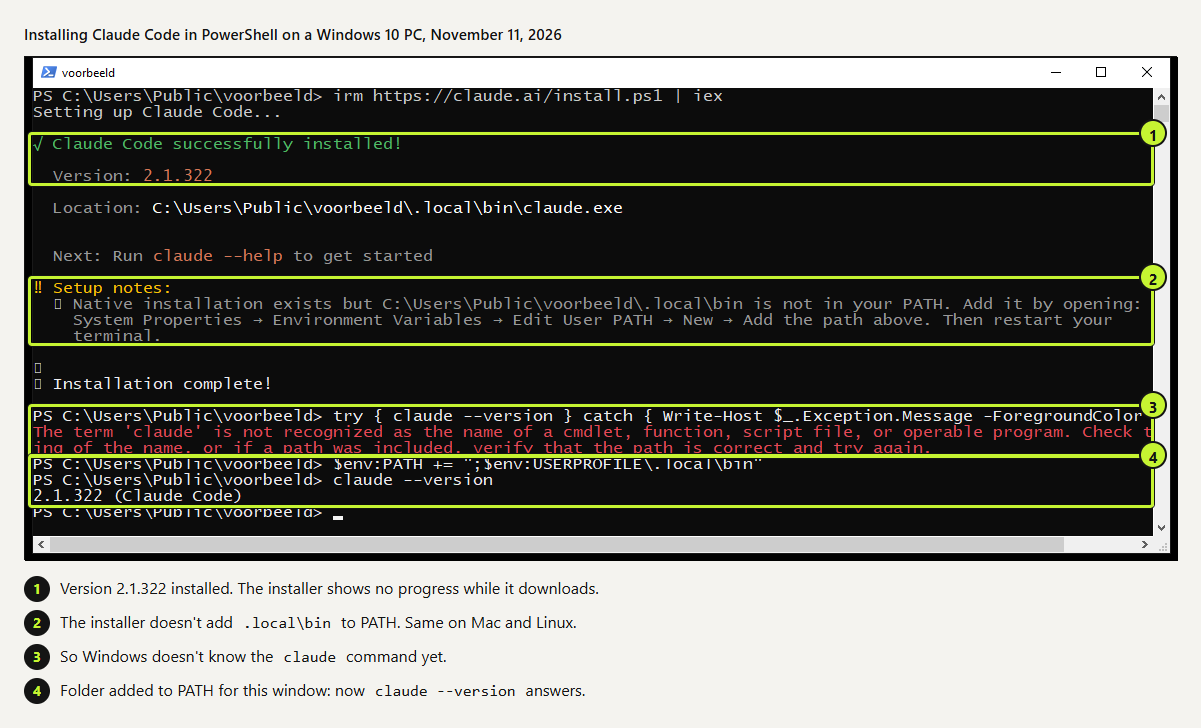
To install Claude Code, run curl -fsSL https://claude.ai/install.sh | bash on macOS or Linux, or irm https://claude.ai/install.ps1 | iex in Windows PowerShell. In our tests it took 16 seconds on a Mac that had never had Claude Code, 6 seconds on Ubuntu and 26 on Windows 10. On all three, claude didn't work until we added the install folder to PATH. This guide covers which flavor to install, the PATH fix, the errors we hit and a first task you can check by hand.
Tested by us on 11 November 2026.
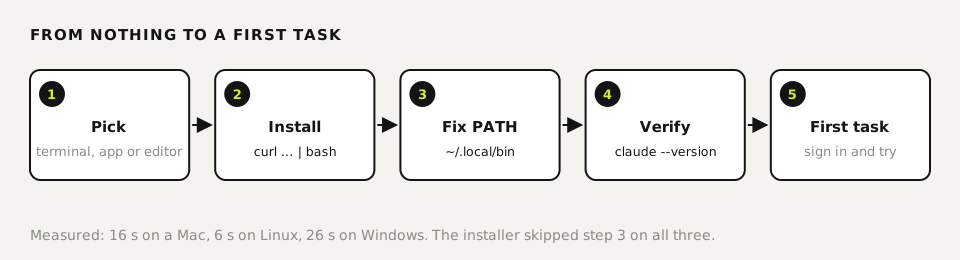
Terminal, desktop app or editor extension?
Claude Code comes in three forms that share one settings folder (~/.claude) and one conversation history. You can switch later without losing anything, so pick the one that fits today.
| Terminal (CLI) | Desktop app | VS Code extension | |
|---|---|---|---|
| Best for | Developers, scripts, servers, automation | People who've never opened a terminal | People who live in VS Code or Cursor |
| Install | One command (below) | Download from claude.com/download | Extension anthropic.claude-code |
Gives you claude in a terminal | Yes | No | No, it bundles its own copy |
Runs unattended (cron, CI, claude -p) | Yes | No | No |
Start with the desktop app if the terminal scares you. Install the CLI as soon as you want Claude Code to run on its own, in scripts or on a server.
Requirements
- macOS 13+, Windows 10 1809+ or Windows Server 2019+, or Linux: Ubuntu 20.04+, Debian 10+, Alpine 3.19+.
- 4 GB of RAM or more, x64 or ARM64, and an internet connection.
- A paid plan (Pro, Max, Ultra, Team or Enterprise) or a Console account with API credit. The free claude.ai plan doesn't include Claude Code.
- No admin rights and no Node.js. Everything installs into your home folder.
Install commands by platform
| Platform | Command | Updates |
|---|---|---|
| macOS, Linux, WSL | curl -fsSL https://claude.ai/install.sh | bash | Automatic |
| Windows PowerShell | irm https://claude.ai/install.ps1 | iex | Automatic |
| Homebrew | brew install --cask claude-code | Manual: brew upgrade claude-code |
| WinGet | winget install Anthropic.ClaudeCode | Manual: winget upgrade Anthropic.ClaudeCode |
| Debian/Ubuntu apt repo | Add Anthropic's signed repo, then sudo apt install claude-code | With your system updates |
| npm (Node.js 22+) | npm install -g @anthropic-ai/claude-code | Automatic if npm can write without sudo |
We use the native installer on every machine because it keeps itself current. The Homebrew cask claude-code follows the stable channel, which the docs describe as typically about a week behind; claude-code@latest gets every release. Windows needs PowerShell-specific PATH commands, covered step by step in our Windows install guide.
 (opens at full size)
Install on macOS and Linux
Run the installer
Open Terminal (Cmd+Space, type Terminal) and paste the command. You can run it from any folder; it installs into your home directory either way. It prints nothing while it downloads, so give it a moment.
bashcurl -fsSL https://claude.ai/install.sh | bashRead the setup notes at the end
Both our machines reported version 2.1.322 installed at
~/.local/bin/claude, followed byNative installation exists but ~/.local/bin is not in your PATH. The installer doesn't edit your shell profile: our.zshrchad the same checksum before and after.Add ~/.local/bin to PATH
macOS uses zsh by default, so the line goes into
.zshrc. On Linux with bash, swap in.bashrc. Run it once; running it twice adds a duplicate line.bashecho 'export PATH="$HOME/.local/bin:$PATH"' >> ~/.zshrc && source ~/.zshrcVerify
claude --versionshould print a version, ours was2.1.322 (Claude Code).claude doctorprints a read-only health check without starting a session: platform, install method, whether auto-updates are on, and any warnings.bashclaude --version claude doctor
Sign in and run a first task
cd into a project folder and type claude. A browser window opens for sign-in; use the account that pays for your plan. Always start Claude Code inside the project you want it to touch, since it can read the folder you start in and everything below it.
For a first task, pick something small that produces a result you can check by hand. Ours: a folder containing only facturen.csv, a four-row invoice export with date, client and amount columns, and this prompt:
Write a Python script totaal.py that reads facturen.csv and prints the total
amount per client, sorted from high to low. Then run it once and show the output.
On Linux with Claude Code 2.1.321, the script was written and run within 9 seconds. Output: C 300.00, A 165.75, B 80.00. We checked client A by hand (120.50 + 45.25 = 165.75). Unprompted, it used Python's Decimal type for money, which avoids floating-point rounding errors in the cents. A small test like this shows how Claude Code reads, writes and runs before you point it at real books.
Errors and fixes
| Message | Cause | Fix | Source |
|---|---|---|---|
command not found: claude | ~/.local/bin isn't on PATH. | Step 3 above, then open a new terminal. | seen |
Multiple installations found in claude doctor | An old npm install sits next to the native one. | Remove it with npm uninstall -g @anthropic-ai/claude-code, or PATH order decides which one runs. | seen |
Not logged in · Please run /login | You ran claude -p before ever signing in. | Run claude once with no flags and sign in. | seen |
syntax error near unexpected token '<' or 403 | The URL returned a web page instead of the script: an unsupported region, a proxy or a firewall. | Retry later, check your network, or use Homebrew, WinGet or npm. | docs |
EBADENGINE during npm install | Node.js older than 22. | Only a warning; claude still runs. Better: use the native installer. | docs |
Permission error on npm install -g | Your global npm folder isn't writable. | Don't use sudo npm install -g. Switch to the native installer. | docs |
Uninstall without leftovers
The docs give two commands for removing a native install. After our Mac test, an empty ~/.local/state/claude folder with a locks subfolder was still there, so we add a third line. Settings and history live in ~/.claude and ~/.claude.json; delete those only if you want a completely clean slate.
rm -f ~/.local/bin/claude
rm -rf ~/.local/share/claude
rm -rf ~/.local/state/claude
Questions
Is Claude Code free to install?
Installing is free; using it isn't. You need Pro or higher, or a Console account with API credit. A free claude.ai account can't sign in to Claude Code.
Do I need admin or sudo rights?
No. The native installer writes only to your home folder on macOS, Linux and Windows. Only the Linux apt, dnf or apk route needs sudo.
Can I use Claude Code in VS Code or Cursor?
Yes. Install the anthropic.claude-code extension; Anthropic's docs list Cursor as supported. The extension bundles its own copy, so install the CLI too if you also want claude in a terminal.
How do I check my version and whether auto-updates are on?
claude --version prints the version. claude doctor shows whether auto-updates are enabled and which channel you follow, latest or stable.
Do I need Node.js?
Not for the native installer, Homebrew or WinGet. Only the npm route needs Node.js 22 or later, and even then the installed binary doesn't use Node at runtime.
Sources
- Claude Code docs: Advanced setup checked on
- Claude Code docs: Quickstart checked on
- Claude Code docs: Troubleshoot installation and login checked on
- Claude Code docs: Use Claude Code in VS Code checked on
More in claude in practice
- How to install Claude Code on WindowsInstall Claude Code on Windows 10 or 11 with one PowerShell command, fix the PATH step the installer skips, and choose between native Windows and WSL.
- Claude Desktop App: Download, Install and the Settings Worth ChangingWhere to download Claude Desktop for Mac, Windows and Linux, what it costs, what it does that the browser can't, and the settings to change first.
- How to Update Claude Code, Choose a Channel and Pin a VersionUpdate Claude Code with one command, switch to the stable channel or stop updates. Tested on Windows: 2.1.300 to 2.1.322, stable gave 2.1.311.
- How to Install Claude Code on a MacInstall Claude Code on a Mac with one Terminal command, then fix the PATH step the installer leaves to you. Tested on Apple silicon, plus Homebrew and npm.
Also useful
- AGENTS.md Explained: One Instruction File for Codex, Claude Code and Other AgentsAGENTS.md is the shared instruction file for coding agents. How Codex reads it, when Claude Code does, and the one-line fix we tested.
- How to Build an MCP Server: A Tested Python and Node ExampleBuild a working MCP server in Python or Node, test it without a model, inspect it, then connect it to an AI app. Full code and the errors we hit.
- Building n8n workflows with Claude Code: what works and what you still checkClaude Code built, validated and tested three n8n workflows through n8n's MCP server. What worked, what you still check yourself, and the prompt to copy.