Claude Code MCP Servers: Add Them, Test Them, Remove Them
Run claude mcp add to connect an MCP server to Claude Code, claude mcp list to test it and claude mcp remove to take it out again. An MCP server gives Claude access to something outside your project, such as a folder, a database or Notion. We added three servers on a Windows PC and had Claude Code remember a customer note across two separate sessions through a memory server. Along the way we hit two mistakes that are easy to miss.
Tested by us on 11 November 2026.
Add a server: the three commands we used
There are two kinds. A local server is a program Claude Code starts on your machine, called stdio; everything after the -- is that program's command line. A remote server is reached over a URL, called http. These are the three commands from our test:
# Local server: read and write access to one folder
claude mcp add --transport stdio files -- npx -y @modelcontextprotocol/server-filesystem C:\Users\Public\voorbeeld\project

# Local server your whole team gets, through .mcp.json
claude mcp add --scope project --transport stdio memory -- npx -y @modelcontextprotocol/server-memory

# Remote server, available in all your projects
claude mcp add --scope user --transport http context7 https://mcp.context7.com/mcp
Run from the project folder. Swap the path for your own project.
| Scope | Stored in | Who gets it |
|---|---|---|
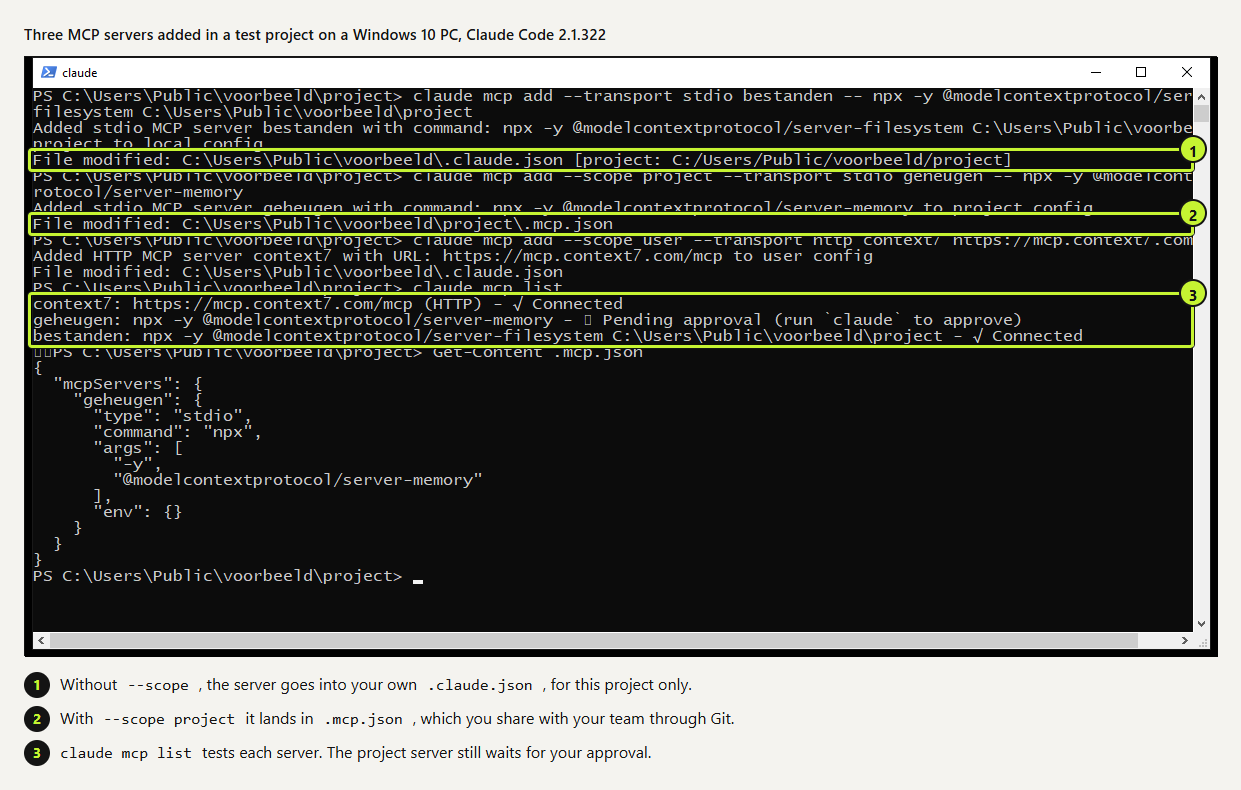
local (default) | Your own .claude.json, under this project | You, in this project only |
project | .mcp.json in the project root | Everyone who pulls the repo |
user | Your own .claude.json | You, in every project |
 (opens at full size)
Check that it connects
claude mcp list starts each server briefly and reports Connected or an error. The file server and the remote server connected straight away. The memory server from .mcp.json showed Pending approval: Claude Code asks, at the first interactive session, whether you trust servers from a shared project file. Someone else may have committed that file, so the prompt is there for a reason.
One catch: claude -p loads project servers without asking. The docs say so, and our script runs did exactly that. If you run Claude Code in scripts against someone else's repository, read its .mcp.json first.
Test it in a real session
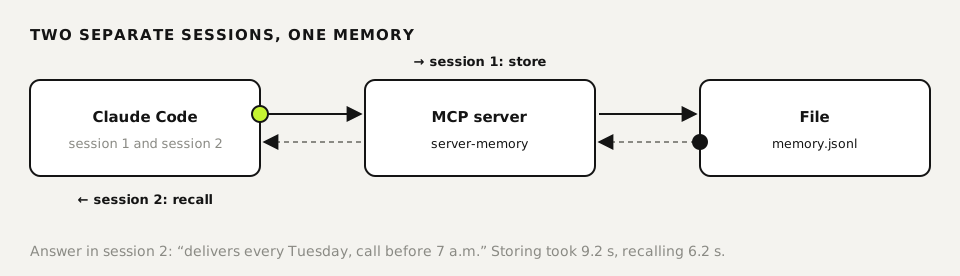
Connected doesn't mean working. We gave Claude Code two prompts in two separate sessions. First: store in the MCP memory that the customer Bakkerij De Vries delivers every Tuesday and wants a call before 7 a.m. After 9.2 seconds the note was in the memory server's file. In the second session we asked when that customer delivers. Claude searched the memory and answered in 6.2 seconds with Tuesday and the early call.
Claude Code names a server's tools mcp__<server>__<tool>, as in mcp__memory__search_nodes. In scripts, --allowedTools "mcp__memory__*" allows every tool of that one server and nothing else.
Two mistakes we made
- The position of
-ematters. Our first try was--transport stdio -e MEMORY_FILE_PATH=… memory. Claude Code read the server name as a second environment variable and failed. Put-ebefore--transport, or put any other option between-eand the name. - Without the server, Claude found another way. Because of that failure the memory server didn't exist. Claude Code still said the note was saved, and wrote it to its own memory files instead. The answer looked right, but no MCP server was involved. When you test, check which tool ran: Ctrl+O in a session,
--output-format stream-jsonin a script.
On Windows, npx worked as the command directly in our test, without wrapping it in cmd /c. That was with Node.js 22 and Claude Code 2.1.322.
Remove a server
claude mcp get <name> shows a server's scope and prints the matching remove command. Pass the same scope you added it with, or Claude Code won't find it.
claude mcp get files
claude mcp remove memory --scope project
claude mcp remove context7 --scope user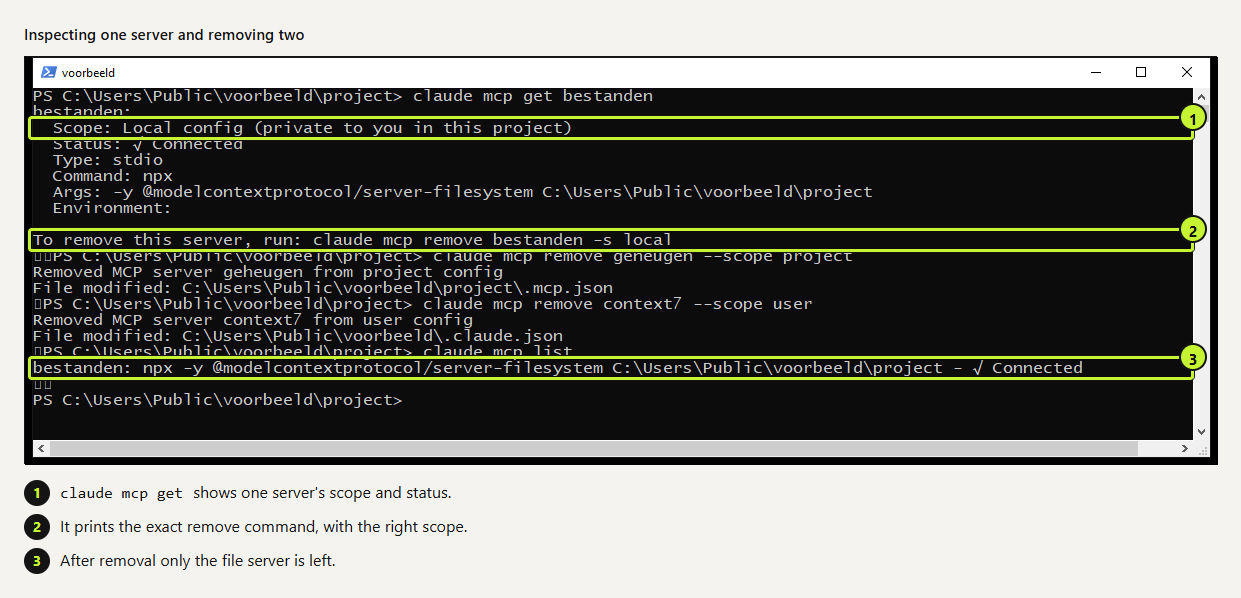 (opens at full size)
The connections we run ourselves
We connect few things, and connect them carefully: email and calendar, documents and spreadsheets, a browser for jobs without their own connector, and our own search memory. Some of these servers we built ourselves with the official SDKs. Every connection gets its own narrow account, and reading mail and sending mail run through different accounts.
Before adding a connection we answer four questions. Which task needs it? Read only, or write too? Which account does it get? And what happens if the agent misuses it? Start with read access. Grant write access only once you have an answer to the last question.
Questions
How do I add an MCP server to Claude Code?
claude mcp add <name> -- <command> for a local server, or claude mcp add --transport http <name> <url> for a remote one. Add --scope project to share it with your team through .mcp.json.
Where is the Claude Code MCP config?
Local and user servers live in your .claude.json; project servers in .mcp.json at the project root.
How do I know Claude used the server?
Look for tool calls named mcp__<server>__… in the transcript (Ctrl+O) or in stream-json output. A good-looking answer alone doesn't prove it.
Why does my project server say Pending approval?
Servers from .mcp.json need your approval in an interactive session first. Start claude in the project and accept them, or reset earlier choices with claude mcp reset-project-choices.
Sources
More in claude in practice
- Claude Desktop App: Download, Install and the Settings Worth ChangingWhere to download Claude Desktop for Mac, Windows and Linux, what it costs, what it does that the browser can't, and the settings to change first.
- Claude Code Commands: The Cheat Sheet We Use Every DayThe Claude Code commands, flags and shortcuts worth learning first, on one printable cheat sheet, plus how to make your own slash command. Tested Nov 2026.
- Claude Code Skills: How to Build, Install and Test a SkillBuild a Claude Code skill with a bundled script in ten minutes. We tested when it loads, when it doesn't, and what an unused skill costs in context.
- Build a Website with Claude Code Without the Generic AI LookWe built one site twice with Claude Code: one prompt versus a design decision first. Screenshots at 1440 and 390 px, the prompts, and the checks we use.
Also useful
- How to Build an MCP Server: A Tested Python and Node ExampleBuild a working MCP server in Python or Node, test it without a model, inspect it, then connect it to an AI app. Full code and the errors we hit.
- Building n8n workflows with Claude Code: what works and what you still checkClaude Code built, validated and tested three n8n workflows through n8n's MCP server. What worked, what you still check yourself, and the prompt to copy.
- Playwright MCP Server: Let an AI Agent Use a Real Browser, Tested on WindowsGive an AI agent a real browser with Playwright MCP. Setup for Claude Code and others, a tested run on Windows, what it returns and how to keep it safe.