AI for accountants: receipts, ledger review and client questions, tested five times
AI is good at the reading part of bookkeeping: pulling figures off receipts, spotting odd entries in a ledger and drafting the questions for your client. In our test it read six receipts five times without one wrong figure, and found all six problems we had planted in an October ledger in five out of five runs. What it didn't do was give the same answer twice. Its list of things to ask the client ran from six to eight items between runs. That's why we keep the checks that never vary, such as duplicates and totals, in a formula.
Tested by us on 11 November 2026.
What we tested, and how often
We invented a small design studio, six receipts and an October ledger with 22 entries. Into the ledger we planted six problems: three double entries, two items coded to the wrong account and an expensive dinner. We worked out the right answers first, then gave Claude (Sonnet 5.5) the tasks on November 11, 2026, running the main ones five times to see how stable the answers were.
| Task | Runs | Result |
|---|---|---|
| Extract six receipts into a table: date, amount before tax, tax, tip, total, payment method | 5 | 180 cells (six fields, six receipts, five runs), none wrong. It left cells empty where a receipt showed no tax or payment method, as asked, and flagged that the airline's "taxes and fees" aren't all tax. |
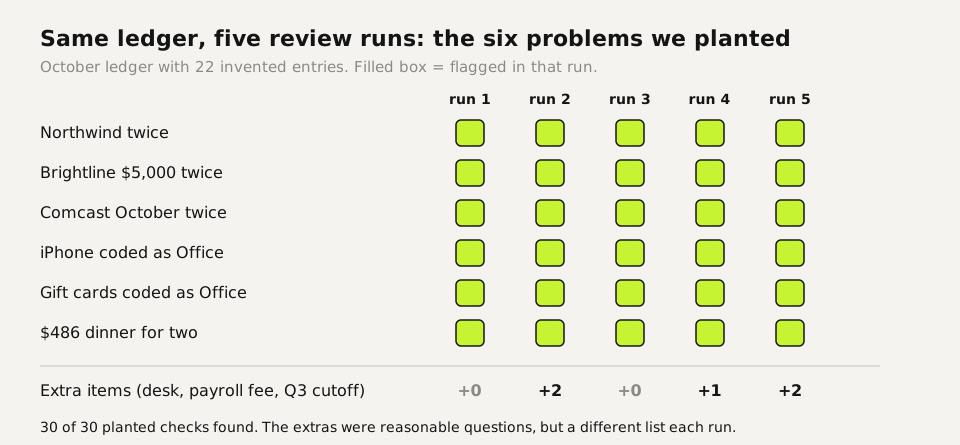
| Review the ledger before month-end close | 5 | All six planted problems in every run. Run 2 and 5 also asked about a standing desk and a recurring payroll fee; run 4 added a question about booking a Q3 fee in October. |
| Total per account and grand total | 3 | $17,688.90 and every account total right to the cent, with the sums written out. |
| Client email with the questions | 1 | Six numbered questions in plain words, about 170 words, no jargon. |
One result surprised us. We asked for an expense category on each receipt but also said "use only what is on the receipt". In all five runs it left the category empty, because no receipt names one. That's the correct reading of a strict prompt, and a useful one: categorize in a separate step, with your own chart of accounts in the prompt.
Which steps are rules and which need AI
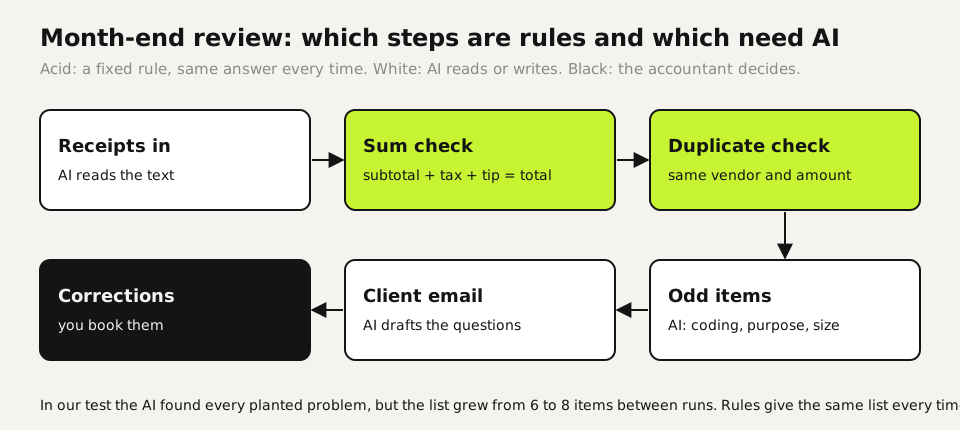
We build our own automations with one question per step: does it go the same way every time? If it does, it becomes a formula or a fixed rule. AI gets the steps that need reading or judgment. In bookkeeping that split is clear. Whether two entries share a vendor and an amount is a lookup. Whether a $486 dinner for two needs a question is judgment.
Two formulas cover the checks that never vary. With dates in column A, vendor in B and amount in D:
Possible duplicate within 14 days (column F):
=COUNTIFS(B:B,B2,D:D,D2,A:A,">="&A2-14,A:A,"<="&A2+14)>1

Receipt adds up (subtotal C, tax D, tip E, total F):
=ROUND(C2+D2+E2-F2,2)=0
TRUE in the duplicate column means: ask. FALSE in the sum column means: the extraction or the receipt is wrong.
In our ledger the duplicate formula marks exactly the three planted double entries plus the two payroll fees, which are 14 days apart. The AI raised those payroll fees in two of five runs. The formula raises them every time, and you decide once that a biweekly fee is fine.
Ten accounting tasks with what you check
| Task | Give the AI | You check |
|---|---|---|
| Receipt extraction (tested) | Receipt text or photo, the columns you want | Run the sum formula on every row |
| Ledger review (tested) | The ledger extract, "list only what needs a question" | Run the duplicate formula alongside it |
| Account totals (tested) | The extract, "show your sums" | Grand total against your software |
| Client questions (tested) | Your findings, the client's role | That no finding was softened or dropped |
| Categorizing (not tested by us) | Descriptions plus your chart of accounts | Anything that may be an asset rather than an expense |
| Bank reconciliation notes (not tested by us) | Unmatched lines from both sides | Every match it proposes, against the source |
| Variance explanation (not tested by us) | Two periods side by side | That it explains with entries, not guesses |
| Engagement letter draft (not tested by us) | Scope in bullet points | Scope and fees; your professional terms |
| Policy summary for staff (not tested by us) | The official text | Quotes and amounts against the source |
| Meeting notes into tasks (not tested by us) | Your notes | Deadlines and who owns each task |
Tax rules the AI flagged, and what they say
The review raised two US tax points without quoting them. We looked both up in IRS Publication 463 (2025 edition, read on November 11, 2026). Business meals are generally 50% deductible when you or an employee is present and the meal isn't lavish or extravagant. Business gifts are deductible up to $25 per recipient per year. The model was right to ask about both the $486 dinner and the $500 in gift cards; it didn't cite the limits, so you add them.
Client data and AI tools
- Tax return information: in the US, Section 7216 of the Internal Revenue Code restricts how tax return preparers use and disclose it. Check what your consent forms cover before client data goes into any outside tool.
- Personal plans: on ChatGPT Free, Plus and Pro, OpenAI's help center lists Improve the model for everyone as on by default; switch it off under Settings → Data controls. Even then, keep client names, SSNs and account numbers out.
- Business plans: OpenAI and Anthropic both state that their business plans exclude training on your content by default (checked November 11, 2026). That covers training, not your professional duty of confidentiality.
- Strip what the task doesn't need: our review needed dates, vendors, amounts and accounts. It didn't need the client's name.
Your first week
- Add the two formulas to the spreadsheet you use for month-end review and run them on last month.
- Run the review prompt on the same month, without client names, and compare its list with the formula's and your own.
- Turn the findings into a client email with AI and time how long that step takes compared with writing it yourself.
Questions
What is the best AI for accountants?
For the reading and writing tasks on this page, a general assistant such as ChatGPT or Claude does the work. The difference is in the setup: rules for what never varies, AI for review and drafting, and you for the booking.
Can AI read receipts accurately?
In our test it read six typed receipts five times with no wrong value, 180 cells in total. Typed text is the easy case; check photos of crumpled receipts with the sum formula on every row.
Can AI review a general ledger?
It found all six planted problems in five out of five runs. The extra questions varied between runs, so pair it with fixed formulas for duplicates and totals.
Is it safe to put client financial data into ChatGPT?
Not on a personal plan with training on. Use a business plan, strip names and identifiers, and check your consent forms; in the US, Section 7216 governs tax return information.
Will AI replace bookkeepers?
Not the judgment. In our test it read and flagged well, but someone still decided which questions matter, looked up the tax limits and booked the corrections.
Sources
- IRS Publication 463 (2025): Travel, Gift, and Car Expenses (50% meals limit, $25 gift limit) checked on
- IRS: Section 7216 information center checked on
- OpenAI Help Center: Data controls in ChatGPT checked on
- OpenAI: Enterprise privacy checked on
- Claude pricing: Team plan, no model training on your content by default checked on
More in aI by profession
- AI for ecommerce: product copy, supplier data, customer questions and stock, each tested three timesWe ran product descriptions, a messy supplier export, customer questions and a reorder check three times each. What AI got right, and what belongs in a formula.
- AI for small business: Claude for Small Business, ChatGPT, and ten tasks worth handing overWhat Claude for Small Business and ChatGPT cost, ten owner tasks AI handles well, and the one forecast mistake our test caught before it reached the bank.
- AI for customer service: five support tasks we tested, and how to stop the message pile-upFive support tasks tested, plus ten runs that show when AI invents refund rules and the one prompt line that stopped it. And how to send one message, not five.
- AI for HR: what we tested, and why AI shouldn't make your hiring decisionsWe tested AI on job posts, leave-policy questions and ranking two equal candidates. The ranking followed list order ten times out of ten.
Also useful
- AI for legal work: five tasks we tested, and the checks that caught the mistakesWe ran an NDA review, a case-law search, a fake citation, a dispute chronology and a redline through AI. What held up, what didn't, and how to check it.
- Claude Desktop App: Download, Install and the Settings Worth ChangingWhere to download Claude Desktop for Mac, Windows and Linux, what it costs, what it does that the browser can't, and the settings to change first.
- Claude Sonnet vs Opus: what we found running the same eight tasksWe gave Haiku 5.5, Sonnet 5.5, Opus 5.5 and Fable 5.2 the same eight checkable tasks. Accuracy, cost per task and where each model fits.