AI for small business: Claude for Small Business, ChatGPT, and ten tasks worth handing over
A small business gets the most from AI on the writing and sorting work that piles up after hours: payment reminders, quotes, review replies, weekly plans. A $20-a-month plan from Claude or ChatGPT covers that, and Claude for Small Business adds ready-made workflows inside QuickBooks, PayPal, HubSpot and other tools. We ran five owner tasks for an invented cleaning company. Four came back fully right, including a quote correct to the cent. The cash forecast had a correct table and one wrong warning underneath it.
Tested by us on 11 November 2026.
What it costs: the plans that matter for a small business
We read the pricing pages on November 11, 2026. Prices are in US dollars and exclude sales tax or VAT.
| Plan | Price | Good for |
|---|---|---|
| ChatGPT Free / Claude Free | $0 | Trying the tasks below; limited messages and uploads |
| ChatGPT Go | $8 per month (may include ads) | More messages and uploads than Free |
| ChatGPT Plus | $20 per month | One owner doing daily writing and planning |
| Claude Pro | $20 per month, or $17 per month billed annually | The same, plus Projects to keep business context in one place |
| Claude Team, standard seat | $25 per seat per month, or $20 billed annually (2 to 150 people) | A team; no training on your content by default, central billing, admin controls |
| ChatGPT Business | Priced per user per month; see OpenAI's pricing page | A team that standardizes on ChatGPT |
Claude for Small Business is not a separate plan. Anthropic launched it on May 13, 2026, as a package you switch on inside Claude Cowork, its desktop workspace for longer tasks. It connects to Intuit QuickBooks, PayPal, HubSpot, Canva, Docusign, Google Workspace and Microsoft 365, and ships with 15 ready-made workflows such as an invoice chaser, a month-end close and a cash forecast. According to the announcement, Claude does the work and you approve before anything is sent, posted or paid. Anthropic also says it doesn't train on your data by default on the Team and Enterprise plans, which is a reason to use a team plan once customer data goes in.
Five owner tasks we ran, and what came back
We invented a six-person commercial cleaning company with six open invoices, a bank balance and a list of fixed costs. Then we gave Claude (Sonnet 5.5) five tasks on November 11, 2026, one prompt and one run each, and checked every number by hand. We worked out the right answers before reading the output. One run per task shows what can go wrong, not how often it does.
| Task | Result | What we checked |
|---|---|---|
| Rank overdue invoices and draft reminders | Right | Picked exactly the three overdue invoices, used the $180 left on a part-paid one, and left out a second invoice of the same customer that wasn't due yet: the trap we had set. |
| Reply to a 1-star review | Right | 65 words, no argument, no admission of liability, an offer to fix it offline. |
| Turn notes into a quote with 8% tax | Right | $264 per visit, $3,612 a month, $4,602.96 for the first month with the deep clean: all correct. It flagged that it had taxed the deep clean too. |
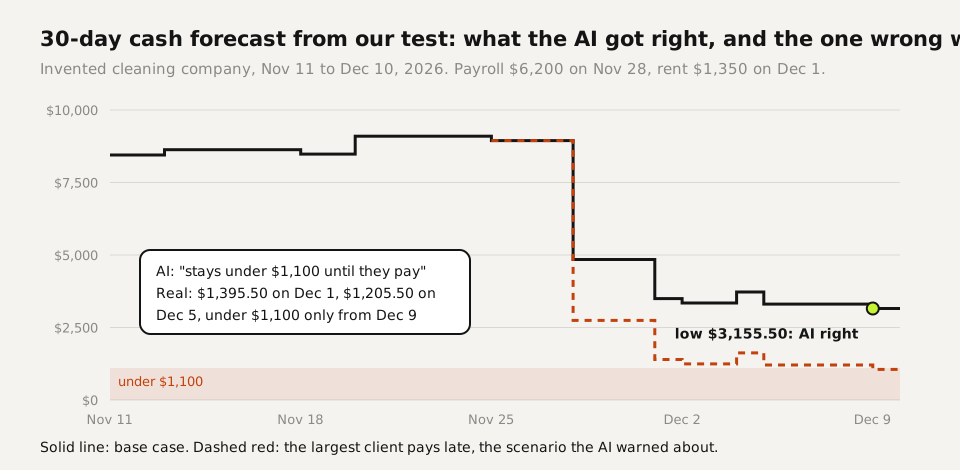
| 30-day cash forecast | One error | Running balance and lowest point ($3,155.50 on December 9) correct. Its risk note said that if the largest client paid late, the balance "stays under $1,100 until they pay". By our count it would be $1,395.50 on December 1 and $1,205.50 on December 5, and dip under $1,100 only on December 9. |
| Voice memo into a weekly to-do list | Right | Every task in, nothing added, the one phone call marked. |
The forecast is the task we'd watch most closely. The table itself was right, and the model also warned that payroll and the biggest incoming payment fell on the same day, which is useful. The mistake sat in the what-if note, and that is the sentence an owner acts on. The fix is one extra line in the prompt: "For each risk scenario, show the running balance by date." Then the claim is a table you can check instead of a sentence you have to trust.
For comparison, this is one of the three reminders it wrote, unedited. The customer had paid $200 of a $380 invoice:
Subject: Friendly reminder: remaining balance on INV-1046

Hi Rosa,

Thank you for your $200 payment on October 20. I'm writing because a
balance of $180.00 remains on invoice INV-1046, which was due on
October 29.

You can send the remainder whenever it's convenient. If you've already
paid it, thank you, and please disregard this message. Let me know if
you have any questions.

Warm regards,
[Your name]
Output from our test. Add your payment link before sending.
Ten tasks a small business can hand to AI
The first five rows are the tasks from our test. The other five follow the same pattern: writing that follows a template, or sorting that needs a little judgment. Each row says what to check before anything leaves the building.
| Task | What to give the AI | What you check |
|---|---|---|
| Payment reminders (tested) | The invoice list, today's date, your payment terms | Which invoices it calls overdue, and the amounts |
| Quotes (tested) | Your notes, unit prices, tax rate | Every line and the totals |
| Review replies (tested) | The review and a word limit | No promises you can't keep, no admission of fault |
| Weekly plan (tested) | A voice memo or a list of loose notes | That nothing was added or dropped |
| Cash forecast (tested) | Bank balance, expected payments, fixed costs | The running balance, and every claim in the risk notes |
| Customer emails | The customer's message and the facts of the order | Order dates and prices against your own system, not the customer's memory |
| Job posts | Duties, hours, pay, location | Pay and hours, and wording such as "young team" that can exclude applicants |
| Social posts | What happened this week and your tone | Customer names or photos you have no permission to share |
| Supplier comparison | Two or three offers pasted in | Unit sizes, delivery fees and minimum orders that differ between offers |
| Month-end summary for your accountant | Exports from your bookkeeping tool | Totals against the bookkeeping tool itself |
The reminder prompt from our test, ready to reuse. Paste your own invoice list below it.
I run a small [type of business]. Using the invoice list below, rank
the invoices that are overdue today from most to least urgent, with
days overdue and amount outstanding. Then draft one short, friendly
payment reminder email per overdue customer (combine invoices for the
same customer). Do not include invoices that are not yet due.

Today is [date]. Payment terms are [30] days from the invoice date.
[invoice number | customer | issue date | amount | paid so far]What not to hand to AI
- Sending, posting or paying without you. Even Anthropic's own small business package asks for your approval first. Keep that step in every setup you build.
- Card numbers, bank logins and passwords. None of the tasks above need them.
- Customer data on a personal plan with training on. On ChatGPT Free, Plus and Pro, Improve the model for everyone is on by default; switch it off under Settings → Data controls. For a team, a business plan that excludes training by default is the cleaner choice.
- Decisions about people. In the EU, the AI Act lists AI used to select job applicants or evaluate staff as high-risk. Let AI write the job post; read the applications yourself.
- Rules that never change. Which invoice is overdue is a date sum. A spreadsheet formula gets that right every time, at no cost per run.
That last point is how we build our own automations. For each step we ask whether it goes the same way every time. If it does, it becomes a formula, a filter or a fixed template. AI only gets the steps that need judgment: reading a customer's email, writing a reminder in the right tone, summarizing a messy note. For reminders, two spreadsheet columns do the sorting before any AI sees the list:
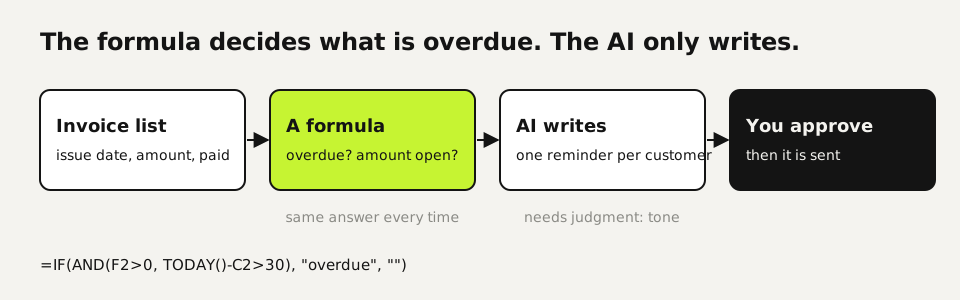
Outstanding (column F):  =D2-E2
Status (column G):       =IF(AND(F2>0, TODAY()-C2>30), "overdue", "")

C = issue date, D = amount, E = paid so far
Filter on "overdue", copy those rows into the reminder prompt. The AI never decides what is overdue.
Claude for Small Business or a plain chatbot?
Start with a plain chatbot if your work lives in email, documents and a spreadsheet. Everything in our test ran on a single prompt with pasted data, no connectors needed.
Claude for Small Business starts to pay off when the data you'd otherwise paste already lives in QuickBooks, PayPal or HubSpot, because the workflows read it directly. That saves the export step and widens what the AI can see. Anthropic says your existing permissions carry over: an employee who can't see something in QuickBooks can't see it through Claude either. Check that your bookkeeping tool is on the connector list before you count on it.
Your first week
- Pick one plan and switch off training in its settings. Free is enough for the first week.
- Run the reminder prompt on this month's open invoices and compare the result with your own list before sending anything.
- Pick the one writing task you put off most, such as quotes or review replies, and do it with AI for the rest of the week. Check it with the table above.
Questions
What is Claude for Small Business and what does it cost?
A package of connectors and 15 ready-made workflows that Anthropic launched on May 13, 2026, switched on inside Claude Cowork. It's not a separate plan; you need a Claude plan, and the price is that of the plan. Claude Pro was $20 per month on November 11, 2026.
Is ChatGPT or Claude better for a small business?
For the writing and sorting tasks on this page, both cost $20 per month for one person. Pick the one that connects to the tools you already use, and try it on your own invoices or quotes before you decide.
Can I trust AI with numbers like quotes and forecasts?
Check them. In our test the quote and the reminder amounts were right to the cent, and so was the forecast table. One what-if warning under the forecast was wrong. Ask for every scenario as a dated table, and keep a calculator next to it.
Is it safe to put customer data into ChatGPT?
Switch off training first, keep card and bank details out, and move to a business plan once you paste customer data regularly. Business plans from both providers exclude training on your content by default.
What is the first thing a small business should automate with AI?
Payment reminders. The overdue list is a rule a spreadsheet can handle, and the AI writes the emails in your tone. In our test that task came back right, including a part-paid invoice.
Sources
- Anthropic: Introducing Claude for Small Business (May 13, 2026) checked on
- Claude pricing (Free, Pro, Max, Team, Enterprise) checked on
- ChatGPT pricing (Free, Go, Plus, Pro, Business) checked on
- OpenAI Help Center: Data controls in ChatGPT checked on
- EU AI Act, Regulation (EU) 2024/1689: Annex III point 4 (employment) checked on
- OpenAI: Enterprise privacy (no training on business data by default) checked on
More in aI by profession
- AI for accountants: receipts, ledger review and client questions, tested five timesWe ran receipt extraction, a month-end ledger review and the totals five times each. Which steps AI handled, which belong in a formula, and what to check.
- AI for ecommerce: product copy, supplier data, customer questions and stock, each tested three timesWe ran product descriptions, a messy supplier export, customer questions and a reorder check three times each. What AI got right, and what belongs in a formula.
- AI for customer service: five support tasks we tested, and how to stop the message pile-upFive support tasks tested, plus ten runs that show when AI invents refund rules and the one prompt line that stopped it. And how to send one message, not five.
- AI for HR: what we tested, and why AI shouldn't make your hiring decisionsWe tested AI on job posts, leave-policy questions and ranking two equal candidates. The ranking followed list order ten times out of ten.
Also useful
- AI for marketers: five tests, and the quality gate that keeps AI copy out of the slop pile30 AI landing-page drafts, 50 character counts and a review analysis, tested: invented offers were the real risk, and one prompt line removed them.
- Claude Desktop App: Download, Install and the Settings Worth ChangingWhere to download Claude Desktop for Mac, Windows and Linux, what it costs, what it does that the browser can't, and the settings to change first.
- Claude Sonnet vs Opus: what we found running the same eight tasksWe gave Haiku 5.5, Sonnet 5.5, Opus 5.5 and Fable 5.2 the same eight checkable tasks. Accuracy, cost per task and where each model fits.