Playwright MCP Server: Let an AI Agent Use a Real Browser, Tested on Windows
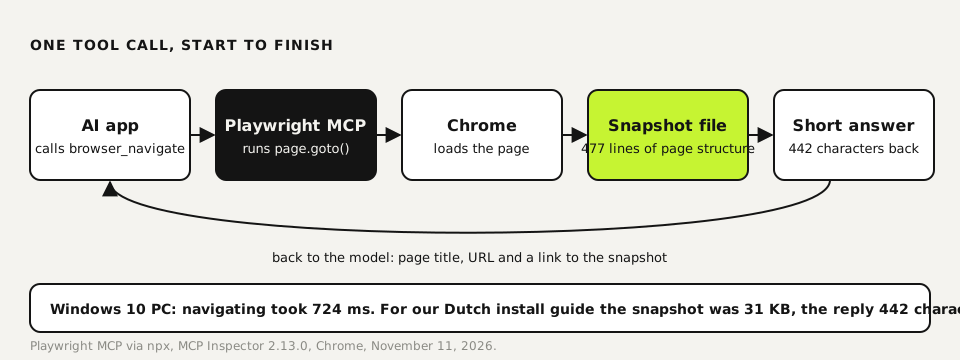
Playwright MCP is Microsoft's MCP server that lets an AI app drive a real browser: open pages, click, type, read the page structure and take screenshots. You add it with one line, such as claude mcp add playwright npx @playwright/mcp@latest in Claude Code, and it runs on Node.js 18 or newer. We ran it on a Windows 10 PC through MCP Inspector, the official test tool. It listed 25 tools and loaded a page in 724 ms. On one of our guides it wrote a 31 KB snapshot to a file and answered in 442 characters, so the page structure only reaches the model when it asks for it.
Tested by us on 11 November 2026.
What it does
The server sits between the AI app and a browser. The model asks for an action, such as go to this URL or click that button. The server performs it with Playwright and reports back what the page looks like as structured text: the accessibility tree, with a short reference for every link and button. The model doesn't need to read pixels, so a text-only model can still click the right thing.
What you need
- Node.js 18 or newer (we tested with Node 22 on Windows 10).
- Chrome or another browser Playwright supports. By default it uses Chrome; our PC already had it, so nothing was downloaded.
- An MCP host: Claude Code, Claude Desktop, VS Code, Cursor, Codex or another app that supports MCP.
- No account and no fee for the server itself. The model calls cost whatever your AI app costs.
Set it up in Claude Code and other apps
Add the server
In Claude Code, one command. The project's README lists the equivalent for VS Code, Cursor, Codex and others.
bashclaude mcp add playwright npx @playwright/mcp@latestChoose headless or visible
By default the browser window is visible, which is useful while you watch what the agent does. For scheduled or background work add
--headless, and--isolatedto keep the profile in memory so no cookies or logins stay behind.json{ "mcpServers": { "playwright": { "command": "npx", "args": ["@playwright/mcp@latest", "--headless", "--isolated"] } } }Check the tools
Run
claude mcp listto see that it connected, or open it in MCP Inspector. You should see 25 tools, from browser_click to browser_wait_for.bashnpx -y @modelcontextprotocol/inspector npx -y @playwright/mcp@latest --headless --isolatedAsk for a task
In plain language: "Open our pricing page and check whether the monthly price on it matches the one in our docs." The model picks browser_navigate, then browser_snapshot or browser_find, and answers.
Our test run, step by step
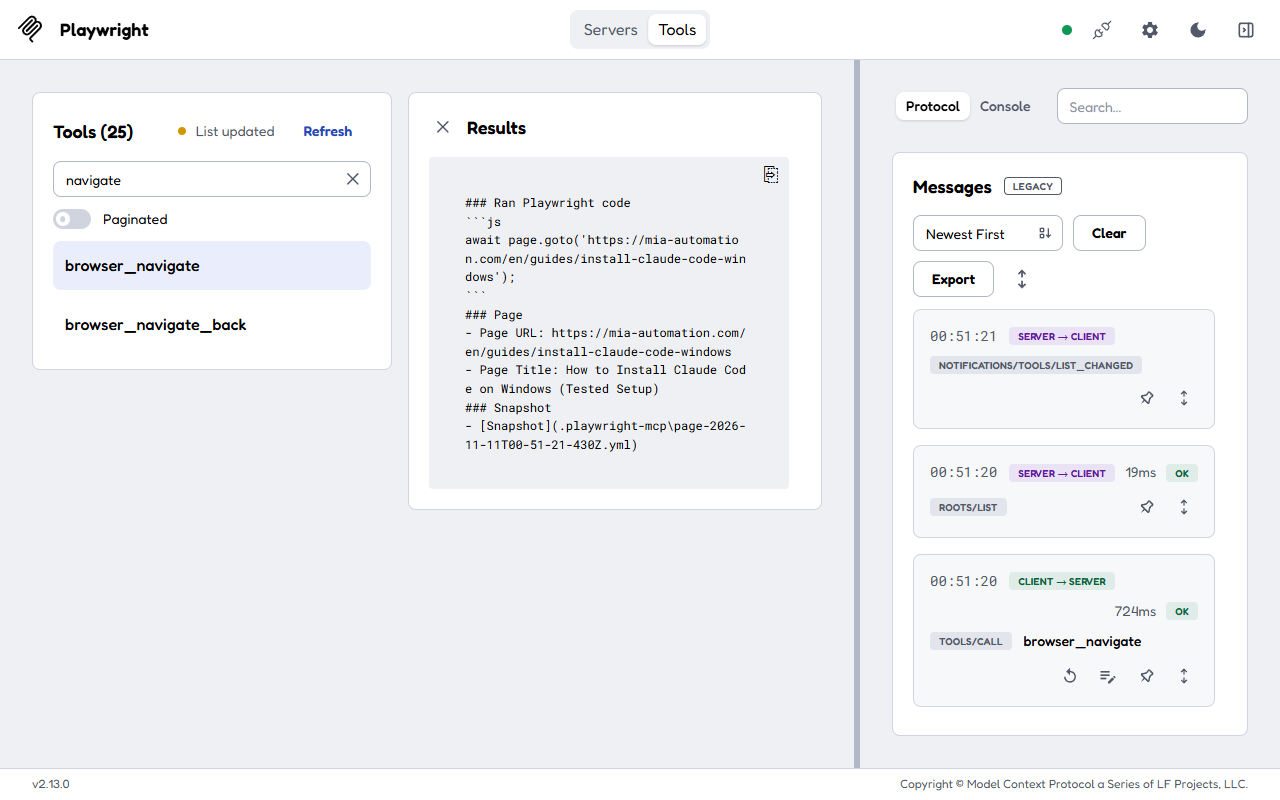
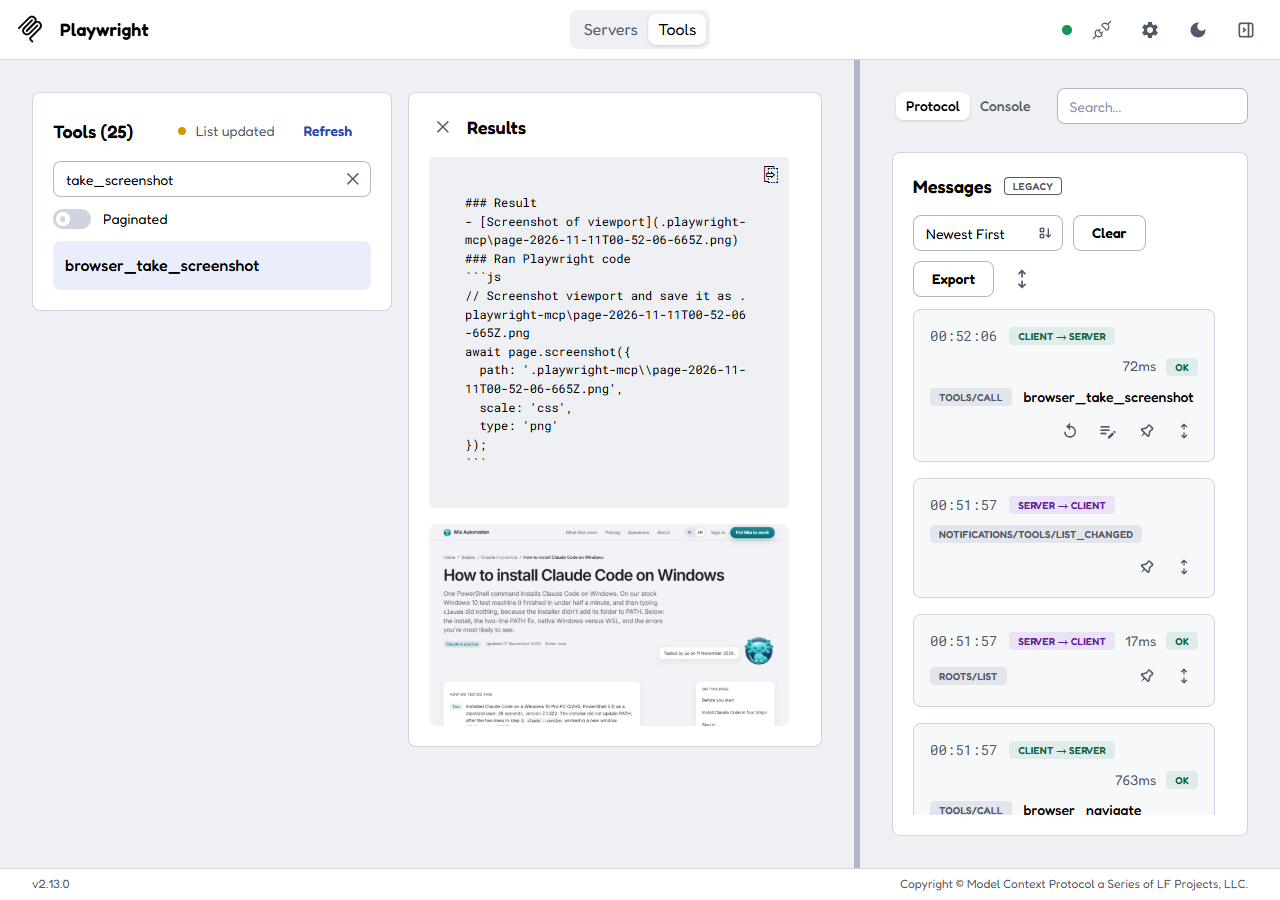
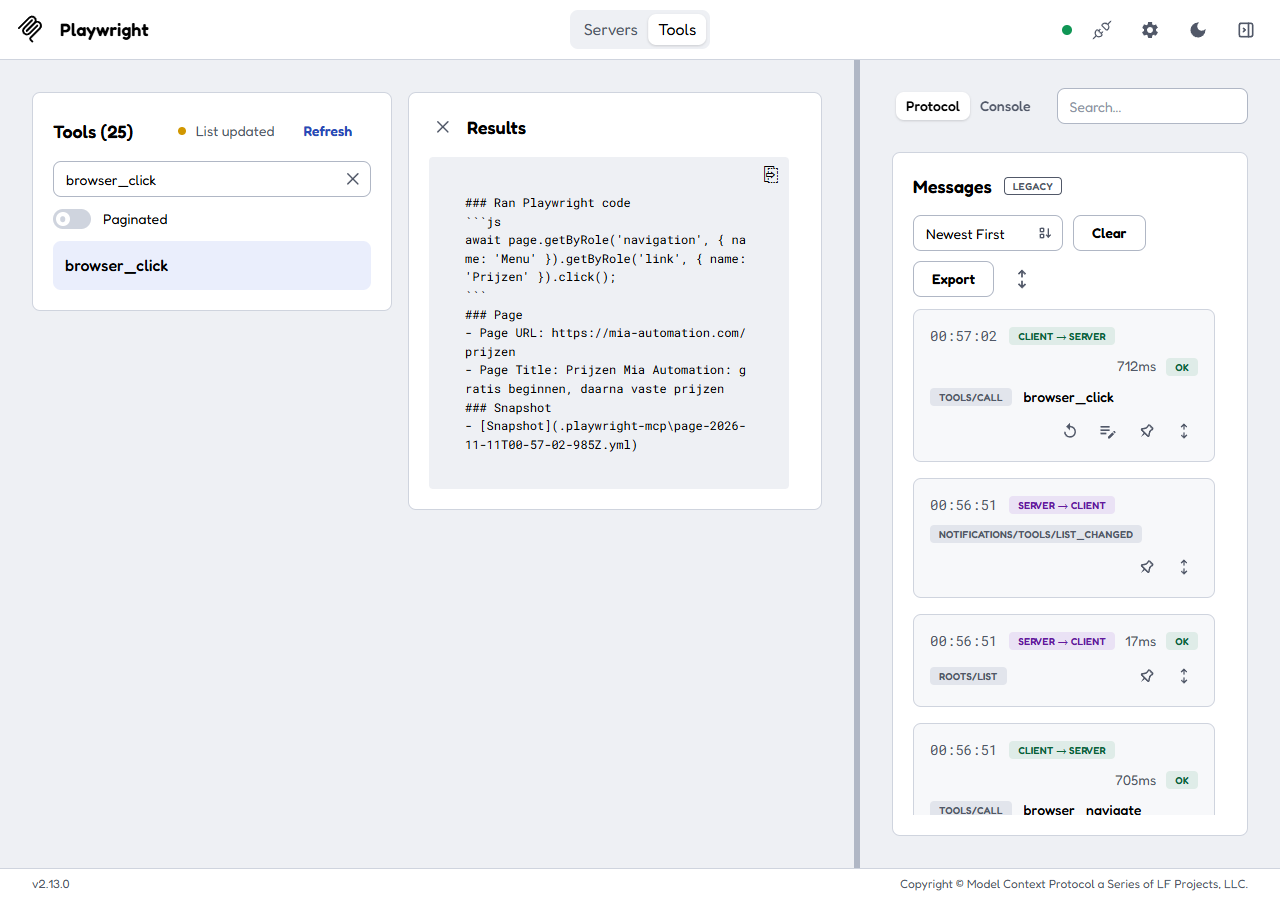
We started the server from MCP Inspector on a Windows 10 PC and called three tools by hand: browser_navigate on one of our own guides, browser_take_screenshot, and in a second session browser_click on a menu link. We didn't test typing or forms; the tool list further down shows which tools need care.
 (opens at full size)
Inspector labels browser_navigate as destructive and open-world: those are the tool's own annotations, telling a host that it changes state and reaches the internet. 18 of the 25 tools carry the destructive label; 7 are read-only. And right after the call, the server asked the client for its roots (the folders it may use) and announced that its tool list had changed.
 (opens at full size)
Clicking works on the references in the snapshot. In the snapshot of our Dutch guide, the pricing link in the menu was listed as link "Prijzen" [ref=e10]. We passed e10 as the target to browser_click. The server turned that into a role-based Playwright locator, clicked it in 712 ms and reported the new page: the pricing page, with a fresh snapshot file.
 (opens at full size)
What it costs per run
The server is free; what you pay for is what the model reads. Our snapshot of one guide was 477 lines and 31 KB. In version 0.0.85 the reply to browser_navigate only pointed to that file. By the common rule of thumb of four characters per token, reading that snapshot would add roughly 8,000 tokens to the model's input; not reading it costs almost nothing. Other pages give other sizes, so measure your own heaviest page before you schedule an agent on it. The project's own README is frank about the trade-off: for coding agents it recommends its CLI with skills when token use matters, and MCP when an agent needs to keep a browser open across many steps.
Where a person signs off
The server labels its own tools, and that gives you a ready-made split. These 7 are read-only and safe to allow without asking: browser_snapshot, browser_find, browser_take_screenshot, browser_console_messages, browser_network_requests, browser_network_request and browser_wait_for. The other 18, from browser_click to browser_run_code_unsafe, can change something and keep asking for approval.
claude --allowedTools "mcp__playwright__browser_snapshot,mcp__playwright__browser_find,mcp__playwright__browser_take_screenshot,mcp__playwright__browser_console_messages,mcp__playwright__browser_wait_for"Claude Code: allow the read-only Playwright tools without a prompt, keep the rest on approval.
- Logins and payments. Don't let the agent type passwords or card details. Log in yourself in a visible browser, or keep those flows out of reach.
- Submitting forms. Filling in is fine; the click on send or buy should come back to you, unless it's a test environment.
- Downloads and uploads. browser_file_upload can send files from your computer to a website. Keep it off unless you need it.
If it goes wrong
| What you see | What to do |
|---|---|
| Two agents fight over one browser profile | A persistent profile works for one browser at a time. Start extra clients with --isolated or their own --user-data-dir. |
| Headless Chrome keeps running after you stop the client | We had this on Windows: stopping the inspector left a headless Chrome behind. Look for chrome.exe processes whose command line contains playwright_chromiumdev_profile and end them; the matching folders in %TEMP% can go too. |
| Snapshot files pile up in your project folder | The server writes to .playwright-mcp in its working folder. Add it to .gitignore or start the server from a scratch folder. |
Related guides
Building a server of your own? Our MCP server build guide walks through one in Python and Node, tested the same way. New to MCP itself? Start with what an MCP server is.
Questions
What is the Playwright MCP server?
An MCP server from Microsoft that lets AI apps control a browser through Playwright: navigate, click, type, read the page structure and take screenshots.
How do I use Playwright MCP with Claude Code?
Run claude mcp add playwright npx @playwright/mcp@latest, then ask in plain language for a browser task. Add --headless and --isolated for background work.
Does Playwright MCP need screenshots or a vision model?
No. It works from the page's accessibility tree, so any model that reads text can use it. Screenshots are available as a separate tool.
Is Playwright MCP free?
Yes, the server is open source and free. You pay only for the model calls of the AI app that uses it.
Sources
More in aI agents and agentic work
- What Is an MCP Server? The Model Context Protocol Explained With One We BuiltAn MCP server lets AI apps like Claude, ChatGPT and VS Code use your tools and data. We built one in 73 lines, connected it and logged what happened.
- How to Build an MCP Server: A Tested Python and Node ExampleBuild a working MCP server in Python or Node, test it without a model, inspect it, then connect it to an AI app. Full code and the errors we hit.
- AGENTS.md Explained: One Instruction File for Codex, Claude Code and Other AgentsAGENTS.md is the shared instruction file for coding agents. How Codex reads it, when Claude Code does, and the one-line fix we tested.
- Long-Running AI Agents: Build a Harness That Survives Limits and Resumes Where It StoppedHow to keep an AI agent working for hours: its own process, a time limit, a saved session to resume and a report check. With a 67-line harness we tested.
Also useful
- Building n8n workflows with Claude Code: what works and what you still checkClaude Code built, validated and tested three n8n workflows through n8n's MCP server. What worked, what you still check yourself, and the prompt to copy.
- Claude Code MCP Servers: Add Them, Test Them, Remove ThemHow to add an MCP server to Claude Code with claude mcp add, pick the right scope, test it in a real session and remove it. Tested on Windows and Linux.
- Build a Website with Claude Code Without the Generic AI LookWe built one site twice with Claude Code: one prompt versus a design decision first. Screenshots at 1440 and 390 px, the prompts, and the checks we use.