How to Build an MCP Server: A Tested Python and Node Example
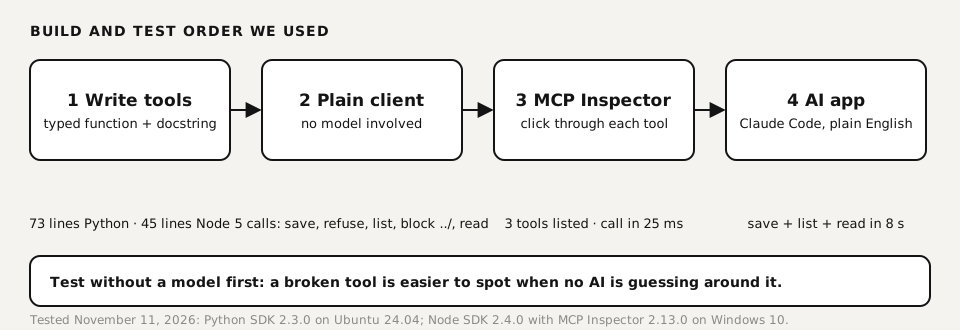
To build an MCP server, you write a few typed functions and register them as tools with the official SDK. Then you test them with a plain client and connect the server to an AI app such as Claude Code or Claude Desktop. We built the same notes server twice, in Python (73 lines) and in Node (45 lines), and tested it four ways. Below is the full code, the order we test in, and the errors we ran into, including one that breaks most tutorials written before the 2.0 SDK.
Tested by us on 11 November 2026.
What you'll build
A small server that gives an AI app three tools for plain-text notes: list_notes, read_note and add_note. It's deliberately boring, because the interesting parts are the ones tutorials skip: a name check so the AI can't write outside its folder, a rule that it never overwrites, and an audit line for every call. Swap the notes folder for your own data and the pattern stays the same.
Before you start
- Python route: Python 3.10 or newer and uv, a fast Python package manager. The official guide requires MCP Python SDK 2.0.0 or higher.
- Node route: Node.js 20 or newer. We tested with Node 20 on Linux and Node 22 on Windows.
- An MCP host to connect to: Claude Code, Claude Desktop, VS Code or another app that supports MCP. For testing you can use MCP Inspector, the official debugging tool, which runs with
npx. - No API key or paid plan is needed to build and inspect the server. You only need one when an AI app starts calling it.
Build the server in Python, step by step
Create the project
Make a folder and add the official SDK with uv. On our machine
uv addfinished in under a second because the packages were cached.bashuv init notes cd notes uv add "mcp[cli]"Write the server
Save this as
notes.py. Each function with a type-hinted signature and a docstring becomes a tool. The docstring is what the model reads to decide when to use it, so write it for the model, not for yourself.python"""A small MCP server for plain-text notes. Three tools: list_notes and read_note only read; add_note writes a new file. Every call is appended to audit.jsonl, and add_note never overwrites a file. Tested with the official Python SDK (mcp 2.3.0), protocol 2026-07-28. """ import json import re import time from pathlib import Path from mcp.server import MCPServer NOTES_DIR = Path(__file__).parent / "notes" AUDIT_LOG = Path(__file__).parent / "audit.jsonl" NOTES_DIR.mkdir(exist_ok=True) mcp = MCPServer("notes") def audit(tool: str, **args) -> None: """Append one line per tool call, so you can see what the AI did.""" with AUDIT_LOG.open("a", encoding="utf-8") as f: f.write(json.dumps({"t": time.strftime("%Y-%m-%dT%H:%M:%S"), "tool": tool, "args": args}) + "\n") def safe_name(name: str) -> str: """Allow letters, digits and dashes only, so a note can never escape the folder.""" slug = re.sub(r"[^a-z0-9-]+", "-", name.lower()).strip("-") if not slug: raise ValueError("Note name needs at least one letter or digit.") return slug @mcp.tool() def list_notes() -> list[str]: """List the names of all saved notes.""" audit("list_notes") return sorted(p.stem for p in NOTES_DIR.glob("*.md")) @mcp.tool() def read_note(name: str) -> str: """Read one note. Args: name: The note name as returned by list_notes. """ audit("read_note", name=name) path = NOTES_DIR / f"{safe_name(name)}.md" if not path.exists(): return f"No note called '{name}'." return path.read_text(encoding="utf-8") @mcp.tool() def add_note(name: str, text: str) -> str: """Save a new note. Refuses to overwrite an existing note. Args: name: Short name, letters, digits and dashes. text: The note itself, plain text or Markdown. """ audit("add_note", name=name, chars=len(text)) path = NOTES_DIR / f"{safe_name(name)}.md" if path.exists(): return f"A note called '{path.stem}' already exists. Pick another name." path.write_text(text, encoding="utf-8") return f"Saved note '{path.stem}' ({len(text)} characters)." if __name__ == "__main__": mcp.run(transport="stdio")Test it without a model
Before any AI touches it, call every tool from a plain MCP client. Ours tries the happy path and two attacks: a duplicate name and a path that tries to escape the folder. Run it with
uv run test_client.py.python"""Talk to notes.py over stdio without any AI model in between.""" import asyncio from mcp import ClientSession, StdioServerParameters from mcp.client.stdio import stdio_client async def main(): params = StdioServerParameters(command="uv", args=["run", "notes.py"]) async with stdio_client(params) as (read, write): async with ClientSession(read, write) as s: await s.initialize() tools = await s.list_tools() print("tools:", [t.name for t in tools.tools]) for name, args in [("add_note", {"name": "Offerte bakkerij", "text": "Call back Friday."}), ("add_note", {"name": "bakery quote", "text": "second try"}), ("list_notes", {}), ("read_note", {"name": "../../etc/passwd"}), ("read_note", {"name": "bakery-quote"})]: r = await s.call_tool(name, args) print(name, "->", [c.text for c in r.content]) asyncio.run(main())Check the output
You should see three tools, a saved note, a refusal for the duplicate, and "No note called '../../etc/passwd'" instead of file contents. That last line is the check doing its job: the name is cleaned before it becomes a path. The audit file now has one line per call.
texttools: ['list_notes', 'read_note', 'add_note'] add_note -> ["Saved note 'bakery-quote' (17 characters)."] add_note -> ["A note called 'bakery-quote' already exists. Pick another name."] list_notes -> ['bakery-quote'] read_note -> ["No note called '../../etc/passwd'."] read_note -> ['Call back Friday.']
The same server in Node
The Node SDK has the same shape: npm install @modelcontextprotocol/server zod, a createServer() function that registers tools with a zod schema, and serveStdio(createServer) to start it. Our version is 45 lines. One rule matters more in Node than in Python: never write to stdout with console.log in a stdio server. Stdout carries the protocol messages, so a stray log line corrupts them. Use console.error for logging.
server.registerTool("add_note", {
  description: "Save a new note. Refuses to overwrite an existing note.",
  inputSchema: z.object({ name: z.string(), text: z.string() }),
}, async ({ name, text: body }) => {
  audit("add_note", { name, chars: body.length });
  const slug = safeName(name), f = path.join(DIR, slug + ".md");
  if (fs.existsSync(f)) return text(`A note called '${slug}' already exists.`);
  fs.writeFileSync(f, body, "utf8");
  return text(`Saved note '${slug}' (${body.length} characters).`);
});
The add_note tool in Node, with the same name check and no-overwrite rule as the Python version.
Inspect it in MCP Inspector
MCP Inspector shows every tool, lets you fill in the inputs by hand and logs each protocol message. Start it next to your server; it opens a page on http://127.0.0.1:6274. Flip the switch to connect, open Tools, pick a tool, fill in the fields and click Execute Tool.
npx -y @modelcontextprotocol/inspector node notes.mjs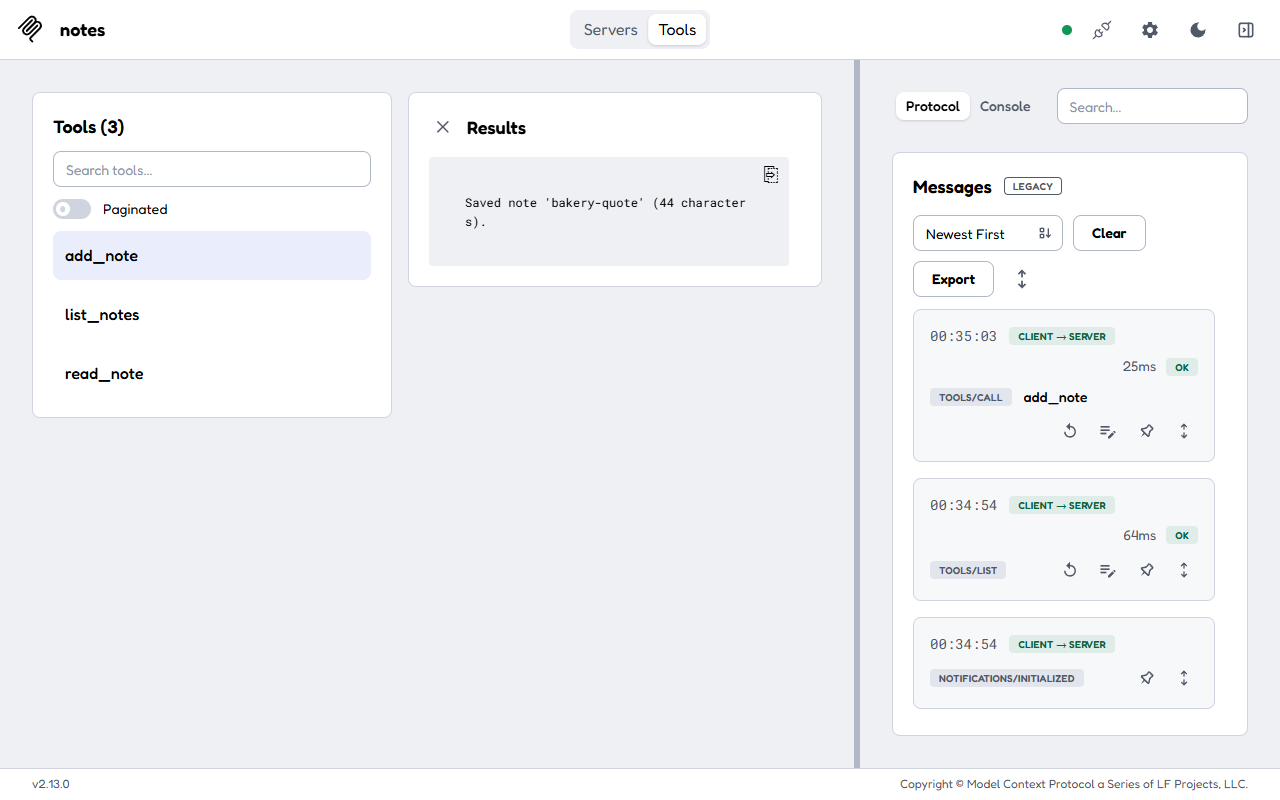 (opens at full size)
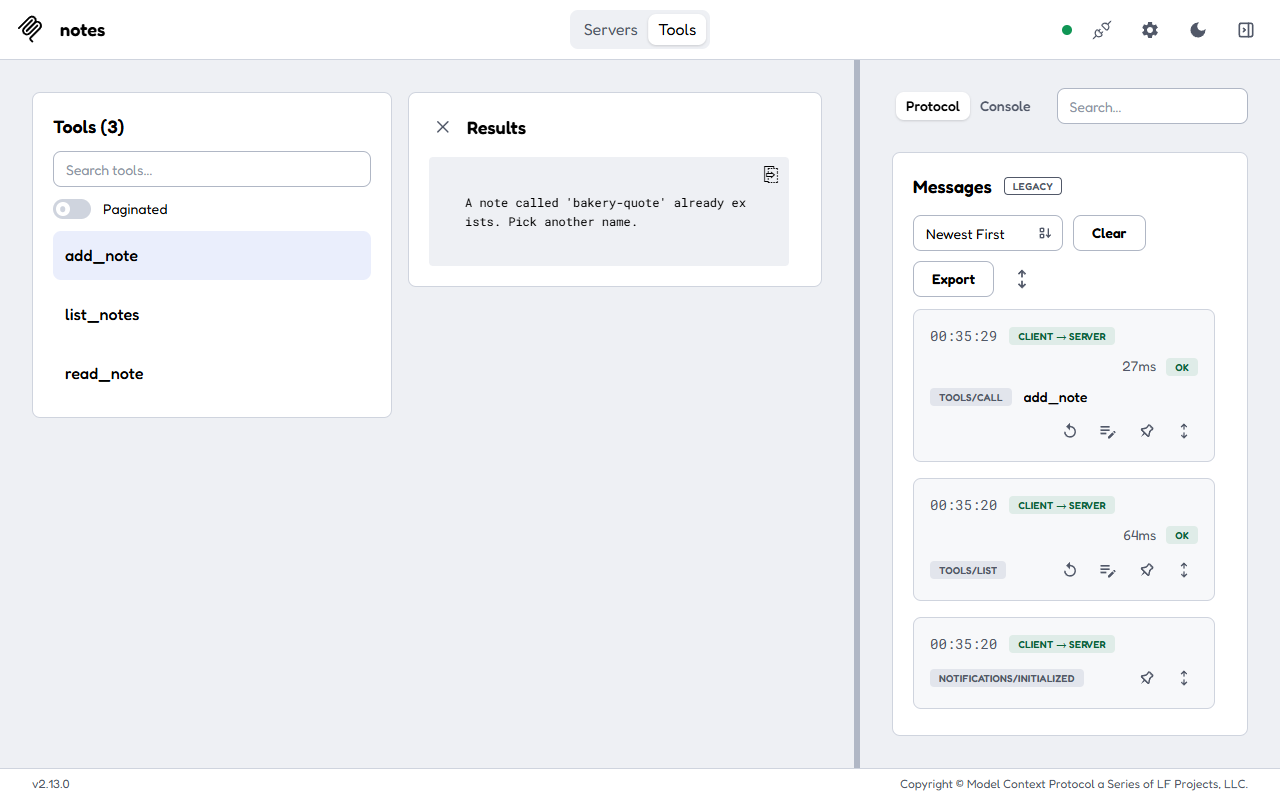 (opens at full size)
Two things we noticed. Inspector 2.13.0 connected using protocol version 2025-11-25 and labeled the log "legacy", although the server also speaks 2026-07-28; the SDK handles both, so this needs no action. And the refusal above is the behavior you want to see before an AI ever gets the tool: "Bakery Quote" and "bakery quote" map to the same file, and the server says no instead of silently replacing a note.
Connect it to an AI app
In Claude Code, one command adds the server. Everything after the double dash is the start command. With --scope project the entry goes into .mcp.json in your project, which you can commit for your team.
claude mcp add --scope project notes -- uv run --directory /path/to/notes notes.py
claude mcp list
Claude Desktop and most other hosts read the same structure from a JSON file under mcpServers:
{
  "mcpServers": {
    "notes": {
      "command": "uv",
      "args": ["run", "--directory", "/path/to/notes", "notes.py"]
    }
  }
}
We asked Claude Code in plain English to save a note, list all notes and read it back. It took 8 seconds and five turns, picked the tools on its own, and mentioned that the server had cleaned up the name.
If it doesn't work
| What you see | Cause | Fix |
|---|---|---|
No module named 'mcp.server.fastmcp' | Tutorial written for SDK 1.x | Import MCPServer from mcp.server |
Pending approval (run claude to approve) in claude mcp list | Servers from a shared .mcp.json stay off until approved | Start claude once in the project and approve the server |
| Claude Code says it needs permission and nothing is saved | In non-interactive mode, tools must be allowed | Approve the tool when asked, or pass --allowedTools mcp__notes__add_note |
| Garbled messages or a server that disconnects at once | Something writes to stdout in a stdio server | Log to stderr (console.error, or Python's logging to stderr) |
Checklist before you let an AI use it
- Every input that becomes a path, query or command is cleaned or validated in the server.
- Write tools refuse to overwrite or delete unless that's their explicit job.
- Every call is logged with the tool name and its inputs.
- Read-only tools and write tools are separate, so a host can allow one without the other.
- Secrets come from environment variables, never from the code or a committed config file.
Questions
How long does it take to build an MCP server?
Not long for a small one: the code is short and the official SDKs do the protocol work. Our notes server is 73 lines of Python or 45 lines of Node, including the safety checks.
Python or Node for an MCP server?
Pick the language your data access already lives in. Both official SDKs register tools the same way; Python uses type hints and docstrings, Node uses zod schemas.
Do I need Claude to test an MCP server?
No. Test with a plain MCP client or MCP Inspector first. No model, no API key and no cost are involved until you connect an AI app.
What is a local MCP server?
A server that runs on your own machine and talks to the AI app over stdio. A remote server runs elsewhere and is reached over Streamable HTTP, usually with OAuth sign-in.
Sources
- Model Context Protocol: Build an MCP server checked on
- MCP Python SDK on GitHub checked on
- MCP TypeScript SDK on GitHub checked on
- Model Context Protocol: MCP Inspector checked on
- Claude Code: Connect Claude Code to tools via MCP checked on
More in aI agents and agentic work
- What Is an MCP Server? The Model Context Protocol Explained With One We BuiltAn MCP server lets AI apps like Claude, ChatGPT and VS Code use your tools and data. We built one in 73 lines, connected it and logged what happened.
- What Is an AI Agent? How Agents Work, Shown With Our Own JobsAn AI agent takes a goal, picks its own steps, uses tools and checks its work. Explained with data from 1,373 agent jobs we ran ourselves.
- Playwright MCP Server: Let an AI Agent Use a Real Browser, Tested on WindowsGive an AI agent a real browser with Playwright MCP. Setup for Claude Code and others, a tested run on Windows, what it returns and how to keep it safe.
- AGENTS.md Explained: One Instruction File for Codex, Claude Code and Other AgentsAGENTS.md is the shared instruction file for coding agents. How Codex reads it, when Claude Code does, and the one-line fix we tested.
Also useful
- Building n8n workflows with Claude Code: what works and what you still checkClaude Code built, validated and tested three n8n workflows through n8n's MCP server. What worked, what you still check yourself, and the prompt to copy.
- Claude Code MCP Servers: Add Them, Test Them, Remove ThemHow to add an MCP server to Claude Code with claude mcp add, pick the right scope, test it in a real session and remove it. Tested on Windows and Linux.
- Build a Website with Claude Code Without the Generic AI LookWe built one site twice with Claude Code: one prompt versus a design decision first. Screenshots at 1440 and 390 px, the prompts, and the checks we use.