Claude Code Skills: How to Build, Install and Test a Skill
A Claude Code skill is a folder under .claude/skills containing a SKILL.md file. Claude Code reads only its short description and loads the rest when your request matches. Below we build one that checks CSV exports with a small script. In our test it loaded for a question about importing a customer file and stayed out of the way when we asked for a bakery tagline.
Tested by us on 11 November 2026.
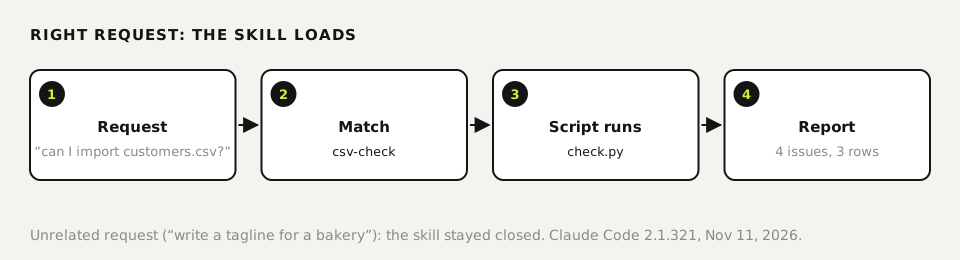
Where Claude Code looks for skills
| Scope | Path | Applies to |
|---|---|---|
| Personal | ~/.claude/skills/<name>/SKILL.md | Every project on this machine |
| Project | .claude/skills/<name>/SKILL.md | This repo; commit it and your team gets it |
| Plugin | <plugin>/skills/<name>/SKILL.md | Wherever the plugin is enabled, as /plugin-name:skill-name |
Put client- or codebase-specific skills in the project. Habits you want everywhere, like your writing rules, belong in your personal folder. Skills you upload to claude.ai live separately and don't show up in Claude Code.
Build a skill in four steps
Create the folder
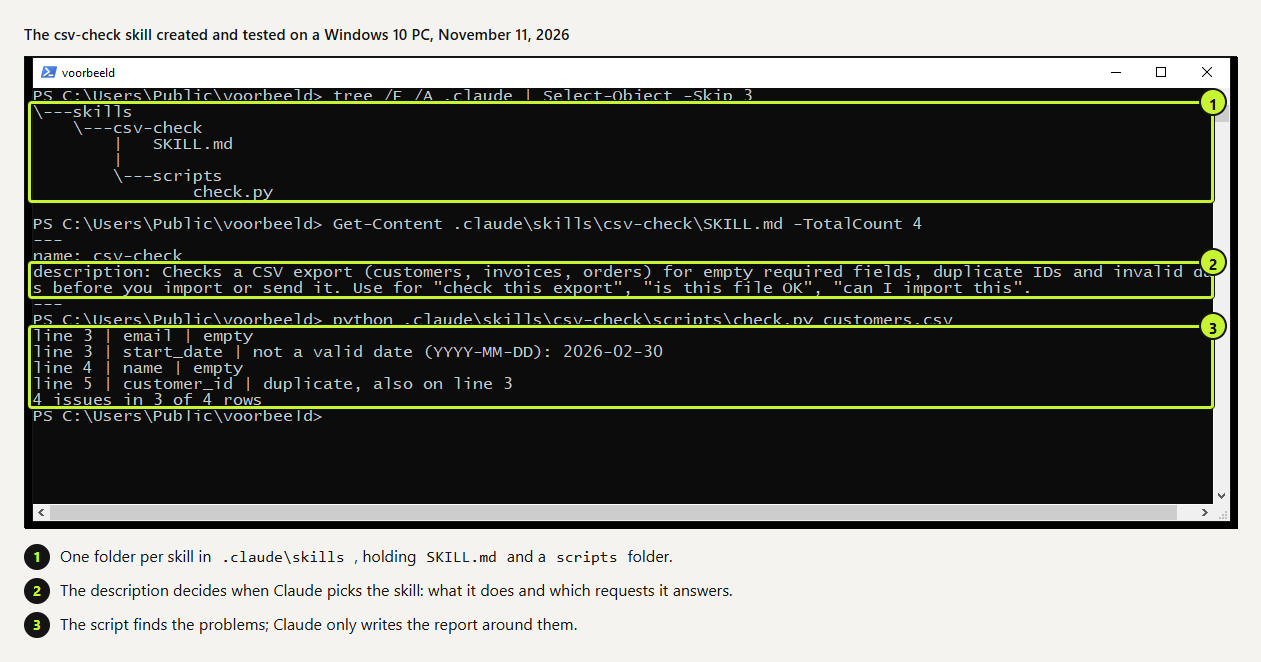
From your project root, create
.claude/skills/csv-check/scripts. The folder name becomes the skill name: lowercase letters, numbers and hyphens.bashmkdir -p .claude/skills/csv-check/scriptsWrite SKILL.md
Between two
---lines at the top gonameanddescription. The description should say what the skill does and which requests it answers, in the words you'd type. The procedure goes below. The full file is further down.Move fixed checks into a script
Anything that runs the same way every time belongs in code. The script finds empty fields, duplicate IDs and invalid dates. Claude doesn't load the script's source, only its output, so the check costs almost nothing in context.
Test with a normal request
Run
claudein the project and ask for something that fits the description without naming the skill. Type/skillsto list what Claude Code has loaded. To force it, start your message with/csv-check.
---
name: csv-check
description: Checks a CSV export (customers, invoices, orders) for empty required fields, duplicate IDs and invalid dates before you import or send it. Use for "check this export", "is this file OK", "can I import this".
---

# Check a CSV

1. Run the script on the file the user names:
   `python3 .claude/skills/csv-check/scripts/check.py <file.csv>`
2. The script prints line, column and problem for each issue. Don't invent extra issues.
3. Report like this:
   - First line: "Ready to import" or "N issues in M rows".
   - Then a table: Line | Column | Issue | Suggested fix.
- Don't edit the file unless the user asks..claude/skills/csv-check/SKILL.md, tested with Claude Code 2.1.321 on November 11, 2026.
#!/usr/bin/env python3
"""Checks a CSV: empty values in the first column and in columns containing 'name', 'email' or 'date', duplicate values in the first column, dates that aren't YYYY-MM-DD."""
import csv, sys, datetime
path = sys.argv[1]
with open(path, newline='', encoding='utf-8-sig') as f:
    rows = list(csv.DictReader(f))
if not rows:
    print("Empty file"); sys.exit()
cols = list(rows[0].keys()); key = cols[0]
required = [c for c in cols if c == key or any(w in c.lower() for w in ('name', 'email', 'date'))]
seen, n, bad = {}, 0, set()
for i, r in enumerate(rows, start=2):
    for c in required:
        if not (r.get(c) or '').strip():
            print(f"line {i} | {c} | empty"); n += 1; bad.add(i)
    v = (r.get(key) or '').strip()
    if v and v in seen:
        print(f"line {i} | {key} | duplicate, also on line {seen[v]}"); n += 1; bad.add(i)
    seen.setdefault(v, i)
    for c in cols:
        if 'date' in c.lower() and (r.get(c) or '').strip():
            try: datetime.date.fromisoformat(r[c].strip())
            except ValueError: print(f"line {i} | {c} | not a valid date (YYYY-MM-DD): {r[c].strip()}"); n += 1; bad.add(i)
print(f"{n} issues in {len(bad)} of {len(rows)} rows").claude/skills/csv-check/scripts/check.py. Standard-library Python only.
 (opens at full size)
How we tested when it loads
Our test project held customers.csv: four rows with an empty email, an empty name, February 30 as a start date and one customer ID used twice. We sent Claude Code two requests with claude -p, which runs a single prompt and prints the result. Adding --output-format stream-json logs every step, including the moment a skill is loaded.
| Request | Skill loaded? | What happened |
|---|---|---|
| Can I import customers.csv into my CRM as it is? | Yes | Ran the script, returned a table of 4 issues with a fix for each, in 7.6 seconds. |
| Write a short tagline for a bakery in Austin. | No | Answered directly. No skill, no script. |
The first version of our script printed "4 issues in 4 rows" when the problems sat in three rows. Claude Code pointed out the mismatch in its report, and we fixed the script to say "4 issues in 3 of 4 rows". Read the first few reports of any new skill critically; they're where you catch mistakes in your own procedure.
What does an unused skill cost? We sent the same one-line prompt four times, twice with the skill in the project and twice without. Total input came to 28,699 and 28,709 tokens with the skill, and 28,760 and 28,770 without. Tokens are the small chunks of text models count. The description's cost disappeared inside the normal variation between runs, which fits Anthropic's figure of about 100 tokens per skill.
Skill vs. CLAUDE.md vs. plugin vs. subagent
| Thing | What it is | Pick it for |
|---|---|---|
| CLAUDE.md | Instructions read at the start of every session in the project | Rules that always apply |
| Skill | A procedure that loads when a request matches | A task that comes back now and then |
| Plugin | A bundle of skills, commands, hooks or MCP servers | Sharing a set with other people |
| Subagent | A helper with its own empty context | Research that reads a lot and reports a little |
A skill can also run as a subagent. Add context: fork to the frontmatter when the skill reads many files you won't need afterwards.
Install skills from someone else
Anthropic publishes example skills on GitHub, including the Word, Excel, PowerPoint and PDF skills. In Claude Code you add the repo as a plugin marketplace, then install a bundle:
/plugin marketplace add anthropics/skills
/plugin install document-skills@anthropic-agent-skillsHow we keep a hundred skills usable
We run about a hundred skills side by side. Our main instruction file names the categories in a few lines and points to the skills, which hold the actual procedures. Every description is one or two sentences, with the words people type up front. When two skills overlap, they get separate jobs or we merge them. What that costs showed up in /context during a normal session: all descriptions together took 10k tokens, about 1% of the context window. Per skill it ranged from 60 to 230 tokens, depending on the length of the description.
We never edit a third-party skill to add our own rules. Updates overwrite it, and the change is gone. Our rules go in a skill of our own. In Claude Code 2.1.252 and later, /skill-doctor shows each skill's context cost and how often it's used.
Questions
How do I install a skill in Claude Code?
Put the folder with SKILL.md in ~/.claude/skills/ or in your project's .claude/skills/. For skills in a plugin marketplace, use /plugin install. If the skills folder didn't exist before, run /reload-skills.
When does Claude Code load a skill, and how do I control it?
When your request matches the description. Control it through the description, or set disable-model-invocation: true so only you can start it with /name.
How do I see whether a skill was used?
In an interactive session the call shows up in the conversation. With claude -p --output-format stream-json, it appears as a step in the output.
Where can I find good Claude Code skills on GitHub?
Start with anthropics/skills, which includes a template and the document skills. Treat community collections like any other code from the internet and read them first.
Sources
- Claude Code docs: Skills checked on
- Claude Platform docs: Agent Skills overview checked on
- GitHub: anthropics/skills checked on
More in claude in practice
- What Are Claude Skills? How They Work, a Tested Example, and When to Use OneClaude Skills explained with a working editing skill we tested 11 times in Claude Code: how often it loaded on its own and how to force it.
- Installing Claude Code: Pick the Right Version, Install It, Run a First TaskInstall Claude Code with one command, tested on a fresh Mac, Ubuntu and Windows 10: which version to pick, the PATH fix, real errors and a first task.
- How to Create Claude Skills That Load at the Right MomentBuild a Claude skill from idea to tested version: description, short core, details in a separate file, and a 10-request trigger test with the fixes it led to.
- Claude Code Hooks: Five Examples You Can Copy, TestedFive Claude Code hooks with full code: block dangerous commands, protect secrets, add a house rule, log every tool call, refuse to stop on failing tests.
Also useful
- Claude marketing skills: a copy check and an SEO check, tested with and without the skillTwo Claude marketing skills, a copy check and an SEO page check, tested with and without the skill. The SKILL.md files are on this page.
- AGENTS.md Explained: One Instruction File for Codex, Claude Code and Other AgentsAGENTS.md is the shared instruction file for coding agents. How Codex reads it, when Claude Code does, and the one-line fix we tested.
- How to Build an MCP Server: A Tested Python and Node ExampleBuild a working MCP server in Python or Node, test it without a model, inspect it, then connect it to an AI app. Full code and the errors we hit.