Claude Code Commands: The Cheat Sheet We Use Every Day
Claude Code has more than 60 slash commands, but about a dozen cover a normal working day: /init, /plan, /context, /compact, /clear, /resume, /rewind, /diff and /code-review among them. Below is a one-page cheat sheet with those, the start-up flags and the keys we use. We checked the flags in the help output of Claude Code 2.1.322 on Windows, ran a custom command on 2.1.321 on Linux, and took the slash commands and keys from Anthropic's reference on November 11, 2026.
Tested by us on 11 November 2026.
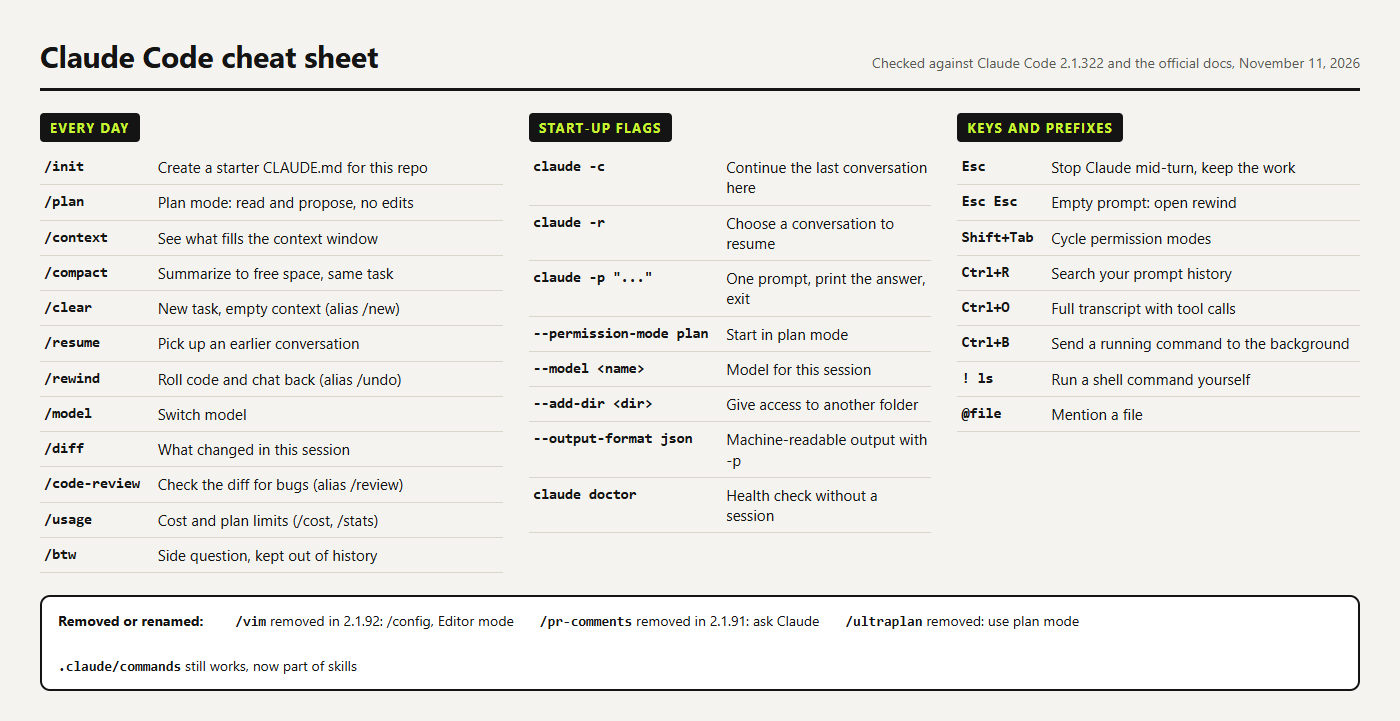 (opens at full size)
The commands to learn first
Type / in a session to see every command; a few letters filter the list. The table is ranked by how often each one saved us time. Learn the first three in your first week and the rest when you hit the situation in the third column.
| # | Command | When it pays off | Skip it when |
|---|---|---|---|
| 1 | /init | First session in a repo: writes a starter CLAUDE.md you then trim | The repo already has a CLAUDE.md you trust |
| 2 | /plan | Changes that touch more than a few files; you approve the plan before any edit | A one-file fix: the plan costs a round trip |
| 3 | /context | Answers get vague; it shows what fills the window | The session is young |
| 4 | /compact | Long session, same task. In our test it cut 75.2k tokens to 33.8k | You're switching tasks: use /clear |
| 5 | /clear | New task. Starts empty, project memory stays | You still need the earlier details |
| 6 | /rewind | Claude went the wrong way: roll back its edits and the chat | The damage came from shell commands; use Git |
| 7 | /diff + /code-review | Before you commit; --fix applies the findings | Throwaway experiments |
| 8 | /usage | Close to your plan limit | Pay-as-you-go API keys with their own dashboard |
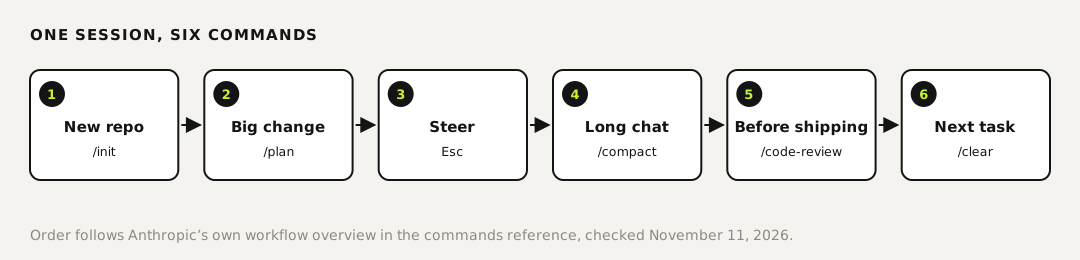
What /context and /compact did in our test
We asked Claude Code 2.1.321 to read three Python files and summarize them, then ran /context in the same session. It reported 75.2k tokens in use, 60.3k of them conversation, the rest system prompt, tools and skill descriptions. After /compact the same session showed 33.8k, with the conversation down to 18.9k. The summary kept the task and the three file names. The full file contents were gone, so Claude would have to read them again for details.
That's the trade-off. Compact when the old details are done with, and give it a focus such as /compact keep the test output when something must survive. Use /clear when the next task has nothing to do with the last one.
Start-up flags worth knowing
Flags go after claude when you start it. We checked each of these in claude --help on version 2.1.322 on a Windows PC.
| Flag | What it does |
|---|---|
claude -c | Continue the most recent conversation in this folder |
claude -r | Pick a conversation to resume, or pass its ID or name |
claude -p "prompt" | Run one prompt, print the answer and exit; the basis for scripts |
--permission-mode plan | Start in plan mode. Other choices: acceptEdits, auto, manual, dontAsk, bypassPermissions |
--model sonnet | Pick the model for this session |
--add-dir ../shared | Let Claude read and edit a second folder |
--output-format json | With -p: structured output you can parse |
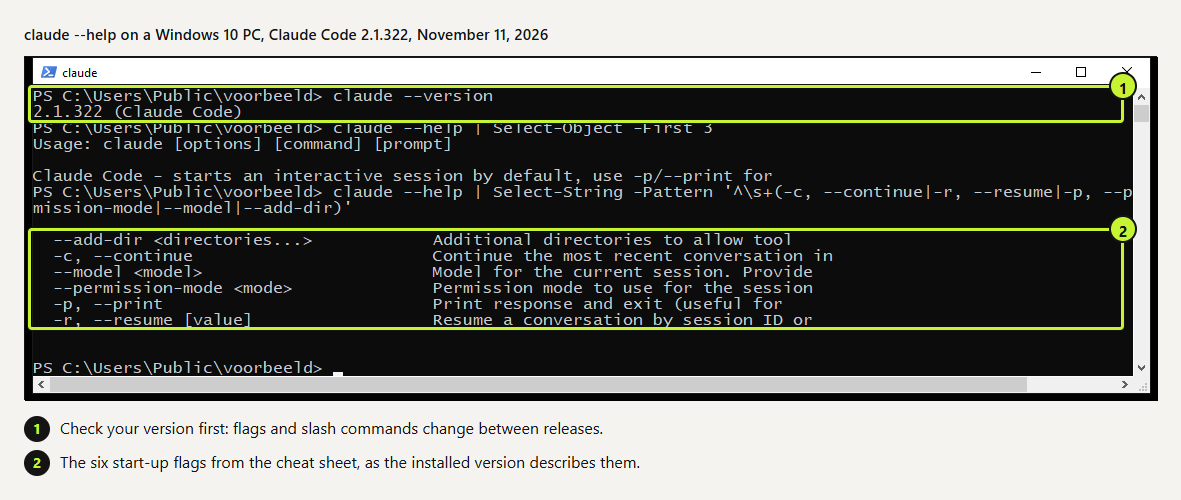 (opens at full size)
claude --help yourself after an update; it always matches the version you have.Keys and prefixes
What we verified ourselves: the flags (help output on 2.1.322), claude -p and a custom command (2.1.321). The slash commands and keys come from Anthropic's reference; shortcuts can differ per terminal, especially Option and Alt combinations on a Mac.
- Esc stops Claude mid-turn and keeps the work so far, so you can redirect. Esc Esc on an empty prompt opens the rewind menu.
- Shift+Tab cycles permission modes: manual, accept edits and plan. Bypass and auto mode join the cycle only when your settings and plan allow them.
- Ctrl+O shows the full transcript with every tool call. Use it when you want to know what Claude ran.
- Ctrl+R searches earlier prompts. Ctrl+B sends a running command or agent to the background.
- An exclamation mark at the start runs a shell command yourself and adds its output to the conversation, for example before
git status. @ mentions a file.
What we left off the sheet, and why
These are useful, but only in specific setups. The commands /background and /batch are for running several agents at once on a large codebase. With /remote-control and /teleport you move a session between your machine, the browser and your phone. Scheduled cloud tasks live under /schedule. And /mcp, /hooks and /permissions are setup screens you open once per project, not every day.
We also left out aliases. The alias /new does the same as /clear, and /undo the same as /rewind. One name per action is easier to remember; the menu shows the alias when you type it.
Make your own slash command
A custom command is a Markdown file. Put it in .claude/commands/ for one project or ~/.claude/commands/ for all of them; the file name becomes the command. Claude Code has merged commands into skills, so .claude/skills/standup/SKILL.md gives you the same /standup, with room for extra files. This is the one we tested:
---
description: Short Monday standup from the last 7 days of commits
---
Read `git log --since="7 days ago" --oneline` and write for Monday's standup:
1. What got done (one line per commit, in plain English).
2. What stands out or is still open.
Eight lines max, no intro.
.claude/commands/standup.md
In a test repo with three commits, claude -p "/standup" answered in 5.6 seconds. It listed the three changes in plain English and then flagged two things we hadn't asked about: the .claude/ folder wasn't committed, and the work sat on master while the repo's main branch was main. That second part is the reason to keep "what stands out" in the prompt.
Removed and renamed
| Old | What to do now |
|---|---|
/vim | Removed in 2.1.92. Switch the editor mode in /config |
/pr-comments | Removed in 2.1.91. Ask Claude to read the PR comments |
/ultraplan | Removed. Start in plan mode instead |
/review | Keep using it if you like: it's now an alias of /code-review |
/cost, /stats | Same screen as /usage; learn that one |
/bug, /share | Since 2.1.212 their own bug report command, no longer aliases of /feedback |
Questions
Which Claude Code commands should I learn first?
/init, /plan and /context, then /compact, /clear and /rewind. Together they decide how a session starts, how big changes get planned and how you recover when things drift.
How do I see all slash commands?
Type / in a session. The full list with descriptions is in Anthropic's commands reference; it changes with most releases.
How do I make my own slash command?
Create .claude/commands/name.md in your project with the instructions in Markdown, or a skill folder with SKILL.md. Then type /name.
Can I use slash commands with claude -p?
Yes for commands and skills that produce text, like our /standup. Commands that open a dialog only work in an interactive session.
Sources
- Claude Code docs: Commands checked on
- Claude Code docs: Interactive mode (keyboard shortcuts) checked on
- Claude Code docs: CLI reference checked on
- Claude Code docs: Skills (custom commands merged into skills) checked on
- Claude Code docs: Checkpointing (what /rewind does not undo) checked on
More in claude in practice
- Installing Claude Code: Pick the Right Version, Install It, Run a First TaskInstall Claude Code with one command, tested on a fresh Mac, Ubuntu and Windows 10: which version to pick, the PATH fix, real errors and a first task.
- Claude Code Skills: How to Build, Install and Test a SkillBuild a Claude Code skill with a bundled script in ten minutes. We tested when it loads, when it doesn't, and what an unused skill costs in context.
- Claude Code Hooks: Five Examples You Can Copy, TestedFive Claude Code hooks with full code: block dangerous commands, protect secrets, add a house rule, log every tool call, refuse to stop on failing tests.
- Build a Website with Claude Code Without the Generic AI LookWe built one site twice with Claude Code: one prompt versus a design decision first. Screenshots at 1440 and 390 px, the prompts, and the checks we use.
Also useful
- AGENTS.md Explained: One Instruction File for Codex, Claude Code and Other AgentsAGENTS.md is the shared instruction file for coding agents. How Codex reads it, when Claude Code does, and the one-line fix we tested.
- How to Build an MCP Server: A Tested Python and Node ExampleBuild a working MCP server in Python or Node, test it without a model, inspect it, then connect it to an AI app. Full code and the errors we hit.
- Building n8n workflows with Claude Code: what works and what you still checkClaude Code built, validated and tested three n8n workflows through n8n's MCP server. What worked, what you still check yourself, and the prompt to copy.