What Is an MCP Server? The Model Context Protocol Explained With One We Built
An MCP server is a small program that exposes a piece of software, such as a calendar, a database or a folder of notes, to AI apps through the Model Context Protocol (MCP), an open standard. Any app that speaks MCP, including Claude, ChatGPT, VS Code and Cursor, can then use it without a custom integration. We connect AI tools to seven kinds of software through MCP every day. For this page we wrote one more server, connected it to Claude Code and recorded what it did with and without permission.
Tested by us on 11 November 2026.
MCP server meaning, in plain terms
Before MCP, every AI app needed its own integration for every service. MCP replaces that with one shared format: build a server once and every MCP-capable app can use it. The protocol's own docs compare it to USB-C, one port that fits many devices.
Three roles make it work. The host is the AI app you use, such as Claude Code or VS Code. The server exposes something useful. For each server it connects to, the host creates a dedicated client, so a host with seven servers runs seven separate connections and no server sees another's traffic.
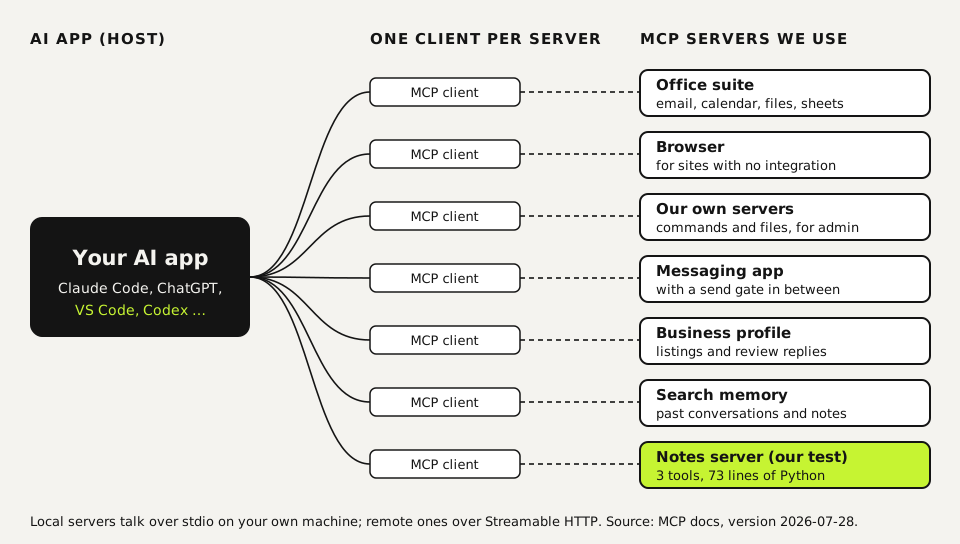
Four of those seven servers we wrote ourselves, in Python or Node with the official SDKs; for the messaging app we run an open-source server with our own changes. Reading and sending mail use separate accounts, the browser runs on a connected desktop rather than a server, and every outgoing message passes a check before it leaves. That last rule exists because of the warning further down this page.
How an MCP server works
A server can offer three kinds of things, which the spec calls primitives:
- Tools: actions the model may run, such as creating a calendar event or querying a database.
- Resources: data the model may read, such as a file or a record.
- Prompts: reusable templates for common requests.
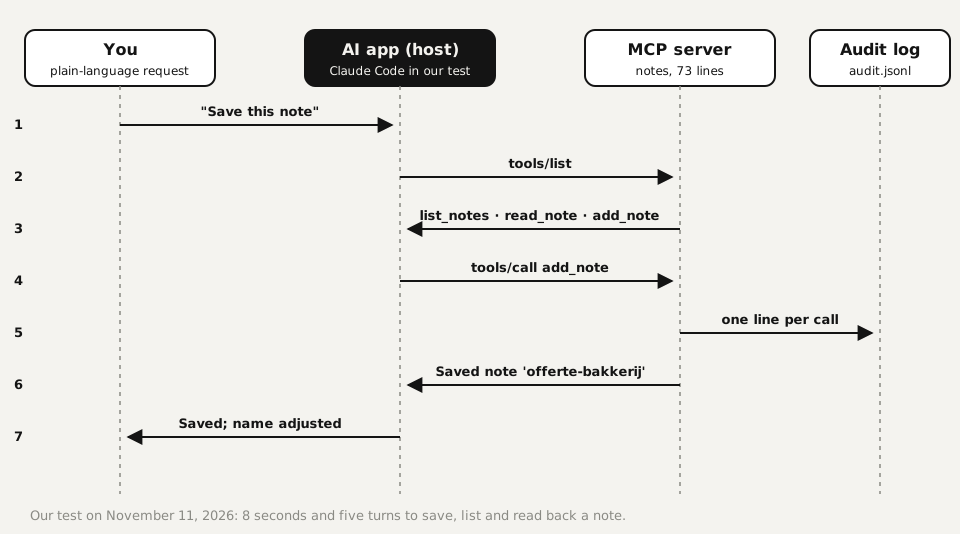
The host asks each server for its list (tools/list), shows the descriptions to the model, and the model decides which tool to call (tools/call). Messages are JSON-RPC 2.0. Local servers run on your machine and talk over stdio; remote servers run elsewhere and talk over Streamable HTTP, usually with OAuth for sign-in.
The protocol has dated versions; the current one is 2026-07-28, according to the official docs on November 11, 2026.
In practice almost everything is tools. The description you write for each tool matters more than you'd expect: it's the only thing the model reads when deciding whether to use it.
We built an MCP server and connected it: what happened
Our test server stores plain-text notes. list_notes and read_note only read; add_note writes a new file and refuses to overwrite one. Every call goes to an audit log. Here's the core:
from mcp.server import MCPServer

mcp = MCPServer("notes")

@mcp.tool()
def add_note(name: str, text: str) -> str:
    """Save a new note. Refuses to overwrite an existing note."""
    audit("add_note", name=name, chars=len(text))
    path = NOTES_DIR / f"{safe_name(name)}.md"
    if path.exists():
        return f"A note called '{path.stem}' already exists."
    path.write_text(text, encoding="utf-8")
    return f"Saved note '{path.stem}'."

if __name__ == "__main__":
    mcp.run(transport="stdio")
With the official Python SDK, a typed function with a docstring becomes a tool. The docstring is what the model reads.
We added it to Claude Code with one command. Everything after the double dash is how the server starts:
claude mcp add --scope project notes -- uv run --directory /path/to/notes notes.py| What we did | What happened |
|---|---|
| Called all three tools from a plain MCP client, no model involved | All worked. A name like ../../etc/passwd returned "No note called …" and read nothing outside the folder. |
Added the server with --scope project | Claude Code wrote it to .mcp.json and listed it as "Pending approval". Servers from a shared project file stay off until someone approves them. |
| Asked in plain English to save, list and read back a note, with the three tools allowed | Done in 8 seconds and five turns, with three lines in the audit log. We used a Dutch note name, "offerte bakkerij" (bakery quote); Claude Code mentioned unprompted that the server had stored it as offerte-bakkerij. |
| Same request with no tool permission | Claude Code refused the write, said it needed permission and created no file. |
The renamed note is the interesting part. The server cleans every name so a request can never write outside its folder. The host doesn't do that for you; path checks, overwrite rules and logging belong in the server.
MCP vs. API: which one you need
| API | MCP server | |
|---|---|---|
| Built for | A developer writing code | An AI app that chooses what to call |
| Description | Docs for humans | A description per tool that the model reads |
| Reuse | Each app writes its own integration | Any MCP host can use it |
| Discovery | Read the docs | The host asks for the tool list at runtime |
An MCP server often wraps an API. Use the API directly when code decides what happens; add an MCP server when you want an AI app to decide.
We split it the same way. Our scheduled routines that run identically every day call APIs straight from code, which is cheaper, predictable and easy to test. MCP servers go where an agent has to choose, like searching an inbox. Sending gets stricter treatment: outgoing mail and messages always go through one fixed route with checks built in, even when an agent made the call, because a sent message can't be taken back.
What people use MCP servers for
- Office work: read mail, draft a reply, book a meeting. We use separate accounts for reading and for sending.
- Browser control for sites with no integration, such as a supplier portal.
- Running your own systems: execute commands and read files on a server you manage.
- Searching your own knowledge: notes, past conversations, internal docs.
- Developer work: GitHub issues, Figma designs, browser tests.
Does it work beyond Claude? Yes. The MCP docs list Claude and ChatGPT among the assistants that support it, along with VS Code, Cursor and other developer tools. The exact steps to add a server differ per app and sometimes per plan.
Is MCP safe? A short checklist
MCP defines the message format, not what a server may do. The protocol's own security guide is blunt: a local MCP server is an ordinary process that can read anything your account can, including keys and credentials, and can reach the internet. These are the rules we run by:
- Know what you run. Install servers from the service's own maker or a source you've checked, pin the version, and remove servers you no longer use.
- Start read-only. Grant write tools once you know what happens if the model misuses them.
- One narrow account per connection. Never your main login. Then you can revoke one connection without touching the rest.
- Confirm risky actions. Sending, paying and deleting go through a separate check in code before anything goes out, so the model's judgment is never the last line.
- Log every call. Our test server wrote one line per action, so you can see exactly what happened afterwards.
Questions
What is an MCP server in simple terms?
A small program that offers a piece of software, like a calendar or a database, to AI apps in a standard format. The AI sees a list of actions with descriptions and can use them on its own. Ours was 73 lines of Python.
What does MCP stand for?
Model Context Protocol, an open standard for connecting AI applications to external tools and data. It has nothing to do with the Microsoft Certified Professional certification that shares the acronym.
How does an MCP server work?
The AI app connects, asks for the list of tools, and the model calls whichever tool fits the request. Local servers talk over stdio, remote ones over Streamable HTTP, using JSON-RPC messages.
Does ChatGPT support MCP?
Yes. ChatGPT is listed alongside Claude, VS Code and Cursor as an MCP client in the official MCP documentation.
How do I add an MCP server to Claude Code?
Run claude mcp add <name> -- <start command> for a local server, or claude mcp add --transport http <name> <url> for a remote one. Then run claude mcp list to see whether it connected, failed or is waiting for approval.
Sources
More in aI agents and agentic work
- How to Build an MCP Server: A Tested Python and Node ExampleBuild a working MCP server in Python or Node, test it without a model, inspect it, then connect it to an AI app. Full code and the errors we hit.
- Playwright MCP Server: Let an AI Agent Use a Real Browser, Tested on WindowsGive an AI agent a real browser with Playwright MCP. Setup for Claude Code and others, a tested run on Windows, what it returns and how to keep it safe.
- AGENTS.md Explained: One Instruction File for Codex, Claude Code and Other AgentsAGENTS.md is the shared instruction file for coding agents. How Codex reads it, when Claude Code does, and the one-line fix we tested.
- Long-Running AI Agents: Build a Harness That Survives Limits and Resumes Where It StoppedHow to keep an AI agent working for hours: its own process, a time limit, a saved session to resume and a report check. With a 67-line harness we tested.
Also useful
- Building n8n workflows with Claude Code: what works and what you still checkClaude Code built, validated and tested three n8n workflows through n8n's MCP server. What worked, what you still check yourself, and the prompt to copy.
- Claude Code MCP Servers: Add Them, Test Them, Remove ThemHow to add an MCP server to Claude Code with claude mcp add, pick the right scope, test it in a real session and remove it. Tested on Windows and Linux.
- What Are Claude Skills? How They Work, a Tested Example, and When to Use OneClaude Skills explained with a working editing skill we tested 11 times in Claude Code: how often it loaded on its own and how to force it.