Long-Running AI Agents: Build a Harness That Survives Limits and Resumes Where It Stopped
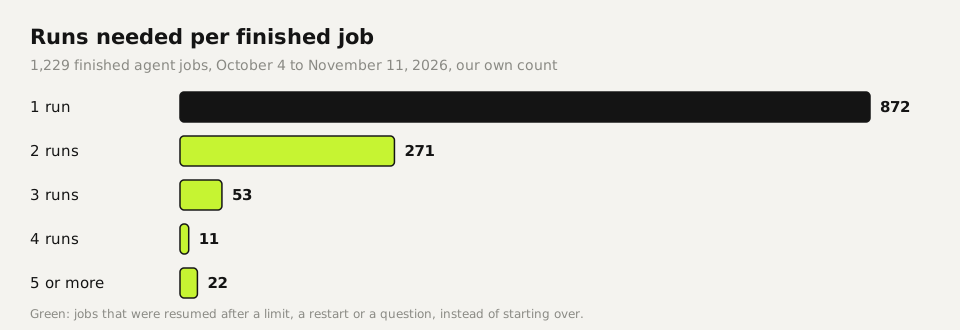
A long-running AI agent needs a harness: a small wrapper around the agent. It starts the agent in its own process, gives it a time limit and saves its session so it can be resumed. It also checks a final report before the job counts as done. We run every job that outlasts a chat this way, and 1,229 of them finished between October 4 and November 11, 2026. Below is a 67-line harness you can copy, the test we ran on it, and the one bug that kept our first test process hanging for three minutes.
Tested by us on 11 November 2026.
What a harness does
Agents stop for dull reasons: a usage limit, a server restart, a chat window that closes, a question nobody answers. Without a harness, the work is lost or starts over. With one, the job has an identity outside the agent: a folder, a session id, a status file and a rule for when it's done.
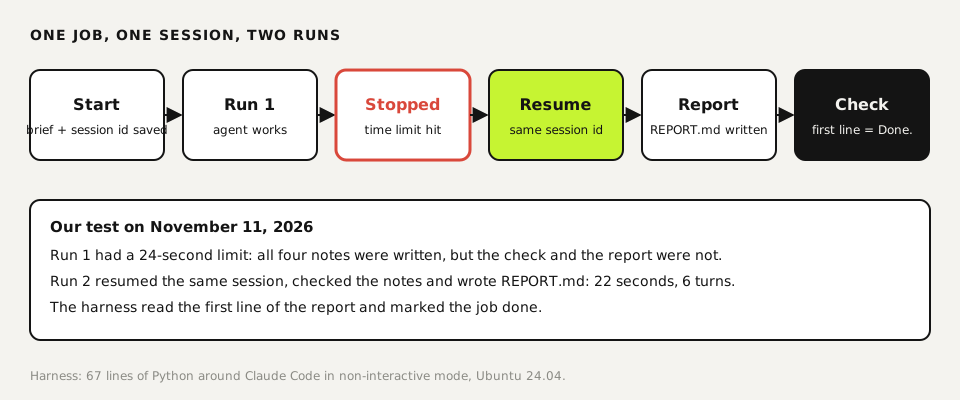
- Its own process. A helper agent started from a chat dies when the chat ends. Long work runs as a separate process, on Linux ideally as its own service.
- A time limit. Every job ends by itself. Ours default to six hours; the test below used 24 seconds on purpose.
- A session id chosen up front. The harness picks the id before the agent starts, so it's known even if the process is killed a second later.
- A resume path. After a limit or crash the harness continues the same session with "continue where you left off", instead of starting over and paying twice.
- A report check. The job counts as done only when REPORT.md exists and its first line is exactly "Done."
Before you start
- Python 3.8 or newer.
- A coding agent with a non-interactive mode and resumable sessions. We used Claude Code (
claude -p,--session-id,--resume); Codex hascodex execandcodex exec resume. - A folder per job. The agent may write only there.
Build and test the harness
Save the harness
Copy this into
harness.py. It adds the same rules to every brief, writesstatus.jsonand a smallstatus.htmlafter every change, and checks the report at the end. The line withstdin=subprocess.DEVNULLmatters; see step 4.python#!/usr/bin/env python3 """Minimal harness for a long-running coding-agent job. start: harness.py start <jobdir> <brief.md> [--minutes N] resume: harness.py resume <jobdir> [--minutes N] Each job gets its own session id (chosen up front), a time limit, a status file, a log, and must end with REPORT.md whose first line is "Done." or "Not done: ...". Tested with Claude Code 2.1.321 in non-interactive mode (-p). MIT licence. """ import json, subprocess, sys, time, uuid, html, pathlib AGENT = ["claude", "-p", "--output-format", "json", "--allowedTools", "Read,Write,Edit,Glob,Grep"] RULES = """ Rules for this job: - Work only inside this folder. Do not send, publish or delete anything outside it. - Finish the whole task; do not stop to ask questions. - End by writing REPORT.md. First line: "Done." or "Not done: <reason>". Then: what you made, how you checked it, what is still open. """ def save(job, **kw): st = json.loads((job / "status.json").read_text()) if (job / "status.json").exists() else {} st.update(kw, updated=time.strftime("%Y-%m-%d %H:%M:%S")) (job / "status.json").write_text(json.dumps(st, indent=2)) rows = "".join(f"<tr><th>{html.escape(k)}</th><td>{html.escape(str(v))}</td></tr>" for k, v in st.items()) (job / "status.html").write_text(f"<!doctype html><meta charset=utf-8><title>Job status</title>" f"<style>body{{font:16px system-ui;margin:32px}}th{{text-align:left;padding:6px 16px 6px 0;color:#555}}td{{padding:6px 0}}</style>" f"<h1>Job: {html.escape(job.name)}</h1><table>{rows}</table>") return st def run(job, prompt, extra, minutes): t0 = time.time() try: p = subprocess.run(AGENT + extra + [prompt], cwd=job, capture_output=True, text=True, timeout=minutes * 60, stdin=subprocess.DEVNULL) # never wait on a terminal out = json.loads(p.stdout or "{}") state = "finished" if p.returncode == 0 and not out.get("is_error") else "error" (job / "log.jsonl").open("a").write(json.dumps({"t": time.time(), "result": out.get("result", "")[:2000]}) + "\n") return save(job, state=state, turns=out.get("num_turns"), seconds=round(time.time() - t0, 1)) except subprocess.TimeoutExpired: return save(job, state="stopped: time limit", seconds=round(time.time() - t0, 1)) def check_report(job, st): rep = job / "REPORT.md" first = rep.read_text().splitlines()[0].strip() if rep.exists() else "" ok = first == "Done." return save(job, report=first or "(missing)", done=ok) def main(): cmd, job = sys.argv[1], pathlib.Path(sys.argv[2]).resolve() minutes = float(sys.argv[sys.argv.index("--minutes") + 1]) if "--minutes" in sys.argv else 60 if cmd == "start": job.mkdir(parents=True, exist_ok=True) sid = str(uuid.uuid4()) save(job, session=sid, state="running", runs=1) brief = pathlib.Path(sys.argv[3]).read_text() st = run(job, brief + RULES, ["--session-id", sid], minutes) elif cmd == "resume": st = json.loads((job / "status.json").read_text()) save(job, state="running", runs=st.get("runs", 1) + 1) st = run(job, "Continue where you left off. Do not redo finished work." + RULES, ["--resume", st["session"]], minutes) st = check_report(job, st) print(json.dumps(st, indent=2)) if __name__ == "__main__": main()Write a brief
Plain text: what to make and how to check it. The harness appends the rules about the folder, finishing without questions and writing REPORT.md.
textWrite four short explainer notes for a small bakery's new staff, one file each: opening.md, till.md, allergens.md, deliveries.md. About 120 words each. Then check each file exists and is between 90 and 160 words.Start it, then interrupt it on purpose
We gave the first run 24 seconds. The agent wrote all four notes and was stopped before it could check them or write the report. Status:
stopped: time limit, report missing.bashpython3 harness.py start job2 brief.md --minutes 0.4Resume the same session
The second run picked up the same conversation, checked the notes and wrote the report in 22 seconds and 6 turns. In our first attempt this step hung. The agent had written its report after 9 seconds, but the process kept running until we stopped it at 195 seconds. It was most likely waiting on input from the terminal: with standard input closed, the repeat test exited normally.
bashpython3 harness.py resume job2 --minutes 5
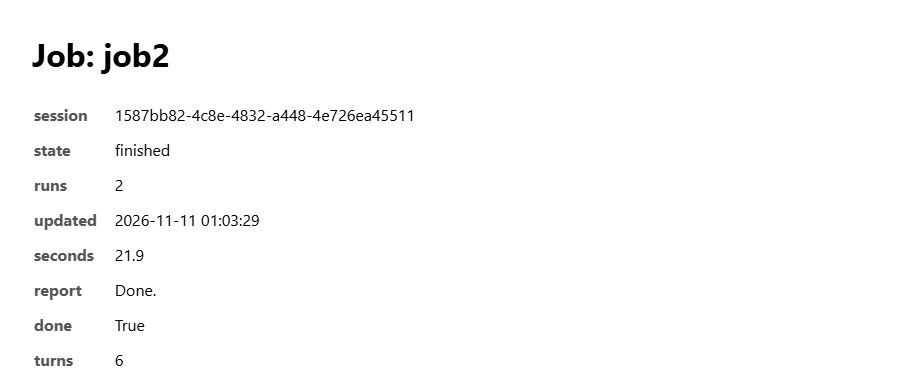 (opens at full size)
How this scales: our numbers
Our production version is longer, but it does the same five things. It also plans the resume itself. When a run ends on a usage limit, the next run is scheduled for when the limit resets, or after 10, 30 or 60 minutes if that time is unknown. A job that is waiting on a person's answer is never resumed automatically, because it would continue without the decision it asked for.
Keep the agent talking while it works
Hours of silence make people stop jobs that were fine. Our agents post one plain-language sentence every 10 to 20 minutes: what they did and why, without code or paths. Technical detail goes in a collapsible field. "The server side works; now I'm writing the tests, because the access rules must be provably closed" tells you more than a log line.
If it goes wrong
| What you see | Cause | Fix |
|---|---|---|
| The agent is finished but the process never exits | It's waiting on input from the terminal | Start it with standard input closed (stdin=subprocess.DEVNULL) |
| A resumed job redoes finished work | The resume prompt doesn't say what to skip | Say "do not redo finished work" and keep outputs in files the agent can see |
| The report says done but nothing works | The agent graded itself | Make done a check you run: tests, word counts, a reviewer |
| Helper agents vanish halfway | They were started from a chat that ended | Run long work in its own process, never as a background helper of a chat |
Questions
What is an AI agent harness?
A small program around an agent. It starts the agent in its own process, sets a time limit and saves the session so it can resume. It also checks a final report before the job counts as done.
How do I keep an AI agent running for hours?
Don't run it inside a chat. Start it as its own process with a time limit, save the session id, resume after limits or crashes, and have it report progress in short sentences.
Can an AI agent resume after hitting a usage limit?
Yes, if you keep the session. With Claude Code, start with --session-id and continue with --resume. In our setup 357 of 1,229 finished jobs needed more than one run.
How do I know a long-running agent has finished?
Define done as something you can check: a report whose first line says "Done.", passing tests, or a review score. Don't accept the agent's own word.
Sources
- Claude Code: Run Claude Code programmatically checked on
- Claude Code: CLI reference (--session-id, --resume) checked on
- Anthropic: Building effective agents checked on
More in aI agents and agentic work
- What Is an AI Agent? How Agents Work, Shown With Our Own JobsAn AI agent takes a goal, picks its own steps, uses tools and checks its work. Explained with data from 1,373 agent jobs we ran ourselves.
- Agentic AI vs. AI Agents: What Differs When You Run ThemAn AI agent does one job; agentic AI is the setup that lets agents act on their own, often several at once. Shown with 1,379 jobs from our own work.
- AI Agent Examples: Ten Agents We Run Every Day, With What Each Run CostsTen AI agents that run every day in our own business: what each does, how often, what one run costs and where a person still signs off.
- Agentic AI vs. Generative AI: We Ran the Same Tasks Both WaysGenerative AI writes the answer; agentic AI also does the work. We ran two real tasks both ways and counted the steps a person still had to take.
Also useful
- Building n8n workflows with Claude Code: what works and what you still checkClaude Code built, validated and tested three n8n workflows through n8n's MCP server. What worked, what you still check yourself, and the prompt to copy.
- Build a Website with Claude Code Without the Generic AI LookWe built one site twice with Claude Code: one prompt versus a design decision first. Screenshots at 1440 and 390 px, the prompts, and the checks we use.
- Claude Code Agent Teams: Setup, a Real Test, and When They're Worth ItHow to turn on Claude Code agent teams and what a three-teammate review gave us: 24 findings versus 12 from one session, at seven times the cost.