How to Update Claude Code, Choose a Channel and Pin a Version
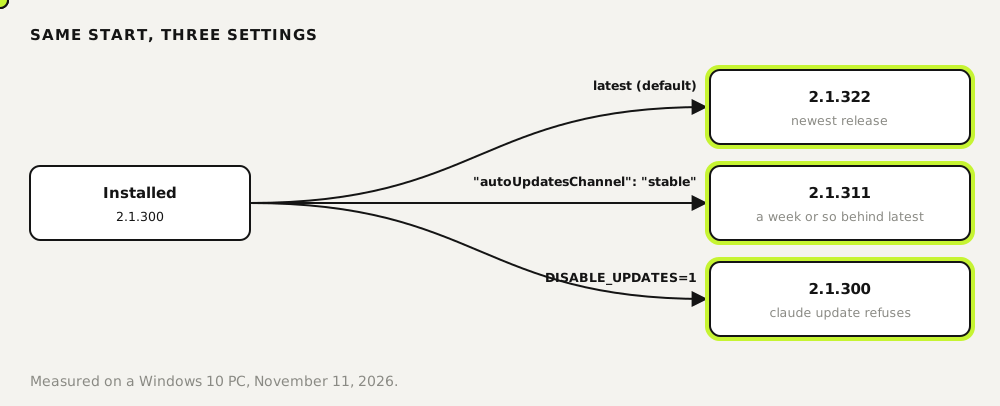
Run claude update to install the newest Claude Code right away. A native install also updates itself in the background; Homebrew, WinGet, npm and Linux packages need their own upgrade command. We tested it on a Windows 10 PC: claude update took version 2.1.300 to 2.1.322 in one step. On the stable channel the same start ended at 2.1.311, and with DISABLE_UPDATES set the command refused.
Tested by us on 11 November 2026.
Update by install method
First find out how you installed it. claude doctor prints a Running: line such as native (2.1.322), plus whether auto-updates are on. Then use the matching command.
| Installed with | Update command | Updates on its own? |
|---|---|---|
| Native installer (curl, PowerShell, CMD) | claude update | Yes, in the background; takes effect next start |
| Homebrew | brew upgrade claude-code or brew upgrade claude-code@latest | No |
| WinGet | winget upgrade Anthropic.ClaudeCode | No |
| npm | npm install -g @anthropic-ai/claude-code@latest | Yes, if npm can write without sudo |
| apt / dnf / apk | sudo apt update && sudo apt upgrade claude-code (or dnf/apk equivalent) | No |
| VS Code extension | Update it in the Extensions view | Follows VS Code's extension updates |
Skip npm update -g for this. According to the docs it respects the version range from the original install and may not move you to the newest release. On WinGet the upgrade can fail while Claude Code is running, because Windows locks the file; close your sessions first.
Update now with claude update
Check your version
Run
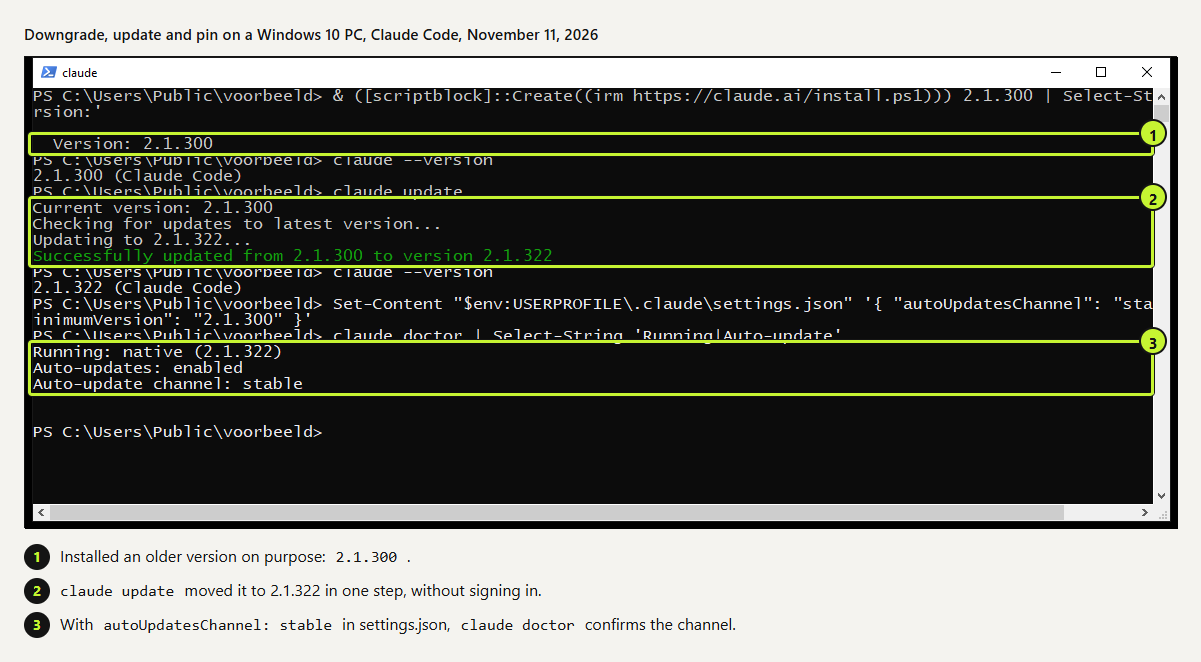
claude --version. Ours said2.1.300 (Claude Code)because we had installed an older release on purpose.bashclaude --versionUpdate
Run
claude update. It prints the current version, the channel it checks and the target, thenSuccessfully updated from 2.1.300 to version 2.1.322. You don't need to be signed in.bashclaude updateRestart open sessions
Running sessions keep the old version until you start them again. Exit and run
claude -cto continue where you were.
 (opens at full size)
Latest or stable: pick a channel
Claude Code has two release channels. latest, the default, gets every release as soon as it ships. stable serves a version the docs describe as typically about a week old, skipping releases with major regressions. On our test PC that difference was concrete: on the same morning, latest meant 2.1.322 and stable meant 2.1.311.
{
  "autoUpdatesChannel": "stable",
  "minimumVersion": "2.1.300"
}~/.claude/settings.json. You can also switch in /config under Auto-update channel.
minimumVersion is a floor: updates never install anything older. Without it, switching an up-to-date install to stable could move you back. One catch from the docs: a newly launched model can need a newer version than stable serves, so switch back to latest if a model doesn't show up.
Stop updates or stay on one version
| Setting | What it stops | What still works |
|---|---|---|
DISABLE_AUTOUPDATER=1 | Background updates | claude update and claude install by hand |
DISABLE_UPDATES=1 | Every update path | Nothing: claude update refuses |
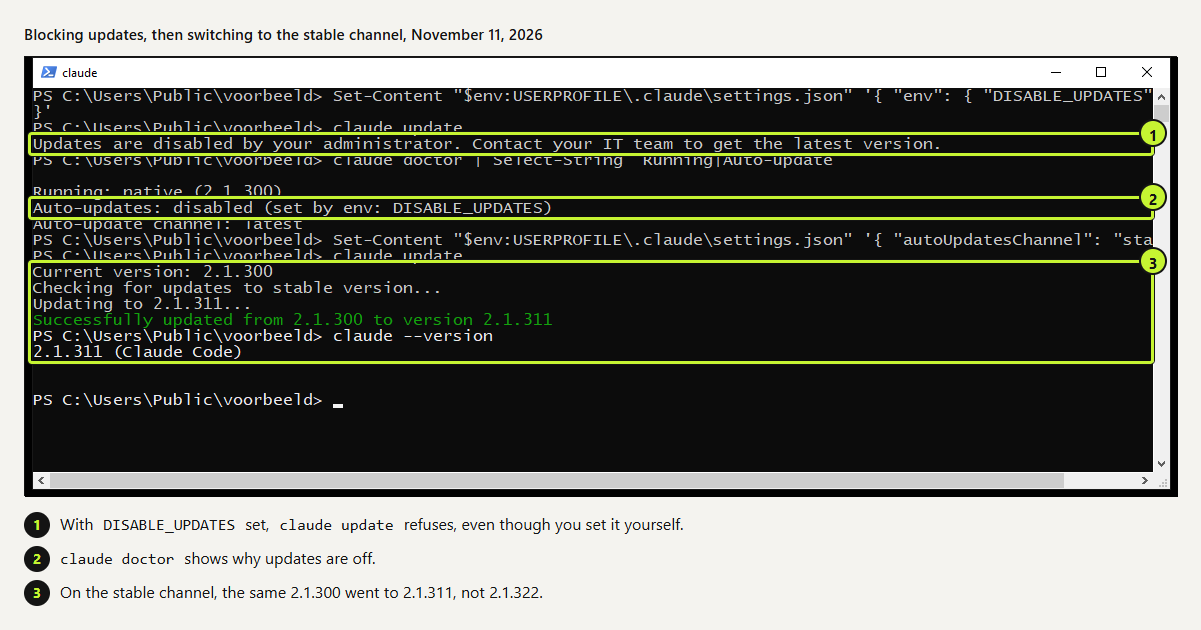
Put either one under env in settings.json. We tested DISABLE_UPDATES: claude update answered Updates are disabled by your administrator. Contact your IT team to get the latest version. That's the message even when you set it yourself, so leave a note for whoever comes after you.
 (opens at full size)
On machines that run scheduled jobs unattended, we turn off background updates and update on purpose, at a moment we pick. A tool that changes under a job at night makes failures harder to trace. On machines where people work interactively, we stay on latest.
Go back to an older version
The native installer takes a version number. This is how we installed 2.1.300 for the test; it works the same for rolling back after a bad release. Turn off auto-updates afterwards, or the next start pulls you forward again.
curl -fsSL https://claude.ai/install.sh | bash -s 2.1.300macOS, Linux and WSL. On Windows PowerShell: & ([scriptblock]::Create((irm https://claude.ai/install.ps1))) 2.1.300
When updating goes wrong
Multiple installations foundinclaude doctor. An old npm install sits next to the native one, and the PATH order decides which runs. Remove the one you don't use. We hit this on a Linux machine.- Package managers lag behind. The same day
claude updategave 2.1.322, WinGet listedAnthropic.ClaudeCodeat 2.1.317. Use the native installer if you want releases on day one. Auto-update failedin the footer. Runclaude doctor; it shows the last update attempt and the error. The troubleshooting docs list fixes per cause.
Questions
How do I update Claude Code?
Run claude update for a native install. Homebrew, WinGet, npm and Linux packages use their own upgrade command; see the table at the top.
Does Claude Code update automatically?
Native and npm installs do, in the background, and the new version starts next time. Homebrew, WinGet, apt, dnf and apk don't, unless you set CLAUDE_CODE_PACKAGE_MANAGER_AUTO_UPDATE=1 for Homebrew or WinGet.
How do I check which version I have?
claude --version prints it. claude doctor adds the install method, the channel and the last update attempt.
How do I stop Claude Code from updating?
Set DISABLE_AUTOUPDATER=1 to stop background updates, or DISABLE_UPDATES=1 to block claude update too.
Sources
More in claude in practice
- Installing Claude Code: Pick the Right Version, Install It, Run a First TaskInstall Claude Code with one command, tested on a fresh Mac, Ubuntu and Windows 10: which version to pick, the PATH fix, real errors and a first task.
- Claude Code Commands: The Cheat Sheet We Use Every DayThe Claude Code commands, flags and shortcuts worth learning first, on one printable cheat sheet, plus how to make your own slash command. Tested Nov 2026.
- How to install Claude Code on WindowsInstall Claude Code on Windows 10 or 11 with one PowerShell command, fix the PATH step the installer skips, and choose between native Windows and WSL.
- How to Install Claude Code on a MacInstall Claude Code on a Mac with one Terminal command, then fix the PATH step the installer leaves to you. Tested on Apple silicon, plus Homebrew and npm.
Also useful
- AGENTS.md Explained: One Instruction File for Codex, Claude Code and Other AgentsAGENTS.md is the shared instruction file for coding agents. How Codex reads it, when Claude Code does, and the one-line fix we tested.
- How to Build an MCP Server: A Tested Python and Node ExampleBuild a working MCP server in Python or Node, test it without a model, inspect it, then connect it to an AI app. Full code and the errors we hit.
- Building n8n workflows with Claude Code: what works and what you still checkClaude Code built, validated and tested three n8n workflows through n8n's MCP server. What worked, what you still check yourself, and the prompt to copy.