How to Install Claude Code on a Mac
One Terminal command installs Claude Code on a Mac, and on our Apple silicon test Mac it took 17 seconds. What several install guides get wrong is the next step. They say the installer adds itself to your shell config; in our test with version 2.1.322 it didn't. It printed a PATH warning, and a new Terminal window said "claude not found" until we added the line it suggested. Below: the install, how to check whether you need that line, Homebrew and npm, and how to remove it again.
Tested by us on 11 November 2026.
What you need
- macOS 13 or newer, on Apple silicon or Intel, with at least 4 GB of memory, according to Anthropic's system requirements.
- An internet connection while you work.
- A paid account: Claude Pro, Max, Ultra, Team or Enterprise, or a Console account with API credit. The free claude.ai plan doesn't include Claude Code.
- No admin password, no Homebrew and no Node.js. Our test Mac had neither installed.
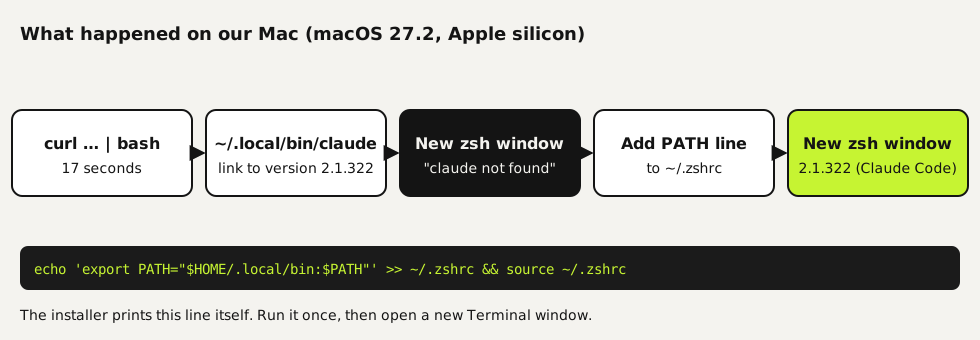
Install Claude Code in four steps
Open Terminal
Press Command and Space, type Terminal and press Enter. The window opens in your home folder, and the prompt usually ends in
%, which means your shell is zsh, the default on current Macs.Run the installer
Paste this line and press Enter. It shows no progress while it downloads, so give it a moment: ours took 17 seconds.
bashcurl -fsSL https://claude.ai/install.sh | bashAdd the folder to your PATH
Read the end of the output. If it warns that
~/.local/binis not in your PATH, check it with the first line below, from Anthropic's troubleshooting guide. No output means you need the fix: run the other two lines once, for zsh. Running them twice adds the line twice.bashecho $PATH | tr ':' '\n' | grep -Fx "$HOME/.local/bin" echo 'export PATH="$HOME/.local/bin:$PATH"' >> ~/.zshrc source ~/.zshrcOpen a new window and check
Close Terminal and open a new window, then type
claude --version. We got2.1.322 (Claude Code). Now go to a project folder and typeclaudeto sign in.bashclaude --version
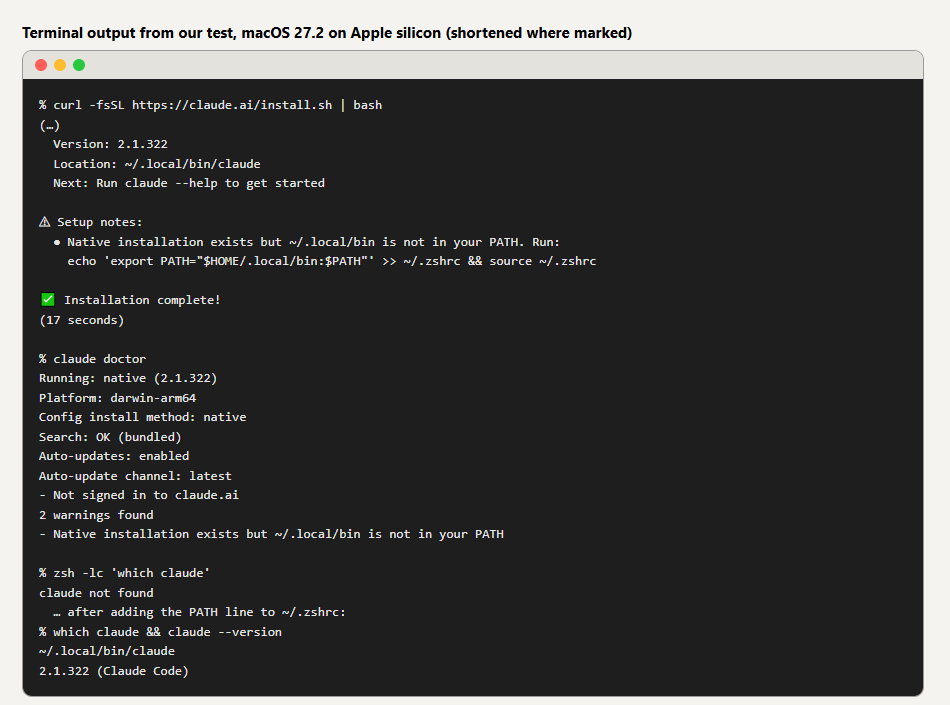 (opens at full size)
How we tested it
We ran the installer on a Mac with macOS 27.2 on Apple silicon, sending the commands over a remote connection rather than typing in Terminal.app, and read back the output. To leave the owner's own setup untouched, we pointed HOME at a temporary folder and deleted it afterwards. That temporary home had no ~/.zshrc, so there was nothing that could already contain the PATH line. On a Mac where another tool has added ~/.local/bin to your ~/.zshrc, claude may work straight away; the check in step 3 tells you. Anthropic's troubleshooting guide describes the same manual step, which matches what we saw.
| Check | Result |
|---|---|
| Time to install | 17 seconds |
| Version | 2.1.322 (Claude Code), platform darwin-arm64 |
| Where it went | ~/.local/bin/claude, a link to ~/.local/share/claude/versions/2.1.322 |
claude in a new zsh window, before the PATH line | claude not found |
| After the PATH line, in a new window | Found, version 2.1.322 |
claude doctor | Native install, auto-updates enabled, channel latest, 2 warnings: PATH and not signed in |
Native installer, Homebrew or npm?
All three put the same program on your Mac; they differ in how updates arrive. Our Mac had neither Homebrew nor Node.js, so we tested only the native installer. The Homebrew and npm commands below are Anthropic's, not ours.
| Method | Command | Updates | Choose it when |
|---|---|---|---|
| Native installer | curl -fsSL https://claude.ai/install.sh | bash | Automatic, in the background | You want the simplest setup that keeps itself current |
| Homebrew | brew install --cask claude-code | Manual with brew upgrade claude-code. The claude-code cask is about a week behind; claude-code@latest gets new versions on day one | You manage everything with Homebrew and prefer a tested version |
| npm | npm install -g @anthropic-ai/claude-code | Upgrade with npm install -g @anthropic-ai/claude-code@latest | You already work with Node.js 22 or newer. Never use sudo with it |
We'd pick the native installer, for reasons we saw in the test: it needed nothing else on a Mac without Homebrew or Node.js, it took 17 seconds, and claude doctor reported auto-updates switched on from the start. With Homebrew or npm you upgrade by hand.
If it goes wrong
| What you see | What's going on | Fix |
|---|---|---|
zsh: command not found: claude | ~/.local/bin isn't in your PATH yet | Run the PATH line from step 3, then open a new window |
| Still not found after the PATH line | The old window doesn't see the change, or you use bash instead of zsh | Open a new window. In bash, add the same line to ~/.bash_profile |
claude runs an old version | A second install, for example from npm or Homebrew, comes first in your PATH | Run which -a claude and remove the one you don't use |
Doctor warns Not signed in to claude.ai | Normal before your first session | Type claude in a project folder and sign in in the browser |
Remove it again
rm -f ~/.local/bin/claude
rm -rf ~/.local/share/claude
Uninstall commands for a native installation, from Anthropic's setup page. Your settings in ~/.claude stay unless you delete that folder too.
Using Windows as well? The steps there differ in one place, the PATH fix, which you do in PowerShell. See installing Claude Code on Windows. Once it runs, set up a CLAUDE.md file so Claude Code knows your project's rules from the first session.
Questions
Can I install Claude Code on a Mac without Homebrew?
Yes. The native installer needs only Terminal and curl, which every Mac has. Our test Mac had no Homebrew at all.
Does Claude Code work on Apple silicon?
Yes. We installed it on Apple silicon and claude doctor reported the platform as darwin-arm64. Intel Macs are supported too, according to the system requirements.
Is Claude Code free on a Mac?
Installing it is free. Using it needs a paid Claude plan (Pro or higher) or a Console account with API credit.
Is there a Claude Code app for Mac?
Yes. The Claude desktop app for macOS has a Code tab with Claude Code built in, so you don't need Terminal at all. A paid plan is still required.
Sources
More in claude in practice
- How to install Claude Code on WindowsInstall Claude Code on Windows 10 or 11 with one PowerShell command, fix the PATH step the installer skips, and choose between native Windows and WSL.
- CLAUDE.md and Claude Code Memory: A Template We TestedHow Claude Code memory works through CLAUDE.md, with a template we tested: rules that stick, background files that load only when needed, and AGENTS.md.
- Installing Claude Code: Pick the Right Version, Install It, Run a First TaskInstall Claude Code with one command, tested on a fresh Mac, Ubuntu and Windows 10: which version to pick, the PATH fix, real errors and a first task.
- How to Update Claude Code, Choose a Channel and Pin a VersionUpdate Claude Code with one command, switch to the stable channel or stop updates. Tested on Windows: 2.1.300 to 2.1.322, stable gave 2.1.311.
Also useful
- AGENTS.md Explained: One Instruction File for Codex, Claude Code and Other AgentsAGENTS.md is the shared instruction file for coding agents. How Codex reads it, when Claude Code does, and the one-line fix we tested.
- How to Build an MCP Server: A Tested Python and Node ExampleBuild a working MCP server in Python or Node, test it without a model, inspect it, then connect it to an AI app. Full code and the errors we hit.
- Building n8n workflows with Claude Code: what works and what you still checkClaude Code built, validated and tested three n8n workflows through n8n's MCP server. What worked, what you still check yourself, and the prompt to copy.