CLAUDE.md and Claude Code Memory: A Template We Tested
Claude Code's memory starts with CLAUDE.md, a plain text file in your project that Claude Code reads at the start of every session. It's where you put the rules you'd otherwise repeat in every prompt. We tested the template below on a scheduling request. Without it, Claude Code booked an outdoor paint job for next week, in November. With it, Claude Code read our season rule, declined, and offered three alternatives in the report format we asked for. Here is the file, how Claude Code loads it, and what the tests showed.
Tested by us on 11 November 2026.
How Claude Code loads its memory
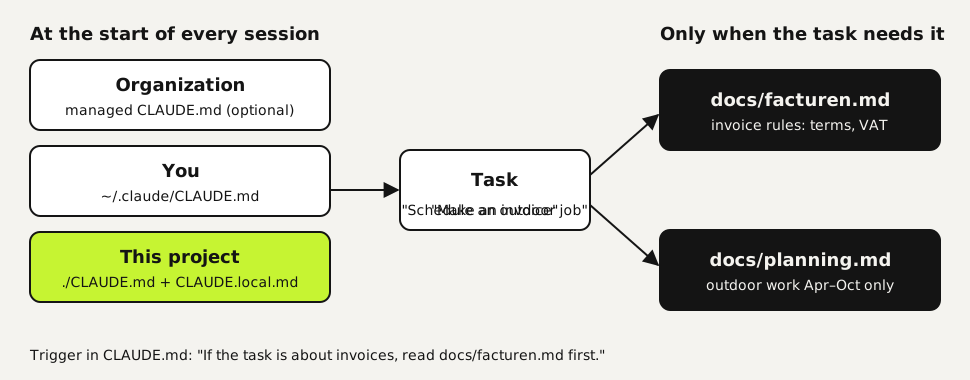
Claude Code stacks several CLAUDE.md files rather than picking one: your organization's managed file if IT set one up, then your personal file, then the project's. Files in subfolders, and any background file you point to, load later, once the work gets there. That keeps the context window, the amount of text the model can hold at once, free for the actual task.
| File | Location | Applies to |
|---|---|---|
| Project instructions | ./CLAUDE.md or ./.claude/CLAUDE.md | Everyone on the project, committed to git |
| Personal project notes | ./CLAUDE.local.md (add it to .gitignore) | Only you, in this project |
| Personal instructions | ~/.claude/CLAUDE.md | Only you, in every project |
| Managed policy | macOS: /Library/Application Support/ClaudeCode/CLAUDE.md, Windows: C:\Program Files\ClaudeCode\CLAUDE.md, Linux: /etc/claude-code/CLAUDE.md | Every user on the machine, loaded first |
There's a second layer called auto memory: notes Claude Code writes itself when you correct it, stored per project under ~/.claude/projects/. The first 200 lines or 25 KB of it load into every session. CLAUDE.md is the part you control, so it's where hard rules belong.
Write a CLAUDE.md in five steps
Generate a draft with /init
Open Claude Code in your project folder and run
/init. It scans the project and writes a CLAUDE.md with build commands and layout. On our small test project it took 8 seconds and produced 19 lines. It noticed the code used exact decimal math but couldn't know why. The why is yours to add.text/initGive every hard rule a date and a reason
A bare rule like "always use Decimal" gets misapplied a few weeks later, once nobody remembers what it protects. Add the date, the incident that caused it and what enforces it. With the reason in hand, Claude Code can apply the rule to cases you didn't list, such as an average or a percentage.
Move background into separate files with a trigger
Everything in CLAUDE.md costs context in every session, relevant or not. Keep only the hard rules in the file. Put topic background in its own file and add one line saying when to read it: "If the task is about invoices, VAT or payment terms, read docs/facturen.md first."
Define the report format
You only see Claude Code's final message, not everything it did along the way. Ask for a fixed shape: done or not done, what changed, how it was checked, what's still open.
Test it on a real task
Run the same task in a fresh session with and without the rule. If the rule doesn't stick, make it more concrete or move it up. Keep each file under 200 lines, as the documentation recommends.
The template we tested
This is the CLAUDE.md we tested, written for the bookkeeping scripts of a made-up painting company. Copy the structure and swap in your own rules.
# Project instructions

Bookkeeping scripts for a small painting company. Python 3, standard library only.

## Hard rules

### Money (2026-03-04, hard rule)
Why: a float rounding error put an invoice 1 cent off from the books.
Rule: use Decimal for every amount, including averages and percentages. Round only for display: 2 places, ROUND_HALF_UP.
Enforced by: tests/test_money.py.

### Customer data (2026-05-12, hard rule)
Why: a test file with real customer names nearly went public.
Rule: use made-up names in examples and tests. Never write to export/.
Enforced by: pre-commit check.

## Read first, when the task calls for it
- Invoices, VAT or payment terms? Read docs/invoices.md first.
- Scheduling or quotes? Read docs/planning.md first.

## How to report
1. First line: done, or not done and why.
2. What changed, in plain words.
3. How you checked it.
4. What's still open.
CLAUDE.md template, tested with Claude Code 2.1.321 on November 11, 2026.
What happened when we tested it
Every run was a fresh Claude Code 2.1.321 session on Ubuntu with no other settings loaded, and we read the session logs to see which files Claude Code opened. The runs are few, so read the table as examples of what happened, not as rates. The scheduling test ran with this English template; the other tasks used a Dutch version of the same file.
| Task | Without this CLAUDE.md | With this CLAUDE.md |
|---|---|---|
| Schedule an outdoor job for next week (1 run each) | Wrote schedule.md for November 16 to 20, with blanks for name and address | Read docs/planning.md, declined November, offered April, an exception or indoor work, in the four-part report format |
| Average invoice amount per customer (3 runs each) | Float math in 1 of 3 runs; the other 2 happened to use Decimal | Decimal with ROUND_HALF_UP in 3 of 3 |
| Invoice line with VAT and due date (2 runs) | Not run | Read the invoice rules first in 2 of 2; the 14-day term and the VAT choice ended up in the script |
| Count invoices per customer (2 runs) | Not run | Also read the invoice rules in 2 of 2, because the word "invoices" was in the task. Harmless, but not needed |
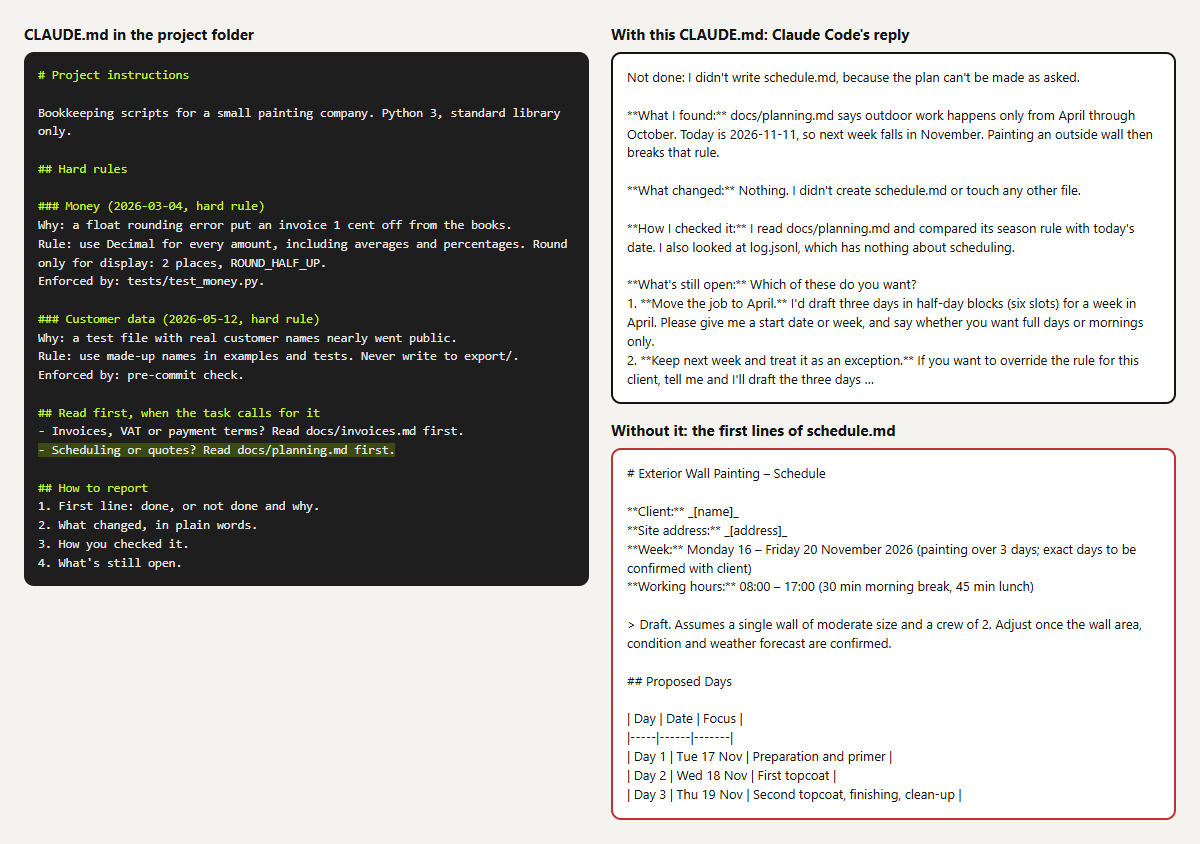 (opens at full size)
The lesson from the counting task: a trigger line matches words in the request, not what the task needs. With two short background files that costs almost nothing. With a dozen long ones, write narrower triggers.
When Claude Code ignores your CLAUDE.md
| Symptom | Likely cause | Fix |
|---|---|---|
| A rule is followed some of the time | The file is long or the rule is vague | Stay under 200 lines; make the rule concrete, with an example |
| Claude Code picks between two rules at random | Two files contradict each other, often a subfolder CLAUDE.md | Keep one rule and note which one it replaces |
| Something forbidden happens anyway | CLAUDE.md is context, not a lock | Block it with a PreToolUse hook, a script that refuses the action before it runs |
| Your AGENTS.md is ignored | A CLAUDE.md exists in the folder or above it | Put @AGENTS.md in your CLAUDE.md so both load |
An @ import doesn't load | The path contains a space | Escape each space with a backslash, or rename the folder |
CLAUDE.md vs. AGENTS.md
AGENTS.md is the same idea as an open format shared by several coding agents. Claude Code reads AGENTS.md only when there's no CLAUDE.md in the working folder or above it. If you run more than one agent, keep your rules in AGENTS.md and make a CLAUDE.md that contains only @AGENTS.md. Every agent then reads the same rules from one file. That's how we run Claude Code and Codex side by side.
Questions
Where does the CLAUDE.md file go?
In the root of your project, next to your other files. Rules that apply to all your projects go in ~/.claude/CLAUDE.md in your home folder.
How long should a CLAUDE.md be?
Anthropic's docs recommend under 200 lines per file. Longer files take more context and are followed less reliably. Move background into separate files that load on demand.
Is CLAUDE.md the Claude Code system prompt?
It works like an addition to it: Claude Code reads it before your first request. But it's a regular file you write and version, and Claude Code treats it as context rather than a rule it can never break.
Does Claude Code remember things between sessions without CLAUDE.md?
Yes, through auto memory: notes it saves when you correct it, loaded at the start of each session. You can read and edit those notes, but for rules you depend on, write them in CLAUDE.md.
Sources
More in claude in practice
- How to install Claude Code on WindowsInstall Claude Code on Windows 10 or 11 with one PowerShell command, fix the PATH step the installer skips, and choose between native Windows and WSL.
- Claude Code Best Practices: Six Habits, Each Tested Before We Recommend ItSix Claude Code best practices we tested on the same small project: rules with reasons, proof before done, hooks, when to plan and when subagents pay off.
- Claude Code Plan Mode: How to Use It, and When It Pays OffHow to use Claude Code plan mode, and what it changed in ten timed runs: no gain on clear tasks, but it asked the one question the direct run got wrong.
- Build a Website with Claude Code Without the Generic AI LookWe built one site twice with Claude Code: one prompt versus a design decision first. Screenshots at 1440 and 390 px, the prompts, and the checks we use.
Also useful
- AGENTS.md Explained: One Instruction File for Codex, Claude Code and Other AgentsAGENTS.md is the shared instruction file for coding agents. How Codex reads it, when Claude Code does, and the one-line fix we tested.
- How to Build an MCP Server: A Tested Python and Node ExampleBuild a working MCP server in Python or Node, test it without a model, inspect it, then connect it to an AI app. Full code and the errors we hit.
- Building n8n workflows with Claude Code: what works and what you still checkClaude Code built, validated and tested three n8n workflows through n8n's MCP server. What worked, what you still check yourself, and the prompt to copy.