How to Create Claude Skills That Load at the Right Moment
To create a Claude skill, write a folder with a SKILL.md: a description that says what it does and when to use it, a short numbered core, and longer details in separate files. Then test it with requests that should and shouldn't trigger it. Our meeting-notes skill was right on 9 of 10 test requests the first time. One change to the description fixed the miss, and one test run showed a rule we'd forgotten. Here is the whole process, with the files.
Tested by us on 11 November 2026.
Step 1: pick one job that comes back
A good skill does one job you'd otherwise explain again and again. Ours turns raw meeting notes into decisions, action items with owners and open questions. It's narrow enough to describe in one sentence, and the output is easy to check against the notes.
Step 2: write the description first
Claude decides whether to load a skill from its name and description alone, so this is the part that matters most. Say what the skill does, then when to use it, in the words people type. Anthropic's limits: a name of at most 64 lowercase letters, numbers and hyphens, without "claude" or "anthropic", and a description of at most 1,024 characters.
Step 3: keep the core short, put details next to it
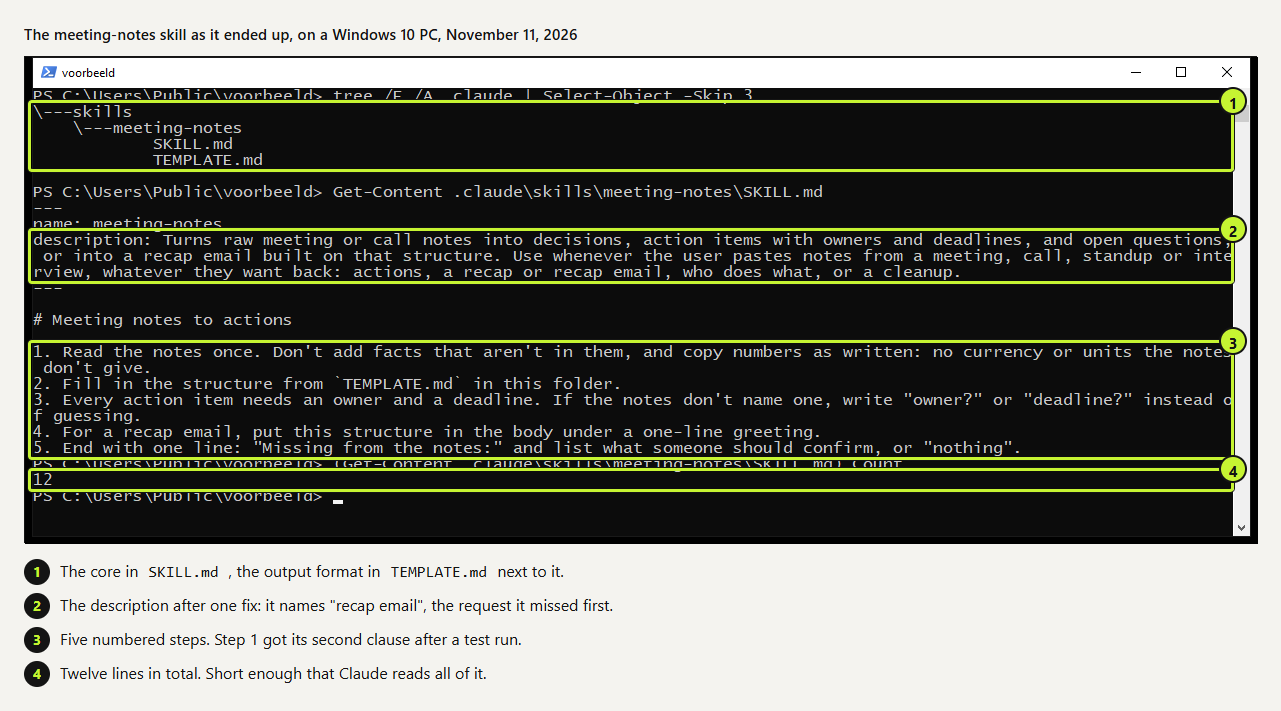
The body of SKILL.md is read in full when the skill loads. Ours is twelve lines: five numbered steps. The output format lives in TEMPLATE.md beside it, which Claude reads only when step 2 points there. Long reference material, examples and scripts belong in separate files too; they cost nothing until they're opened.
---
name: meeting-notes
description: Turns raw meeting or call notes into decisions, action items with owners and deadlines, and open questions, or into a recap email built on that structure. Use whenever the user pastes notes from a meeting, call, standup or interview, whatever they want back: actions, a recap or recap email, who does what, or a cleanup.
---

# Meeting notes to actions

1. Read the notes once. Don't add facts that aren't in them, and copy numbers as written: no currency or units the notes don't give.
2. Fill in the structure from `TEMPLATE.md` in this folder.
3. Every action item needs an owner and a deadline. If the notes don't name one, write "owner?" or "deadline?" instead of guessing.
4. For a recap email, put this structure in the body under a one-line greeting.
5. End with one line: "Missing from the notes:" and list what someone should confirm, or "nothing".meeting-notes/SKILL.md, final version after the tests below.
## Decisions
- <decision> (<who decided, if stated>)

## Action items
| What | Owner | Deadline |
|---|---|---|
| <action> | <name or owner?> | <date or deadline?> |

## Open questions
- <question>

Missing from the notes: <items or "nothing">
meeting-notes/TEMPLATE.md
 (opens at full size)
.claude/skills/ in a project, or in ~/.claude/skills/ for all your projects.Step 4: test with ten requests
Write five requests that should load the skill and five that shouldn't, including two near misses: a request that mentions a meeting but isn't about notes, and one that asks for a summary of something else. Run each once with Claude Code and check whether the skill loaded. This script does that for a project skill:
#!/usr/bin/env bash
# trigger-test.sh: run each request once, report whether the skill loaded.
# Usage: ./trigger-test.sh meeting-notes requests.txt   (one request per line)
skill="$1"; while IFS= read -r q; do
  claude -p "$q" --setting-sources project --output-format stream-json --verbose \
    < /dev/null > /tmp/run.jsonl 2>&1
  if grep -q "\"skill\":\"$skill\"" /tmp/run.jsonl; then r=loaded; else r=skipped; fi
  printf '%-8s %s\n' "$r" "${q:0:60}"
done < "$2"
--setting-sources project keeps your personal skills out of the test, so only the skill under test competes.
| Round | What we changed | Result |
|---|---|---|
| 1 | First description | 9 of 10 right. "Write a recap email of this meeting" didn't load the skill. |
| 2 | Added "or into a recap email" and "whatever they want back" to the description | Recap email loaded 3 of 3. Agenda and tagline requests still skipped it. |
| 3 | Added "copy numbers as written: no currency" to step 1 | The budget came back as "6000" instead of "€6000". |
The mistakes we made
- We described the input, not the requests. The first description listed actions and recaps, but a request for a recap *email* didn't match strongly enough. Naming the output people ask for fixed it.
- We trusted "don't add facts" to cover numbers. In the first run Claude wrote "€6000" and in the same breath noted that the currency wasn't stated. A general rule didn't stop a specific habit; a specific line did.
- We almost skipped the near misses. The agenda request mentions a meeting. It's the kind of request that shows whether a description is too broad, and it stayed unloaded in every run.
One more lesson from earlier tests with another skill: even a good description isn't a guarantee. Across eleven runs, one short request skipped the skill entirely. When the format matters, start the message with /meeting-notes and Claude Code always runs it.
Use the skill in claude.ai too
The same folder works in claude.ai. Zip it with the folder name matching the skill name, then go to Customize > Skills, click +, Create skill and Upload a skill. Code execution has to be on under Settings. Skills don't sync between Claude Code and claude.ai, so upload it again after every change.
Questions
How do I create a Claude skill?
Make a folder with a SKILL.md that starts with name and description, followed by short numbered instructions. Put it in .claude/skills/ for Claude Code, or upload it as a zip in claude.ai.
How long should a skill be?
As short as the job allows. Ours is twelve lines; Anthropic's guidance keeps the body of SKILL.md under 500 lines and moves the rest into separate files.
How do I know when my skill loads?
Test it with requests that should and shouldn't trigger it, and look for the Skill call in the transcript or in stream-json output.
Can a skill include scripts?
Yes. Scripts in the skill folder run when the instructions call them, and only their output enters the conversation.
Sources
- Claude Platform docs: Agent Skills overview checked on
- Claude Platform docs: Skill authoring best practices checked on
- Claude Code docs: Skills checked on
- Claude Help Center: Using Skills in Claude checked on
More in claude in practice
- What Are Claude Skills? How They Work, a Tested Example, and When to Use OneClaude Skills explained with a working editing skill we tested 11 times in Claude Code: how often it loaded on its own and how to force it.
- Claude Code Skills: How to Build, Install and Test a SkillBuild a Claude Code skill with a bundled script in ten minutes. We tested when it loads, when it doesn't, and what an unused skill costs in context.
- How to Add Skills to Claude: Claude Code, Plugins and claude.aiAdd a skill to Claude Code (personal, project or plugin) or upload it to claude.ai. We tested each Claude Code route, including Anthropic's marketplace.
- Claude Code Hooks: Five Examples You Can Copy, TestedFive Claude Code hooks with full code: block dangerous commands, protect secrets, add a house rule, log every tool call, refuse to stop on failing tests.
Also useful
- Claude marketing skills: a copy check and an SEO check, tested with and without the skillTwo Claude marketing skills, a copy check and an SEO page check, tested with and without the skill. The SKILL.md files are on this page.
- AGENTS.md Explained: One Instruction File for Codex, Claude Code and Other AgentsAGENTS.md is the shared instruction file for coding agents. How Codex reads it, when Claude Code does, and the one-line fix we tested.
- How to Build an MCP Server: A Tested Python and Node ExampleBuild a working MCP server in Python or Node, test it without a model, inspect it, then connect it to an AI app. Full code and the errors we hit.