How to Add Skills to Claude: Claude Code, Plugins and claude.ai
To add a skill to Claude, put its folder where the product looks for it. In Claude Code that's ~/.claude/skills/ for all your projects or .claude/skills/ in one project, or you install a plugin that bundles skills. In claude.ai you upload the folder as a zip under Customize > Skills. We tested the Claude Code routes on Linux and Windows. A single session loaded skills from three places at once, and Anthropic's own marketplace installed four document skills in two commands.
Tested by us on 11 November 2026.
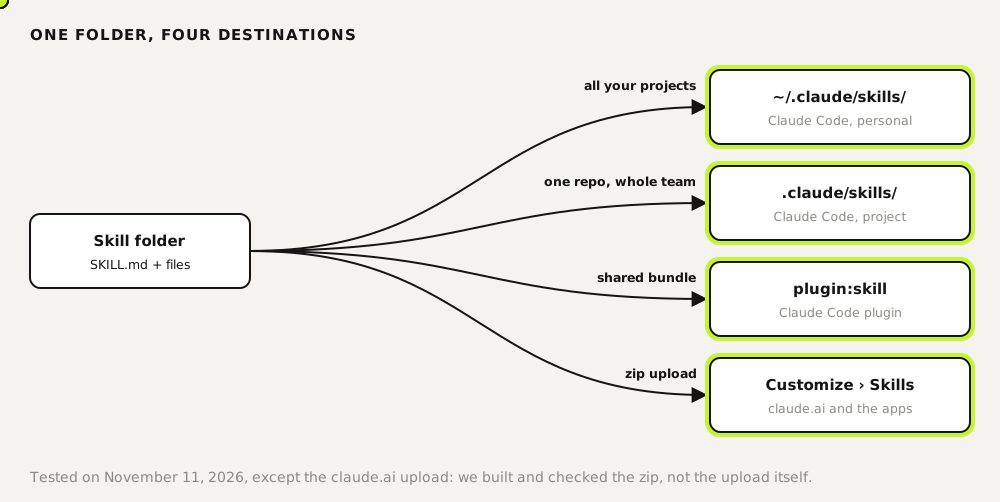
Pick the right place
| Where | Path or route | Who gets it |
|---|---|---|
| Claude Code, personal | ~/.claude/skills/<name>/SKILL.md | You, in every project on this machine |
| Claude Code, project | .claude/skills/<name>/SKILL.md | Everyone who pulls the repo |
| Claude Code plugin | /plugin install or claude plugin install | Wherever the plugin is enabled; skills appear as plugin:skill |
| claude.ai and the apps | Zip, then Customize > Skills > + > Create skill > Upload a skill | Your account; Team and Enterprise can share |
Add a skill to Claude Code by copying a folder
A skill is a folder with a SKILL.md inside. Copy the folder into one of the two skills directories and start a new session; if the skills directory didn't exist yet, run /reload-skills in a running session. Type /skills to check it's there.
# for all your projects
mkdir -p ~/.claude/skills && cp -r meeting-notes ~/.claude/skills/

# for one project, shared through Git
mkdir -p .claude/skills && cp -r meeting-notes .claude/skills/
macOS and Linux. On Windows the personal folder is %USERPROFILE%\.claude\skills.
To prove the routes stack, we started one Claude Code 2.1.321 session with a skill in the project folder, another in a folder passed with --add-dir, and a third inside a plugin loaded with --plugin-dir. All three showed up in the same session: meeting-notes, csv-check and team-tools:plain-english-pass. The plugin skill carried the plugin's name as a prefix, so two plugins can ship a skill with the same name without clashing.
Install skills from a marketplace
Anthropic publishes its own skills, including Word, Excel, PowerPoint and PDF, as a plugin marketplace on GitHub. Inside a session use /plugin; from the shell, these two commands do it:
claude plugin marketplace add anthropics/skills
claude plugin install document-skills@anthropic-agent-skills
claude plugin details document-skills@anthropic-agent-skills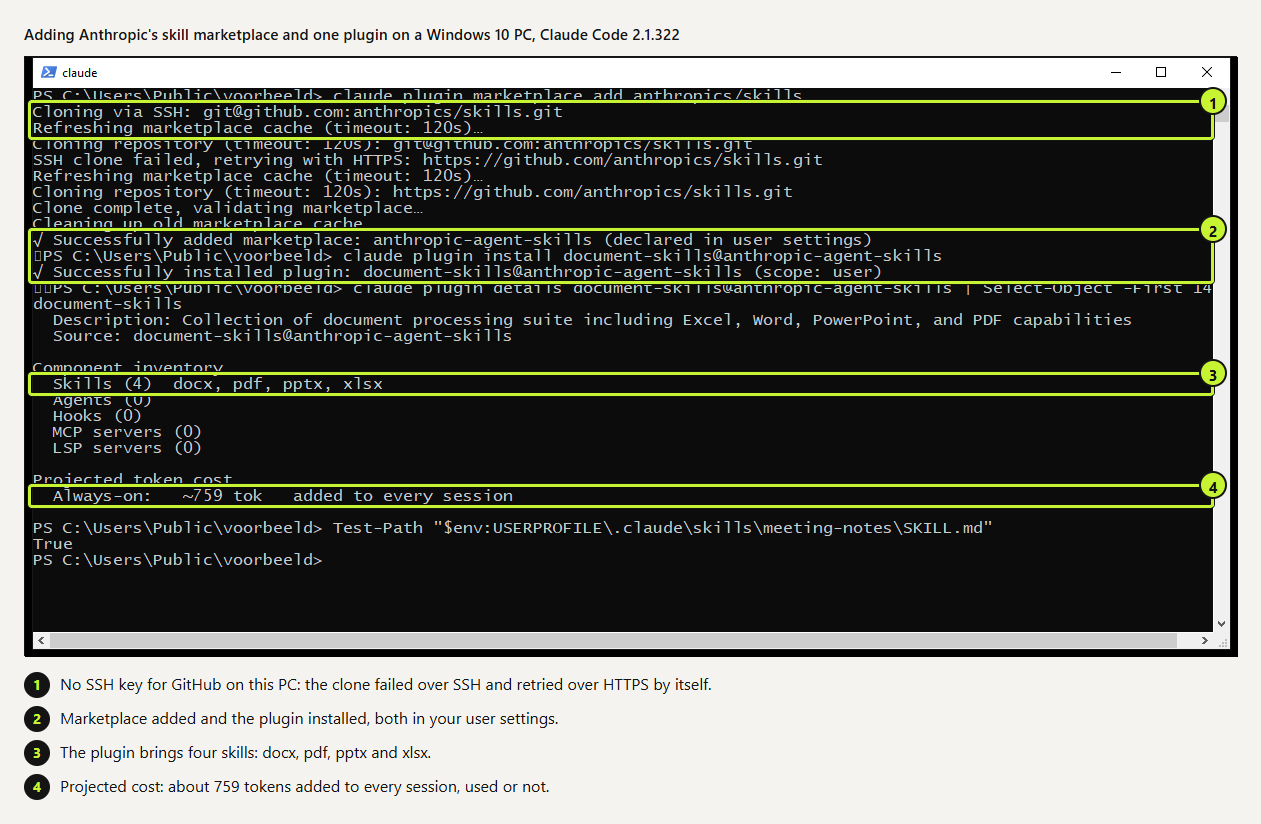 (opens at full size)
On our Windows test PC, which had no SSH key for GitHub, the clone failed over SSH and retried over HTTPS on its own. Run claude plugin details before you keep a plugin. It lists what's inside and the projected cost. For these four skills that was about 759 tokens added to every session, used or not.
Add a skill to claude.ai
- Turn on code execution: Settings > Capabilities (in the newer layout: Create and edit files).
- Zip the skill so the zip contains the folder, and the folder name matches the
nameinSKILL.md. - Go to Customize > Skills, click +, then Create skill and Upload a skill, and pick the zip.
- Switch the skill on in the list. On Team and Enterprise, an owner may have to allow skills first.
We built and checked the zip, not the upload. Our meeting-notes.zip was 1,408 bytes, with meeting-notes/SKILL.md and meeting-notes/TEMPLATE.md inside. Per Anthropic's docs, claude.ai accepts only these frontmatter fields: name, description, license, compatibility, metadata and allowed-tools. Any other key fails the upload, so remove Claude Code-only fields such as disable-model-invocation first.
Before you add someone else's skill
A skill can include scripts that run with your permissions. Read every file before you add one, scripts first, and look for network calls and commands that have nothing to do with the skill's job. Anthropic's own advice is to use skills you wrote yourself or got from Anthropic, and to treat anything else like installing software.
Questions
How do I add skills to Claude Code?
Copy the skill folder into ~/.claude/skills/ or your project's .claude/skills/, or install a plugin that contains skills with /plugin install.
How do I add a skill to claude.ai?
Zip the folder, then go to Customize > Skills, click +, Create skill, Upload a skill. Code execution must be on.
Where can I download Claude skills?
Anthropic publishes example and document skills in the anthropics/skills repository on GitHub, which also works as a Claude Code plugin marketplace. Treat community collections like any other code.
Do skills sync between Claude Code and claude.ai?
No. Add the skill in each place you want to use it, and update each copy after a change.
Sources
- Claude Code docs: Skills checked on
- Claude Help Center: Using Skills in Claude checked on
- GitHub: anthropics/skills checked on
- Claude Platform docs: Agent Skills overview (security) checked on
More in claude in practice
- What Are Claude Skills? How They Work, a Tested Example, and When to Use OneClaude Skills explained with a working editing skill we tested 11 times in Claude Code: how often it loaded on its own and how to force it.
- How to Create Claude Skills That Load at the Right MomentBuild a Claude skill from idea to tested version: description, short core, details in a separate file, and a 10-request trigger test with the fixes it led to.
- Claude Code Skills: How to Build, Install and Test a SkillBuild a Claude Code skill with a bundled script in ten minutes. We tested when it loads, when it doesn't, and what an unused skill costs in context.
- The Best Claude Skills: We Tested Ten Against Claude Code Without ThemWe ran ten popular Claude skills on a real task, once with the skill and once without. Three earned a place. Full scores, the ones we dropped and why.
Also useful
- Claude pricing: what every plan costs and what you getClaude Free, Pro, Max, Ultra, Team and Enterprise prices from the official page, what changed in 2026, and three questions to pick a plan.
- Claude marketing skills: a copy check and an SEO check, tested with and without the skillTwo Claude marketing skills, a copy check and an SEO page check, tested with and without the skill. The SKILL.md files are on this page.
- AGENTS.md Explained: One Instruction File for Codex, Claude Code and Other AgentsAGENTS.md is the shared instruction file for coding agents. How Codex reads it, when Claude Code does, and the one-line fix we tested.