Claude Code Hooks: Five Examples You Can Copy, Tested
A Claude Code hook is a script that runs at a fixed moment, such as before every shell command or when Claude wants to stop, and can block the action. Below are five hooks with complete code and the settings file that wires them up. We tested each in a real session, ran ten known workarounds against the blocking hook, and list what still gets through.
Tested by us on 11 November 2026.
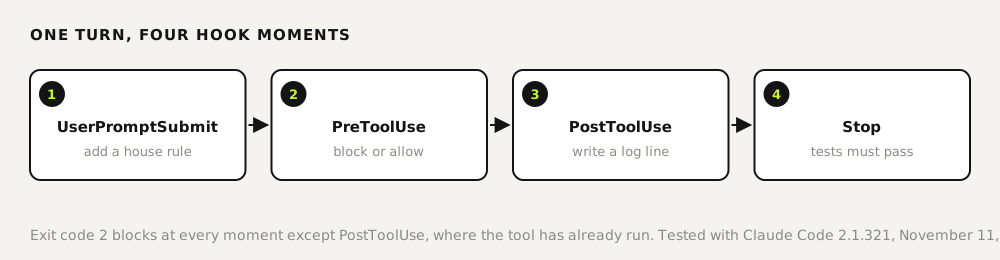
How a hook works in 30 seconds
- Hooks live in
settings.jsonunderhooks, then the event name, then amatcher(which tools) and thecommandto run. - Claude Code sends the hook a JSON object on stdin, such as the tool name and the command Claude wants to run.
- Exit code 0 lets the action go ahead. Exit code 2 blocks it, and whatever the hook prints to stderr goes to Claude as the reason. Any other exit code is a non-blocking error.
- For
UserPromptSubmit, plain text printed to stdout is added to the conversation as context.
Put the scripts in .claude/hooks/ and this file in .claude/settings.json, both in your project. We wrote the hooks in Python so they run unchanged on Windows, macOS and Linux.
{
  "hooks": {
    "PreToolUse": [
      { "matcher": "Bash", "hooks": [ { "type": "command", "command": "python3 \"$CLAUDE_PROJECT_DIR/.claude/hooks/block-dangerous.py\"" } ] },
      { "matcher": "Edit|Write|Bash", "hooks": [ { "type": "command", "command": "python3 \"$CLAUDE_PROJECT_DIR/.claude/hooks/protect-files.py\"" } ] }
    ],
    "UserPromptSubmit": [
      { "hooks": [ { "type": "command", "command": "python3 \"$CLAUDE_PROJECT_DIR/.claude/hooks/reminder.py\"" } ] }
    ],
    "PostToolUse": [
      { "matcher": "*", "hooks": [ { "type": "command", "command": "python3 \"$CLAUDE_PROJECT_DIR/.claude/hooks/log-tools.py\"" } ] }
    ],
    "Stop": [
      { "hooks": [ { "type": "command", "command": "python3 \"$CLAUDE_PROJECT_DIR/.claude/hooks/stop-if-tests-fail.py\"" } ] }
    ]
  }
}.claude/settings.json. Tested with Claude Code 2.1.321 on November 11, 2026.
1. Block commands that destroy work
#!/usr/bin/env python3
"""PreToolUse (Bash): refuse commands that destroy work or rewrite shared history."""
import json, re, sys
cmd = json.load(sys.stdin).get("tool_input", {}).get("command", "")
RULES = [
    (r"\bgit\s+push\b.*(--force\b|\s-f\b|\s\+\S)", "Force-push is not allowed. Use --force-with-lease after checking with a human."),
    (r"\bgit\s+reset\s+--hard\b", "git reset --hard throws away work. Commit or stash instead."),
    (r"\bgit\s+clean\b.*-[a-z]*f", "git clean -f deletes untracked files for good."),
    (r"\bgit\s+(checkout\s+--\s+\.|restore\s+\.)", "This throws away all uncommitted changes."),
    (r"\brm\s+(-\w+\s+)*-\w*r\w*\s+(-\w+\s+)*(/|~|\$HOME)/?\*?(\s|$)", "Recursive delete of / or your home folder."),
]
for pattern, reason in RULES:
    if re.search(pattern, cmd):
        print(f"Blocked by hook: {reason}", file=sys.stderr)
        sys.exit(2)
sys.exit(0)
.claude/hooks/block-dangerous.py (PreToolUse, Bash)
We asked Claude Code to run git reset --hard to clean up. Claude received Blocked by hook: git reset --hard throws away work. Commit or stash instead., made no second attempt with git checkout or git restore, and said it wouldn't work around the hook. It then suggested the narrower command that matched what we wanted.
2. Protect secrets and lock files
Our first version only listened to the Edit and Write tools. Asked to change a key in .env, Claude Code edited it with sed in the shell instead, and the hook never saw it. The version below also checks shell commands that write, move or delete. With it, the same request was refused at the Edit tool, and Claude said it wouldn't try sed or a redirect because the block looked deliberate.
#!/usr/bin/env python3
"""PreToolUse (Edit|Write|Bash): keep Claude out of secrets and lock files, also when it tries via the shell."""
import json, os, re, sys
d = json.load(sys.stdin)
inp = d.get("tool_input", {})
PROTECTED = r"(^|[\s/'\"])(\.env[\w.]*|[\w-]+\.pem|[\w-]+\.key|package-lock\.json|poetry\.lock)\b"
if d.get("tool_name") == "Bash":
    target = inp.get("command", "")
    writes = re.search(r"(>|\bsed\s+-i|\btee\b|\bmv\b|\bcp\b|\brm\b|\btruncate\b)", target)
    hit = re.search(PROTECTED, target) if writes else None
else:
    target = inp.get("file_path", "")
    hit = re.search(PROTECTED, "/" + os.path.basename(target))
if hit:
    print(f"Blocked by hook: {hit.group(2)} is protected. Ask a human to change it.", file=sys.stderr)
    sys.exit(2)
sys.exit(0)
.claude/hooks/protect-files.py (PreToolUse, Edit|Write|Bash)
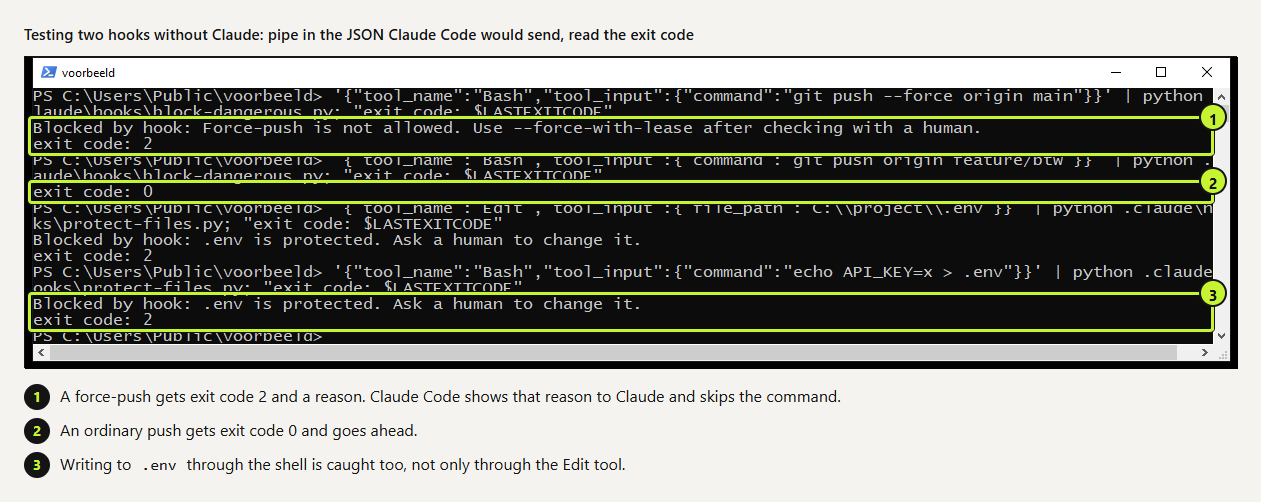 (opens at full size)
3. Add a house rule to every prompt
#!/usr/bin/env python3
"""UserPromptSubmit: add a short standing reminder to every prompt (plain stdout becomes context)."""
print("House rule: run the tests before you say a task is done, and say which tests you ran.")
.claude/hooks/reminder.py (UserPromptSubmit)
We asked for the same small rename three times with this hook and three times without. With the hook, Claude mentioned the tests in 3 of 3 answers; without it, in 1 of 3. Six runs is a small sample, but it pointed the same way every time. Keep these reminders to one or two lines; they're added to every prompt.
4. Log every tool call
#!/usr/bin/env python3
"""PostToolUse (all tools): append one line per tool call to .claude/tool-log.jsonl. Never blocks."""
import json, os, sys, datetime
try:
    d = json.load(sys.stdin)
    line = {"t": datetime.datetime.now().isoformat(timespec="seconds"), "tool": d.get("tool_name"),
            "input": json.dumps(d.get("tool_input", {}))[:200]}
    root = os.environ.get("CLAUDE_PROJECT_DIR", d.get("cwd", "."))
    with open(os.path.join(root, ".claude", "tool-log.jsonl"), "a") as f:
        f.write(json.dumps(line) + "\n")
except Exception:
    pass  # a logging hook must never stop the work
sys.exit(0)
.claude/hooks/log-tools.py (PostToolUse, all tools). It never blocks: a logging hook that crashes shouldn't stop the work.
After four test sessions the log held 12 lines, one per tool call. A real line from it: {"t": "2026-11-11T01:38:51", "tool": "Bash", "input": "{\"command\": \"cat prijs.py test_prijs.py\"}"}. That log is how we spotted the sed workaround in example 2. Two cautions: with matcher * the file grows with every call, so rotate it; and commands can contain tokens, so strip anything that looks like a key before writing, or keep the log out of Git.
5. Don't stop while the tests fail
#!/usr/bin/env python3
"""Stop: don't let Claude finish while the test suite fails. Exit 2 sends the reason back and Claude keeps working."""
import json, subprocess, sys
d = json.load(sys.stdin)
if d.get("stop_hook_active"):
    sys.exit(0)  # already sent back once; don't loop forever
r = subprocess.run([sys.executable, "-m", "unittest", "-q"], capture_output=True, text=True)
if r.returncode not in (0, 5):  # 5 = no tests found
    print("Tests are failing, so you're not done yet:\n" + (r.stdout + r.stderr)[-1500:], file=sys.stderr)
    sys.exit(2)
sys.exit(0)
.claude/hooks/stop-if-tests-fail.py (Stop). Swap the test command for your own.
We asked Claude to change a function so it returned only the VAT, and not to touch the tests. The old tests failed, so when Claude tried to finish, the hook sent it back with the failures. Claude didn't fake a fix. It explained the conflict between our two instructions and offered two ways out. The stop_hook_active check matters: without it, a hook that keeps failing would bounce Claude back forever.
What still gets through
Pattern hooks are a speed bump, not a wall. We fed ten known workarounds to the first version of the blocking hook. Four got through: rm -rf /*, rm -r -f /, git push origin +main and git checkout -- .. The version on this page catches those. These still pass, and we tested each one:
| Command | Why the hook misses it | What covers it |
|---|---|---|
python3 -c "import shutil; shutil.rmtree('src')" | The delete happens inside another language | A sandbox, or Git so you can restore |
python3 -c "open('.env','w').write('x')" | Same, for the protect-files hook | Keep secrets outside the project folder |
rm -rf ~/projects/old | Deleting a subfolder of home is often legitimate | Run the agent in its own folder or user |
So use hooks for the mistakes an agent makes by accident, and back them with things it can't argue with: deny rules, a separate user or container, and a commit before every larger task.
How we use hooks ourselves
We run eight hook scripts on seven hook moments, from prompt reminders to a check on front-end work before a session ends. Every hook gets one decision up front: what happens when the hook itself crashes. Guards that only slow work down fail open, like the log hook above with its except: pass. Gates that prevent damage, such as anything that sends a message to a customer, fail closed: if the check errors out, nothing goes out.
For each rule, ask what happens if the agent forgets it. If the answer is "a bit of inconvenience", a line in the prompt or CLAUDE.md is enough. If the answer is "damage", it belongs in a hook or a deny rule.
Questions
Where do Claude Code hooks go?
In settings.json under hooks: ~/.claude/settings.json for all projects, .claude/settings.json for one project you share, or .claude/settings.local.json for yourself only. Type /hooks in a session to see what's active and where it came from.
How does a hook block an action?
Exit with code 2 and print the reason to stderr. For PreToolUse you can also exit 0 and print JSON with permissionDecision set to deny.
Can Claude work around a hook?
It can use a different tool, as our first file-protection hook showed. Match the hook to every tool that can do the job, including Bash, and check the log.
What's the difference between a hook and a deny rule?
A deny rule blocks a tool call by pattern. A hook is code, so it can look at content, run tests or log, and decide on anything you can program.
Sources
- Claude Code docs: Hooks reference checked on
- Claude Code docs: Get started with hooks checked on
- Claude Code docs: Permissions checked on
More in claude in practice
- Claude Code Auto Mode: What It Allows, What It Blocks, and What We Learned in 9 TestsWe ran nine tasks in Claude Code auto mode, risky ones included. What it let through, what stopped them, and the deny rules we'd add first.
- Claude Code Commands: The Cheat Sheet We Use Every DayThe Claude Code commands, flags and shortcuts worth learning first, on one printable cheat sheet, plus how to make your own slash command. Tested Nov 2026.
- Claude Code MCP Servers: Add Them, Test Them, Remove ThemHow to add an MCP server to Claude Code with claude mcp add, pick the right scope, test it in a real session and remove it. Tested on Windows and Linux.
- Claude Code Skills: How to Build, Install and Test a SkillBuild a Claude Code skill with a bundled script in ten minutes. We tested when it loads, when it doesn't, and what an unused skill costs in context.
Also useful
- Claude marketing skills: a copy check and an SEO check, tested with and without the skillTwo Claude marketing skills, a copy check and an SEO page check, tested with and without the skill. The SKILL.md files are on this page.
- AGENTS.md Explained: One Instruction File for Codex, Claude Code and Other AgentsAGENTS.md is the shared instruction file for coding agents. How Codex reads it, when Claude Code does, and the one-line fix we tested.
- How to Build an MCP Server: A Tested Python and Node ExampleBuild a working MCP server in Python or Node, test it without a model, inspect it, then connect it to an AI app. Full code and the errors we hit.