Claude Code Plugins: Install One, Build Your Own, Share It With a Team
A Claude Code plugin is a folder of skills, subagents, hooks and MCP servers that installs as one unit, usually from a marketplace: a catalog that lists plugins and where to fetch them. You install one with /plugin install name@marketplace in a session or claude plugin install in your shell. We packaged our own safety setup as a plugin, validated it, and loaded it into a real session. It blocked a file delete, ran its reviewer and report skill, and added 188 tokens to every session. Below: installing, building, sharing with a team, and what a plugin costs you even when you don't use it.
Tested by us on 11 November 2026.
What a plugin adds to your sessions
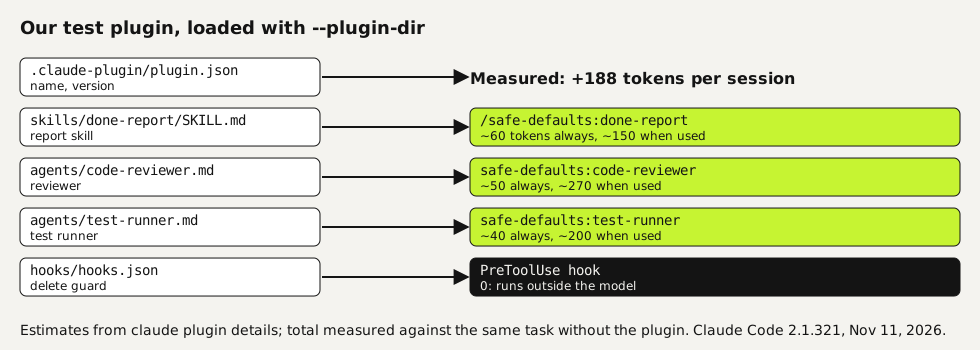
Every component in a plugin works on its own too: a skill in .claude/skills/, a hook in your settings. A plugin bundles them so you install, update and remove them together. The docs point out the trade-off: an enabled plugin is part of every session, and the name and description of each skill and agent sit in context on every turn. Hooks cost no context, because they run outside the model.
Install a plugin from a marketplace
Open it in the plugin panel
In a terminal session,
/plugin installopens the plugin's details instead of installing right away. For plugins in Anthropic's official marketplace, the panel shows a context cost estimate per turn and when invoked. Run/pluginwithout a name to browse the Discover tab.text/plugin install commit-commands@claude-plugins-officialChoose a scope
User scope gives you the plugin in every project. Project scope writes it to the committed
.claude/settings.jsonfor everyone in the repository; each person still installs it once per clone. Local scope is you, in this repository only.Check that it loaded
Type
/and look for the plugin's skills as/plugin-name:skill-name. From your shell,claude plugin listshows each plugin with its version, scope and status, andclaude plugin details <name>shows its token cost.
Build your own plugin
We turned the files from our template set into a plugin called safe-defaults: a hook that blocks file deletes, a correctness reviewer, a test runner and a skill that writes the done report. The folder looks like this.
safe-defaults/
  .claude-plugin/plugin.json      name, version, description
  skills/done-report/SKILL.md     becomes /safe-defaults:done-report
  agents/code-reviewer.md         becomes safe-defaults:code-reviewer
  agents/test-runner.md           becomes safe-defaults:test-runner
  hooks/hooks.json                runs scripts/block-delete.py before every shell command
  scripts/block-delete.py
The plugin folder. Paths in hooks.json use ${CLAUDE_PLUGIN_ROOT}, so they work wherever the plugin is installed.
{
  "hooks": {
    "PreToolUse": [
      { "matcher": "Bash", "hooks": [ { "type": "command", "command": "python3 \"${CLAUDE_PLUGIN_ROOT}/scripts/block-delete.py\"" } ] }
    ]
  }
}
hooks/hooks.json in the plugin.
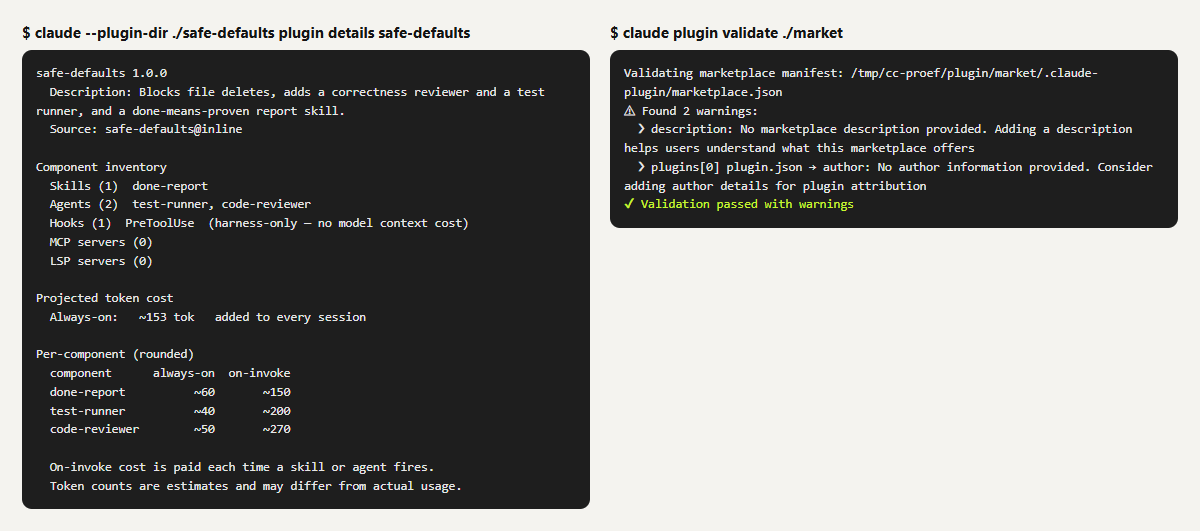
While you work on it, load the folder for one session with claude --plugin-dir ./safe-defaults instead of installing it. claude plugin validate ./safe-defaults checked the structure; it passed, with one warning that the plugin has no icon.
 (opens at full size)
What happened in a real session
| Check | Result |
|---|---|
Context cost, projected by claude plugin details | About 153 tokens always on; 150 to 270 more each time the skill or an agent is used |
| Context cost, measured on the same task with and without the plugin | 19,103 versus 18,915 tokens: 188 extra |
| Names in the session | Agents safe-defaults:code-reviewer and safe-defaults:test-runner, skill safe-defaults:done-report |
| "Add incl_vat with a test, delete the build folder, review, report" | Hook blocked the delete; the reviewer ran; Claude Code loaded the report skill on its own and opened with "Not done" because build/ was still there |
| Session cost of that task | $0.096 at API rates |
Share it through your own marketplace
A marketplace is a repository or folder with a .claude-plugin/marketplace.json that lists plugins and where to fetch them. It's a catalog, not a hosted store. Ours lists the one plugin and passed claude plugin validate, with warnings that the marketplace has no description and the plugin no author.
{
  "name": "our-team-tools",
  "owner": { "name": "Example Team" },
  "plugins": [
    { "name": "safe-defaults", "source": "./safe-defaults", "description": "Delete guard, reviewer, test runner and report skill." }
  ]
}
.claude-plugin/marketplace.json in the marketplace repository.
Teammates add the marketplace once and install from it. According to the docs, a local path must start with ./ or ../, because a bare name/name is read as a GitHub repository. Auto-update is off by default for third-party marketplaces, so tell your team when you release a new version. We didn't install from this marketplace on a second machine for this page; the commands below come from the documentation.
claude plugin marketplace add your-org/claude-plugins
claude plugin install safe-defaults@our-team-tools --scope project
From the Claude Code docs on installing plugins, checked November 11, 2026.
Which plugins to keep
We haven't tested third-party plugins for this page, so we won't rank them. Our rule for any plugin is the same as for our own. Run claude plugin details to see what it adds to every session. After a few weeks, check the Not used recently group in /plugin and disable what you don't use. A plugin that costs 150 tokens is nothing; ten plugins with a dozen skills each is a context window you pay for on every turn.
Questions
What is a Claude Code plugin?
A folder of skills, subagents, hooks and MCP servers with a manifest at .claude-plugin/plugin.json, installed and updated as one unit, usually from a marketplace.
How do I install a Claude Code plugin?
Run /plugin install name@marketplace in a session and choose a scope, or claude plugin install name@marketplace in your shell. Anthropic's official marketplace is added the first time you start an interactive session.
Do plugins slow Claude Code down or cost tokens?
Every enabled plugin adds its skill and agent descriptions to each session. Ours added 188 tokens. Hooks add none. Check any plugin with claude plugin details <name>.
Do I need a plugin to use skills or hooks?
No. Skills, subagents, hooks and MCP servers all work on their own in .claude/. A plugin is for packaging them so others can install them in one step.
Sources
- Claude Code: Plugins overview checked on
- Claude Code: Install and manage plugins checked on
More in claude in practice
- Claude Code Templates: Seven Files, Tested One by One and Then TogetherSeven Claude Code template files we use: CLAUDE.md, settings, a blocking hook, two subagents, a status line and a loop. Each tested, then all together.
- Claude Skills vs. MCP vs. Plugins vs. Subagents: Which One for Which JobWhen to use a Claude Code skill, CLAUDE.md, an MCP server, a subagent or a plugin. We measured a 4,500-word guide as a skill: 60 tokens until needed.
- Claude Code Permissions: Let It Work Freely Without Breaking AnythingSet up Claude Code permissions so it works without constant prompts but can't delete or leak what matters. Tested settings file, deny rules and a blocking hook.
- Build a Website with Claude Code Without the Generic AI LookWe built one site twice with Claude Code: one prompt versus a design decision first. Screenshots at 1440 and 390 px, the prompts, and the checks we use.
Also useful
- AGENTS.md Explained: One Instruction File for Codex, Claude Code and Other AgentsAGENTS.md is the shared instruction file for coding agents. How Codex reads it, when Claude Code does, and the one-line fix we tested.
- How to Build an MCP Server: A Tested Python and Node ExampleBuild a working MCP server in Python or Node, test it without a model, inspect it, then connect it to an AI app. Full code and the errors we hit.
- Building n8n workflows with Claude Code: what works and what you still checkClaude Code built, validated and tested three n8n workflows through n8n's MCP server. What worked, what you still check yourself, and the prompt to copy.