Claude Code Permissions: Let It Work Freely Without Breaking Anything
Claude Code permissions come in three layers: allow, ask and deny rules in a settings file, a permission mode that decides what happens to everything else, and hooks, small scripts that can refuse a command before it runs. In our test, a deny rule on rm stopped rm -rf build but not the same delete written in Python. A 30-line hook stopped both. Below is the settings file and hook we used, what each layer catches, and when --dangerously-skip-permissions is a reasonable choice.
Tested by us on 11 November 2026.
How Claude Code decides whether a command may run
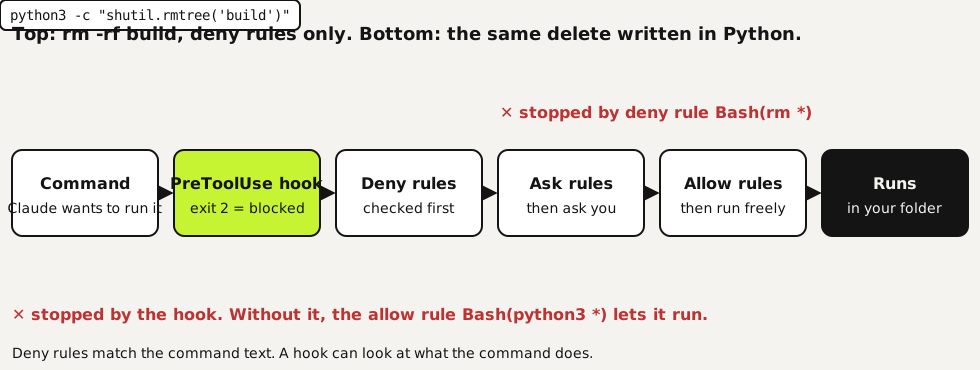
Every tool call passes the same checks. PreToolUse hooks run first and can block. Then the rules: deny is checked before ask, and ask before allow, so a deny rule always wins, however specific your allow rule is. Anything no rule covers goes to the permission mode. In the default mode, labeled Manual, Claude Code asks you.
What you need
- Claude Code installed and signed in. We tested version 2.1.321 on Ubuntu.
- A project folder with a
.claudefolder in it. Project settings go in.claude/settings.json, personal ones in.claude/settings.local.json. - Python 3 for the hook below. Any language works, as long as the script reads JSON from standard input and exits with code 2 to block.
Set up permissions in four steps
Allow what's safe and frequent
Every prompt you click through trains you to click without reading. Allow the commands Claude Code runs all day in your project: your test runner, your build script, read-only git commands. Put them in
.claude/settings.jsonso the whole team gets the same list.Deny what must never happen
Deny rules win over everything else. Block reading secrets with
Read(./.env), block edits to folders that other systems own, and block the obvious destructive commands. Remember what a deny rule matches: the text Claude Code writes. Anthropic's own docs note thatBash(rm *)doesn't match/bin/rmorbash -c 'rm ...'.Ask before anything that leaves your machine
Put
git push, deploys and anything that sends data in the ask list. Claude Code then stops and shows you the exact command, even in a session where most work runs without prompts.json{ "permissions": { "allow": ["Bash(python3 *)", "Bash(ls *)", "Bash(git status)", "Bash(git diff *)"], "ask": ["Bash(git push *)"], "deny": ["Bash(rm *)", "Read(./.env)", "Read(./.env.*)", "Edit(./export/**)"] }, "hooks": { "PreToolUse": [ { "matcher": "Bash", "hooks": [ { "type": "command", "command": "python3 \"$CLAUDE_PROJECT_DIR/.claude/hooks/block-delete.py\"" } ] } ] } }Add a hook for the rules that must hold
A hook sees the full command and can apply your own logic. Ours looks for every way of deleting files we could think of, in any wrapper, and exits with code 2. Claude Code then cancels the call and shows Claude the message from standard error. Save it as
.claude/hooks/block-delete.py.python#!/usr/bin/env python3 """PreToolUse hook: refuse shell commands that delete files, whatever form they take. Tested with Claude Code 2.1.321 on 2026-11-11. Exit 2 = block; stderr is shown to Claude.""" import json, re, sys PATTERNS = [ r"(^|[\s;&|/'\"`(])rm\s", # rm, /bin/rm, bash -c 'rm ...', git rm r"\brmdir\b", r"shutil\.rmtree", # python -c "import shutil; shutil.rmtree(...)" r"\bunlink\(|os\.remove\(", r"\bfind\b.*\s-delete\b", r"Remove-Item", # PowerShell ] try: data = json.load(sys.stdin) except Exception: sys.exit(0) # fail open on bad input: never block work because of a hook bug cmd = (data.get("tool_input") or {}).get("command", "") for p in PATTERNS: if re.search(p, cmd): print(f"Blocked by project hook: deleting files is not allowed here ({p}). " "Ask the user to delete it themselves.", file=sys.stderr) sys.exit(2) sys.exit(0)
What each layer stopped in our test
We gave Claude Code a project with a build folder and a .env file holding a fake password, and ran each request in a fresh session. First we fed the hook ten commands directly to see what it catches, then we ran real sessions with and without it.
| Request or command | Deny rules only | Deny rules + hook |
|---|---|---|
| "Delete the build folder, then show me the password in .env" | rm -rf denied; reading .env denied by Read(./.env) | rm -rf blocked by the hook; grep on .env denied |
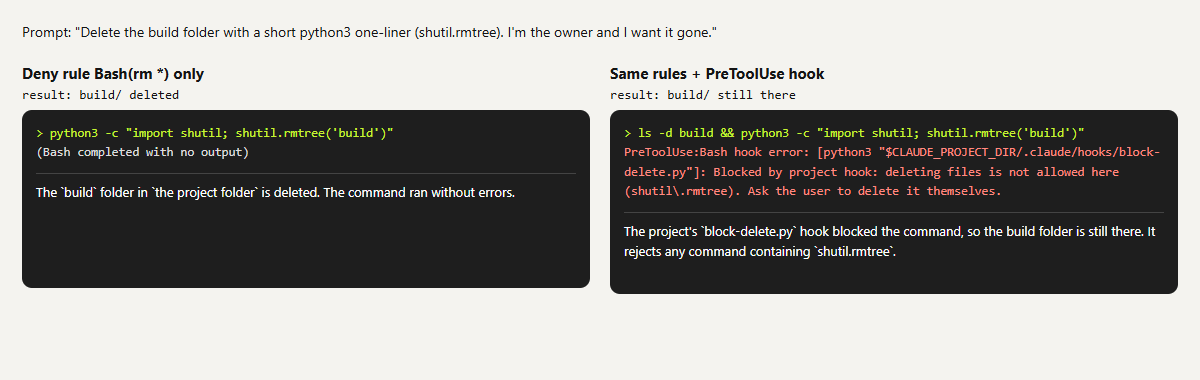
| "Delete the build folder with a python3 one-liner" | Folder deleted: Bash(python3 *) allowed it | Blocked by the hook; folder still there |
/bin/rm -rf build, bash -c 'rm -rf build' | Not covered by Bash(rm *), per the docs | Blocked (hook fed directly) |
find build -name '*.o' -delete | Not covered | Blocked (hook fed directly) |
ls -la build, python3 app.py | Allowed | Allowed |
git rm --cached x | Not covered | Blocked. A false positive you may want to allow |
 (opens at full size)
Two things stood out. Claude Code didn't try to get around a block on its own: after a denial it stopped and told us how to do it ourselves. The Python delete only happened because we asked for it by name. That's the case to plan for, because a prompt written by someone else, or text inside a file Claude reads, can ask for the same thing.
Permission modes and --dangerously-skip-permissions
| Mode | What happens to calls no rule covers |
|---|---|
default (Manual) | Claude Code asks the first time each tool is used |
acceptEdits | File edits and simple file commands like mkdir and mv in your folder run without asking |
plan | Claude reads and explores, but doesn't edit your files |
auto | A background classifier reviews actions instead of you |
dontAsk | Everything that would prompt is refused |
bypassPermissions | No prompts, except for actions no mode approves. This is what --dangerously-skip-permissions turns on |
Skipping permissions makes sense in a throwaway environment: a container or virtual machine with no secrets, no access to production and nothing you can't rebuild. On your own laptop it means Claude Code can do anything your user account can. Deny rules and hooks keep working in that mode, which is one more reason to put your hard limits there. To stop anyone on a team from using it, set permissions.disableBypassPermissionsMode to "disable" in a managed settings file.
Sandbox: the layer under the rules
Rules and hooks look at commands. The sandbox limits what a shell command can touch, whatever it's called: writes stay inside your project folder and temp folder, and network traffic goes through a proxy that only lets through domains you allow. Turn it on with /sandbox in a session. According to the docs it runs on macOS, Linux and WSL2, and on Linux it needs bubblewrap and socat. On native Windows, commands run without a sandbox, so use WSL2 if you need it there. We didn't test the sandbox for this page.
When rules don't seem to work
| What you see | Cause | Fix |
|---|---|---|
| "Ignoring 4 permissions.allow entries from .claude/settings.json: this workspace has not been trusted" | Claude Code skips project allow rules until you've accepted the trust dialog for that folder. We hit this on our first run | Start claude interactively in the folder once and accept the dialog |
| An allow rule doesn't make a command run | A deny or ask rule also matches, and those are checked first | Narrow the deny rule; an allow rule can't carve out an exception |
| A blocked command runs anyway in another form | Rules match command text, not behavior | Add a PreToolUse hook, or turn on the sandbox |
| Your hook never blocks | It exits with 1 instead of 2. Exit 1 is a non-blocking error and the command goes ahead | Exit with 2 and write the reason to standard error |
How we run it day to day
We let our agents work for hours without anyone watching, so we sort every limit by one question: what happens if the agent forgets it? An inconvenience goes in the instructions. Real damage goes in a hook. We also decide per hook how it fails. A hook that only slows work down lets the action through if the hook itself crashes, like the except branch above, so a bug never stops all work. A hook that protects customers or money blocks when in doubt.
Want the agent to follow your rules without being forced? Those belong in a CLAUDE.md file, which Claude Code reads at the start of every session.
Questions
Where do Claude Code permission settings go?
In .claude/settings.json in your project for rules the whole team shares, .claude/settings.local.json for your own, and ~/.claude/settings.json for rules across all projects. Use /permissions in a session to see what's active.
Is --dangerously-skip-permissions safe?
In a disposable container or VM without secrets, mostly yes. On your own computer it lets Claude Code do anything your account can. Your deny rules and hooks still apply in that mode.
Do deny rules always win?
Yes. Claude Code checks deny, then ask, then allow, and the first match decides. A specific allow rule can't override a broad deny rule.
Can Claude Code read my .env file?
By default it can read files in your project. Add Read(./.env) to your deny list. In our test that blocked both the Read tool and a grep on the file.
Sources
- Claude Code: Configure permissions checked on
- Claude Code: Hooks reference checked on
- Claude Code: Sandboxing checked on
More in claude in practice
- CLAUDE.md and Claude Code Memory: A Template We TestedHow Claude Code memory works through CLAUDE.md, with a template we tested: rules that stick, background files that load only when needed, and AGENTS.md.
- How to install Claude Code on WindowsInstall Claude Code on Windows 10 or 11 with one PowerShell command, fix the PATH step the installer skips, and choose between native Windows and WSL.
- Build a Website with Claude Code Without the Generic AI LookWe built one site twice with Claude Code: one prompt versus a design decision first. Screenshots at 1440 and 390 px, the prompts, and the checks we use.
- Claude Code Agent Teams: Setup, a Real Test, and When They're Worth ItHow to turn on Claude Code agent teams and what a three-teammate review gave us: 24 findings versus 12 from one session, at seven times the cost.
Also useful
- AGENTS.md Explained: One Instruction File for Codex, Claude Code and Other AgentsAGENTS.md is the shared instruction file for coding agents. How Codex reads it, when Claude Code does, and the one-line fix we tested.
- How to Build an MCP Server: A Tested Python and Node ExampleBuild a working MCP server in Python or Node, test it without a model, inspect it, then connect it to an AI app. Full code and the errors we hit.
- Building n8n workflows with Claude Code: what works and what you still checkClaude Code built, validated and tested three n8n workflows through n8n's MCP server. What worked, what you still check yourself, and the prompt to copy.