AI for translators: a glossary-first workflow, tested on a Dutch-to-English lease
AI is a fast first-draft and second-reader tool for translators, as long as your glossary comes first and you check what it says it did. We tested it on a short Dutch residential lease. With a six-term glossary, both runs used every term exactly. Without one, it picked different words for the same thing. As a reviewer it found all four errors we had planted, including a dropped "not" that turned a ban on pets into permission. It also slipped once, changing euros into dollars without being asked.
Tested by us on 11 November 2026.
What we tested, and what came back
We wrote a five-clause Dutch addendum to a residential lease, with a few classic traps: "eventuele" (meaning "any", not "eventual"), "actuele" ("current", not "actual"), a penalty cap, and "werkdagen" (working days). Then we gave Claude (Sonnet 5.5) five tasks on November 11, 2026, and read every output against the source ourselves. We write in Dutch and English every day, so we could judge both sides.
| Task | Runs | Result | What we saw |
|---|---|---|---|
| Translate NL→EN with a six-term glossary | 2 | Right | Every glossary term used exactly, both false friends handled, numbering kept. It listed seven real ambiguities in the Dutch, such as whether the €500 cap applies per late payment or over the whole lease. |
| Same text, no glossary | 2 | Right, but different words | Correct meaning, but "Rental Agreement" and "property" instead of "Lease Agreement" and "home", and a more formal "shall" style. |
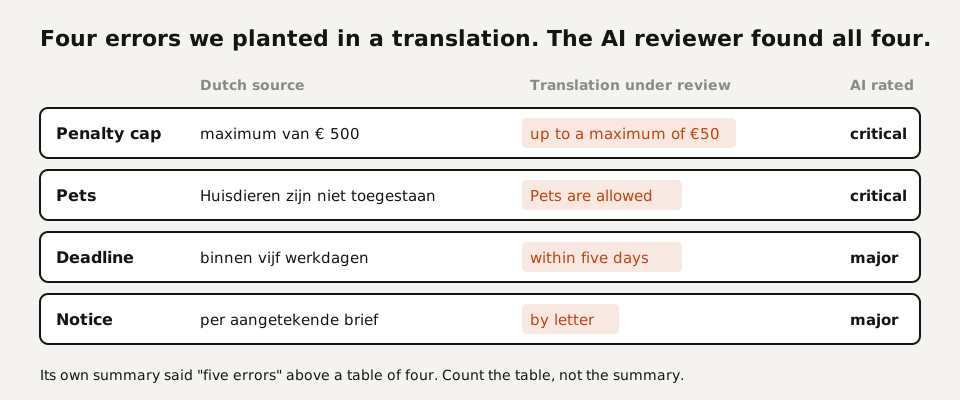
| Review a translation with four planted errors | 1 | Found all four | €500 turned into €50, "working days" shortened to "days", "registered letter" reduced to "letter", and "not allowed" turned into "allowed". The summary said five errors while the table listed four. |
| Extract a bilingual term list | 1 | One slip | Useful jurisdiction notes, such as "late fee" instead of "penalty" for US leases. But it rendered "maximum van € 500" as "cap of $500": a currency change nobody asked for. |
| Localize a Dutch product text for a US web shop | 1 | Right | Correct conversions (1.7 L to 57 fl oz, 1.1 kg to 2.4 lb, 75 cm to 29.5 in) and nine items it left for the client, from the price in dollars to 230-volt appliances not working on US outlets. |
Two findings shape the workflow below. First, terminology drifts between prompts unless you pin it: the same clause became a "Lease Agreement" in one run and a "Rental Agreement" in the next prompt. Second, the errors that remain are the quiet ones. A currency symbol that changes inside a term list, or a summary that miscounts its own findings, won't stand out on a first read.
The glossary-first workflow
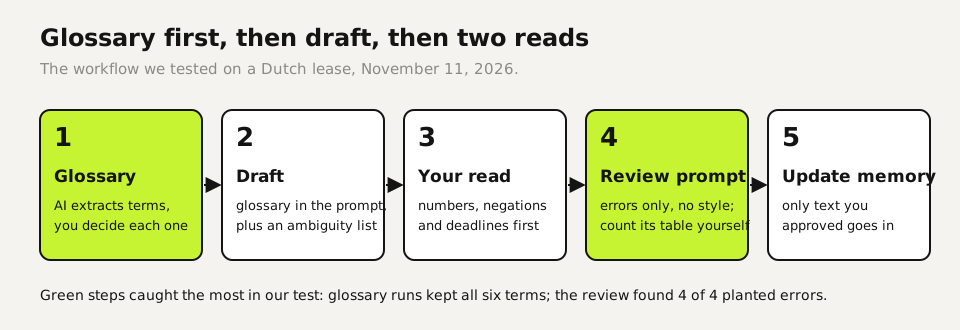
- Build the glossary before you translate. Ask the AI to extract domain terms from the source, then decide each target term yourself. Treat its suggestions as a draft: in our test one line of that list changed the currency.
- Translate with the glossary in the prompt and ask it to list every sentence where the source is ambiguous. That list is often worth more than the draft, because those are the questions for your client.
- Read the draft against the source yourself, clause by clause, with numbers, negations and deadlines first.
- Run a separate review prompt on your final version that only looks for errors, not style. Count the findings in its table yourself.
- Update your glossary and translation memory with the decisions you made, so the next job starts from them.
This is the translation prompt from our test. The last line does more than it seems: it turns the AI into a second reader of the source, not only a producer of target text.
Translate this [source language] text into [US English] for a client.
Follow the glossary exactly. Keep the numbering. After the
translation, list any sentence where the source was ambiguous.

Glossary (use exactly):
[source term] = [target term]
...

Text:
[paste]
And the review prompt that caught all four planted errors:
You are a reviewer. Compare the source with the translation and list
every error: mistranslation, omission, wrong number, changed meaning.
For each: clause, what the source says, what the translation says,
severity (critical/major/minor). Don't comment on style.

SOURCE:
[paste]

TRANSLATION:
[paste]Ten translation tasks, with what you check
| Task | Use AI for | You check |
|---|---|---|
| Term extraction (tested) | A first list of domain terms | Every target term; currencies and units unchanged |
| First draft with glossary (tested) | A full draft and a list of source ambiguities | Numbers, negations, deadlines, defined terms |
| Review of your own translation (tested) | A second reader looking for meaning errors | Its count against its own table |
| Localization (tested) | Units, dates, formats, and a list of client decisions | That it didn't make the client's decisions for them |
| Ambiguity questions for the client | Turning the ambiguity list into clear questions | That each question is answerable with yes, no or a choice |
| Style guide check | Comparing a draft with the client's style rules | Rules it may have applied too broadly |
| Consistency across files | Spotting a term translated two ways | Which of the two variants the glossary prescribes |
| Back-translation of a critical clause | A quick literal check of meaning | That the back-translation is literal, not a rewrite |
| Summaries for reviewers | A short note on what a long document says | Nothing in the summary that isn't in the source |
| Quotes and admin | Word counts, deadlines, polite emails | Rates and dates against your own records |
What you don't paste into an AI tool
Most translation work arrives under a confidentiality clause, and some clients ban machine translation outright. Read your contract before the first prompt. If it says nothing, ask.
- Never on a personal plan with training on: client documents with names, contracts under NDA, medical or court documents. On ChatGPT Free, Plus and Pro, Improve the model for everyone is on by default (Settings → Data controls). Claude's consumer plans have a model improvement setting in the privacy settings.
- On a business plan: both OpenAI and Anthropic say they don't train on business data by default. That covers training. It doesn't answer whether your client allows the text to leave your machine at all.
- Strip what the task doesn't need: names of people and companies, addresses, case numbers. Put them back in your own editor.
- Tell the client when AI was part of your process, if the contract or your professional association asks for that.
- Keep your own glossary and translation memory local. They are your assets, and you control who sees them.
Where AI fits next to your CAT tool
If you work in a CAT tool, keep it as the place where the final text and translation memory live. Use a chatbot for the steps around it: term extraction, ambiguity questions, a second review of the finished file, and localization decisions. That keeps your memory clean, because only text you approved goes into it. We tested the chatbot side only; we haven't compared the AI features built into individual CAT tools.
Your first week
- Take a finished job you know well and run the review prompt on it. See whether it finds anything you would have wanted to know.
- On your next job, build the glossary first and use the translation prompt with the ambiguity line. Send the ambiguity list to your client as questions.
- Compare your time on that job with a similar job without AI. Your own numbers tell you more than any survey.
Questions
Will AI replace translators?
For the work we tested, no. The draft was good, but every risky mistake (a reversed negation, a changed cap, a currency swap) needed a person who reads both languages to catch. The job shifts toward terminology, review and client questions.
Is ChatGPT or Claude good enough for professional translation?
As a first draft with a glossary, yes, in our Dutch-to-English test. Without a glossary it chose different terms per run, and as a term extractor it made one unasked currency change. Check every output before it reaches a client.
Can I use AI on confidential client documents?
Only if your contract allows it, and then on a business plan that excludes training, with names and case details stripped. Many translation contracts forbid machine translation, so ask first.
How do I keep terminology consistent with AI?
Put a glossary in every prompt and tell the AI to follow it exactly. In our test that kept all six terms identical across runs; without it the document title and key nouns changed between prompts.
Can AI check my translation for errors?
Yes, as a second reader. In our test a review prompt found all four planted errors, including a missing "not". Its own summary miscounted them, so count the table yourself.
Sources
More in aI by profession
- AI for legal work: five tasks we tested, and the checks that caught the mistakesWe ran an NDA review, a case-law search, a fake citation, a dispute chronology and a redline through AI. What held up, what didn't, and how to check it.
- ChatGPT for Teachers and Claude for Teachers: what's free, what's safe, and what we testedWho gets ChatGPT for Teachers or Claude for Teachers free, what never goes into a chatbot, and five classroom tasks we ran, including where grading wobbled.
- AI for accountants: receipts, ledger review and client questions, tested five timesWe ran receipt extraction, a month-end ledger review and the totals five times each. Which steps AI handled, which belong in a formula, and what to check.
- AI for customer service: five support tasks we tested, and how to stop the message pile-upFive support tasks tested, plus ten runs that show when AI invents refund rules and the one prompt line that stopped it. And how to send one message, not five.
Also useful
- AI for marketers: five tests, and the quality gate that keeps AI copy out of the slop pile30 AI landing-page drafts, 50 character counts and a review analysis, tested: invented offers were the real risk, and one prompt line removed them.
- AI for small business: Claude for Small Business, ChatGPT, and ten tasks worth handing overWhat Claude for Small Business and ChatGPT cost, ten owner tasks AI handles well, and the one forecast mistake our test caught before it reached the bank.
- Claude Desktop App: Download, Install and the Settings Worth ChangingWhere to download Claude Desktop for Mac, Windows and Linux, what it costs, what it does that the browser can't, and the settings to change first.