AI for legal work: five tasks we tested, and the checks that caught the mistakes
General AI chatbots are good at first-pass contract review, chronologies and redline comparisons, and they still get case law wrong in ways that look convincing. In our test of five legal tasks, the chatbot found every problem we had planted in a contract and refused to summarize a case we made up. It also stated the holding of a real EU judgment backwards. This guide starts with what never goes into an AI tool and how to catch invented or distorted authority, then shows the five tasks with prompts.
Tested by us on 11 November 2026.
What never goes into a general AI tool
Your duty of confidentiality doesn't change because the tool is new. Anything you paste into a chatbot leaves your firm, and on consumer plans it may be used to train models unless you switch that off. The safe line is about the account type, not about which brand you prefer.
- Never on a personal or free plan: client names, matter numbers, anything covered by privilege, personal data of the other side, documents under a protective order, settlement figures.
- Acceptable on a personal plan: your own templates and clause libraries, public legislation and judgments, anonymized fact patterns you wrote yourself, drafting questions without client facts.
- Client documents: only on a business plan your firm has signed a data processing agreement for, with training off by contract, and only if your engagement terms and your bar's rules allow it.
- Turn training off anyway: on ChatGPT Free, Plus and Pro, Improve the model for everyone is on by default (Settings → Data controls). Claude's consumer plans have a model improvement setting in the privacy settings, and Incognito chats are never used for training.
- Strip before you paste: replace parties with roles (Supplier, Customer), drop addresses and registration numbers, round amounts if the exact figure identifies the deal.
For EU and UK work, add one question: where is the data stored and processed? According to OpenAI's help center, new ChatGPT Enterprise and Edu workspaces and the API can store content at rest in Europe (EEA plus Switzerland), with in-region processing available on Enterprise and Edu. Anthropic's regional compliance page lists Claude in European regions through AWS Bedrock and Google Cloud Vertex AI, so EU processing for Claude currently runs through one of those platforms. We checked both pages on November 11, 2026. This is a checklist, not legal advice; your firm's data protection officer decides.
How to catch invented or distorted case law
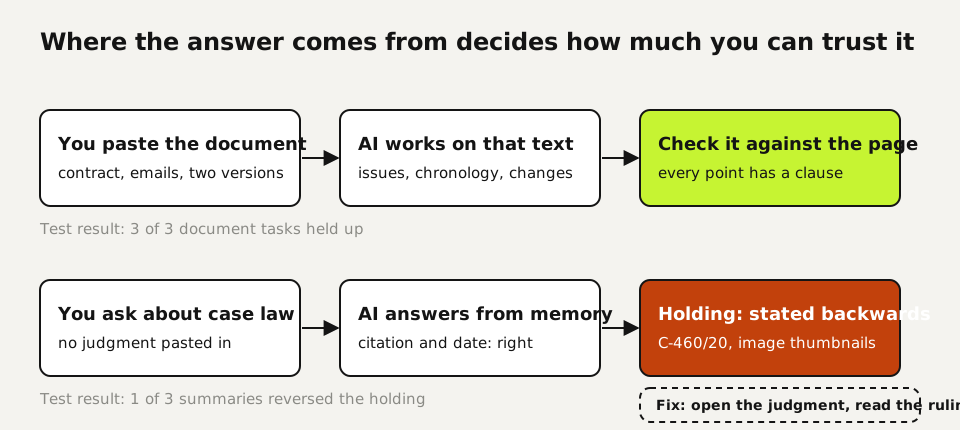
Invented citations get the headlines, and the model we tested handled that trap well: asked about a Court of Appeal case we made up, it said it couldn't verify the case and refused to summarize it. The harder problem was a real case with the wrong holding.
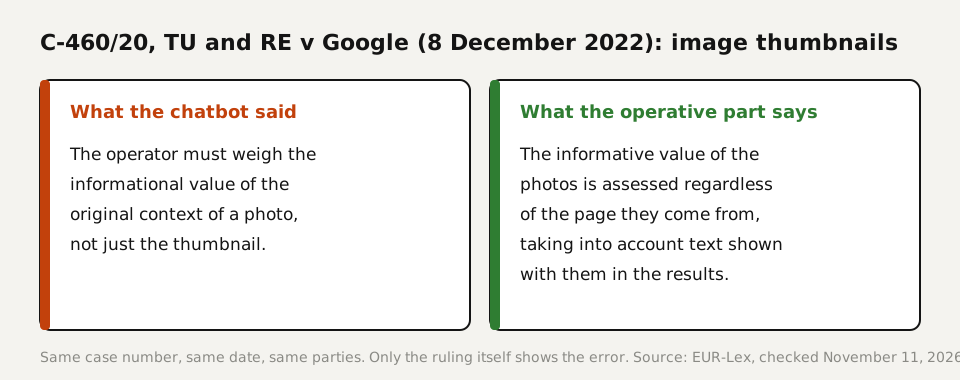
We asked for three Court of Justice judgments on delisting by search engines. All three case numbers and dates were correct: C-131/12 (Google Spain, May 13, 2014), C-507/17 (Google v CNIL, September 24, 2019) and C-460/20 (TU and RE v Google, December 8, 2022). The summary of C-460/20 said the operator must weigh a photo's original context, not only the thumbnail. The operative part of the judgment says the opposite: the informative value of thumbnails is assessed regardless of the context of the page they come from, taking into account any text shown with them in the results. The same answer also offered a High Court case as an example of Court of Appeal authority.
- Treat every authority as a lead, not a source. Open the judgment on the official database (EUR-Lex, CURIA, BAILII, your national court site) before it enters a draft.
- Read the operative part, not the summary. Our wrong holding came with a correct case number, date and parties. Only the operative part showed the error.
- Check the court. A case number with EWHC is the High Court; EWCA is the Court of Appeal. The chatbot mixed those up while the citation itself was right.
- Ask the model to separate memory from sources. The model opened with "These are from memory", which was the correct warning. Make that a standing instruction.
- Use a research tool with a real citator for anything you file. A general chatbot has no live connection to case law unless you give it one.
The five legal tasks we ran
We gave Claude (Sonnet 5.5) five tasks on November 11, 2026, each as one prompt without follow-up. All documents were invented, with fictional companies, so no client data was involved. We checked every answer by hand against the documents and, for the case law, against EUR-Lex.
| Task | Time | Result | What we found |
|---|---|---|---|
| Review a one-sided "mutual" NDA for the receiving party | 28 s | Good | Found all six problems we planted: one-way definition, no end date, a no-hire clause dressed as non-solicitation, a per-breach penalty, no compelled-disclosure exception, no governing law. Added four reasonable extra points. |
| Three EU judgments on the right to be forgotten | 10 s | Partly wrong | Citations and dates correct; the holding on image thumbnails in C-460/20 stated backwards; a High Court case offered as Court of Appeal authority. |
| Summarize a case we invented | 10 s | Good | Said it couldn't verify the case and gave no holding. Explained the real test from the Supreme Court in Cavendish v Makdessi instead. |
| Chronology and reconciliation from an email thread about a disputed invoice | 28 s | Good | Correct timeline. Worked out that the EUR 700 deduction matched no figure in the file (the stated basis came to EUR 240) and listed ten gaps a lawyer would need to fill. |
| Compare two versions of a liability clause | 16 s | Good | Caught all five changes, including the quiet deletion of "in any contract year", and said which party each one favors. |
Four out of five is a good result, and the failure was in the task lawyers lean on most. Contract work went well because everything the model needed was in the prompt. Case law went wrong because it relied on memory. That's the rule we'd take from this test: give the model the document, and verify anything it brings from outside.
Ten legal tasks with a prompt and a check
| Task | What to give the model | What you check yourself |
|---|---|---|
| First-pass contract review | The contract, whose side you're on, and a request to rank issues by risk with a one-line fix | Every clause it says is missing, against the document |
| Redline comparison | Both versions, with the instruction not to miss small wording changes | Run your own compare tool alongside it |
| Chronology | The emails or a summary, with a column for the source of each line | Dates and amounts, one by one |
| Reconciling amounts | The figures and the claimed basis | The arithmetic, and any assumption it states (such as a unit price) |
| Gap list for a file | The file and the question "what would a lawyer need that isn't here?" | Whether the gaps it lists matter for your theory |
| Plain-language client letter | Your legal analysis, the client's question, a word limit | That nothing in the letter goes beyond your analysis |
| Clause drafting | The commercial deal in bullet points and your house style | Defined terms and cross-references |
| Deposition or interview outline | The chronology and the issues | That questions don't assume facts not in evidence |
| Research starting points | A precise legal question and jurisdiction | Every authority on the official database, operative part first |
| Summary of a long judgment you paste in | The full text and the points you need | Quotes against the original; pinpoint paragraphs |
This is the NDA prompt from our test. It found all six planted issues because it says whose side you're on and forbids a full rewrite, which keeps the answer short enough to check.
You are assisting a commercial lawyer who acts for [party].
Review this agreement from [party]'s point of view. List every issue
that creates risk or imbalance for [party], ranked from highest to
lowest risk, with the clause number, why it matters, and a suggested
fix in one sentence. Do not rewrite the whole agreement.

[paste the anonymized agreement]
And the standing instruction we'd add to every research prompt, based on what went wrong:
For every case or statute you mention: give the citation, say whether
you are working from memory or from text I provided, and quote the
passage the point rests on. If you are unsure a source exists or what
it holds, say so instead of summarizing it.
Which AI tools lawyers use, and what they cost
There are two kinds. General assistants such as ChatGPT, Claude, Gemini and Copilot work on whatever you give them, with business plans that keep your data out of training. Legal research platforms from the large legal publishers connect a model to their own case law databases and citators. Anthropic now also markets Claude to legal teams directly, with ready-made legal artifacts and connectors to legal software. Prices for business plans and legal platforms change often and most legal platforms quote per firm, so check the vendor's own page on the day you decide.
Our test points to a simple split. For work on documents you supply, a general assistant on a business plan did the job. For finding and citing authority, use a tool that cites from a live database, and still open the source.
Checking an AI summary of a file
Ask for a source column in every chronology, as we did. It turns checking into ticking boxes: each line points to an email or document you can open. Our chronology also marked one line as derived (the passed delivery date) instead of found, which is the kind of honesty you want to require. Then check three things by hand: every date, every amount, and every sentence that contains "agreed", because that is where summaries quietly turn a request into a commitment.
Your first week
- Ask your firm which AI plan it has a data processing agreement for. If it has none, limit yourself to templates, public law and anonymized facts.
- Run your next incoming NDA through the review prompt, anonymized, and compare the issue list with your own markup.
- Add the standing citation instruction to your research prompts and verify every authority on the official database, operative part first.
Questions
Which legal tasks can you safely do with AI?
Tasks where you supply the material: contract review, redline comparisons, chronologies, gap lists and plain-language letters. In our test those were the tasks that went well. Research from the model's memory is the risky part.
How reliable is AI at reviewing a contract?
In our test it found all six problems we planted in an NDA and added four sensible points. It's a strong first pass, and you still check each point against the document before it reaches a client.
Can I put client data into ChatGPT or Claude?
Not on a personal or free plan. Use a business plan your firm has a data processing agreement for, with training off, and only within your engagement terms and your bar's rules.
How do I avoid invented case law?
Open every authority on an official database and read the operative part. In our test the model refused a fake case but stated a real EU holding backwards, with the correct citation.
Which AI tools keep data in Europe?
OpenAI offers European data residency for new ChatGPT Enterprise and Edu workspaces and the API. Claude is available in European regions through AWS Bedrock and Google Cloud Vertex AI, according to Anthropic's regional compliance page (checked November 11, 2026).
How do I check an AI summary of a file?
Require a source column, then check every date, every amount and every sentence that says something was agreed. Those three are where summaries go wrong.
Sources
- EUR-Lex: Judgment of the Court of Justice in C-460/20, TU and RE v Google (December 8, 2022) checked on
- OpenAI Help Center: Data residency and inference residency for ChatGPT checked on
- Anthropic: Claude regional compliance and availability checked on
- Anthropic: Claude for legal teams checked on
- OpenAI Help Center: Data controls in ChatGPT checked on
- Anthropic Privacy Center: Is my data used for model training? checked on
More in aI by profession
- ChatGPT for Teachers and Claude for Teachers: what's free, what's safe, and what we testedWho gets ChatGPT for Teachers or Claude for Teachers free, what never goes into a chatbot, and five classroom tasks we ran, including where grading wobbled.
- AI for translators: a glossary-first workflow, tested on a Dutch-to-English leaseA glossary-first AI workflow for translators, tested on a Dutch lease: where terms drifted, which planted errors review caught, and one currency slip.
- AI for accountants: receipts, ledger review and client questions, tested five timesWe ran receipt extraction, a month-end ledger review and the totals five times each. Which steps AI handled, which belong in a formula, and what to check.
- AI for customer service: five support tasks we tested, and how to stop the message pile-upFive support tasks tested, plus ten runs that show when AI invents refund rules and the one prompt line that stopped it. And how to send one message, not five.
Also useful
- AI for small business: Claude for Small Business, ChatGPT, and ten tasks worth handing overWhat Claude for Small Business and ChatGPT cost, ten owner tasks AI handles well, and the one forecast mistake our test caught before it reached the bank.
- Claude Desktop App: Download, Install and the Settings Worth ChangingWhere to download Claude Desktop for Mac, Windows and Linux, what it costs, what it does that the browser can't, and the settings to change first.
- Claude Sonnet vs Opus: what we found running the same eight tasksWe gave Haiku 5.5, Sonnet 5.5, Opus 5.5 and Fable 5.2 the same eight checkable tasks. Accuracy, cost per task and where each model fits.