ChatGPT for Teachers and Claude for Teachers: what's free, what's safe, and what we tested
ChatGPT for Teachers is free for verified US K–12 educators through June 2028, and Claude for Teachers gives verified US K–12 teachers a free year if they sign up by June 30, 2027. Teachers outside the US get neither, so they use a regular plan and keep identifiable student data out of it. We ran five everyday teaching tasks through an AI chatbot: three came back ready to use, and two had errors a teacher would have to catch.
Tested by us on 11 November 2026.
Who can get ChatGPT for Teachers and Claude for Teachers free
Both programs are built for American schools. Each one checks that you work at a US K–12 school or district, and neither is open to students. We read both providers' own pages on November 11, 2026.
| ChatGPT for Teachers | Claude for Teachers | |
|---|---|---|
| Who qualifies | Teachers, staff, school leaders and district administrators at an accredited US K–12 school or district | Verified US K–12 educators |
| Cost | Free through June 2028; OpenAI says it may adjust pricing after that | Free for a full year if you sign up by June 30, 2027 |
| How you sign up | Verify with your school email, then create or join a Teachers workspace | Verify as an educator; schools and districts can also set up a central organization |
| Training on your chats | Covered by the Teacher Access Terms and Student Data Privacy Agreement you accept at sign-up | Off for verified teacher accounts, according to Anthropic |
| Student records | Built for classroom materials and student data, within your district's agreement | Only with authorization from your school or district; without it, Anthropic advises leaving identifiable student information out |
In the US, pick the one your district supports, because district authorization decides what student data you may use. Outside the US, neither program applies.
Teaching in the UK, Canada, Australia or the EU? You're on the same plans as everyone else: the free tiers, or a paid personal plan. Those plans are fine for lesson materials, but they aren't covered by a school data agreement, so the rules in the next section matter more.
What you can put into an AI tool, and what stays out
Start here, before any prompt. The safe default is that nothing identifies a student unless your school has a signed agreement with that provider. Names are only part of it. A grade combined with a class and a medical note can point to one child as clearly.
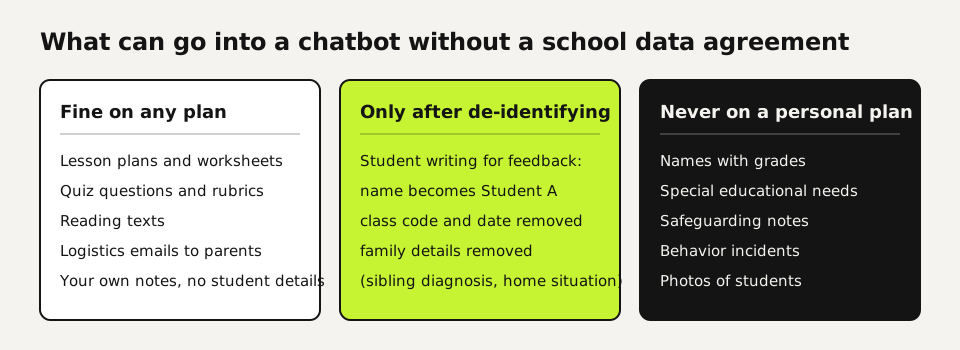
- Fine on any plan: lesson plans, worksheets, quiz questions, rubrics, reading texts, emails about logistics, your own notes without student details.
- Only after de-identifying: student writing for feedback. Replace the name with a letter, remove the class code and the date, and delete family details, such as a sibling's diagnosis, that point to one household.
- Never on a personal plan: names with grades, special educational needs, safeguarding notes, behavior incidents, report-card comments with names, photos of students.
- Check the setting first: on ChatGPT Free, Plus and Pro, Improve the model for everyone is on by default; switch it off under Settings → Data controls. Claude's consumer plans have a model improvement setting under privacy settings, and Incognito chats are never used for training.
- Ask your school before you start: does it have an agreement with an AI provider, and which tool does it allow? If it has one, use that tool and nothing else for anything about students.
In the EU, two parts of the AI Act matter for schools. Article 4, as amended in 2026, asks organizations that deploy AI to take measures that support their staff's AI literacy. Annex III lists AI systems intended to evaluate learning outcomes as high-risk, with the obligations for those systems applying from December 2, 2027. A chatbot you use to draft feedback isn't such a system by default, but a school that lets AI decide grades moves toward that category. This is a checklist, not legal advice: your school's data protection officer has the final word.
Five classroom tasks we ran, and what came back
We gave Claude (Sonnet 5.5) five tasks on November 11, 2026, each as a single prompt without follow-up. All the material was invented, so no student data was involved. The prompts are written for any chatbot and contain nothing that only works in Claude. We haven't rerun them in ChatGPT.
| Task | Time | Result | What we had to fix |
|---|---|---|---|
| 50-minute lesson plan on photosynthesis, mixed ability, no lab | 14 s | Usable | The timings added up to 45 minutes, not 50. |
| One text rewritten at three reading levels | 14 s | Usable | Nothing. It kept all eight facts and listed its own wording changes, including two terms it had added. |
| Grade three short essays on a 16-point rubric, three runs | 11–14 s per run | Partly | One essay scored 14, then 12, then 12. See below. |
| 10-question quiz on the causes of World War I, with answer key | 54 s | Partly | The answer key was correct. The explanations for two questions were mixed up, which the chatbot pointed out itself at the end. |
| Email to parents about a rescheduled museum trip | 3 s | Usable | Nothing. 122 words, every date and amount right. |
The pattern matches what we see in other work: AI is fast and good at drafting, and it slips on details that look right at a glance. A lesson plan that runs five minutes short or a quiz explanation attached to the wrong option won't jump out at you, so read every output as if a student teacher wrote it.
Can ChatGPT grade essays? What three runs on the same essays showed
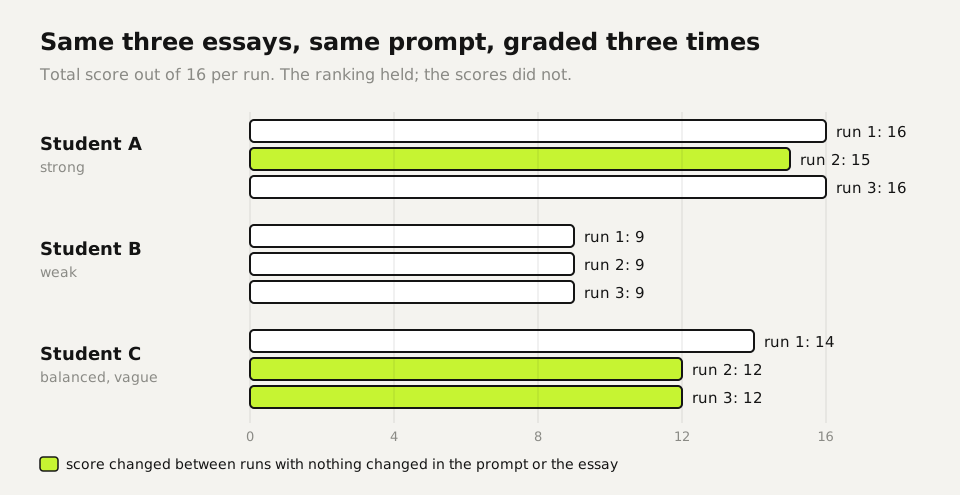
We wrote three short argumentative paragraphs of the kind a 14-year-old hands in: one strong, one weak with a spelling slip, one balanced but vague. We asked for scores on four criteria (claim, evidence, counterargument, conventions), each from 1 to 4, and then ran the identical prompt three times.
| Essay | Run 1 | Run 2 | Run 3 |
|---|---|---|---|
| Student A (strong) | 16 | 15 | 16 |
| Student B (weak) | 9 | 9 | 9 |
| Student C (balanced, vague) | 14 | 12 | 12 |
The ranking held in every run, and the feedback pointed the same way each time: Student C should state a position in the first sentence and name a real source instead of "research suggests." The numbers moved, though. Student C's evidence score went from 3 to 2 and the counterargument score from 4 to 3 between runs, with nothing changed. Student A got full marks twice, while the only evidence in that paragraph was a show of hands in one class.
So use AI for the first pass of written feedback, and keep the grade yourself. If you want scores as a starting point, run the prompt twice and look closely at every criterion where the runs disagree. That disagreement tells you which essays need your attention.
Ten teaching tasks, with what to check each time
These are the tasks that come back every week in most classrooms. The prompts contain nothing tool-specific, so you can paste them into whichever chatbot your school allows. Give the age group, the time you have and what students already know, because a vague prompt gets you a generic lesson.
| Task | What to ask for | What you check |
|---|---|---|
| Lesson plan | Objective, starter, main activity, differentiation, exit ticket, with minutes per part | Do the minutes add up? Is every activity possible in your room? |
| Reading levels | The same text at two or three levels, plus a list of facts it dropped or changed | Did it add facts that weren't in your source? |
| Quiz or test | Questions first, answer key separately, one misconception per wrong option | Every answer in the key, one by one |
| Feedback on writing | One strength and one next step per student, tied to your rubric | Is it about this text, or could it fit any essay? |
| Rubric | Four criteria, four levels, in student-friendly language | Can a student tell level 2 from level 3? |
| Parent email | Under 150 words, the facts as a list, no exclamation marks | Dates, times, amounts, reply deadline |
| Worked examples | Three examples from easy to hard, with each step written out | Do the calculations yourself |
| Discussion questions | Questions that have more than one defensible answer | Would your quietest student dare to answer? |
| Translation of a letter home | A plain version first, then the translation | Ask a speaker of that language before sending anything sensitive |
| Reflection on your lesson | Your own notes in, three questions back to you | Your notes contain no student names |
This is the grading prompt from our test. Replace the rubric and paste in de-identified texts labeled Student A, B, C.
Grade these short texts by 14-year-olds using the rubric.
For each student: the four scores, the total out of 16, and two
sentences of feedback addressed to the student: one strength and
one concrete next step.
End with a table: student, the four criteria, total.

Rubric (score each criterion 1-4):
1. Claim: a clear position.
2. Evidence: specific, relevant support.
3. Counterargument: addresses another view and responds to it.
4. Conventions: spelling, grammar, punctuation.

Student A:
...
Run it twice. Where the two runs give different scores, read that essay yourself first.
And the quiz prompt, split in two because of what happened in our test. Ask for the questions and the key first. Ask for the misconception notes in a second message, so a mistake in the notes can't drag the key along with it.
Write a 10-question multiple-choice quiz on [topic] for [age]-year-olds.
Four options per question, one correct. Then give only the answer key
as a table.

(second message)
For each question, explain which misconception each wrong option
is designed to catch.
Teaching students to use AI responsibly
Neither teacher program gives students an account. ChatGPT's terms require users to be at least 13, with a parent's permission under 18, and Anthropic's education page notes that Claude is for users aged 18 and over. What works in class is showing the tool on your own screen. Let students predict an answer, then compare it with what the chatbot says, and hunt for the mistake together. Our quiz test gives you a ready example: an answer key that was right next to explanations that were wrong.
Give students one rule they can repeat: AI may help you think, but you hand in what you can explain. Ask them to note where they used AI, the same way they cite a book.
Your first week with AI in the classroom
- Monday: ask your school which AI tools are allowed and whether there is a data agreement. If you use a personal plan, switch off training in the settings.
- Midweek: take one task you do every week, such as a parent email or an exit ticket, and do it with AI for the rest of the week. Check the output the way the table above describes.
- Friday: run one feedback round on de-identified writing, twice, and compare the two runs with your own judgment before you hand anything back.
Questions
Can teachers get ChatGPT Plus or ChatGPT for Teachers free?
Verified US K–12 teachers and school staff get ChatGPT for Teachers free through June 2028, according to OpenAI's help center. There is no free ChatGPT Plus for teachers, and teachers outside the US don't qualify for either.
Can I put student data into ChatGPT?
Only if your school or district has an agreement with the provider and allows it. On a personal plan, use lesson materials and de-identified student work only: no names, grades with names, special needs or safeguarding notes.
How do I use ChatGPT to plan lessons?
Give it the age group, lesson length, what students already know and what equipment you have, and ask for minutes per part. Then check that the minutes add up and that every activity fits your room. In our test they added up to 45 out of 50.
Can ChatGPT grade essays reliably?
Not on its own. In our test the ranking stayed the same across three runs, but one essay's score moved by two points out of 16 with nothing changed. Use it for draft feedback and keep the grade yourself.
How do I differentiate with AI for different levels?
Ask for the same text at two or three reading levels and for a list of every fact it dropped or changed. In our test it kept all facts and added two terms of its own, which it listed.
Is Claude for Teachers available outside the US?
No. Anthropic offers it to verified US K–12 educators. Elsewhere you use Claude's regular free or paid plans, which have no school data agreement.
Sources
- OpenAI Help Center: ChatGPT for Teachers (eligibility, free period, features) checked on
- Anthropic: Introducing Claude for Teachers (July 14, 2026) checked on
- Claude Help Center: Claude for Teachers, your data and our terms checked on
- OpenAI Help Center: Data controls in ChatGPT checked on
- Anthropic Privacy Center: Is my data used for model training? checked on
- EU AI Act, Regulation (EU) 2024/1689: Article 4, Article 113 and Annex III point 3 checked on
- OpenAI Terms of Use: minimum age checked on
- Regulation (EU) 2026/1744 amending the AI Act (Article 4, high-risk dates) checked on
More in aI by profession
- AI for legal work: five tasks we tested, and the checks that caught the mistakesWe ran an NDA review, a case-law search, a fake citation, a dispute chronology and a redline through AI. What held up, what didn't, and how to check it.
- AI for translators: a glossary-first workflow, tested on a Dutch-to-English leaseA glossary-first AI workflow for translators, tested on a Dutch lease: where terms drifted, which planted errors review caught, and one currency slip.
- AI for accountants: receipts, ledger review and client questions, tested five timesWe ran receipt extraction, a month-end ledger review and the totals five times each. Which steps AI handled, which belong in a formula, and what to check.
- AI for customer service: five support tasks we tested, and how to stop the message pile-upFive support tasks tested, plus ten runs that show when AI invents refund rules and the one prompt line that stopped it. And how to send one message, not five.
Also useful
- AI for small business: Claude for Small Business, ChatGPT, and ten tasks worth handing overWhat Claude for Small Business and ChatGPT cost, ten owner tasks AI handles well, and the one forecast mistake our test caught before it reached the bank.
- AI for HR: what we tested, and why AI shouldn't make your hiring decisionsWe tested AI on job posts, leave-policy questions and ranking two equal candidates. The ranking followed list order ten times out of ten.
- Claude Desktop App: Download, Install and the Settings Worth ChangingWhere to download Claude Desktop for Mac, Windows and Linux, what it costs, what it does that the browser can't, and the settings to change first.