A Claude Code Status Line That Shows Cost, Context and Git Branch
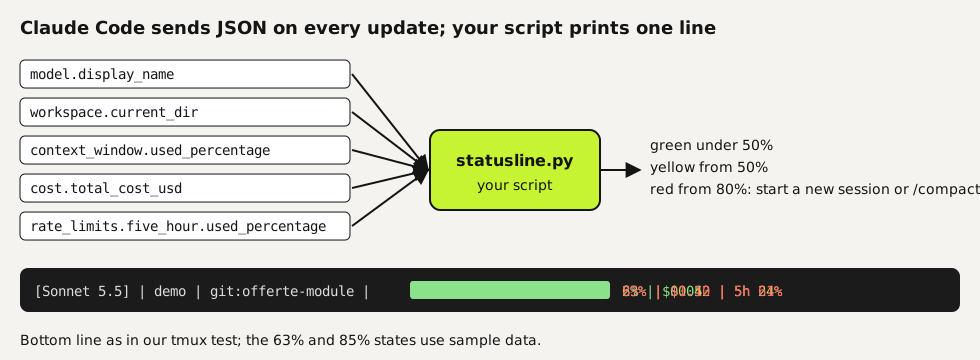
The Claude Code status line is a row at the bottom of the terminal that shows whatever a script of yours prints. Claude Code sends that script the session data as JSON. With about 40 lines of Python you can show the model, the folder and the git branch, plus how full the context window is and what the session has cost so far. Below is the script we tested in a live Claude Code 2.1.321 session on Linux and on a Windows 10 PC, the two lines of settings that turn it on, and the fields you can add.
Tested by us on 11 November 2026.
How the status line works
Each time the conversation changes, Claude Code runs your command and passes a JSON object on standard input. Whatever your script prints becomes the status line. According to the docs, updates are batched every 300 ms, and you can add a refreshInterval in seconds if you show something time-based, like a clock. Colors work through ANSI escape codes, as long as your terminal supports them.
What you need
- Claude Code. We tested with version 2.1.321.
- Python 3. The script uses only the standard library, so you don't need
jq, which many examples online depend on and which Windows doesn't ship with. - Git, if you want the branch name. Without it the script leaves that part out.
Set it up in three steps
Save the script
Save this as
statusline.pyin your.claudefolder:~/.claude/statusline.pyon macOS and Linux,C:\Users\<you>\.claude\statusline.pyon Windows.python#!/usr/bin/env python3 """Claude Code status line: model | folder | git branch | context bar | cost | 5-hour limit. Reads the session JSON that Claude Code sends on stdin. Standard library only. Tested with Claude Code 2.1.321 on Ubuntu and with Python 3 on Windows 10, 2026-11-11.""" import json, os, subprocess, sys data = json.load(sys.stdin) get = lambda path, default=None: (lambda d: d if d is not None else default)( __import__("functools").reduce(lambda d, k: d.get(k) if isinstance(d, dict) else None, path.split("."), data)) GREEN, YELLOW, RED, DIM, RESET = "\033[32m", "\033[33m", "\033[31m", "\033[2m", "\033[0m" def color(pct): return GREEN if pct < 50 else YELLOW if pct < 80 else RED model = get("model.display_name", "?") folder = os.path.basename(get("workspace.current_dir", "") or "") or "?" branch = "" try: branch = subprocess.run(["git", "branch", "--show-current"], cwd=get("workspace.current_dir") or ".", capture_output=True, text=True, timeout=1).stdout.strip() except Exception: pass # no git, or not a repository: show nothing pct = int(get("context_window.used_percentage", 0) or 0) bar = "#" * (pct // 10) + "-" * (10 - pct // 10) cost = get("cost.total_cost_usd", 0) or 0 parts = [f"[{model}]", folder] if branch: parts.append(f"git:{branch}") parts.append(f"{color(pct)}{bar} {pct}%{RESET}") parts.append(f"${cost:.2f}") five = get("rate_limits.five_hour.used_percentage") if five is not None: parts.append(f"{color(five)}5h {five:.0f}%{RESET}") print(f" {DIM}|{RESET} ".join(parts))Point Claude Code at it
Add a
statusLineentry to~/.claude/settings.json. Starting the script throughpython3means it doesn't need to be executable, a common reason for a blank status line. On Windows, writepythoninstead ofpython3and use the full path to the script.json{ "statusLine": { "type": "command", "command": "python3 ~/.claude/statusline.py" } }Start a session and check the bottom row
Start
claudein a project folder. The line appears below the input box after the first update. If nothing shows, run the script by hand with sample input, as in the test below, and read the error.
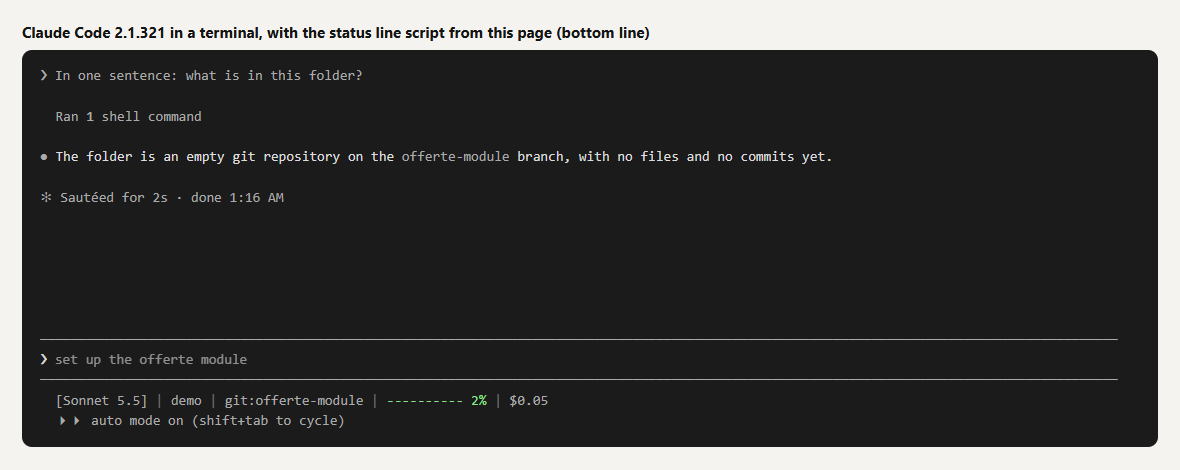 (opens at full size)
How we tested it
| Test | Where | Result |
|---|---|---|
| Sample JSON with all fields | Ubuntu, Python 3.11 | All six parts shown; context 63% in yellow, 5-hour limit 24% in green |
Empty JSON {} | Ubuntu | [?] | ? | 0% | $0.00, no crash |
| Same sample, folder with a git branch | Windows 10, Python 3.14, Git 2.52 | Same line, including the branch name; test files removed afterwards |
| Live interactive session | Claude Code 2.1.321 in a terminal on Ubuntu | Line updated after each answer, from $0.03 to $0.05; no 5-hour segment, because the session didn't send rate_limits |
That last row matters if you copy examples from elsewhere. Not every field is present in every session, so read each one with a default, as the get() helper does. A script that crashes on a missing field shows nothing at all.
Fields you can add
| Field | What it holds |
|---|---|
model.display_name | The model name, as shown in the interface |
workspace.current_dir, workspace.project_dir | The current folder and the folder where you started Claude Code |
context_window.used_percentage | How full the context window is, already calculated |
cost.total_cost_usd | Estimated session cost at list price. It may differ from your bill |
cost.total_lines_added, cost.total_lines_removed | Lines of code changed in the session |
rate_limits.five_hour.used_percentage, rate_limits.seven_day.used_percentage | How much of your 5-hour and 7-day limit you've used, when present |
pr.number, pr.review_state | The open pull request for the current branch, when there is one |
Let Claude Code write one for you
You can also type /statusline followed by what you want, for example /statusline show model name and context percentage with a progress bar. Claude Code writes a script in ~/.claude/ and updates your settings. /statusline delete removes it again. We prefer keeping our own script in version control, so the line looks the same on every machine we work on.
Why we watch cost and context
The two numbers that change how we work are the context percentage and the session cost. When the bar turns red, the session is carrying a lot of old conversation, and a fresh session with a short summary usually works better than pushing on. The cost figure keeps long agent runs honest: it's an estimate, but it shows quickly when a task is using far more than it should. For rules that keep agents from doing damage, see permissions and hooks.
Questions
Where do I configure the Claude Code status line?
In the statusLine object of your settings file, usually ~/.claude/settings.json, with "type": "command" and the command that runs your script.
Does the status line work on Windows?
Yes. We ran the script above with Python 3.14 on Windows 10. Use python and the full path to the script in the command.
Is the cost in the status line what I pay?
It's an estimate at list price, calculated by Claude Code itself. The docs note it can differ from your bill, and on a subscription you pay a flat fee.
Why doesn't my status line show the 5-hour limit?
The rate_limits field isn't sent in every session. In our test it was missing, so the script skips that part when the field is absent.
Sources
- Claude Code: Customize your status line checked on
More in claude in practice
- Claude Code Permissions: Let It Work Freely Without Breaking AnythingSet up Claude Code permissions so it works without constant prompts but can't delete or leak what matters. Tested settings file, deny rules and a blocking hook.
- CLAUDE.md and Claude Code Memory: A Template We TestedHow Claude Code memory works through CLAUDE.md, with a template we tested: rules that stick, background files that load only when needed, and AGENTS.md.
- Build a Website with Claude Code Without the Generic AI LookWe built one site twice with Claude Code: one prompt versus a design decision first. Screenshots at 1440 and 390 px, the prompts, and the checks we use.
- Claude Code Agent Teams: Setup, a Real Test, and When They're Worth ItHow to turn on Claude Code agent teams and what a three-teammate review gave us: 24 findings versus 12 from one session, at seven times the cost.
Also useful
- AGENTS.md Explained: One Instruction File for Codex, Claude Code and Other AgentsAGENTS.md is the shared instruction file for coding agents. How Codex reads it, when Claude Code does, and the one-line fix we tested.
- How to Build an MCP Server: A Tested Python and Node ExampleBuild a working MCP server in Python or Node, test it without a model, inspect it, then connect it to an AI app. Full code and the errors we hit.
- Building n8n workflows with Claude Code: what works and what you still checkClaude Code built, validated and tested three n8n workflows through n8n's MCP server. What worked, what you still check yourself, and the prompt to copy.