Claude Code in a Loop: /loop, the Ralph Loop, and When a Long Job Needs Something Else
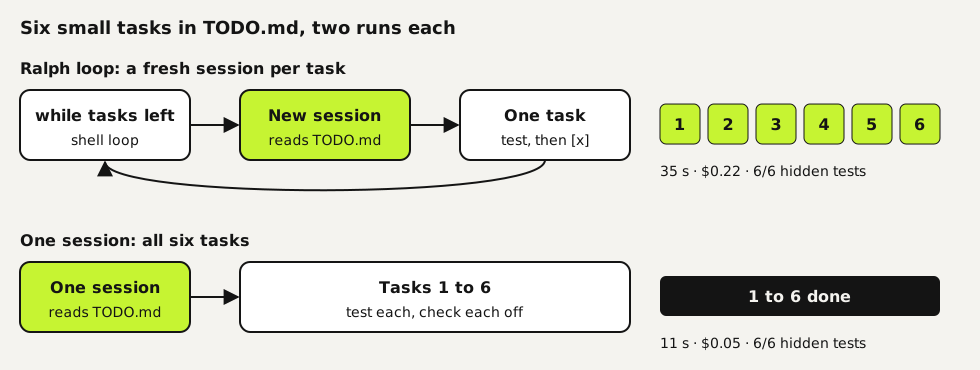
"Claude Code loop" means one of two things. /loop is a built-in command that repeats a prompt on a timer inside an open session, useful for watching a deploy or a pull request. The Ralph loop is a shell script that starts a fresh Claude Code session over and over until a task list is empty. We ran six small tasks both as a Ralph loop and in one session. Both passed six of six hidden tests; the loop cost four times as much and took three times as long. Below is when each one fits, the script we ran, and how we handle jobs that run for hours.
Tested by us on 11 November 2026.
Two loops with the same name
| /loop | Ralph loop | |
|---|---|---|
| What it is | A built-in command that re-runs a prompt in your session | A shell loop that starts a new Claude Code session each round |
| Example | /loop 5m check if the deployment finished | while loop around claude -p that stops when TODO.md has no open items |
| Context | One session that keeps growing | Fresh context every round; memory lives in files |
| Stops when | You cancel it, the session closes, or after seven days | Your stop condition is met, or a round limit you set |
| Good for | Polling: CI, deploys, review comments | Long task lists where one session would fill its context |
Use /loop to watch something
Give /loop an interval and a prompt and Claude Code turns it into a schedule: /loop 5m check if the deployment finished and tell me what happened. Leave out the interval and Claude picks a delay between one minute and one hour after each round, depending on what it saw. A bare /loop runs a built-in maintenance prompt, or your own .claude/loop.md if you have one. According to the docs, tasks only fire while Claude Code is running and idle, recurring tasks expire after seven days, and missed runs aren't caught up. For anything that must run with your laptop closed, the docs point to cloud or desktop scheduled tasks.
Run a Ralph loop
Write the task list
Put the tasks in
TODO.mdas a checklist. Add one line at the top that tells each session to do exactly one unchecked task, test it and check it off. The file is the loop's memory: every round starts with an empty context and learns where things stand from this file.Write the loop
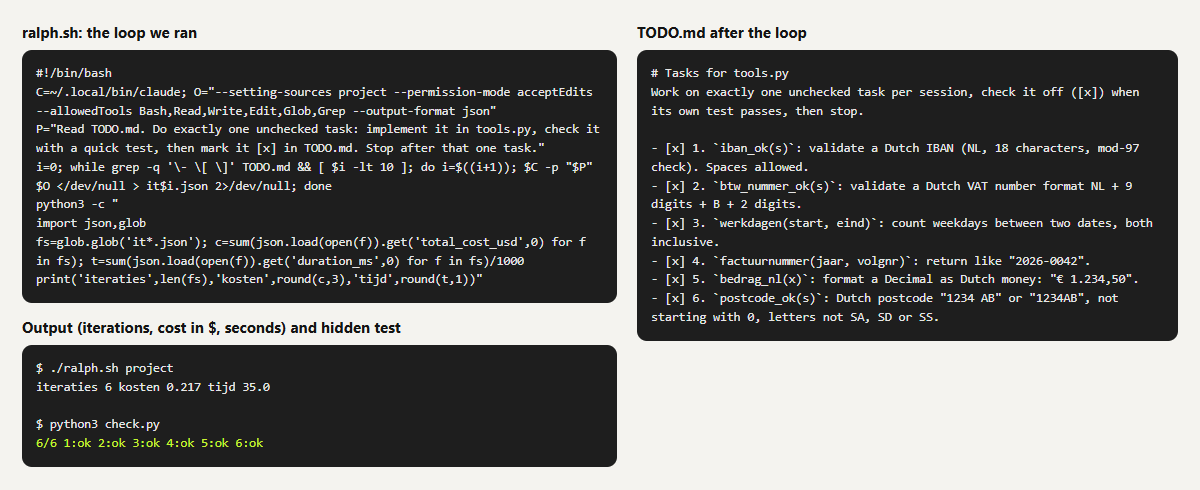
This is the script we ran. It stops when no unchecked items are left, or after ten rounds, so a task that never gets checked off can't run up a bill.
bash#!/bin/bash C=~/.local/bin/claude O="--setting-sources project --permission-mode acceptEdits --allowedTools Bash,Read,Write,Edit,Glob,Grep --output-format json" P="Read TODO.md. Do exactly one unchecked task: implement it in tools.py, check it with a quick test, then mark it [x] in TODO.md. Stop after that one task." i=0 while grep -q '\- \[ \]' TODO.md && [ $i -lt 10 ]; do i=$((i+1)) $C -p "$P" $O </dev/null > it$i.json 2>/dev/null doneCheck the result yourself
A checked box means the session thought the task was done. Run your own tests after the loop. We used a hidden test file that Claude Code never saw.
 (opens at full size)
What our test showed
| Variant | Sessions | Hidden tests passed | Time | Cost |
|---|---|---|---|---|
| Ralph loop, run 1 | 6 | 6 of 6 | 35.0 s | $0.217 |
| Ralph loop, run 2 | 6 | 6 of 6 | 36.4 s | $0.216 |
| One session, run 1 | 1 | 6 of 6 | 11.4 s | $0.054 |
| One session, run 2 | 1 | 6 of 6 | 11.4 s | $0.054 |
Each fresh session has to read the project and the task list again before it starts, and that repeated reading is where the extra cost goes. For six small tasks one session had more than enough room, so the loop bought nothing. The loop starts to pay off when a single session can't hold the whole job: dozens of tasks, large files, or work that runs into a context limit halfway. We didn't test that size, so we can't give you a break-even point.
How we run jobs that take hours
Our agents often work for hours on one job, and we don't use either loop for that. A helper started from an open session lives in that session: close it or restart the machine and the helper stops, often without a word. So each long job runs as its own background process, on Linux a systemd-run --user unit, with its own time limit and a final report. Since October 4, 2026, we've run 1,364 jobs this way: 1,217 finished, 137 were stopped by hand and 5 ended in an error (our own count, November 10, 2026).
- The brief goes in a file: goal, limits, which folder it may write to and what counts as done.
- Its own process: not tied to the terminal or chat it was started from, with a hard time limit (six hours by default) and a memory cap.
- The session ID is saved: after a usage limit or a restart, we resume the same session with "continue where you left off" instead of starting over. Claude Code supports this with
--resumeand--continue. - A final step that always runs: even after an error, it records the status and tells whoever asked whether the job finished, stopped or failed.
- A report with proof: what's done, how it was tested, what's still open. The same done-means-proven rule as in our best practices.
Which one to use
| You want to | Use |
|---|---|
| Check a deploy or PR every few minutes while you work | /loop with an interval |
| Work through a short list of related tasks | One session, with a done-means-proven rule |
| Work through a long list that won't fit in one context | A Ralph loop with a round limit and your own tests after |
| Run a job for hours that must survive a closed laptop or a restart | A separate background process with a saved session ID, or cloud scheduled tasks |
Questions
What is the Ralph loop in Claude Code?
A pattern that keeps feeding Claude Code the same prompt until a stop condition is met, usually an empty task list. The simplest form is a shell loop that starts a new session each round, which is what we tested. Plugins exist that do it inside one session with a hook; we didn't test those.
How do I stop /loop?
Press Esc while a self-paced loop waits for its next round. A loop with a fixed interval, such as /loop 5m, keeps going until you ask Claude Code to cancel it, the session closes or seven days pass.
Is a Ralph loop cheaper than one long session?
Not in our test: six small tasks cost $0.22 as a loop and $0.05 in one session, with the same result. Every new session has to read the project again.
Does /loop keep running when I close the terminal?
No. Tasks only fire while Claude Code is running. For work that runs unattended, the docs recommend cloud or desktop scheduled tasks, or GitHub Actions.
Sources
More in claude in practice
- Claude Code Best Practices: Six Habits, Each Tested Before We Recommend ItSix Claude Code best practices we tested on the same small project: rules with reasons, proof before done, hooks, when to plan and when subagents pay off.
- Claude Code Subagents: When They Help, and When They Only Cost MoreWe tested Claude Code subagents on real tasks: little context saved, up to twice the cost, and a reviewer that took the author's view. Two subagent files.
- Claude Code Plan Mode: How to Use It, and When It Pays OffHow to use Claude Code plan mode, and what it changed in ten timed runs: no gain on clear tasks, but it asked the one question the direct run got wrong.
- Claude Code Agent Teams: Setup, a Real Test, and When They're Worth ItHow to turn on Claude Code agent teams and what a three-teammate review gave us: 24 findings versus 12 from one session, at seven times the cost.
Also useful
- AGENTS.md Explained: One Instruction File for Codex, Claude Code and Other AgentsAGENTS.md is the shared instruction file for coding agents. How Codex reads it, when Claude Code does, and the one-line fix we tested.
- AI for project managers: minutes, status reports and a critical path, each tested three timesMinutes, a status report and a critical path, each run three times. Where AI was right every time, its one invented claim, and a weekly report setup.
- How to Build an MCP Server: A Tested Python and Node ExampleBuild a working MCP server in Python or Node, test it without a model, inspect it, then connect it to an AI app. Full code and the errors we hit.