AI for project managers: minutes, status reports and a critical path, each tested three times
AI handles the paperwork of project management well: minutes with action items, a weekly status report from a task export, the critical path of a plan. We ran each of those three times on an invented website project. Every run caught the action items without an owner, counted the same three overdue tasks to the day, and found the same 20-day critical path. One status report added a claim the data couldn't support, that nothing had finished late. Below are the tests, the prompts, and a weekly report that prepares itself.
Tested by us on 11 November 2026.
What we tested
We invented a website relaunch with four people, a meeting transcript, a 12-task export and a seven-task plan. Into each we put something easy to miss: an action nobody took on, a launch date changed halfway through the meeting, overdue tasks next to a task due tomorrow, and a plan with two paths that run in parallel. We worked out the answers first. Then we gave Claude (Sonnet 5.5) the tasks on November 11, 2026, three runs each, every run a fresh session with the same prompt.
| Task | Runs | Result |
|---|---|---|
| Meeting transcript into minutes, flag actions without owner or date | 3 | All three runs took the final launch date (December 3, not the December 1 said first) and flagged the mailbox action nobody took on and the logo action without a date. Run 1 also noted that the board preview was raised but never settled. |
| Weekly status report from a 12-task export | 3 | Amber in every run. The same three overdue tasks, at 9, 7 and 6 days. The task due tomorrow was correctly left off the overdue list. Run 1 added "nothing finished late", which the export can't show: it has no completion dates. |
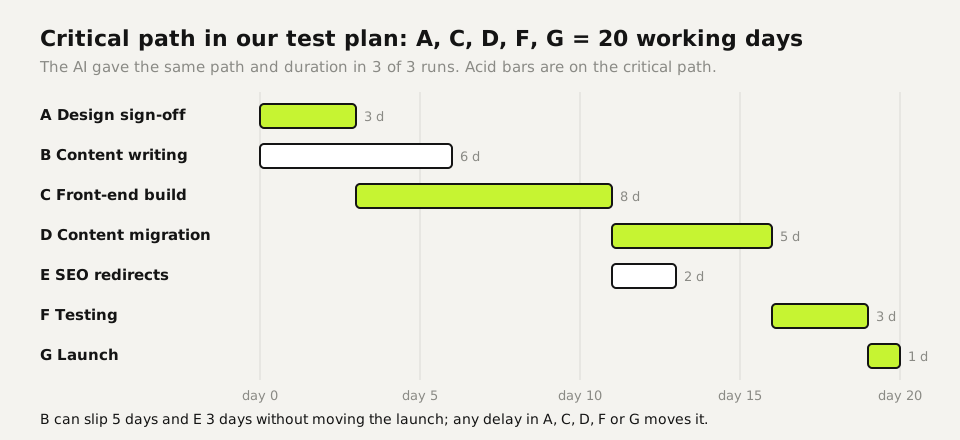
| Critical path of a seven-task plan | 3 | A, C, D, F, G and 20 working days in all three runs. |
| Update email to the client's marketing director | 1 | About 105 words, both client items with their dates, our own late item named. It added "we are working on it" about the late item, a promise the facts didn't contain. |
The two slips have the same shape. The model filled a gap with a sentence that sounds like normal project language. "Nothing finished late" reassures a sponsor; "we are working on it" reassures a client. Neither was in the data. These are the sentences to read twice, because they are the ones people quote back to you.
A weekly status report that prepares itself
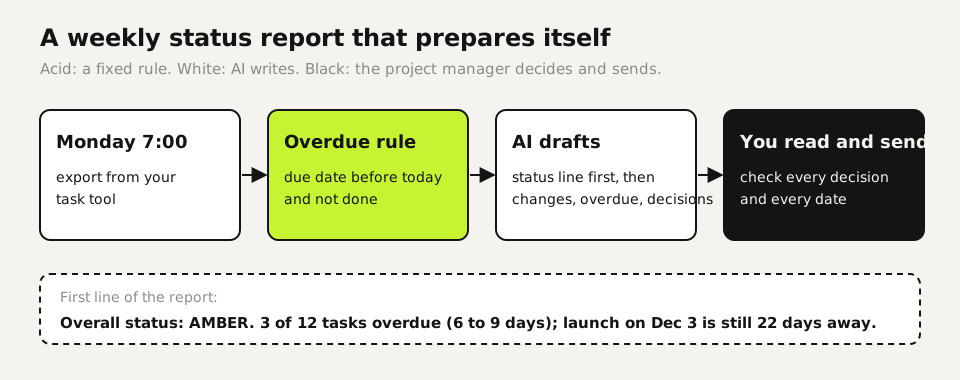
An AI agent for project management can produce this report every Monday morning without anyone starting it: a scheduled job exports the tasks, runs the rule and sends the draft to the project manager. Two things make it reliable. The overdue list comes from a rule, not from the model, so it never varies. And the report has a fixed shape, the same one we require from every agent that reports to us:
- First line is the status in plain words: green, amber or red, and why in one sentence.
- What changed since last week, in the reader's language, not task IDs.
- Evidence: counts and dates, so the reader can check.
- What needs a decision, each one with the options and a recommendation. If there is nothing, the report says: "Nothing needs your decision this week."
The rule for overdue tasks in a spreadsheet, with the due date in column D and status in E:
=IF(AND(D2<TODAY(), E2<>"done"), TODAY()-D2, "")Days overdue, or empty. Paste only the rows with a number into the report prompt.
And the report prompt, with the line we added after run 1:
Write a weekly status report from this task export: overall status
(green/amber/red) with one line why, what changed since last week,
the overdue tasks below with days overdue, and what needs a decision,
with a recommendation for each. State nothing the export doesn't show;
if something is unknown, say it's unknown.

[overdue rows from the formula]
[full task export]Ten project tasks with what you check
| Task | Give the AI | You check |
|---|---|---|
| Minutes and actions (tested) | Transcript or notes, "flag actions without owner or date" | Decisions that changed during the meeting |
| Status report (tested) | Task export plus the overdue rows | Any reassuring sentence the data doesn't show |
| Critical path (tested) | Tasks, durations, dependencies | That every dependency in your tool made it into the prompt |
| Stakeholder email (tested) | The facts and the reader's role | Promises you didn't make |
| Risk log (not tested by us) | Notes from the last three meetings | That each risk has an owner and a trigger |
| Project brief (not tested by us) | The client's request in their words | Scope you never agreed to |
| Retrospective summary (not tested by us) | Notes from the retro | That quieter voices made it in |
| Estimate check (not tested by us) | Your estimate and similar past projects | Assumptions it adds without saying so |
| Change request (not tested by us) | What changes and why | Cost and date impact against your own plan |
| Handover note (not tested by us) | The task list and open promises | Every open promise, with its date |
What stays with the project manager
In our minutes test the model noticed that the board preview was raised and never settled. Whether to raise that with the client is a judgment it can't make for you, and neither is a new launch date, a scope change or what to tell a sponsor when the status turns red. Let the AI prepare those moments with facts and options. The decision and the message that carries it stay with you.
Paste only what the task needs. Our tests ran on first names, task names and dates; no contract values, no personal data about team members. On ChatGPT Free, Plus and Pro, OpenAI's help center lists Improve the model for everyone as on by default; switch it off under Settings → Data controls before pasting client project data.
Your first week
- Run the minutes prompt on your next meeting's notes and compare the action list with your own.
- Add the overdue formula to your task export and use the report prompt for this week's update. Read every reassuring sentence against the data.
- Paste your current plan with durations and dependencies and ask for the critical path. Check whether it matches your tool's own schedule.
Questions
What can AI do for a project manager?
Draft minutes with action items, write the weekly status report from your task export, compute a critical path and draft stakeholder emails. In our three-run tests the core answers were the same every time; two invented reassurances were the errors.
Is an AI-written status report reliable?
The counts were: three overdue tasks, to the day, in three of three runs. One report added a claim the export couldn't support. Let a formula produce the overdue list and tell the model to state nothing the data doesn't show.
Can ChatGPT or Claude calculate a critical path?
In our seven-task test it found the right path and the 20-day duration in three of three runs. Bigger plans live in your scheduling tool; use AI to explain the path, not to replace the tool.
What is an AI agent for project management?
A setup that runs on its own schedule: it pulls the task export, drafts the report and puts it in front of you. Keep the overdue rule in a formula and keep sending with the project manager.
Will AI replace project managers?
Not the decisions. In our test the AI found the open question about the board preview, but whether and how to raise it with the client is the project manager's call.
Sources
- OpenAI Help Center: Data controls in ChatGPT checked on
More in aI by profession
- AI for accountants: receipts, ledger review and client questions, tested five timesWe ran receipt extraction, a month-end ledger review and the totals five times each. Which steps AI handled, which belong in a formula, and what to check.
- AI for customer service: five support tasks we tested, and how to stop the message pile-upFive support tasks tested, plus ten runs that show when AI invents refund rules and the one prompt line that stopped it. And how to send one message, not five.
- AI for ecommerce: product copy, supplier data, customer questions and stock, each tested three timesWe ran product descriptions, a messy supplier export, customer questions and a reorder check three times each. What AI got right, and what belongs in a formula.
- AI for HR: what we tested, and why AI shouldn't make your hiring decisionsWe tested AI on job posts, leave-policy questions and ranking two equal candidates. The ranking followed list order ten times out of ten.
Also useful
- AI for small business: Claude for Small Business, ChatGPT, and ten tasks worth handing overWhat Claude for Small Business and ChatGPT cost, ten owner tasks AI handles well, and the one forecast mistake our test caught before it reached the bank.
- AI for marketers: five tests, and the quality gate that keeps AI copy out of the slop pile30 AI landing-page drafts, 50 character counts and a review analysis, tested: invented offers were the real risk, and one prompt line removed them.
- Claude Code Agent Teams: Setup, a Real Test, and When They're Worth ItHow to turn on Claude Code agent teams and what a three-teammate review gave us: 24 findings versus 12 from one session, at seven times the cost.