Zapier pricing: what three common workflows cost per month
Zapier's paid plans start at $19.99 a month billed yearly ($29.99 monthly) for 750 tasks and rise to $489 for 100,000. Every successful action step uses a task, and an AI step uses five on its default setting. We counted three common workflows at 1,000 runs a month each: they need the $189 tier with the AI step on its default Premium setting, or $129 on Standard. The same work fits in the €20 Starter plan of n8n Cloud.
Tested by us on 11 November 2026.
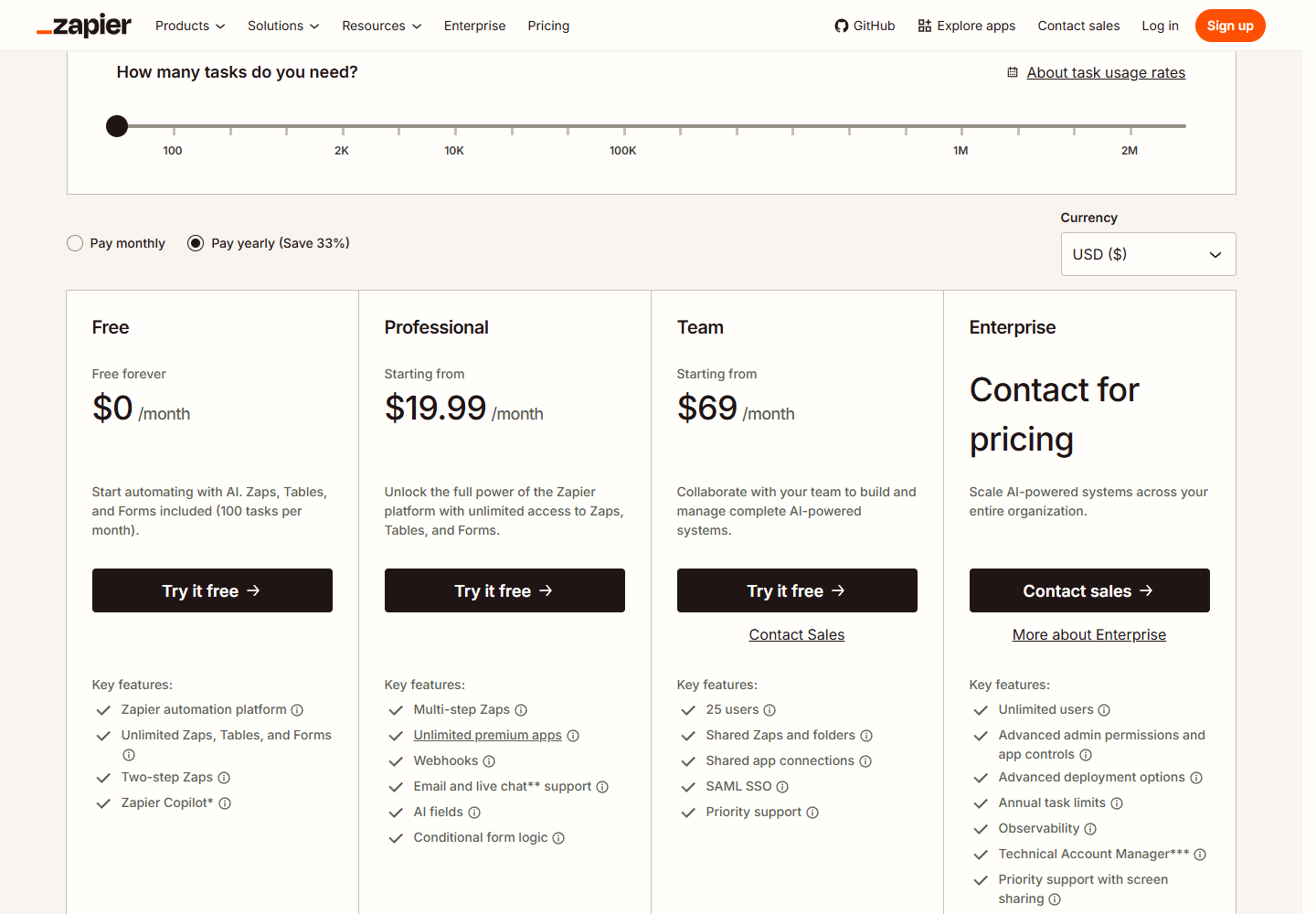
Zapier plans and prices on November 11, 2026
 (opens at full size)
| Tasks per month | Professional | Team |
|---|---|---|
| 100 | Free plan: $0 (two-step Zaps only) | Not offered |
| 750 | $19.99 (€17.83) | Not offered |
| 1,500 | $39 (€34.78) | Not offered |
| 2,000 | $49 (€43.70) | $69 (€61.53) |
| 5,000 | $89 (€79.37) | $119 (€106.12) |
| 10,000 | $129 (€115.03) | $169 (€150.70) |
| 20,000 | $189 (€168.54) | $249 (€222.04) |
| 50,000 | $289 (€257.71) | $399 (€355.81) |
| 100,000 | $489 (€436.06) | $599 (€534.15) |
What counts as a task, and what does not
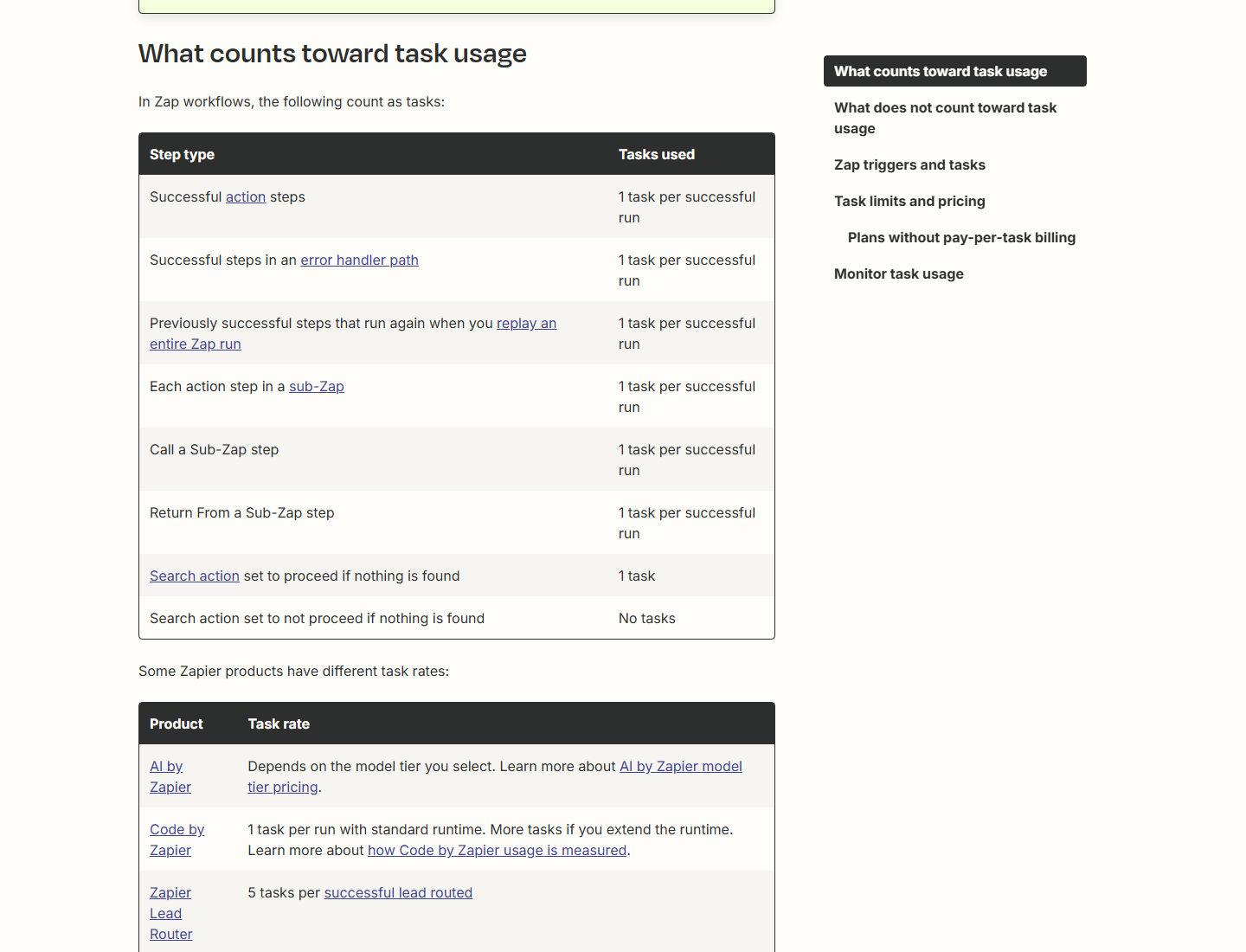
Zapier bills one task for every action step that succeeds. The trigger, the step that starts a Zap, never costs a task, and neither does polling an app for new data. Filters, Paths, Formatter, Delay, Looping and steps in Zapier Tables and Forms are free too, according to Zapier's help article on task usage (updated November 5, 2026). Failed steps and test runs in the editor do not count.
 (opens at full size)
The AI step is where the count jumps. AI by Zapier counts its model tier as a multiplier: Standard 1 task, Advanced 3, Premium 5, plus the same multiplier again for every tool the AI calls. On paid plans a new AI step starts on Premium. One AI summary in a Zap therefore costs five tasks unless you switch the tier.
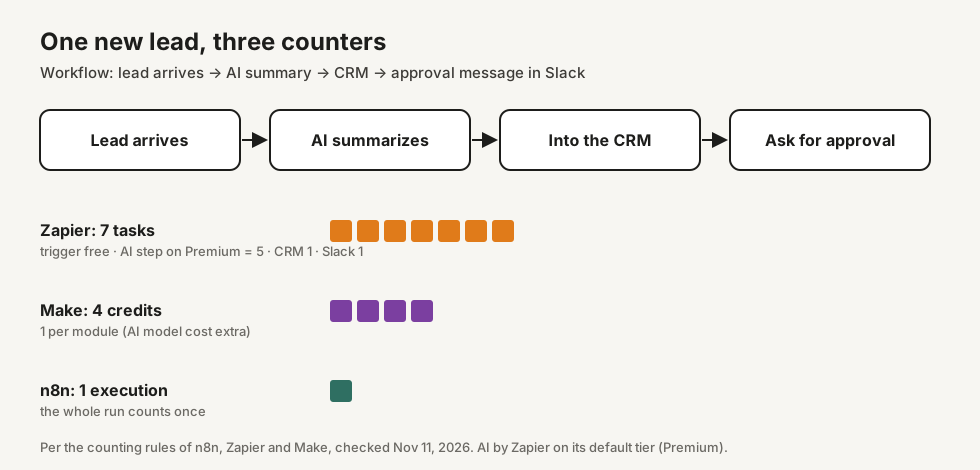
Three ordinary workflows, worked out
We took three workflows that small businesses automate first and counted them with Zapier's rules. A run is one form submitted, one reminder sent or one new lead, at 100 and at 1,000 runs a month per workflow. The reminders come from one scheduled run a day, so that workflow adds 30 search steps a month on top.
| Workflow | Steps that cost tasks | Tasks at 100 runs | Tasks at 1,000 runs |
|---|---|---|---|
| Form → spreadsheet row + confirmation email | 2 actions | 200 | 2,000 |
| Invoice reminder on the due date | 1 search per day (30 a month), then email + mark as sent per reminder | 230 | 2,030 |
| New lead → AI summary (Premium) → CRM → approval message | AI 5, CRM record 1, Slack message 1 | 700 | 7,000 |
| Same lead workflow, AI step on Standard | AI 1, CRM record 1, Slack message 1 | 300 | 3,000 |
| All three, AI on Premium | 1,130 → 1,500 tier | 11,030 → 20,000 tier | |
| All three, AI on Standard | 730 → 750 tier | 7,030 → 10,000 tier |
| Volume per workflow | Zapier, AI on Premium | Zapier, AI on Standard | n8n Cloud |
|---|---|---|---|
| 100 runs a month | 1,130 tasks → $39 (€34.78) | 730 tasks → $19.99 (€17.83) | 230 of 2,500 executions → Starter, €20 |
| 1,000 runs a month | 11,030 tasks → $189 (€168.54) | 7,030 tasks → $129 (€115.03) | 2,030 of 2,500 executions → Starter, €20 |
The AI tier is the biggest lever in this calculation. Moving one AI step from Premium to Standard drops the bill at 1,000 runs from $189 to $129 a month. By comparison, n8n comes out far cheaper because it bills one execution per complete run: a daily reminder run that sends twenty emails is one execution. We checked that counting rule on our own self-hosted n8n install, where five runs of a four-step workflow with ten invoice lines each showed up as five executions; according to its pricing page, n8n Cloud uses the same definition. In return for its higher price, Zapier needs no server, offers more ready-made app connections and has a simpler editor.
Make counts a credit per module per bundle of data, and its trigger costs a credit per check; that is how the diagram arrives at 4 credits. We left Make out of the price table because we could not confirm what a credit costs on the day we wrote this.
What happens when you go over your task limit
By default Zapier keeps your Zaps running and switches you to pay-per-task billing for the rest of the period. Your rate depends on your plan and billing cycle and is shown in your Billing settings, not on the public pricing page. Extra usage stops at three times your plan's task limit: on the 750 tier you can reach 2,250 tasks, Zapier's own example. After that, runs are held until the next cycle. The per-task rate itself is not published. You can turn pay-per-task off, and then Zaps are held as soon as you reach the limit. Zapier emails you at 80 and 100 percent.
How to keep the task count down
- Check the AI tier on every AI by Zapier step. Premium is the default on paid plans and costs five times Standard. A summary or a classification without tools runs on Standard.
- Filter early. A Filter step costs nothing and stops runs that would otherwise use tasks further down.
- Watch the loops. Looping itself is free, but every action inside it counts. A loop over 20 overdue invoices that sends a mail and marks each one as sent costs 40 tasks in Zapier and one execution in n8n.
- Batch where you can. A daily digest of new leads is one email instead of thirty.
- Check Task Usage after a week before you pick a tier. The 750 tier fills faster than most people expect.
Questions
Why is Zapier so expensive?
Zapier charges per action, not per run. Our lead workflow uses 7 tasks per lead with the AI step on its default tier, so 1,000 leads need 7,000 tasks and the $129 or $189 tier. In n8n the same run counts once.
Is Zapier free, and what can you do with 100 tasks?
The Free plan costs $0 and includes 100 tasks a month, for two-step Zaps only: one trigger and one action. That covers about three simple automations a day, for example a form that adds a spreadsheet row.
What is cheaper than Zapier?
For the same three workflows n8n Cloud cost €20 a month at both 100 and 1,000 runs, against $39 and $189 for Zapier. Self-hosted n8n has no license fee.
What counts as a task, and what does not?
Each successful action step is one task. Triggers, polling, Filters, Paths, Formatter, Delay, Looping, failed steps and tests are free. AI by Zapier counts 1, 3 or 5 tasks depending on the model tier.
What happens if you go over your task limit?
Zapier switches you to pay-per-task billing at the rate in your Billing settings, up to three times your plan's limit. If you turned that off, new runs are held until your next billing cycle.
Do you earn a commission on Zapier?
No. We have no paid relationship with Zapier, n8n or Make and use no affiliate links.
Sources
- Zapier: Plans and pricing checked on
- Zapier Help: How is task usage measured in Zapier? checked on
- Zapier Help: How pay-per-task billing works checked on
- Zapier Help: AI by Zapier model tier pricing checked on
- n8n: Plans and pricing checked on
- Make Help Center: Operations checked on
- ECB euro reference rate USD (November 10, 2026: 1.1214) checked on
More in pricing and comparisons
- n8n pricing: what 10, 100 or 1,000 runs a day costn8n Cloud costs €20 to €144 a month; self-hosting costs a server of about €11. What 10, 100 and 1,000 runs a day cost, with our own test.
- Claude API pricing: what real tasks cost per modelClaude API prices per million tokens, plus measured costs for five tasks in dollars and euros: 100 invoices cost under $0.90 on Sonnet 5.5.
- Claude Code pricing: plans, limits and what one task costsClaude Code plans from $20 a month, plus our test: a coding task averaged $0.28 on Opus 5.5 and $0.09 on Sonnet 5.5. When the API is cheaper.
- Claude Sonnet vs Opus: what we found running the same eight tasksWe gave Haiku 5.5, Sonnet 5.5, Opus 5.5 and Fable 5.2 the same eight checkable tasks. Accuracy, cost per task and where each model fits.