Chatting with Mia inside your OS
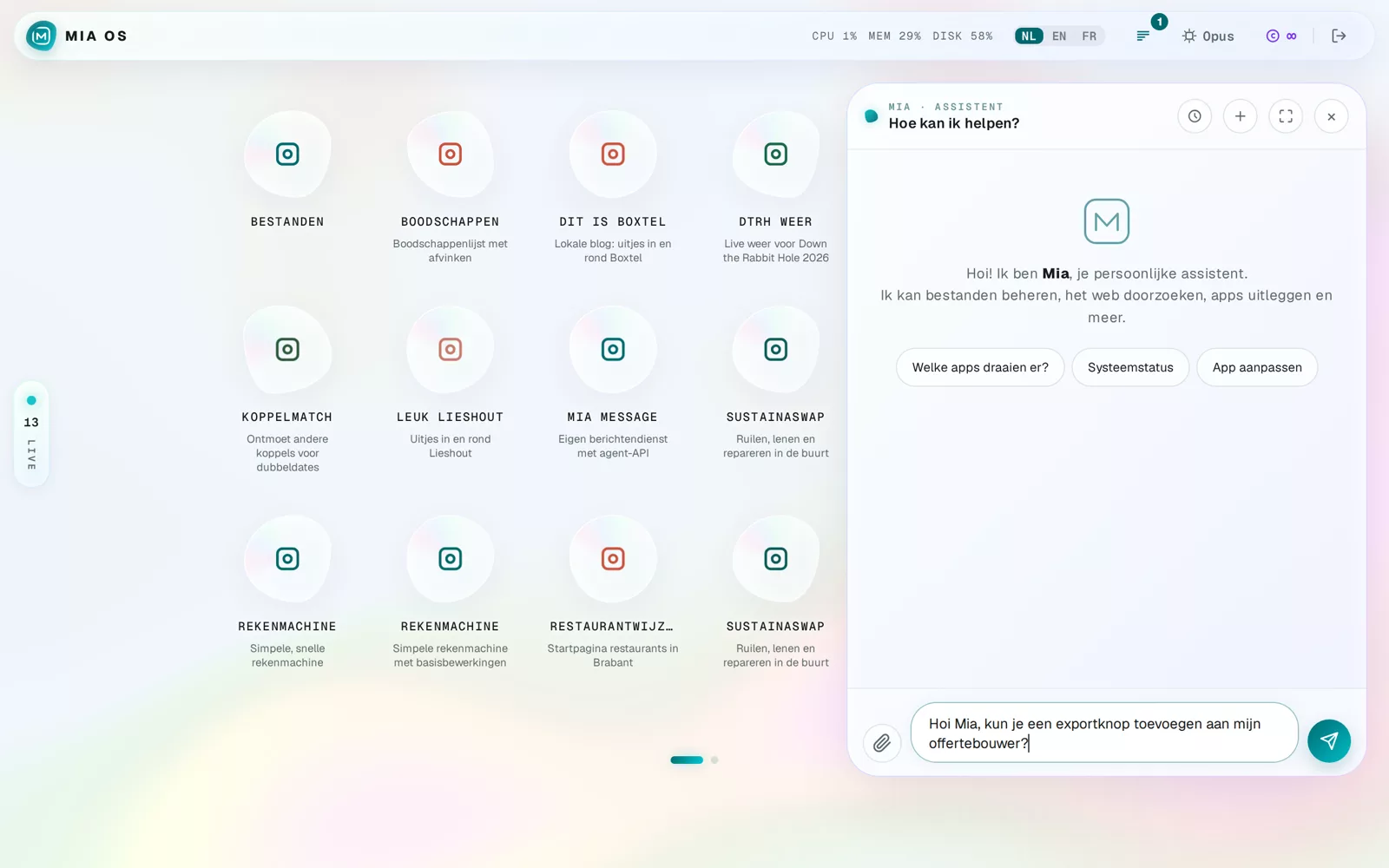
The chat is the shortest route to everything in your OS. You type what you want, Mia does it.
Opening the chat
- Click the Mia button in the bottom right.
- Choose Chat with Mia.
- Type your question or instruction and press Enter.
What can you ask?
Anything related to your OS and apps, in plain language:
- "Add an export button to my quote builder"
- "Which apps are running?" or "How is the system doing?"
- "Explain how my time tracker works"
The buttons above the input field are shortcuts for common questions.
Attachments and history
Use the paperclip to send files or screenshots ("rebuild this", "what does this say?"). The clock icon opens earlier conversations; the square puts the chat in full screen.
Frequently asked questions
Is this the same Mia as on WhatsApp or in the Mia DM app?
Yes — same brain and memory. The in-OS chat is always included.
Can Mia change apps from the chat?
Yes. Describe the change and Mia applies it — you see the result immediately.
Dig deeper
Building your first tool: from idea to app
Start the app builder via the Mia button, describe your idea in plain language and Mia builds a complete working app within minutes.
Read more →Go deeperHow do you give Mia a good brief?
Better descriptions lead to better software. Practical tips to get Mia to build exactly what you have in mind.
Read more →