The smart menu: right-click everything
The fastest way to change something: right-click it and say what should be different. Works on every element, in every app.
How to open it
Click the right mouse button on a button, text, image — anything, including inside your apps. The element lights up and the smart menu appears, showing at the top exactly which element you grabbed.
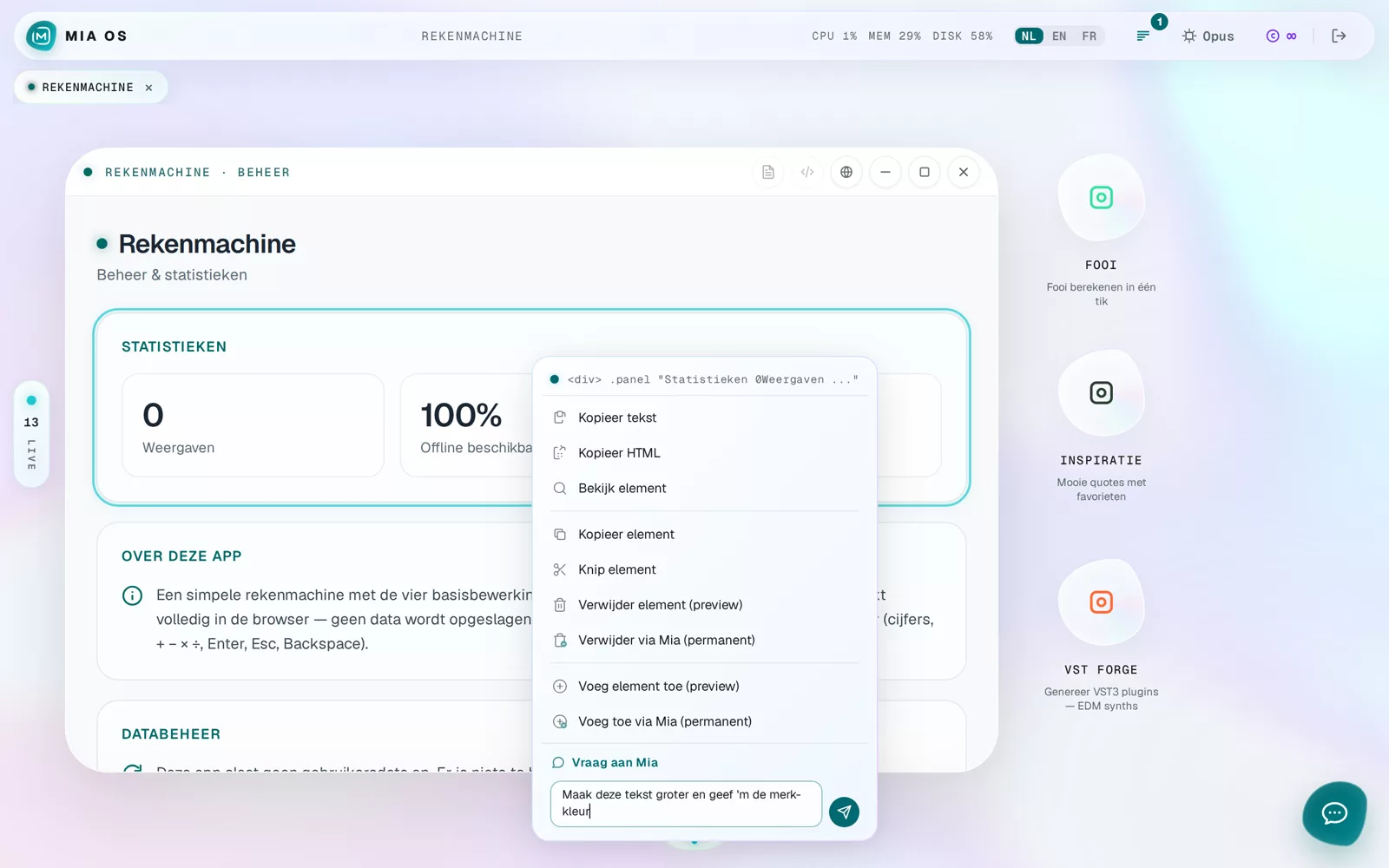
The standard actions
- Copy text / Copy HTML — content straight to your clipboard.
- Copy / Cut element — move an element, even to another spot in the app.
- Delete element — first as a preview; Mia applies permanent removal cleanly.
- Add element — place something new at exactly that spot.
Ask Mia — the most powerful option
At the bottom is an input field: type what should happen to this element, for example "make this text bigger and give it the brand colour". Mia knows exactly which element you mean and applies the change to the real app.
Frequently asked questions
Does this work on my phone too?
Yes — press and hold an element for the same menu.
Can I accidentally break something?
No. Deleting starts as a preview and permanent changes go through Mia, who verifies everything. You can always roll back.
Dig deeper
Chatting with Mia inside your OS
Open the chat via the Mia button and ask anything in plain language: change apps, system status, files — with attachments and history.
Read more →Go deeperChanging an existing app without breaking anything
How to make safe changes to an existing app with Mia OS — step by step, with no technical knowledge and no risk.
Read more →